KO
|
EN
gitlite — search
Search
#typescript
#ai-agents
#ai
#dsh-plugin
#deepseek-harness
#open-source
#cli
#claude-code
#codex
#developer-tools
#react
#windows
WaterfallLayout
★ 229
Open GitHub ↗
water-fall layout in iOS
Download README (.md)
Explore Similar Repositories
scores
:
scores: Metrics for the verification, evaluation and optimisation of forecasts, predictions or models.
data-analysis-using-python
:
Exploratory data analysis 📊using python 🐍of used car 🚘 database taken from ⓚ𝖆𝖌𝖌𝖑𝖊
argocd-hub-spoke-demo
:
Deploy resources to multiple kubernetes clusters using Argo CD.
CombineFirebase
:
Combine wrapper on Google's iOS Firebase library.
eqrcode
:
Simple QRCode Generator in Elixir
// repository documentation
Was this content helpful?
★ 0
(0 ratings)
Select Rating:
★
★
★
★
★
Submit Feedback
Recent Feedback
×
Download README
Do you want to download the
README.md
file for
WaterfallLayout
?
Download (.md)
# WaterfallLayout Waterfall layout in iOS [](https://github.com/sgr-ksmt/WaterfallLayout/releases)  [](https://github.com/Carthage/Carthage) [](https://cocoapods.org/pods/WaterfallLayout) [](https://cocoapods.org/pods/WaterfallLayout)  ## Features - Can select flow/waterfall layout per section. - Self-Sizing cell available 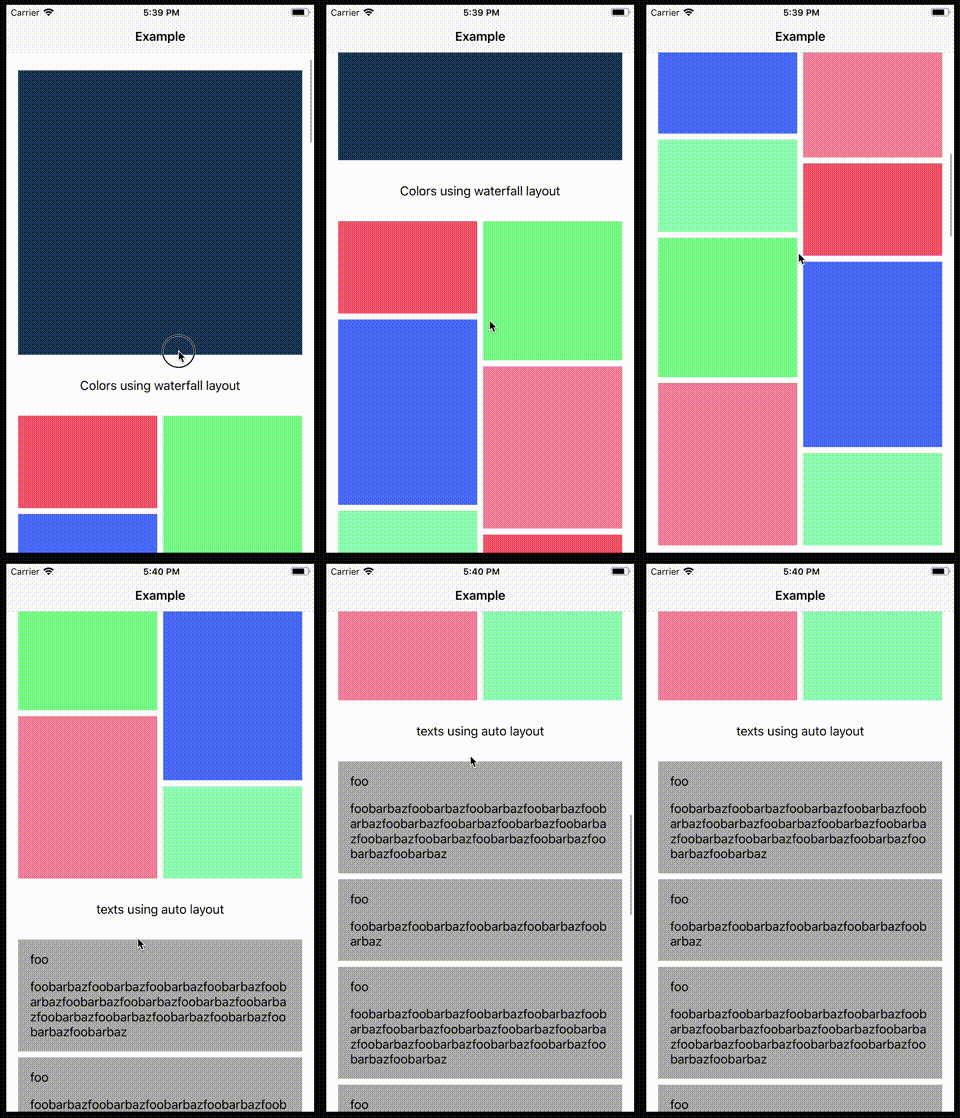 ## How to use ```swift class ViewController: UIViewController { @IBOutlet private weak var collectionView: UICollectionView! { didSet { let layout = WaterfallLayout() layout.delegate = self layout.sectionInset = UIEdgeInsets(top: 16, left: 16, bottom: 16, right: 16) layout.minimumLineSpacing = 8.0 layout.minimumInteritemSpacing = 8.0 layout.headerHeight = 50.0 collectionView.collectionViewLayout = layout collectionView.register(...) collectionView.dataSource = self collectionView.delegate = self } } } extension ViewController: UICollectionDataSource { ... } extension ViewController: WaterfallLayoutDelegate { func collectionViewLayout(for section: Int) -> WaterfallLayout.Layout { switch section { case 0: return .flow(column: 1) // single column flow layout case 1: return .waterfall(column: 3) // three waterfall layout default: return .flow(column: 2) } } func collectionView(_ collectionView: UICollectionView, layout: WaterfallLayout, sizeForItemAt indexPath: IndexPath) -> CGSize { return CGSize(...) } } ``` ### Properties ```swift public var minimumLineSpacing: CGFloat { get set } public var minimumInteritemSpacing: CGFloat { get set } public var sectionInset: UIEdgeInsets { get set } public var headerHeight: CGFloat { get set } public var headerInset: UIEdgeInsets { get set } public var footerHeight: CGFloat { get set } public var footerInset: UIEdgeInsets { get set } public var estimatedItemSize: CGSize { get set } ``` ### Layout delegte ```swift public protocol WaterfallLayoutDelegate: class { // MARK: - Required func collectionViewLayout(for section: Int) -> WaterfallLayout.Layout func collectionView(_ collectionView: UICollectionView, layout: WaterfallLayout, sizeForItemAt indexPath: IndexPath) -> CGSize // MARK: - Optional func collectionView(_ collectionView: UICollectionView, layout: WaterfallLayout, minimumInteritemSpacingFor section: Int) -> CGFloat? func collectionView(_ collectionView: UICollectionView, layout: WaterfallLayout, minimumLineSpacingFor section: Int) -> CGFloat? func collectionView(_ collectionView: UICollectionView, layout: WaterfallLayout, sectionInsetFor section: Int) -> UIEdgeInsets? func collectionView(_ collectionView: UICollectionView, layout: WaterfallLayout, headerHeightFor section: Int) -> CGFloat? func collectionView(_ collectionView: UICollectionView, layout: WaterfallLayout, headerInsetFor section: Int) -> UIEdgeInsets? func collectionView(_ collectionView: UICollectionView, layout: WaterfallLayout, footerHeightFor section: Int) -> CGFloat? func collectionView(_ collectionView: UICollectionView, layout: WaterfallLayout, footerInsetFor section: Int) -> UIEdgeInsets? func collectionView(_ collectionView: UICollectionView, layout: WaterfallLayout, estimatedSizeForItemAt indexPath: IndexPath) -> CGSize? } ``` ## Requirements - iOS 9.0+ - Xcode 9+ - Swift 4+ ## Installation ### Carthage - Add the following to your *Cartfile*: ```bash github "sgr-ksmt/WaterfallLayout" ~> 0.1 ``` - Run `carthage update` - Add the framework as described. <br> Details: [Carthage Readme](https://github.com/Carthage/Carthage#adding-frameworks-to-an-application) ### CocoaPods **WaterfallLayout** is available through [CocoaPods](http://cocoapods.org). To install it, simply add the following line to your Podfile: ```ruby pod 'WaterfallLayout', '~> 0.1' ``` and run `pod install` ### Manually Install Download all `*.swift` files and put your project. ## Change log Change log is [here](https://github.com/sgr-ksmt/WaterfallLayout/blob/master/CHANGELOG.md). ## Communication - If you found a bug, open an issue. - If you have a feature request, open an issue. - If you want to contribute, submit a pull request.:muscle: ## License **WaterfallLayout** is under MIT license. See the [LICENSE](LICENSE) file for more info.
