KO
|
EN
gitlite — search
Search
#javascript
#python
#hacktoberfest
#react
#ai
#typescript
#llm
#go
#golang
#android
#machine-learning
#rust
#deep-learning
#linux
zellit
★ 18
Open GitHub ↗
No description available.
Download README (.md)
Explore Similar Repositories
research-note-wrap
:
Turn research, triage, and analysis sessions into reusable Markdown conclusion notes for maintainers.
AIEKit
:
AI Agents skills for AI Engineer
ritual
:
An open source and minimal habit tracker
plottter
:
A free, open-source desktop app for generating pen-plotter-ready vector art from math equations, generative algorithms, and raster images.
xuzilong-skills
:
This is a skill repository for AI agent. And it is developed especially for Economic and Management academic research.
// repository documentation
Was this content helpful?
★ 0
(0 ratings)
Select Rating:
★
★
★
★
★
Submit Feedback
Recent Feedback
×
Download README
Do you want to download the
README.md
file for
zellit
?
Download (.md)
# zellit > **Previously known as `zellij-bar-theme-config` / `zellij-tab-config`.** Renamed to `zellit` starting with v0.7.0. The old names redirect to this repo. I got tired of remembering and typing zellij-tab-config ;) A terminal UI for creating, editing, and applying [Zellij](https://zellij.dev) themes. Live preview of your changes across all UI components — tab bar, panes, status bar, tables, lists — before writing anything to disk. 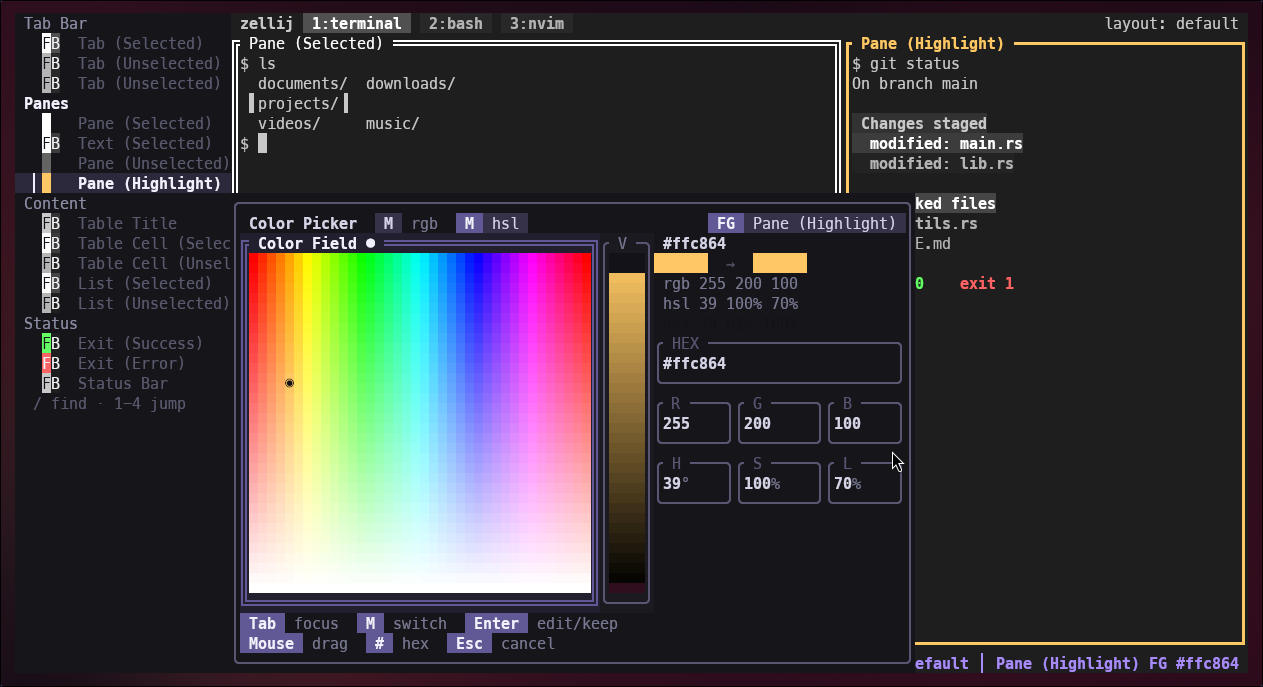 > **New — sidebar navigation.** The element selector is now a single **sidebar tree** on the left, grouped by section (TabBar / Panes / Content / Status). Move through every element with `↑ ↓` (or `j` / `k`), press `1`–`4` to jump straight to a group, and `/` to fuzzy-search any element. Press `A` for an About screen with project links. ## Features - **Live preview** — see every color change reflected instantly across a full Zellij-layout mockup - **41 built-in themes** — all official Zellij themes bundled, no extra files needed - **Per-component theming** — control foreground and background for each UI element independently - **Dual-mode color picker** — RGB sliders plus an HSL field picker with live HEX/RGB/HSL values - **Yank / paste / undo** — copy a color, paste it elsewhere, or undo the last change (`y` / `p` / `u`) - **Theme loader** — fuzzy search, filter by built-in or saved, live preview on scroll - **Rename / delete** — manage saved themes directly from the loader (`r` / `d`) - **Save themes** — writes to `~/.config/zellij/themes/` in the correct KDL format - **Apply to Zellij** — sets `theme "<name>"` in `~/.config/zellij/config.kdl` so Zellij picks it up on next launch - **In-app self-update** — checks GitHub releases on startup and can replace the binary in place on Linux x86_64 (`U` when an update is available) - **Help overlay** — press `?` for a full keybinding reference ## Installation ### Prebuilt binary (Linux x86_64) ```sh curl -fsSL https://raw.githubusercontent.com/allisonhere/zellit/main/install-binary.sh | sh ``` ### Build from source (all platforms) Requires `git` and `cargo` ([rustup.rs](https://rustup.rs)). ```sh curl -fsSL https://raw.githubusercontent.com/allisonhere/zellit/main/install-source.sh | sh ``` Both scripts install to `~/.local/bin` by default. Override with `INSTALL_DIR`: ```sh curl -fsSL ... | INSTALL_DIR=/usr/local/bin sh ``` ### Manual install ```sh git clone https://github.com/allisonhere/zellit.git cd zellit cargo build --release cp target/release/zellit ~/.local/bin/ ``` ## Usage ``` zellit ``` The app opens a full-terminal preview of a Zellij layout. Use the keyboard to navigate and edit. ### Keybindings | Key | Action | |-----|--------| | `↑ ↓` / `j k` | Move through the sidebar tree of preview elements | | `1`–`4` | Jump to a group (TabBar / Panes / Content / Status) | | `/` | Fuzzy-search and jump to any element | | `Tab` | Toggle FG / BG (not available on pane borders) | | `c` / `Enter` | Open color picker for the selected color | | `y` | Yank (copy) current color | | `p` | Paste yanked color | | `u` | Undo last color change | | `s` | Save theme as… (prompts for a name) | | `l` | Open theme loader | | `a` | Apply current theme to Zellij | | `U` | Install the latest released binary when an update is available on Linux x86_64 | | `?` | Toggle help overlay | | `A` | About — project credits and links | | `q` / `Esc` | Quit | **Color picker:** | Key | Action | |-----|--------| | `Tab` / `Shift + Tab` | Move focus between picker controls | | `m` | Switch RGB sliders / HSL field | | `f` | Toggle FG / BG (non-pane elements only) | | `↑ ↓ ← →` | Nudge the focused control | | `Shift` / `Alt` with arrows | Coarse / fine nudging | | `#` | Jump straight to hex editing | | `Enter` | Edit the focused value field or confirm | | `Esc` | Cancel | | `mouse drag` | Drag in the HSL field or lightness slider | **Theme loader:** | Key | Action | |-----|--------| | `type` | Search — fuzzy filter by name; `Enter` or `↓` to commit and navigate results | | `↑ ↓` | Navigate themes | | `Enter` | Load selected theme into editor | | `a` | Apply selected theme directly to Zellij | | `b` | Filter: built-in themes only | | `s` | Filter: saved themes only | | `r` | Rename selected saved theme | | `d` | Delete selected saved theme | | `Esc` | Clear search / cancel | ## Built-in themes All 41 official Zellij themes are bundled in the binary and available immediately from the theme loader (`l`): ansi · ao · atelier · ayu-dark · ayu-light · ayu-mirage · blade-runner · catppuccin-frappe · catppuccin-latte · catppuccin-macchiato · catppuccin-mocha · cyber-noir · dayfox · dracula · everforest-dark · everforest-light · flexoki-dark · gruber-darker · gruvbox-dark · gruvbox-light · iceberg-dark · iceberg-light · kanagawa · lucario · menace · molokai-dark · night-owl · nightfox · nord · one-half-dark · onedark · pencil-light · retro-wave · solarized-dark · solarized-light · terafox · tokyo-night · tokyo-night-dark · tokyo-night-light · tokyo-night-storm · vesper ## Theme format Themes are saved to `~/.config/zellij/themes/<name>.kdl`: ```kdl themes { my-theme { ribbon_selected { base 30 30 46 background 137 180 250 emphasis_0 255 255 255 emphasis_1 200 200 200 emphasis_2 150 150 150 emphasis_3 100 100 100 } // text_unselected, ribbon_unselected, frame_selected, … etc. } } ``` Standard Zellij palette themes (using `fg`, `bg`, `black`, `red`, … keys) are also supported — the loader maps palette colors to components automatically. ## Themeable components | Component | What it styles | |-----------|---------------| | `text_unselected` / `text_selected` | Status-bar text — bare UI text / selection text | | `ribbon_unselected` / `ribbon_selected` | Tabs and status-bar mode pills | | `frame_unselected` / `frame_selected` / `frame_highlight` | Pane borders (FG only — border color) | | `table_title` / `table_cell_unselected` / `table_cell_selected` | Table widgets | | `list_unselected` / `list_selected` | List widgets | | `exit_code_success` / `exit_code_error` | Command-pane exit code indicators | ## Requirements - A terminal with true color support - Rust stable (only needed if building from source)
