KO
|
EN
gitlite — search
Search
#python
#react
#llm
#machine-learning
#tailwindcss
#reactjs
#vite
#c
#hacktoberfest
#javascript
#claude
#openai
calendar
★ 34
Open GitHub ↗
Calendar popup for awesome WM
Download README (.md)
Explore Similar Repositories
EasyAwesomeWM
:
Simple script to setup a beautiful awesomewm desktop
noobie
:
Create a wibar widget for Awesome WM with no lua code!
keyboard-layout-indicator
:
Keyboard layout indicator/switcher widget for awesome-wm
awesome-config
:
My awesome wm configuration.
awesome-wm-slidebar
:
an easy to use, configurable, multi-purpose, animated widget bar written in Lua for Awesome WM
// repository documentation
Was this content helpful?
★ 0
(0 ratings)
Select Rating:
★
★
★
★
★
Submit Feedback
Recent Feedback
×
Download README
Do you want to download the
README.md
file for
calendar
?
Download (.md)
**This repository has been assimilated into** https://github.com/deficient/deficient ## awesome-calendar Small calendar popup for awesome window manager. 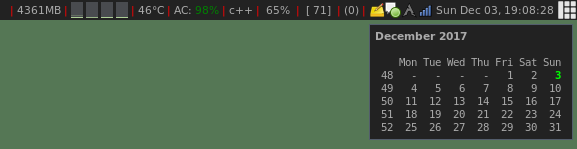 This is a polished up and improved module based on the `calendar2.lua` module by Bernd Zeimetz and Marc Dequènes. ### Installation Drop the script into your awesome config folder. Suggestion: ```bash cd ~/.config/awesome git clone https://github.com/deficient/calendar.git ``` ### Usage In your `rc.lua`: ```lua -- load the widget code local calendar = require("calendar") -- attach it as popup to your text clock widget: calendar({}):attach(mytextclock) ``` You can also add some options to customize the widget's display. For instance: ``` local calendar = require("calendar") calendar_widget = calendar({ fdow = 7, -- Set Sunday as first day of the week (default is -- 1 = Monday) position = "bottom_right", -- Useful if you prefer your wibox at the bottomn -- of the screen }) calendar_widget:attach(mytextclock) ``` ### Requirements * [awesome 4.0](http://awesome.naquadah.org/). May work on 3.5 with minor changes.
