KO
|
EN
gitlite — search
Search
#python
#java
#python3
#arduino
#golang
#machine-learning
#rust
#html
#flask
#javascript
#seismology
#nodejs
orac-control-web
★ 20
Open GitHub ↗
No description available.
Download README (.md)
Explore Similar Repositories
LASSO-MPC
:
PhD Publications and Thesis on LASSO Model Predictive Control
imgui-opencv
:
Use opencv, imgui and poco libraries in a project with Conan
spring-animation-keyframes
:
Generate css keyframes based on spring animations
aws-cloudformation-security-automation-for-wazuh
:
NIST based open source security automation delivered as AWS cloudformation
RTHS
:
Real-Time Hardware Sorter, Using A Multi-Dimensional Sorting Algorithm
// repository documentation
Was this content helpful?
★ 0
(0 ratings)
Select Rating:
★
★
★
★
★
Submit Feedback
Recent Feedback
×
Download README
Do you want to download the
README.md
file for
orac-control-web
?
Download (.md)
# orac-control-web Web client for the ORAC [synth](https://github.com/TheTechnobear/Orac) to be run on the Raspberry PI. Installation tested and designed to work out of the box on the [Patchbox OS](https://blokas.io/patchbox-os/). Web client also includes UDP OSC <-> Socket.IO bridge and simple static file server. It runs on the rPi, next to the ORAC, so all you need is a web browser essentially. Application is designed to be mobile-friendly. 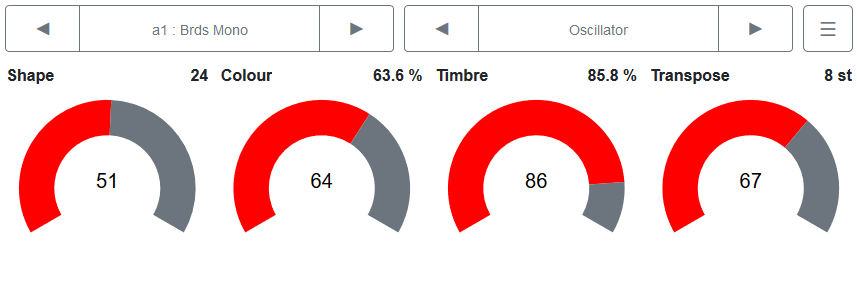 ## Install instructions Currently tested on [**Patchbox OS**](https://blokas.io/patchbox-os/). Application depends on `git`, `python3` (3.5, should work with 3.6, not sure about 3.7) and `pip3`. Install script will check if `git` is installed, but you need to manually verify that `python3` and `pip3` are available (`pip3 --version` and `python3 --version`). Install the missing dependencies through your package manager, e.g. `sudo apt-get install python3-pip`. SSH to your Pi and run: ```sh curl https://raw.githubusercontent.com/dsedleckas/orac-control-web/master/install-orac-control-web.sh | sh ``` Open `http://<rpi-ip-address>:8080` If you're stuck on loading screen, make sure ORAC module is activated and `mec.service` is running. If not, run `patchbox module config`. Any suggestions/comments/bug reports are welcome here, or on the Blokas [community board](https://community.blokas.io/t/web-client-for-orac-2-0/1186). ### Save as an app on your phone **If your Pi always has the same Ip address** (e.g. you're connecting to Pi's WiFi network and accessing `http://172.24.1.1:8080`), you could save the page as an app to your home screen. For example, on Chrome, once opened, click tripple dots and Add to Home screen. Launching application this way will open it in landscape mode and fullscreen instantly. ## Menu navigation Interface should be familiar to any ORAC user before - page/module navigation at the top and parameter controlls below. One change that was made involves menu navigation - _Activate_ button was dropped - instead just tap/click on the wanted item. To scroll the menu (i.e. see more items in the list), you still have to use up/down buttons. ## Development notes ### Web client ``` bash # install client dependencies npm install # serve with hot reload at localhost:8080 npm run dev # build for production with minification npm run build # For production use copy `./dist` contents to `./client` ``` ### Server OSC <-> Socket.IO ```bash cd ./backend pip3 install -r requirements.txt python3 main.py ```
