KO
|
EN
gitlite — search
Search
#python
#javascript
#pytorch
#hacktoberfest
#ethereum
#nodejs
#cli
#game
#reactjs
#ruby
#python3
#matlab
kines
★ 56
Open GitHub ↗
Friendly CLI for Amazon Kinesis Data Streams
Download README (.md)
Explore Similar Repositories
awsbeats
:
AWS Kinesis plugin for Filebeat
kinesis-agent-windows
:
An extensible Windows agent that ingests logs and metrics to AWS services such as Kinesis Stream, Kinesis Firehose, CloudWatch Logs and CloudWatch.
kinesis-writable
:
Node.js writable stream for AWS Kinesis.
aws-kinesis-consumer
:
Consume an AWS Kinesis Data Stream to look over the records from a terminal.
aws-kinesis-local
:
AWS Kinesis local for building applications with streaming data
// repository documentation
Was this content helpful?
★ 0
(0 ratings)
Select Rating:
★
★
★
★
★
Submit Feedback
Recent Feedback
×
Download README
Do you want to download the
README.md
file for
kines
?
Download (.md)
## Kines [](https://badge.fury.io/py/kines) [](https://pypistats.org/packages/kines) [](https://travis-ci.org/dinsaw/kines) [](https://codecov.io/gh/dinsaw/kines) Friendly Command Line Interface for [Amazon Kinesis Data Streams](https://aws.amazon.com/kinesis/data-streams/) 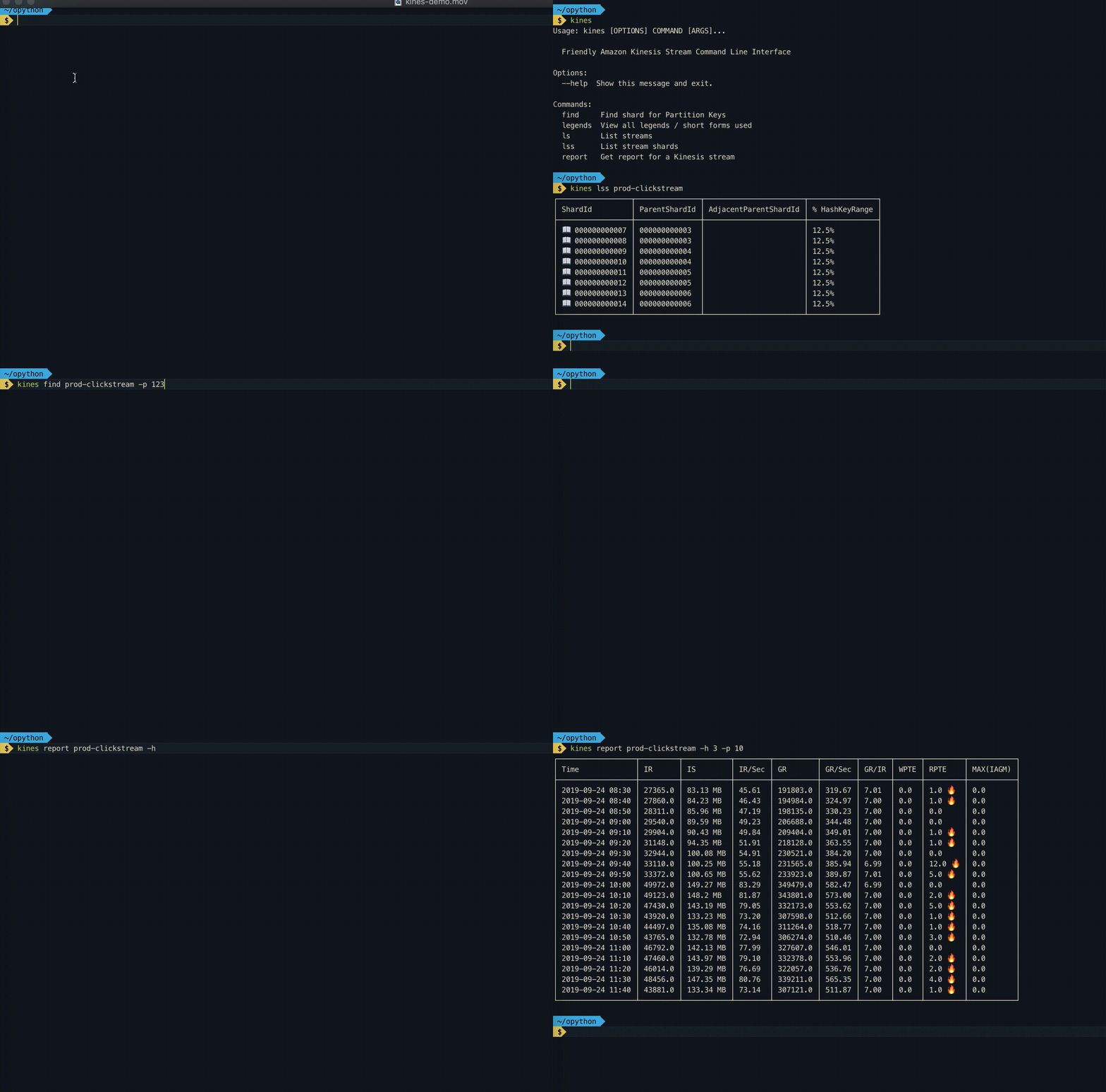 #### Install - `pip install kines` #### Setup - `aws configure` #### Commands ##### List all Kinesis Stream - `kines ls` This command lists streams with their open shard count, enhanced consumers count, retention period and encryption type. Internally this command calls `list-streams` and `describe_stream_summary` methods of [Boto3](https://boto3.amazonaws.com/v1/documentation/api/latest/reference/services/kinesis.html#id34) Kinesis client. 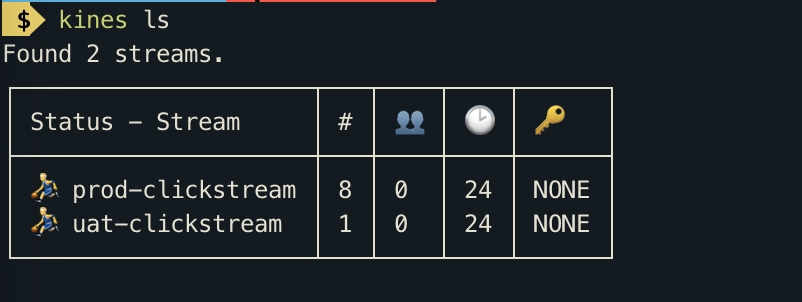 ##### List Kinesis Stream Shards - `kines lss <stream-name>` This command will show you open as well as closed shards of a Kinesis stream. - For detailed output Run `kines lss <stream-name> -d` 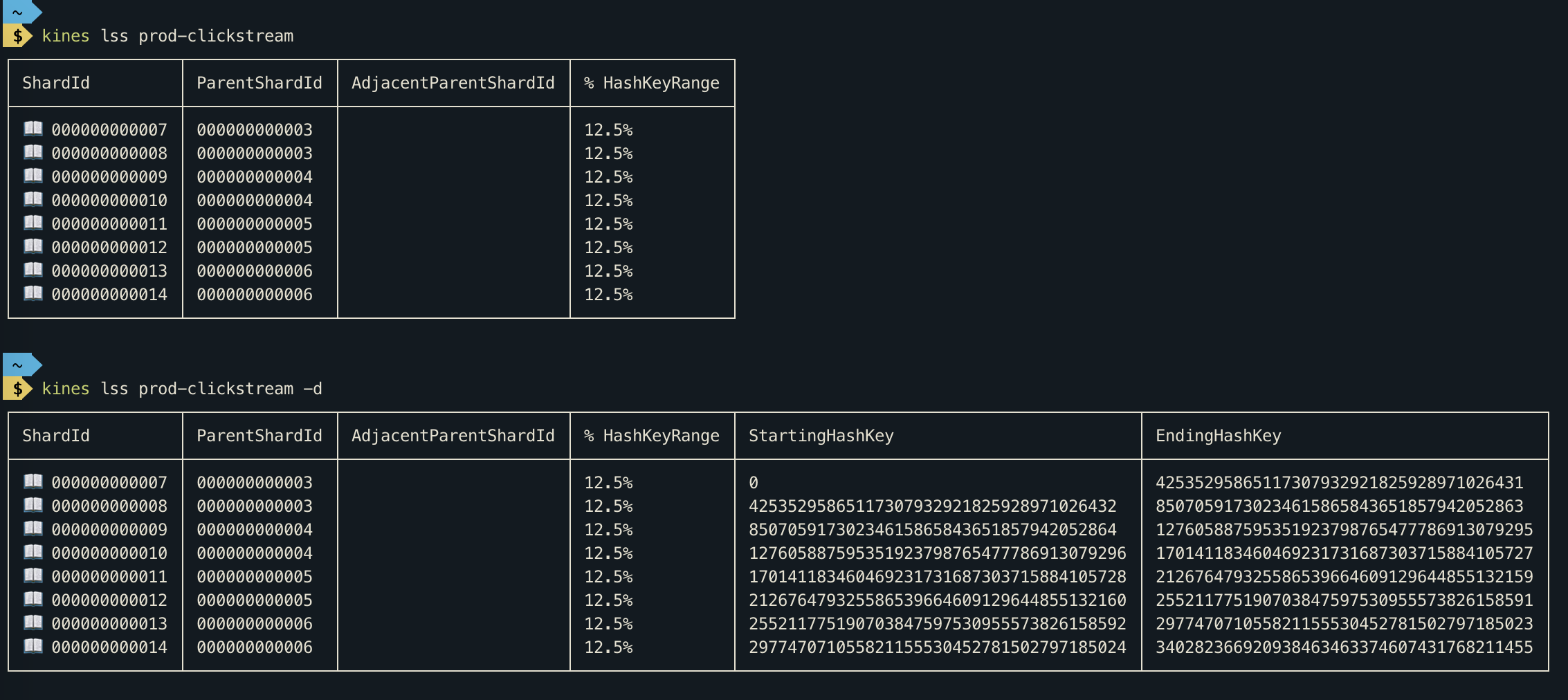 ##### Find shard for partition key - `kines find prod-clickstream -p 123455 -p 8900` From [Kinesis Docs](https://docs.aws.amazon.com/streams/latest/dev/key-concepts.html) > A partition key is used to group data by shard within a stream. Kinesis Data Streams segregates the data records belonging to a stream into multiple shards. It uses the partition key that is associated with each data record to determine which shard a given data record belongs to. Partition keys are Unicode strings with a maximum length limit of 256 bytes. An MD5 hash function is used to map partition keys to 128-bit integer values and to map associated data records to shards. When an application puts data into a stream, it must specify a partition key. This command comes handy when you want to determine shard for a partition key. This Command can accept multiple partition keys. 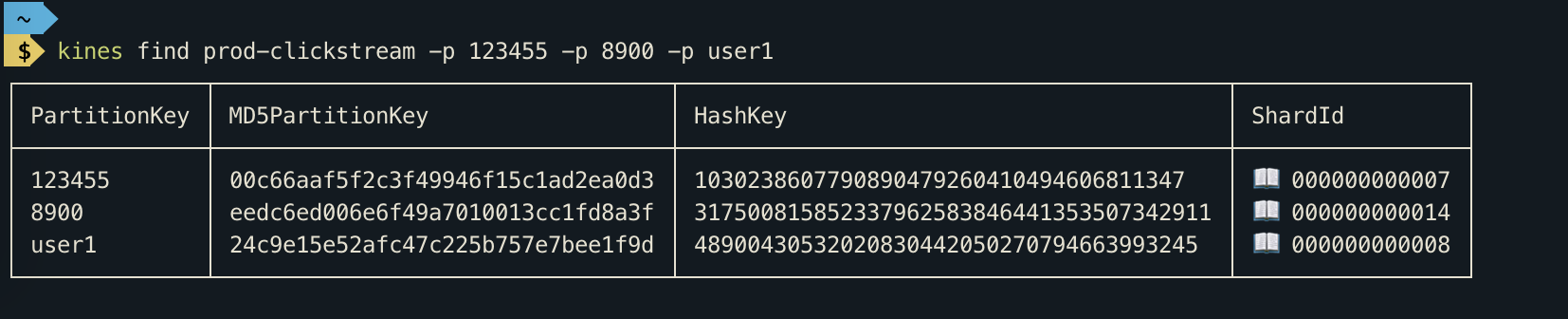 #### Walk through kinesis records - `kines walk <stream-name> <shard-id> -s <sequence-number> -n <number-of-records-per-call>` You can use this command to debug kinesis records. This command internally creates a [Shard Iterator](https://docs.aws.amazon.com/kinesis/latest/APIReference/API_GetShardIterator.html). If you don't specify `sequence-number` then a ShardIterator is created with type `TRIM_HORIZON`, which allows you to fetch from oldest Kinesis records in shard. When you specify `sequence-number` a ShardIterator is created with `AT_SEQUENCE_NUMBER` type, which fetches data from the specified sequence number. The Kinesis record's data is decoded using `base64` decoder. You can press ⏎ to fetch more records or type `n` to abort. 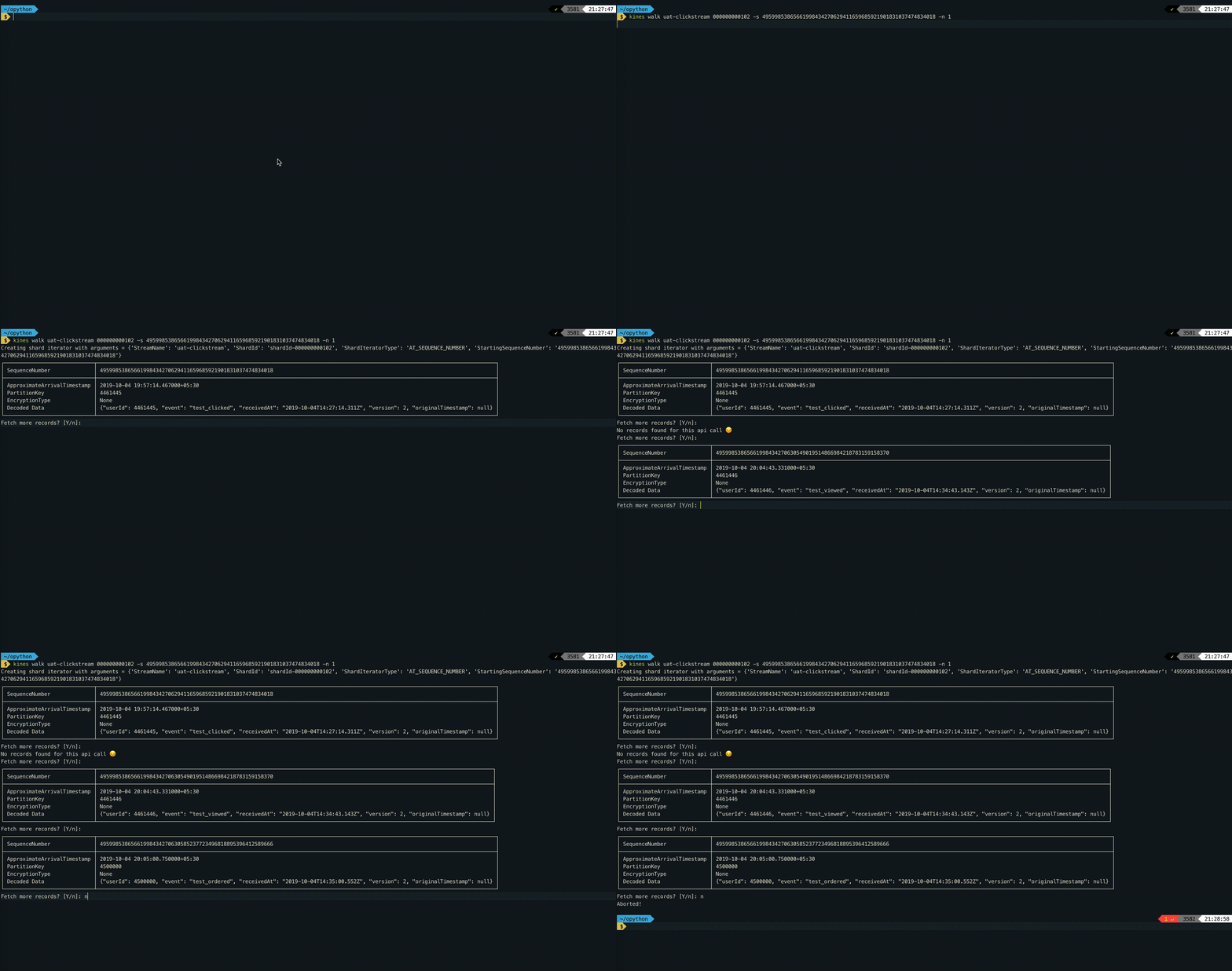 - Use `-t` option to get records from 1 hour 10 minutes ago. Example: `kines walk click-stream 000000000000 -t '1h10m'` - Use `-l` option to start from latest records. Example: `kines walk click-stream 000000000000 -l` - Use `-f` option to poll records repeatedly. Example: `kines walk click-stream 000000000000 -l -f` #### Get report for Kinesis Stream The report command gives you statistics about your Kinesis Stream. Internally, this command calls [`get_metric_data`](https://boto3.amazonaws.com/v1/documentation/api/latest/reference/services/cloudwatch.html#CloudWatch.Client.get_metric_data) of Boto3 Cloudwatch client. Please take a look at legends command for shortforms used in this report. 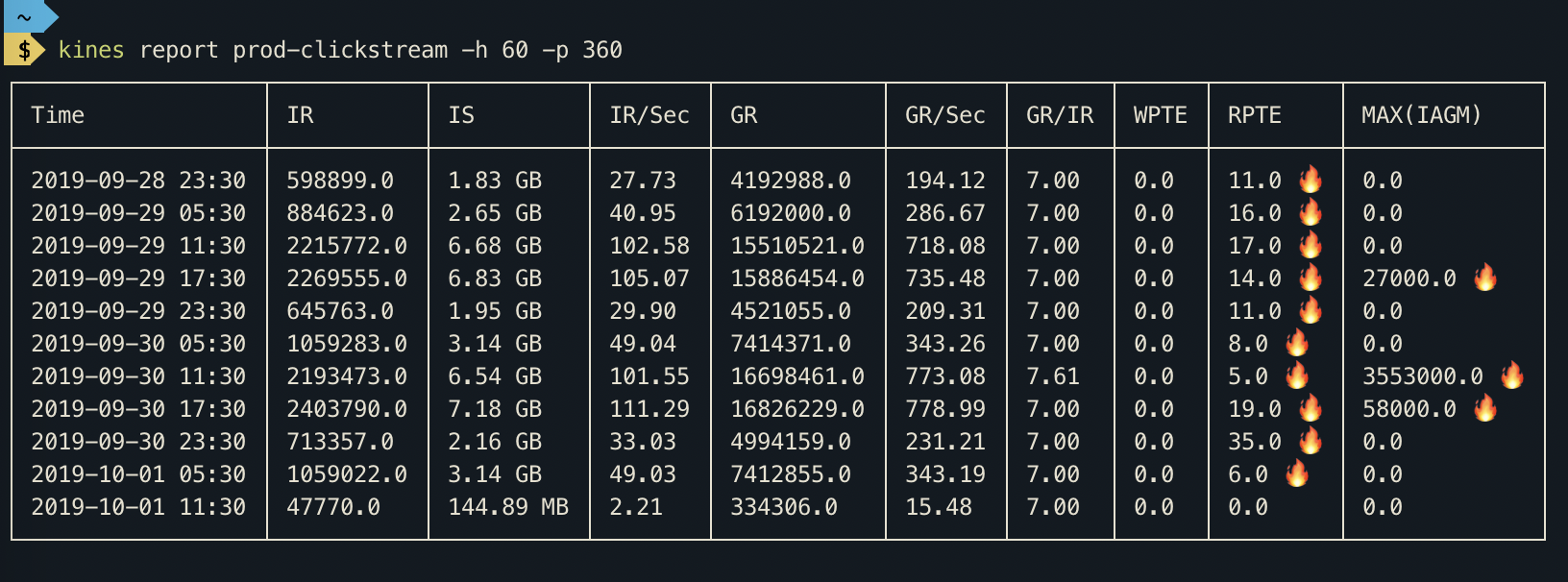 #### View all short forms and legends - `kines legends` 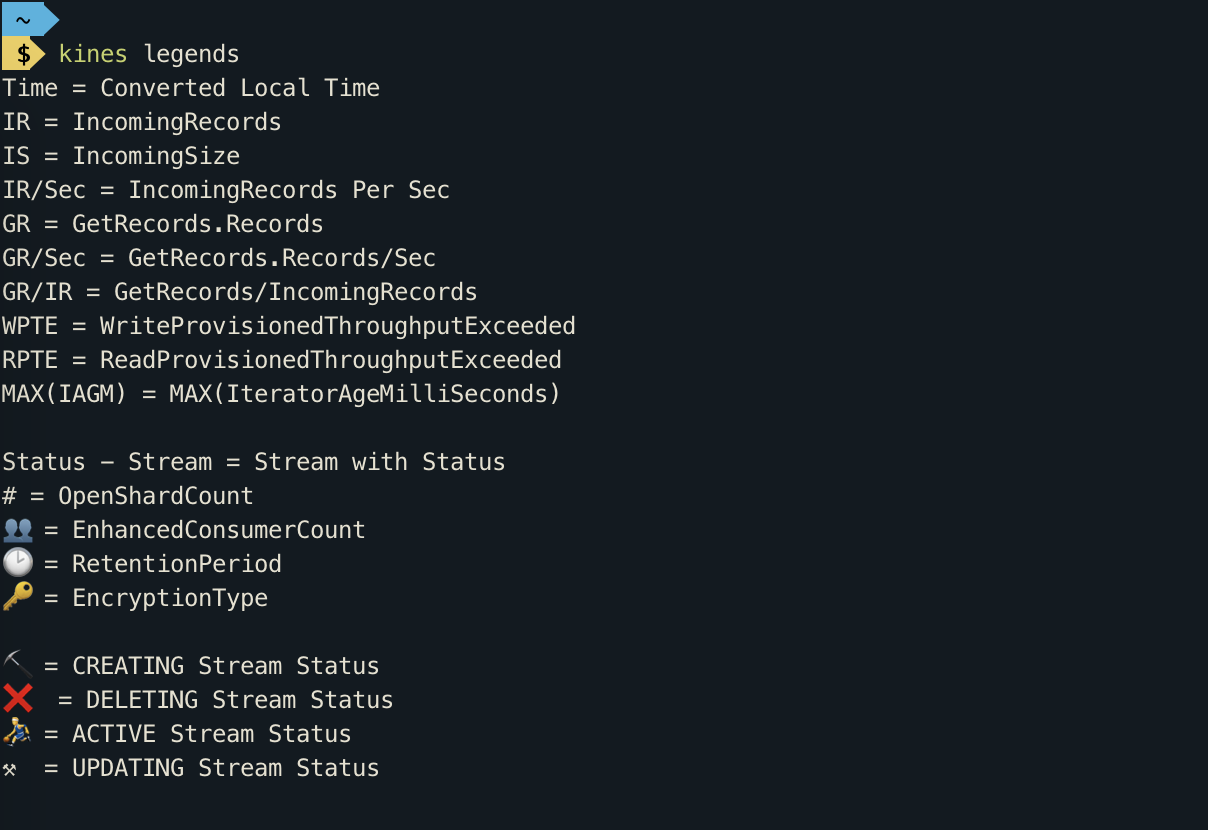 #### How to build in Dev? - `pip install --editable .` #### How to publish to pypi? - `python3 setup.py sdist bdist_wheel` - `twine upload --skip-existing dist/*`
