KO
|
EN
gitlite — search
Search
#javascript
#python
#hacktoberfest
#react
#ai
#typescript
#llm
#go
#golang
#android
#machine-learning
#rust
#deep-learning
#linux
Chimera
★ 10
Open GitHub ↗
Threat Hunting Tool
Download README (.md)
Explore Similar Repositories
DailyHunt-NewsAPI
:
No description available.
seetaface2_onnx_model
:
only contain face detect 、5/81 points 、face recognization models
postcss-edgie
:
PostCSS Plugin to easily target Edge and IE
MIT-Manipal-CSE-Labs-2022
:
No description available.
LambertW
:
LambertW R package: Lambert W x F distributions and Gaussianization for skewed & heavy-tailed data
// repository documentation
Was this content helpful?
★ 0
(0 ratings)
Select Rating:
★
★
★
★
★
Submit Feedback
Recent Feedback
×
Download README
Do you want to download the
README.md
file for
Chimera
?
Download (.md)
# Chimera ### Threat hunting tool based on machine learning This tool can predict the malicious http traffic from the normal http traffic based on the naive bayes algorithm This tool is consisting of three parts: - the preprocessing data part. - the training part. - the testing part. ## Preprocessing Part the tool can take a .pcap file and extract from it all the http headers and divided this http headers to 90% to the training data and 10% to the testing data, just you need to put your normal pcap files in the Normal Directory and the malicious ones in the Malicious Directory. ``` python http.py ``` then you will find inside the Normal Directory the normal http headers, and inside the Malicious Directory the malicious http headers, and they both are divided to 90% to the training data and 10% to the testing data.  ## Training Part the tool then takes the normal and malicious training data and perform the naive bayes theory on them (we implemented the naive bayes theory from the scratch to absolutely fit our training model and to increase the success rate). ``` python train.py ``` you will find a new file called calc.txt which contains all the calculation of the training model (probability of normal http headers, probability of malicious http headers, number of total normal words, number of total malicious words, unique words, probability of normal class and probability of malicious class), and we will use this file and all these calculations in the testing phase. 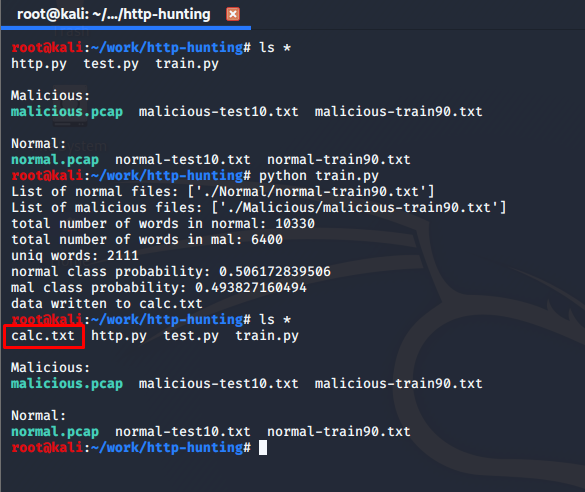 ## Testing Part then the tool takes the user input file that he wants to test against the training model, and load the training model from calc.txt and perform the testing and calculations between this two, where the tool predicts to which class this test case belong. ``` python test.py Normal/normal-test10.txt ```  ``` python test.py Malicious/malicious-test10.txt ```  as you can see, we performing the calculations and predictions on the remaining test data that we divided in the first and we don't know the types of these tests and we don't include it in our training model, so this test data is unknown to us. ### as you can see, we successfully predict all the types on the test data whether it malicious or not without knowing the type of this test data based on the naive bayes machine learning algorithm and our training model. ### and as you go you can continuously include new training data inside our training model to increase its efficacy and increase its success rate. ### Happy Hunting
