KO
|
EN
gitlite — search
Search
#javascript
#python
#hacktoberfest
#react
#ai
#typescript
#llm
#go
#golang
#android
#machine-learning
#rust
#deep-learning
#linux
face-alignment
★ 22
Open GitHub ↗
7000+FPS face alignment
Download README (.md)
Explore Similar Repositories
listbot
:
🤖 Daily updated translation maps for T-Pot
covalent-text-editor-nightly
:
Nightly builds of https://github.com/teradata/covalent text-editor module
disp_codes
:
A collection of seismological codes imlpementing three array-based techniques for measuring seismic surface wave phase velocity dispersion (multi-mode)
rust_musl_docker
:
A well-documented container for building Rust crates for MUSL target. Supports dependencies for OpenSSL and Postgres.
huanhuoclient
:
No description available.
// repository documentation
Was this content helpful?
★ 0
(0 ratings)
Select Rating:
★
★
★
★
★
Submit Feedback
Recent Feedback
×
Download README
Do you want to download the
README.md
file for
face-alignment
?
Download (.md)
LBF ========================= C++ implementation of Face Alignment at 3000 FPS via Regressing Local Binary Features. It could runs 7000+fps in my cpu computer. 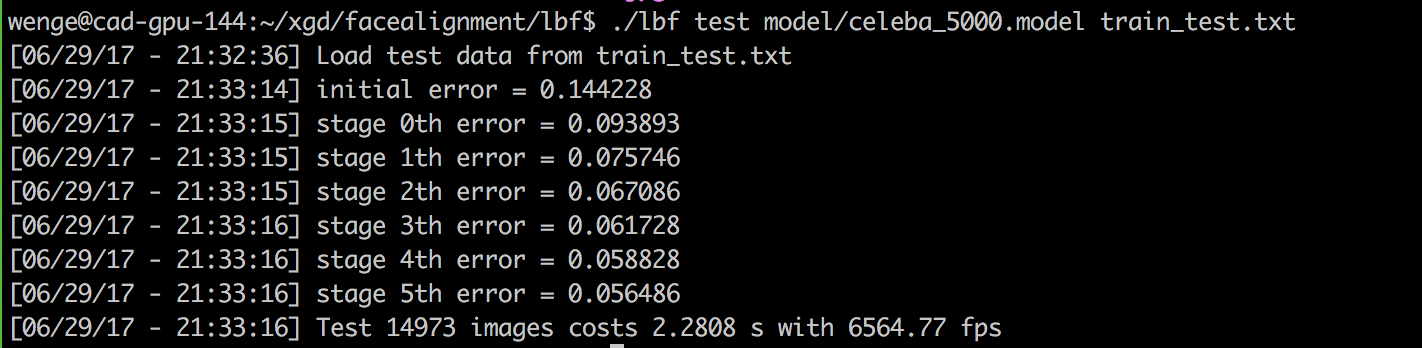 ### Build the project We only need [OpenCV][opencv] and [CMake][cmake] to build the project. ``` git clone https://github.com/memoiry/face-alignment cd face-alignment mkdir build cd build cmake .. make ``` The project provide several function. 1. Prepare the training file. 2. Train the model using your dataset. 3. Face alignment on a image with bounding box information and trained model. 4. Test the effectiveness of a trained model using the dataset you provide. 5. Real-time face alignment on a camera using opencv's VJ detection algorithm. ### 1. Prepare Data We can download dataset from helen dataset. The dataset contains 68 points for every face, however it doesn't provide a bounding box for faces. We need a face detector to generate face bounding box (The haar-like cascade detection provided by OpenCV is a good choice ). Download the dataset and extract the data (xxx.jpg and xxx.pts) to the directory e.g. `/home/test/dataset/afw`. We also need one text file `Path_Images_train.txt`to list the images used for training. The `dir` command on Windows and `find`command on Linux could do this job. Simply run the command on Linux: ``` $ find /home/test/dataset/afw/ -name "*jpg" > /home/test/dataset/afw/Path_Images_train.txt ``` When `Path_Images_train.txt` is prepared, we also need one text file `train.txt`. Each line of the text file points out an image path and face bounding box in this image with facial points location. We use VJ detector provided by OpenCV. Run `lbf prepare` command to generate the text file `train.txt`: ``` $ ./lbf prepare /home/test/dataset/afw/Path_Images_train.txt haarcascade_frontalface_alt.xml train.txt ``` - **/home/test/dataset/afw/Path_Images_train.txt**: the whole path that holds `Path_Images_train.txt` - **haarcascade_frontalface_alt.xml**: OpenCV haar-like face detect model - **train.txt**: output file that holds image path and face bounding box in this image with facial points location **The effectiveness of LBF is quite dependent on the bounding box provided by detection algorithm. While opencv's cascade VJ algorithm provide a square bounding box, the SSD algorithm usually produce a rectangle bounding box. So I highly suggest using the bounding provided by the detection algorithm you will use instead of using prepare script which utilize opencv's VJ algorithm. I have provided a python script as a example to produce train.txt file** ### 2. Train The command `$ ./lbf train` will start training from text file `train.txt`and saving model into file e.g. `my.model` ``` $ ./lbf train train.txt my.model ``` - **train.txt**: text file generated by `$ ./lbf prepare` command - **my.model**: save model file ### 3. Face alignment on image The command `$ ./lbf live` will find faces on input image and locate facial points. ``` $ ./lbf live my.model haarcascade_frontalface_alt.xml test.jpg ``` - **my.model**: pre-trained model file - **haarcascade_frontalface_alt.xml**: OpenCV haar-like face detect model - **test.jpg**: input image ### 4. Face alignment test ```bash ./lbf run ../model/celeba_5000.model ../test_model.txt ``` You may need to place the CelebA dataset in the order of test_model.txt. <img src="https://ooo.0o0.ooo/2017/06/29/5954c81161bd9.png" width=300></img> <img src="https://ooo.0o0.ooo/2017/06/29/5954c81194d69.png" width=300></img> <img src="https://ooo.0o0.ooo/2017/06/29/5954c81540662.png" width=300></img> The model was trained on SSD bounding box and celebA dataset. It performs bad on VJ bounding box. ### 5. Face alignment on camera The command `$ ./lbf camera` will find faces from you camera and locate facial points. ``` ./lbf camera ../model/helen.model ../model/haarcascade_frontalface_alt.xml 0 ``` - **helen.model**: pre-trained model in helen dataset(on opencv's dataset). - **haarcascade_frontalface_alt.xml**: OpenCV haar-like face detect model - **0**: camera index ### Pre-trained Model I provide some pre-trained models which you can find from the directory `model`. ### Reference - [Datasets][dataset] - [Face Alignment at 3000 FPS via Regressing Local Binary Features](http://research.microsoft.com/en-US/people/yichenw/cvpr14_facealignment.pdf) - [jwyang/face-alignment](https://github.com/jwyang/face-alignment) - [yulequan/face-alignment-in-3000fps](https://github.com/yulequan/face-alignment-in-3000fps) [dataset]: http://ibug.doc.ic.ac.uk/resources/facial-point-annotations [opencv]: http://opencv.org/ [cmake]: http://www.cmake.org/ [vs]: https://www.visualstudio.com/
