KO
|
EN
gitlite — search
Search
#python
#java
#hacktoberfest
#php
#dotfiles
#ruby
#javascript
#sqlite
#macos
#jquery
#cli
#c-plus-plus
tadoku
★ 36
Open GitHub ↗
Blazingly Fast™ Visual Novel tracker
Download README (.md)
Explore Similar Repositories
warpsign
:
A lightning-fast iOS app signing solution that leverages the Apple Developer Portal API for seamless entitlements management and code signing.
DataCommit
:
RAG chatbot for DataCommit podcast episodes with Haystack & Chroma & Gemini
NutriLens-AR-Food-Analysis
:
No description available.
MDTeamGPT
:
No description available.
piston
:
Train small sequence models in your browser with WebGPU.
// repository documentation
Was this content helpful?
★ 0
(0 ratings)
Select Rating:
★
★
★
★
★
Submit Feedback
Recent Feedback
×
Download README
Do you want to download the
README.md
file for
tadoku
?
Download (.md)
# Tadoku - Visual Novel Tracker <p align="center"> <img src="assets/icon.png" alt="Tadoku App Icon" style="width: 150px; height: auto;"> </p> <p align="center"> <strong>A modern, blazing-fast Visual Novel tracker designed for Japanese learners and casual readers</strong> </p> <p align="center"> <img src="https://img.shields.io/github/v/release/Eroge-Abyss/tadoku?label=version" alt="Version"> <img src="https://img.shields.io/badge/license-MIT-green.svg" alt="License"> <img src="https://img.shields.io/badge/platform-Windows%20%7C%20Linux-lightgrey.svg" alt="Platform"> <img src="https://www.blazingly.fast/api/badge.svg?repo=Eroge-Abyss%2Ftadoku" alt="fast"> </p> --- ## Table of Contents - [Overview](#overview) - [Features](#features) - [Installation](#installation) - [Prerequisites](#prerequisites) - [Download & Install](#download--install) - [Building from Source](#building-from-source) - [Usage](#usage) - [Getting Started](#getting-started) - [Adding Visual Novels](#adding-visual-novels) - [Tracking Playtime](#tracking-playtime) - [Managing Your Library](#managing-your-library) - [Discord Integration](#discord-integration) - [ExStatic Integration](#exstatic-integration) - [Configuration](#configuration) - [Development](#development) - [Tech Stack](#tech-stack) - [Project Structure](#project-structure) - [Building](#building) - [Contributing](#contributing) - [Troubleshooting](#troubleshooting) - [Screenshots](#screenshots) - [Acknowledgments](#acknowledgments) - [License](#license) - [Support](#support) --- ## Overview Tadoku is a comprehensive Visual Novel library management application that helps you organize, track, and manage your VN collection. Built with **Tauri** and **SvelteKit**, it provides a lightweight, cross-platform experience with an intuitive user interface. Whether you're a Japanese language learner using visual novels for immersion or a casual reader who wants to keep track of your progress, Tadoku offers powerful features to enhance your reading experience. ### Key Highlights - **Lightweight**: Built with Tauri for minimal system resource usage - **Fast**: Blazing-fast performance with modern web technologies - **Cross-platform**: Native support for Windows, with Linux compatibility - **VNDB Integration**: Automatic game information retrieval from VNDB - **Time Tracking**: Precise playtime monitoring with two tracking modes - **Jiten Integration**: Fetches Japanese character counts for visual novels, helping learners gauge reading difficulty and length. - **Discord Rich Presence**: Share your current reading activity - **Privacy-focused**: All data stored locally on your machine --- ## Features ### Core Features - **Visual Novel Library Management**: Add, edit, and organize your VN collection, with support for manual additions and import from VNDB. - **Automatic Playtime Tracking**: Monitor time spent reading each visual novel. - **VNDB API Integration**: Search and import comprehensive game information from VNDB database. - **Game Launcher**: Launch games directly from the application. - **Progress Tracking**: Keep track of your reading progress and completion status. - **Flexible Filtering & Sorting**: Easily find games with advanced filtering and sorting options. ### Advanced Features - **Category Management**: Create custom categories to organize your library and filter your games. - **Jiten Integration**: Fetches Japanese character counts for visual novels, helping learners gauge reading difficulty and length. - **In-App Update System**: Stay up-to-date with the latest features and bug fixes effortlessly. - **Customizable Theming**: Personalize your experience with multiple built-in themes and custom accent colors. - **NSFW Content Filtering**: Built-in blur filter for NSFW images (configurable). - **Pinned Games**: Quick access to your favorite or currently reading visual novels. - **Character & Notes Management**: Track character information and personal notes for each novel. - **Discord Rich Presence**: Display current reading activity on Discord. - **ExStatic Integration**: Enhanced playtime accuracy for Japanese learners. - **Random Game Selector**: Discover new or forgotten visual novels in your library. - **Statistics Reset**: Option to reset playtime and other statistics for a specific game. - **Customizable Playtime**: Choose how to display playtime information and opt to use Japanese titles for tracking. ### Platform Support - **Windows**: Full native support with all features - **Linux**: Basic support (requires building from source) - **Cross-platform Data**: Portable configuration and database files --- ## Installation ### Prerequisites For end users: - Windows 10/11 (recommended) or Linux distribution - Internet connection for VNDB integration (works offline after downloading games info) For developers: - **Rust**: Install from [rustup.rs](https://rustup.rs/) - **Bun**: Install from [bun.sh](https://bun.sh/) - **Node.js**: Version 18+ (if not using Bun) ### Download & Install #### Windows 1. Visit the [Releases page](https://github.com/Eroge-Abyss/tadoku/releases) 2. Download the latest `.exe` installer 3. Run the installer and follow the setup wizard 4. Launch Tadoku from the Start menu or desktop shortcut #### Linux Currently, Linux users need to build from source. Pre-built binaries may be available in future releases. ### Building from Source 1. **Clone the repository**: ```bash git clone https://github.com/Eroge-Abyss/tadoku.git cd tadoku ``` 2. **Install dependencies**: ```bash bun install ``` 3. **Development build**: ```bash bun run tauri dev ``` 4. **Production build**: ```bash bun run tauri build ``` --- ## Usage ### Getting Started 1. **First Launch**: When you first open Tadoku, you'll see an empty library 2. **Add Your First Game**: Click the `+` button to add your first visual novel 3. **Configure Settings**: Access settings to customize tracking preferences and Discord integration ### Adding Visual Novels 1. **Click the Add Button**: Use the `+` button in the main interface 2. **Search VNDB**: Enter the game name or VNDB ID to search the database 3. **Select Game**: Choose the correct game from the search results 4. **Set Executable Path**: Browse and select the game's executable file 5. **Configure Options**: Set up character tracking and other preferences ### Tracking Playtime Tadoku offers two playtime tracking modes: - **Classic Tracking**: Monitors active game windows automatically - **ExStatic Integration**: Enhanced accuracy for Japanese learners **To start tracking**: 1. Launch a game from your library 2. Tadoku automatically detects when the game is running 3. View accumulated playtime in the game details ### Managing Your Library - **Pin Games**: Right-click games to pin them for quick access - **Filter Content**: Use NSFW filtering to blur sensitive content - **Sort Options**: Sort by name, playtime, date added, or completion status ### Discord Integration 1. **Enable in Settings**: Turn on Discord Rich Presence 2. **Automatic Updates**: Your Discord status updates when playing games 3. **Privacy Control**: Toggle the feature on/off at any time ### ExStatic Integration For Japanese learners using text hooker tools: 1. **Install ExStatic Fork**: Use the [custom Tadoku-compatible version](https://github.com/kofta999/exSTATic) 2. **Configure Settings**: Change playtime recording mode to ExStatic in Tadoku settings 3. **Enhanced Tracking**: Get more accurate playtime based on actual text reading --- ## Configuration ### Settings Location - **Windows**: `C:\Users\{username}\AppData\Local\tadoku\` - **Linux**: `/home/{username}/.local/share/tadoku/` ### Key Configuration Options - **Playtime Tracking Mode**: Choose between automatic or ExStatic integration - **Discord Rich Presence**: Enable/disable Discord integration - **NSFW Filtering**: Configure content filtering preferences - **Theming**: Choose between multiple built-in themes or use your custom color accent --- ## Development ### Tech Stack **Frontend**: - SvelteKit 2.x - TypeScript - Vite **Backend**: - Rust with Tauri 2.x - VNDB API integration - Discord Rich Presence SDK **Build Tools**: - Bun (package manager) - Tauri CLI - Rust toolchain ### Project Structure ``` tadoku/ ├── src/ # SvelteKit frontend │ ├── lib/ # Shared components and utilities │ ├── routes/ # Application pages │ └── app.html # HTML template ├── src-tauri/ # Rust backend │ ├── src/ # Rust source code │ ├── Cargo.toml # Rust dependencies │ └── tauri.conf.json # Tauri configuration ├── static/ # Static assets └── assets/ # Application assets and screenshots ``` ### Building **Development**: ```bash bun run tauri dev ``` **Production**: ```bash bun run tauri build ``` **Linting and Formatting**: ```bash bun run format bun run check ``` --- ## Contributing We welcome contributions from the community! Here's how you can help: ### Getting Started 1. Fork the repository 2. Create a feature branch: `git checkout -b feature-name` 3. Make your changes and test thoroughly 4. Submit a pull request with a detailed description ### Areas for Contribution - Bug fixes and performance improvements - New features and enhancements - Documentation improvements - Translation and localization - Testing and QA ### Guidelines - Follow the existing code style and conventions - Update documentation as needed --- ## Troubleshooting ### Common Issues **Game not launching**: - Verify the executable path is correct - Check file permissions - Ensure the game is not already running **Playtime not tracking**: - Confirm classic mode tracking is enabled - Check if the game process is being detected **VNDB search not working**: - Check internet connection - Verify VNDB API is accessible - Try searching with different keywords ### Log Files Logs are stored in: - **Windows**: `C:\Users\{username}\AppData\Local\tauri\logs` - **Linux**: `/home/{username}/.local/share/tauri/logs` **Easy Access**: You can quickly open the logs directory by using the "Open Logs Directory" button in the App Settings section of the application settings. For detailed logging information, see the [Tauri Logging Documentation](https://tauri.app/plugin/logging/#persisting-logs). ### Debug Mode For advanced debugging or to enable more verbose logging in release builds, you can activate debug mode using an environment variable. Set the `TADOKU_DEBUG` environment variable to `1` or `true` before launching the application. - **Linux/macOS:** ```bash TADOKU_DEBUG=1 ./path/to/tadoku ``` Or to enable for your current shell session: ```bash export TADOKU_DEBUG=1 ./path/to/tadoku ``` - **Windows (Command Prompt):** ```cmd set TADOKU_DEBUG=1 ./path/to/tadoku.exe ``` - **Windows (PowerShell):** ```powershell $env:TADOKU_DEBUG="1" ./path/to/tadoku.exe ``` Remember to unset the environment variable if you no longer need debug mode (e.g., `unset TADOKU_DEBUG` on Linux/macOS or `set TADOKU_DEBUG=` on Windows CMD). --- ## Screenshots ### Main Library View 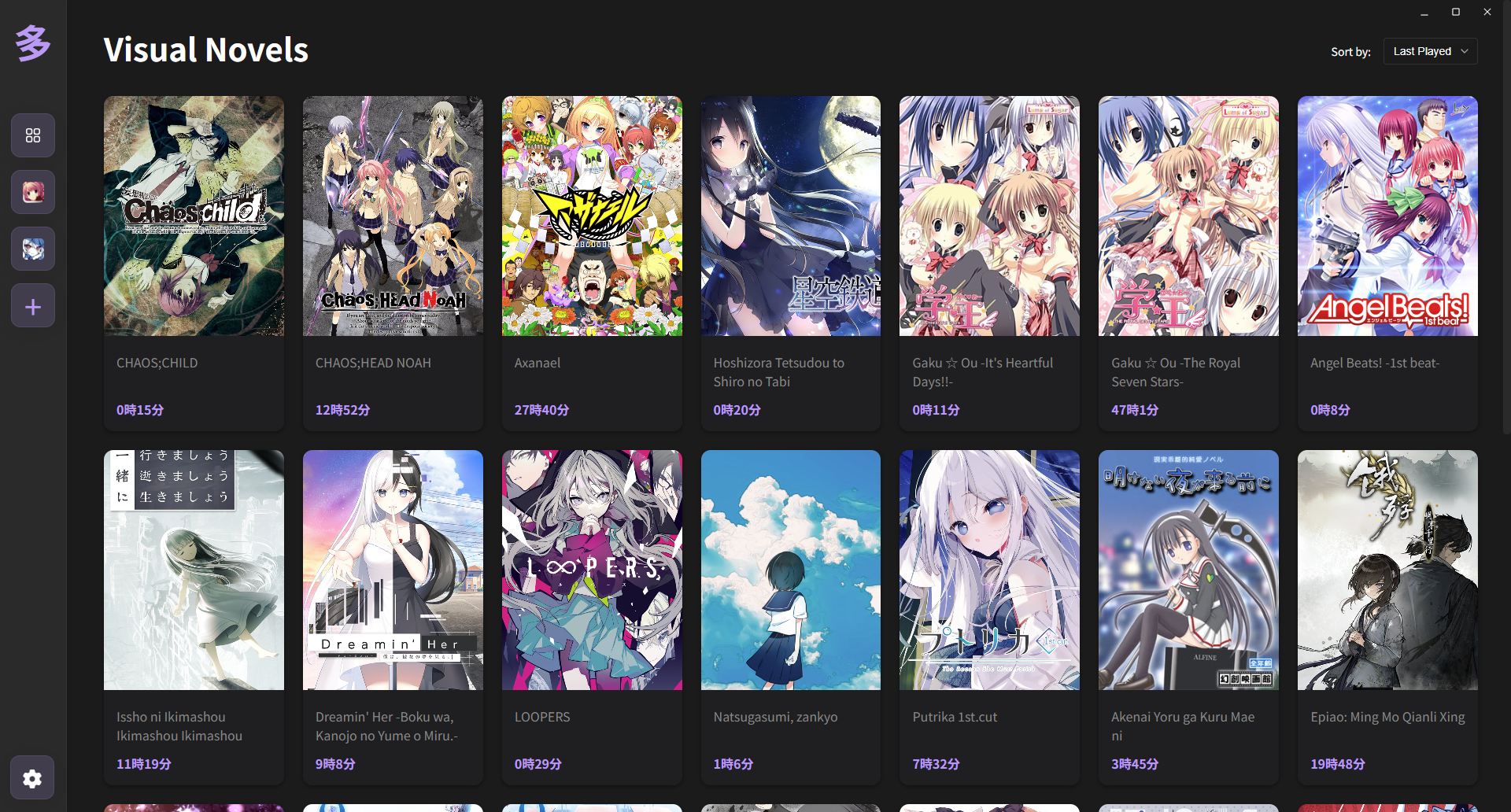 _Overview of your visual novel library with playtime tracking_ ### Game Details Page 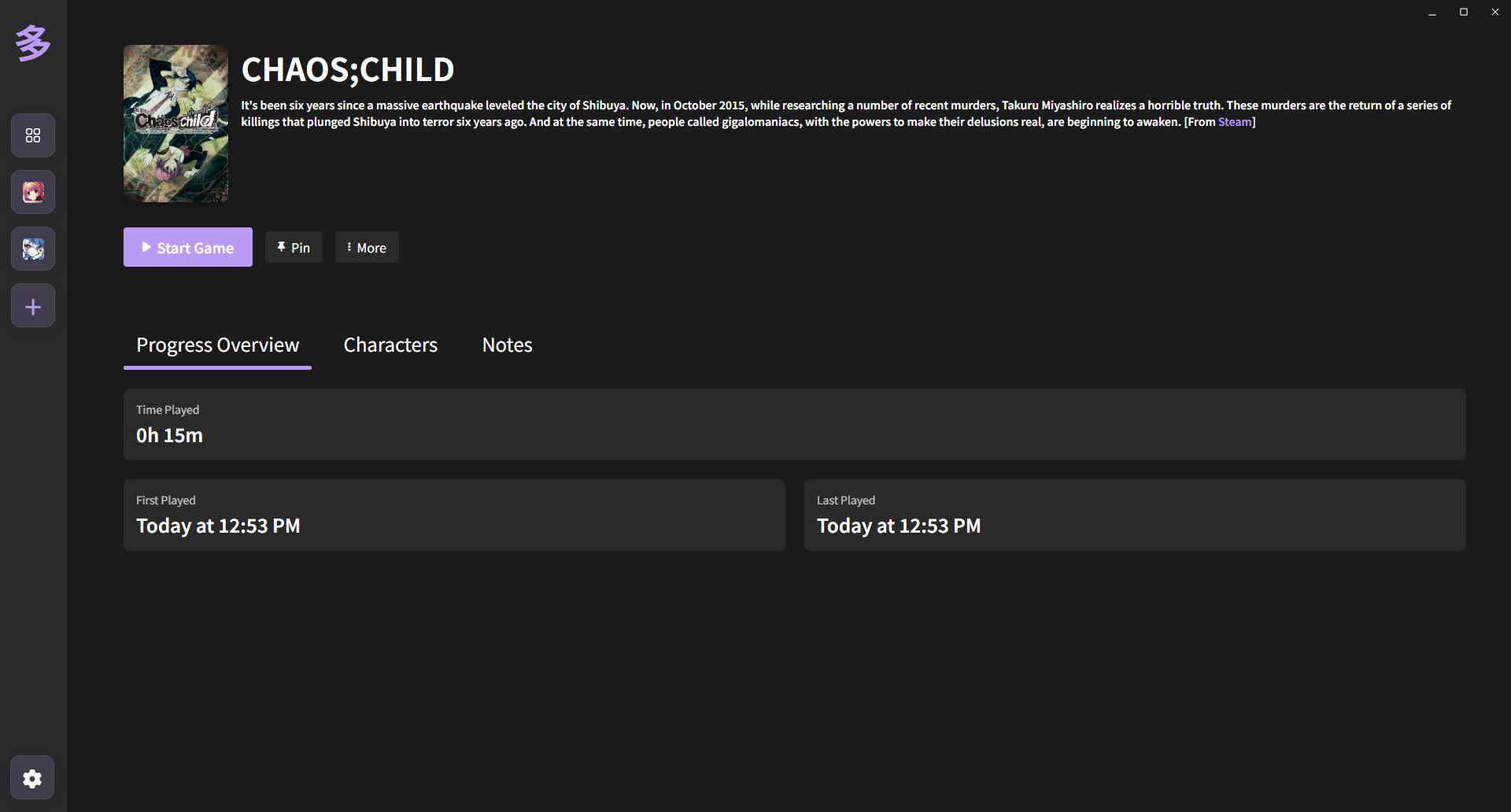 _Detailed information about individual games including characters and progress_ ### Add Game Modal 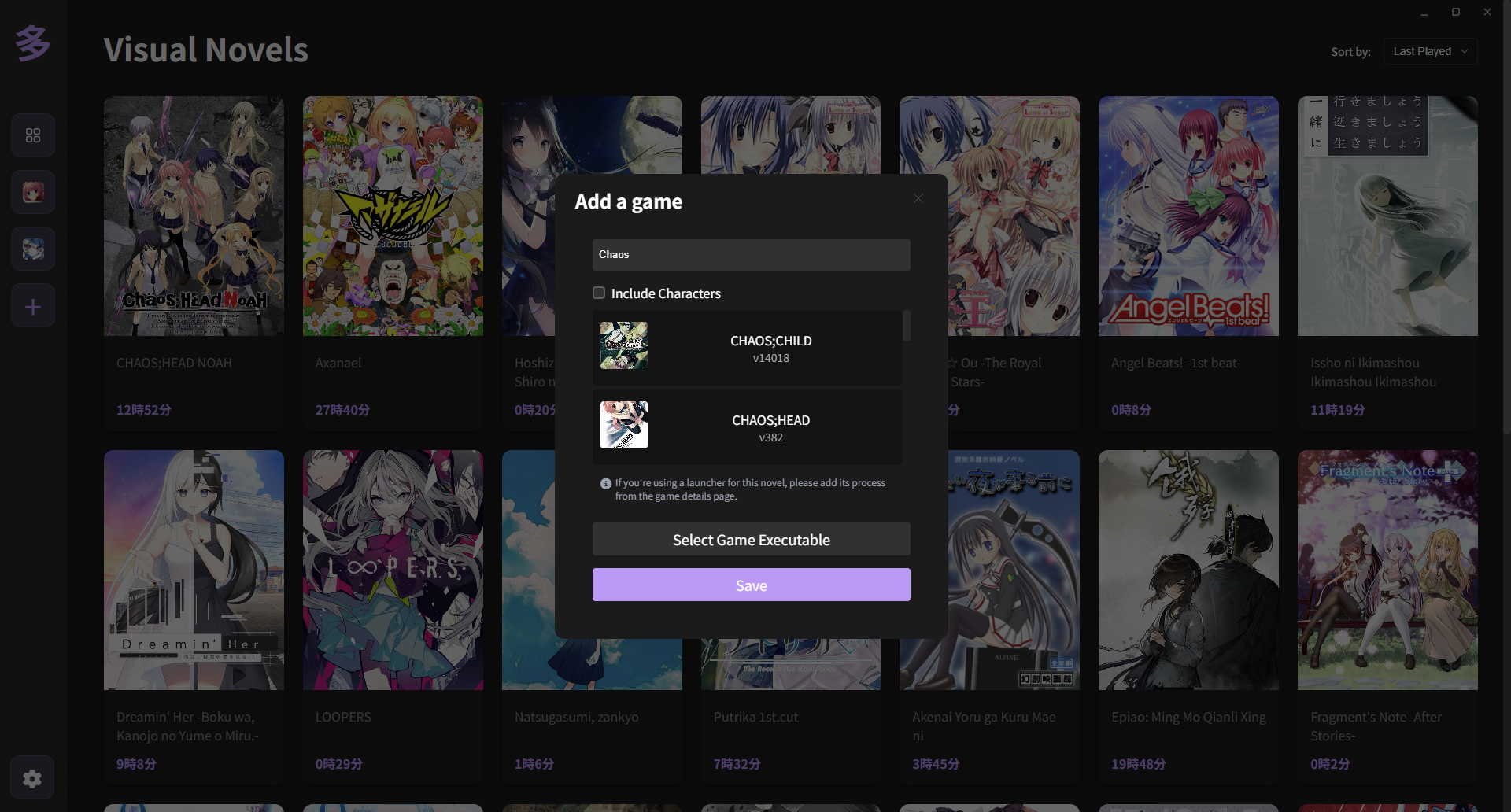 _VNDB integration for easy game addition_ ### Characters Page 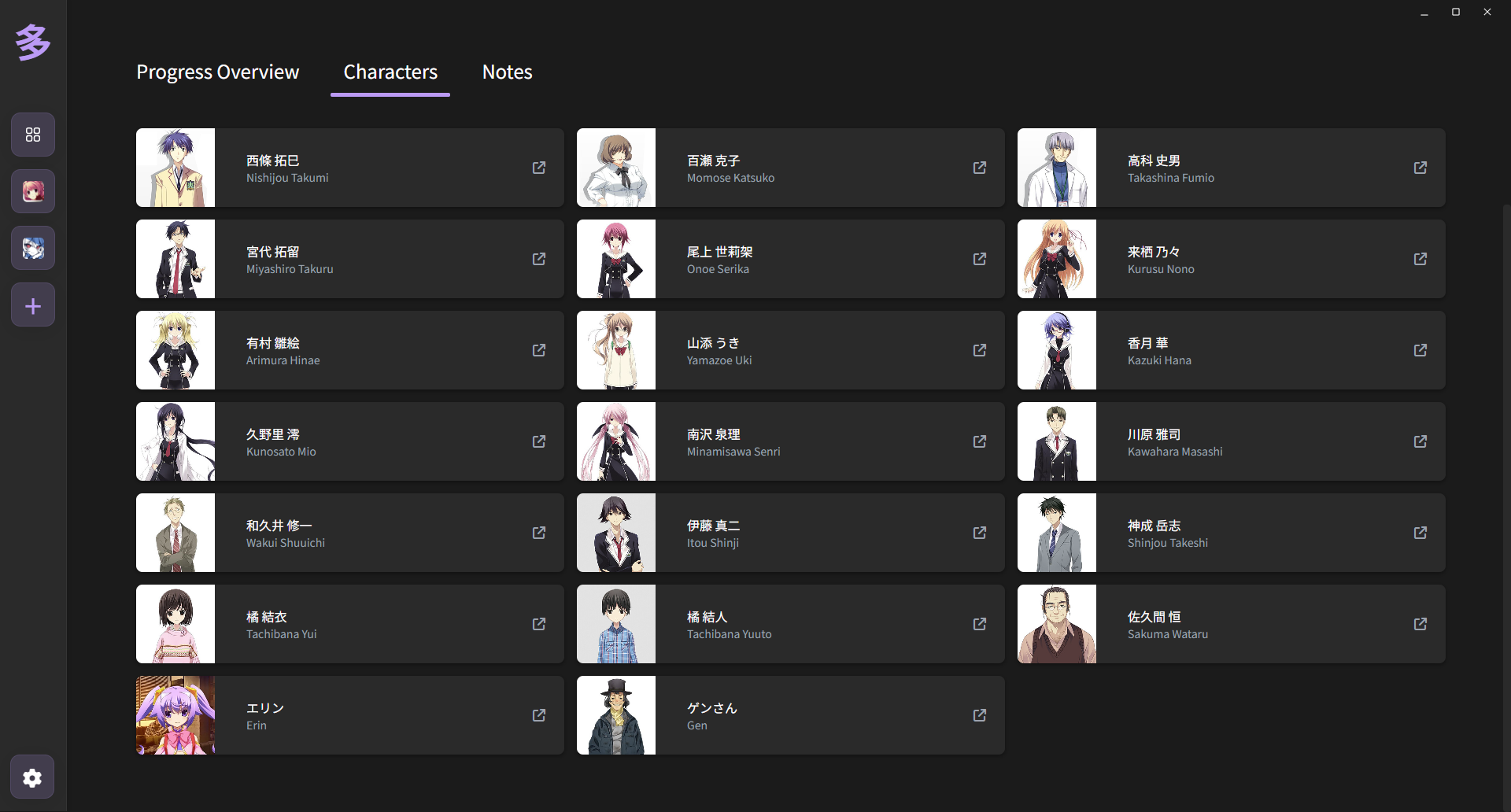 _Character information and tracking (optional feature)_ --- ## Acknowledgments - **[Tauri](https://tauri.app/)**: For providing an excellent framework for building lightweight desktop applications - **[VNDB](https://vndb.org/)**: For maintaining the comprehensive Visual Novel database and API - **[jiten.moe](https://jiten.moe/)**: For providing the Jiten API for Japanese character count data. - **[SvelteKit](https://kit.svelte.dev/)**: For enabling fast and reactive frontend development --- ## License This project is licensed under the MIT License. See the `LICENSE` file for details --- ## Support ### Getting Help If you encounter issues or have questions: 1. **Check Documentation**: Review this README and troubleshooting section 2. **Search Issues**: Look through existing [GitHub Issues](https://github.com/Eroge-Abyss/tadoku/issues) 3. **Create New Issue**: Open a new issue with detailed information 4. **Include Logs**: Attach relevant log files when reporting bugs ### Bug Reports When reporting bugs, please include: - Operating system and version - Tadoku version - Steps to reproduce the issue - Expected vs actual behavior - Log files (if applicable) ### Feature Requests We welcome suggestions for new features! Please: - Check existing feature requests first - Provide detailed use cases - Explain the expected benefit to users --- **Happy reading with Tadoku!**
