KO
|
EN
gitlite — search
Search
#javascript
#python
#hacktoberfest
#react
#ai
#typescript
#llm
#go
#golang
#android
#machine-learning
#rust
#deep-learning
#linux
DankNiriWindows
★ 9
Open GitHub ↗
No description available.
Download README (.md)
Explore Similar Repositories
AutoDeploy
:
Auto-Generated Secure CI/CD Pipelines with AI + MCP
Bilibili-api
:
哔哩哔哩 app端 v8.62.0 逆向实现两个播放量相关接口的游客访问
Agent_Memory_Papers
:
Out of personal interest and learning needs, this repository is used to collect work related to memory in LLM agents, and it is also hoped to be helpful to everyone in the community.
livox_gazebo_ros2_gpu_simulation
:
A ROS2 package to simulate Livox lidars. Using GPU to accelerate.
dev-daxlib-svg
:
Development repository for the DaxLib.SVG library published on DaxLib.org.
// repository documentation
Was this content helpful?
★ 0
(0 ratings)
Select Rating:
★
★
★
★
★
Submit Feedback
Recent Feedback
×
Download README
Do you want to download the
README.md
file for
DankNiriWindows
?
Download (.md)
# Niri Windows Plugin for DMS Launcher [](https://plugins.danklinux.com/niriwindows.html) A launcher plugin that lists all open windows in the Niri window manager and allows quick switching between them. *Example: Type `!` to list all open windows with their workspace locations* Grid Mode 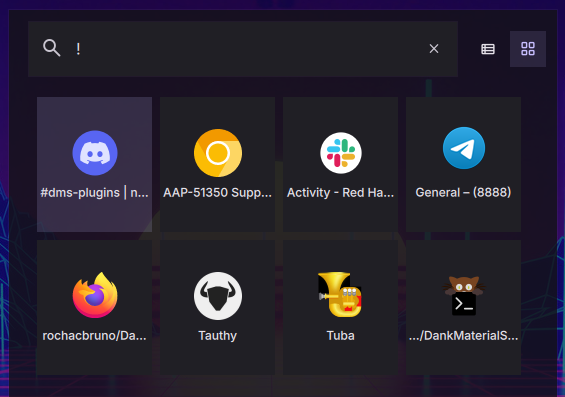 List Mode 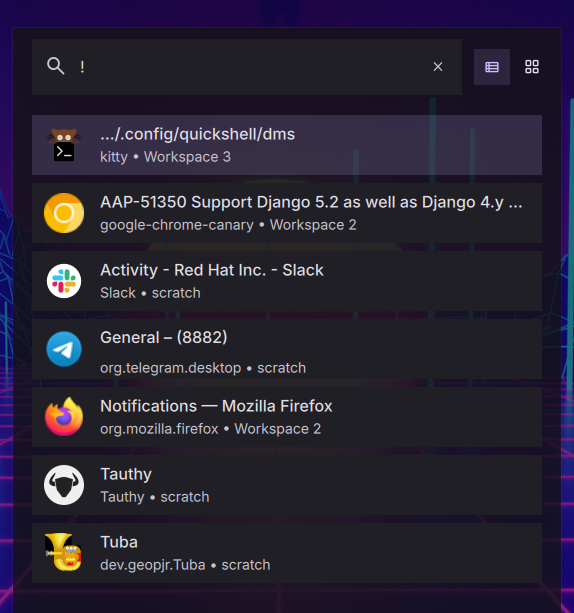 ## Features - **Window Listing**: Displays all open windows from the Niri window manager - **Smart Search**: Filter windows by application name, window title, or workspace - **Quick Switching**: Click or press Enter to instantly switch to any window - **Workspace Info**: Shows which workspace each window is on - **Smart Sorting**: Focused windows appear first, then sorted by workspace - **Default Trigger**: Uses `!` as the default trigger prefix (configurable) - **Desktop Integration**: Automatically fetches application icons from desktop entries ## Installation ### Via DMS ```bash dms plugins install NiriWindows ``` ### Via DMS GUI - Mod + , - Go to Plugins Tab - Choose Browse - Enable third party - install NiriWindows ### Manually ``` cd ~/.config/DankMaterialShell/plugins git clone https://github.com/rochacbruno/DankNiriWindows NiriWindows ``` 1. Open DMS Settings (Ctrl+,) 2. Navigate to Plugins tab 3. Click "Scan for Plugins" 4. Enable the "NiriWindow" plugin with the toggle switch ## Requirements - **Niri Window Manager**: This plugin only works when DMS is running on Niri WM - **DMS Version**: Requires DMS version > 0.1.18 ## Usage ### With Default Settings (! Trigger) 1. Open the launcher (Ctrl+Space) 2. Type `!` followed by a search term: `!firefox` 3. All matching windows appear in the launcher 4. Press Enter to switch to the selected window ### Searching for Windows - **By application**: `!firefox` - Shows all Firefox windows - **By title**: `!document` - Shows windows with "document" in the title - **By workspace**: `!Workspace 2` - Shows windows on Workspace 2 - **All windows**: `!` - Shows all open windows ### Customizing the Trigger You can configure a different trigger prefix or disable it entirely in the settings: 1. Open Settings → Plugins → Niri Windows 2. Change the trigger to a custom value (e.g., `win`, `@`, `w`) 3. Or check "No trigger (always active)" to remove the prefix requirement 4. In the launcher, type your configured trigger: `win firefox` or just `firefox` (if no trigger) ### Adding a keybinding (niri) ```kdl binds { Alt+Tab hotkey-overlay-title="Switch Windows" { spawn "dms" "ipc" "call" "spotlight" "openQuery" "!"; } } ``` ## Window Information Display Each window item shows: - **Name**: Window title (or application name if no title) - **Icon**: Application icon from desktop entry - **Comment**: Application ID and workspace location Example: ``` Window Title org.mozilla.firefox • Workspace 1 ``` ## Sorting Behavior Windows are sorted in the following order: 1. Currently focused window (appears first) 2. Workspace index (lower workspace numbers first) 3. Window name (alphabetically) ## How It Works The plugin integrates with DMS's NiriService to: 1. Monitor all open windows via Niri's event stream 2. Track window properties (app_id, title, workspace, focus state) 3. Use `NiriService.focusWindow(windowId)` to switch windows 4. Update the list in real-time when windows open/close ## Configuration Settings are stored in `~/.config/DankMaterialShell/plugin_settings.json` under the `niriWindows` plugin key: ```json { "pluginSettings": { "niriWindows": { "trigger": "!", "noTrigger": false } } } ``` ## Troubleshooting **No windows appear:** - Make sure you're running DMS on Niri window manager - Check that the plugin is enabled in Settings → Plugins - Verify you have open windows **Plugin doesn't work:** - This plugin only works on Niri WM, not Hyprland or other compositors - Make sure DMS version is > 0.1.18 **Wrong icons showing:** - Icons are fetched from desktop entries using heuristic lookup - Some applications may not have proper desktop entries ## Files - `plugin.json` - Plugin manifest and metadata - `NiriWindowsLauncher.qml` - Main launcher component - `NiriWindowsSettings.qml` - Settings UI - `README.md` - This documentation file - `screenshot.png` - Plugin screenshot ## Version 1.0.0 ## Author Bruno Cesar Rocha
