KO
|
EN
gitlite — search
Search
#python
#java
#python3
#arduino
#golang
#machine-learning
#rust
#html
#flask
#javascript
#seismology
#nodejs
obsidian-frontmatter-tool
★ 20
Open GitHub ↗
No description available.
Download README (.md)
Explore Similar Repositories
speechtotextkit
:
SpeechToTextKit is a Kotlin Multiplatform library that provides a simple and unified API for speech-to-text functionality across multiple platforms.
delta_price_vue
:
No description available.
chattered
:
All in one Gradio interface for chatterbox
fastproxy
:
Fast proxy based on Fast HTTP package for Go. mitm, proxy
auto-tagger-eagle-plugin
:
为 Eagle 资源库中有缩略图的文件自动生成标签,支持 GPU 加速(directML)和 CPU 回退模式
// repository documentation
Was this content helpful?
★ 0
(0 ratings)
Select Rating:
★
★
★
★
★
Submit Feedback
Recent Feedback
×
Download README
Do you want to download the
README.md
file for
obsidian-frontmatter-tool
?
Download (.md)
# Obsidian Frontmatter Tool A powerful, modular desktop tool (PySide6) for convenient editing, analysis and batch management of YAML frontmatter in Markdown files - inspired by Obsidian, but can be used independently. 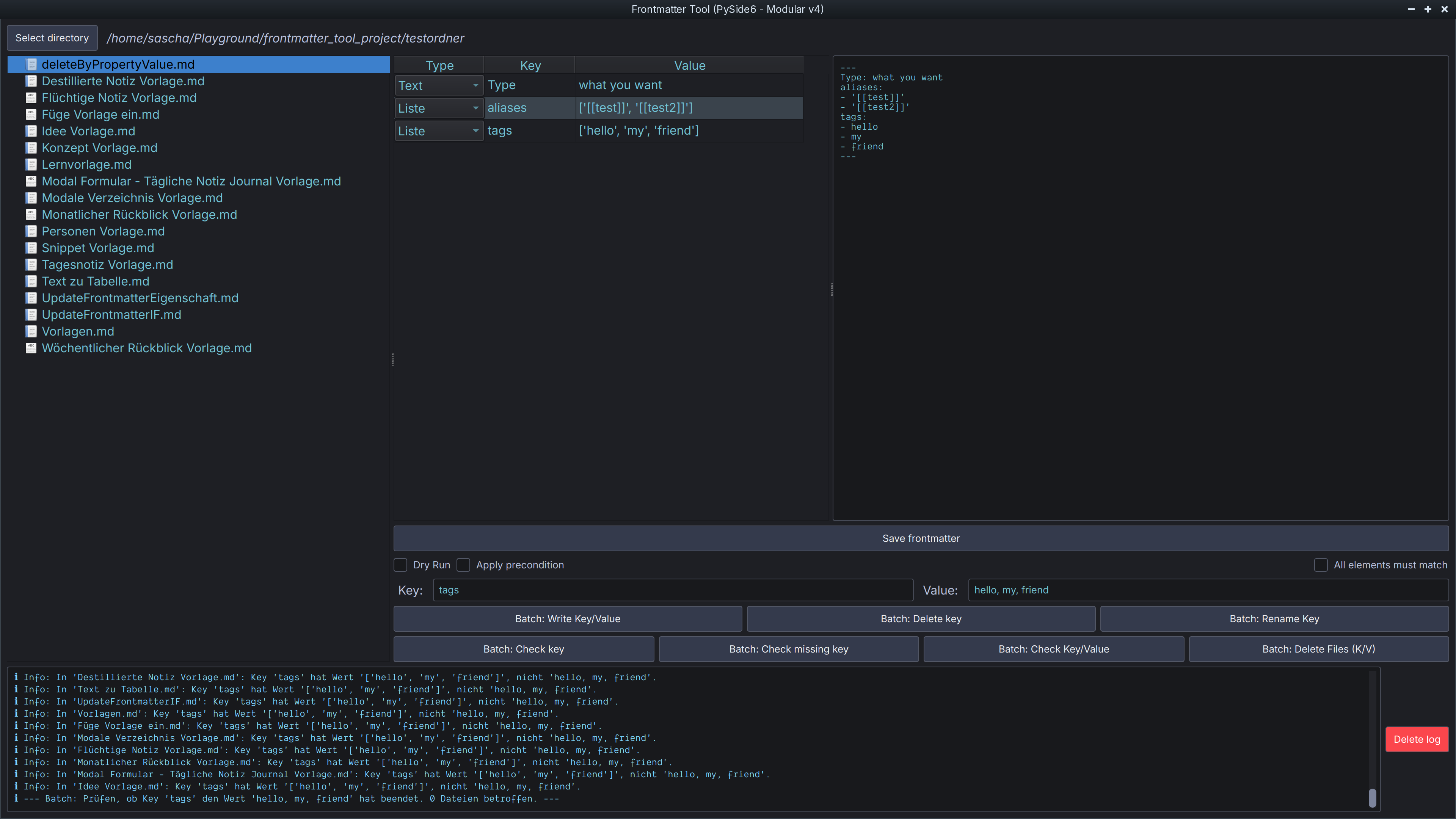 ## Features * **File explorer** with context menu for individual file actions (write key/value, delete key, rename key, delete file) * **Editable frontmatter viewer** (list view): * Type selection per key (text, list, number, checkbox, date) * Save changes directly * Automatic type detection and conversion * Split view: Table (editable) & YAML view (read-only) * **Batch actions** for many files: * Write key/value, delete key, rename key * Check key/value, delete files according to criteria * Flexible preconditions (incl. value\_matches logic) * Dry-run mode for safe testing * **Log area** with colored, formatted log output (incl. emojis) * **Cyberpunk theme** (dark, modern, customizable) * **Robust error handling** (YAML, file operations) * **Modular, testable code** (unit tests for core functions) ## Installation 1. **Install Python 3.12+** 2. Clone repository: ```zsh git clone <repo-url> cd frontmatter_tool_project ``` 3. Install dependencies (recommended: venv): ```zsh python -m venv .venv source .venv/bin/activate pip install -r requirements.txt # oder mit Poetry: poetry install ``` ## Start ```zsh python main.py ``` ## Language selection The user interface language is set to English by default. You can change the language at any time while the program is running via the **Language** menu (at the top menu bar), switching between English and German. Manual editing of the `main.py` file is no longer necessary. ## Execute tests ```zsh pytest tests/ ``` ## Project structure (excerpt) ```text main.py app/ main_window.py # Hauptfenster & UI-Logik core/ actions/ # Batch- und Einzelaktionen (modular) utils.py # value_matches etc. ui_components/ # Dialoge, Table-Viewer, Explorer styles/ # Cyberpunk-Theme TODO.md # Aufgaben & Milestones ``` ## Notes * The tool works directly on Markdown files with YAML frontmatter (e.g. from Obsidian). * Lists, numbers, checkboxes and date values are automatically recognized and saved correctly. * The log output is in color and visually highlights errors, warnings, information and successes. * Comfort functions such as add/delete line, validation etc. are being planned (see TODO.md). ## License MIT * * * **Developed with ❤️ for the Obsidian and Markdown community.**
