KO
|
EN
gitlite — search
Search
#python
#java
#python3
#arduino
#golang
#machine-learning
#rust
#html
#flask
#javascript
#seismology
#nodejs
karhoo-ios-sdk
★ 11
Open GitHub ↗
iOS Network SDK for Karhoo
Download README (.md)
Explore Similar Repositories
rtd
:
Manage your todo in command line with rtd
ng-transition
:
Transition elements via classes like you would in the Vue and Alpine.js libraries.
qemu-of-arm-android
:
How to port the Android emulator to an Android phone
digit-recognition
:
Recognition of digits of an analogue gas meter with Python, Tensorflow, MongoDB and Raspberry Pi
react-native-progress-steps-sample
:
Sample project for react-native-progress-steps library
// repository documentation
Was this content helpful?
★ 0
(0 ratings)
Select Rating:
★
★
★
★
★
Submit Feedback
Recent Feedback
×
Download README
Do you want to download the
README.md
file for
karhoo-ios-sdk
?
Download (.md)
*** <div align="center"> <a href="https://karhoo.com"> <img alt="Karhoo logo" width="250px" src="https://cdn.karhoo.com/s/images/logos/karhoo_logo.png" /> </a> </div> <h1>Karhoo iOS Network SDK</h1>  KarhooSDK is a framework for integrating with the KarhooAPI: https://developer.karhoo.com [**Read The Docs**](https://developer.karhoo.com/docs/build-apps-using-sdks) ## Installation #### CocoaPods You can use [CocoaPods](http://cocoapods.org/) to install `KarhooSDK` by adding it to your `Podfile`: ```ruby use_frameworks! pod 'KarhooSDK', '~> 1.8.5' ``` then import `KarhooSDK` wherever you want to access Karhoo services ``` swift import KarhooSDK ``` #### Carthage Create a `Cartfile` that lists the framework and run `carthage update`. Follow the [instructions](https://github.com/Carthage/Carthage#if-youre-building-for-ios) to add `$(SRCROOT)/Carthage/Build/iOS/YourLibrary.framework` to an iOS project. ``` github "Karhoo/Karhoo-ios-sdk" ``` ### Swift Package Manager The [Swift Package Manager](https://swift.org/package-manager/) is a tool for automating the distribution of Swift code and is integrated into the `swift` compiler and Xcode 11+ Once you have your Swift package set up, adding Karhoo as a dependency is as easy as adding it to the `dependencies` value of your `Package.swift`. ```swift dependencies: [ .package(url: "https://github.com/Karhoo/karhoo-ios-sdk.git", .upToNextMajor(from: "1.8.5")) ] ``` # Usage ## Initialisation There are a few things the SDK needs to know before you can get started. Such as what environment to connect to, or what kind of authentication method to use. These dependencies can be set up in an implementation of the KarhooSDKConfiguration protocol. ```swift import KarhooSDK struct YourCompanyKarhooConfiguration: KarhooSDKConfiguration { func environment() -> KarhooEnvironment { return .sandbox } func authenticationMethod() -> AuthenticationMethod { // for other authentication methods such as guest or token exchange bookings please see: https://developer.karhoo.com/docs/using-the-network-sdk#authentication return .karhooUser } } ``` With this configuration the SDK can be initialised in your App/SceneDelegate ```swift import KarhooSDK class AppDelegate: UIResponder, UIApplicationDelegate { var window: UIWindow? func application(_ application: UIApplication, didFinishLaunchingWithOptions launchOptions: [UIApplication.LaunchOptionsKey: Any]?) -> Bool { Karhoo.set(configuration: YourCompanyKarhooConfiguration()) .. return true } } ``` For full documentation of SDK services please visit our Developer Portal: https://developer.karhoo.com/reference#user-service ## Authentication The KarhooSDK requires authentication, attempting to interact with the SDKs without authenticating will result in errors. There are three possible authentication methods supported: ### Karhoo User A user that is created and managed within the Karhoo platform. Karhoo users are useful for corporate travel and proof of concept integrations. Setup your KarhooSDKConfiguration interface authentication method as ```.karhooUser```. Then you can use the UserService to make a login request with a username and password. ```swift let userService = Karhoo.getUserService() let userLogin = UserLogin(email: "your-user@email.com", password: "abc") userService.login(userLogin: userLogin).execute { result in switch result { case .success(let user): print("user authenticated: ", user) case .failure(let error): print("error: \(error.code) \(error.message)") } } ``` ### Guest User Guest users are anonymous and useful for B2C traveller solutions. When booking as a guest user, the user of your application will not be required to authenticate, however you will be required to provide passenger details when making a booking with the trip service. To setup the SDK in guest mode, specify the authentication method in your KarhooSDKConfiguration interface as ``` .guest``` and provide your credentials as an associated value. After that, you'll be able to interact with the SDK services. ```swift struct YourCompanyKarhooConfiguration: KarhooSDKConfiguration { func environment() -> KarhooEnvironment { return .sandbox } func authenticationMethod() -> AuthenticationMethod { return .guest(settings: GuestSettings(identifier: "", referer: "", organisationId: "")) } } ``` ### Token Exchange It is also possible to sync your users with the Karhoo platform so you can swap your users JWT token for a karhoo user token. This allows your users to automatically authenticate and use Karhoo services. If your integration involves this authentication method you can setup the SDK accordingy using the ```AuthService``` Firstly, specify ```.tokenExchange``` as the authentication method in your SDK configuration file. ```swift struct YourCompanyKarhooConfiguration: KarhooSDKConfiguration { func environment() -> KarhooEnvironment { return .sandbox } func authenticationMethod() -> AuthenticationMethod { return .tokenExchange(settings: TokenExchangeSettings(clientId: "", scope: "")) } } ``` Then use the ```AuthService``` to swap your JWT for a Karhoo user. ```swift let authService = Karhoo.getAuthService() authService.login(token: "user-jwt").execute { result in switch result { case .success(let user): print("user authenticated: ", user) case .failure(let error): print("error: \(error.code) \(error.message)") } } ``` ## Making Requests Once the SDK is authenticated you can make use of the various services of the Karhoo platform. The SDK uses two generic types, Call and PollCall. These are network requests that are going to either make one request or observe the end point over a given interval. ### Example Call ```swift let tripService = Karhoo.getTripService() let tripCancellation = TripCancellation(tripId: "123", cancelReason: .notNeededAnymore) tripService.cancel(tripCancellation: tripCancellation).execute { result in switch result { case .success: print("Trip cancelled") case .failure(let error): print("error: \(error.code) \(error.message)") } } ``` ### Example PollCall Perhaps you want to monitor a trip and update your UI accordingly. We've made an Observable type that can subscribe / unsubscribe a subject to a publisher. ```swift //ensure your reference for the Observer (Subject) AND the Observable (Publisher) are not confined to the scope of a function otherwise they go out of memory at runtime and your UI won't update. private var tripTrackingObservable: Observable<TripInfo>? private var tripTrackingObserver: Observer<TripInfo>? tripTrackingObserver = Observer<TripInfo>.value { [weak self] tripInfo in print("new trip update! ", tripInfo) } tripTrackingObservable = tripService.trackTrip(identifier: "some-trip-id").observable(pollTime: 5) // where 5 = 5 seconds tripTrackingObservable?.subscribe(observer: tripTrackingObserver) // deallocation tripTrackingObservable?.unsubscribe(observer: tripTrackingObserver) ``` # SDK Architecture overview: The SDK is split into Services. Services such as Trip, DriverTracking, Availability, User, Payments etc. These services in turn depend on Interactors, these Interactors depend on a request. Simply calling a function in a service will trigger the interactor to call the request. The request uses our HttpClient to make the network call. Models are encoded/decoded using Decodable structs. These are located in Api/DataObjects/Request /Response groups. There is a unit test target that tests individual classes work as expected, and there is an integration test target that uses OHHTPStubs to test the sdk works as expected end to end. (from the network layer to a service) 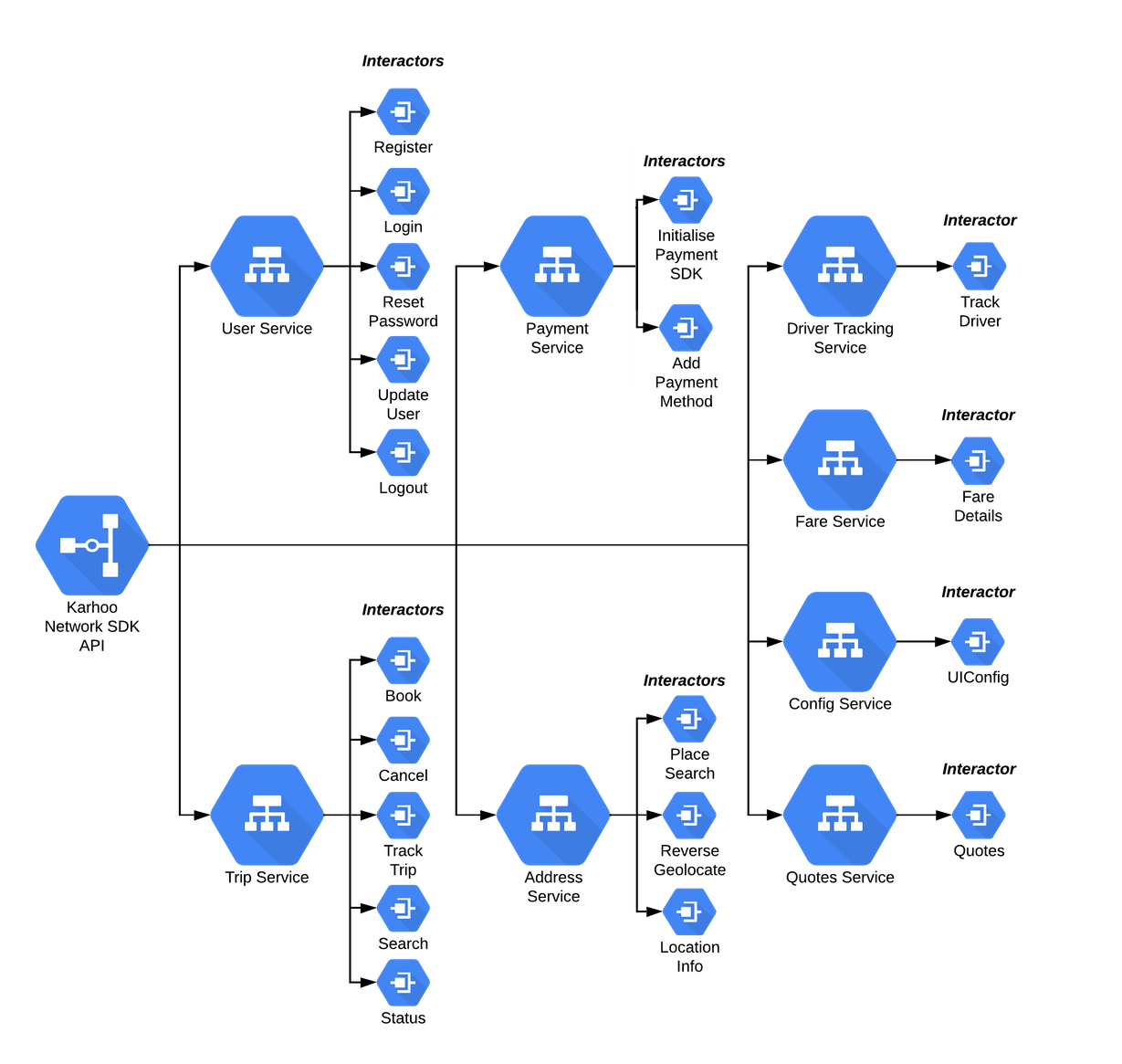 # Setup For Development We use Swift Package Manager to handle the SDK internal dependencies and development. On Xcode 11+, once you've checked out the project you can go to `Xcode -> File -> Swift Packages -> Update to Latest Package Versions` ## Running Tests There is an Xcode scheme for unit tests and integration tests. Unit tests test the functionality of individual classes using mocked dependencies. The integration tests mock backend responses with JSON contrtacts and ensure the SDK works from input to output. ## Client example There is an example project inside the Client directory of this repository. This is meant to be a fast way to test SDK changes and development steps. You will need to add access Keys to the client module as these are ignored due to this being an open source repository. ```swift struct Keys { static let identifier = "" ... } ``` ## Issues _Looking to contribute?_ ### 🐛 Bugs Please file an issue for bugs, missing documentation, or unexpected behavior. ### 💡 Feature Requests Please file an issue to suggest new features. Vote on feature requests by adding a 👍. This helps maintainers prioritize what to work on. ### ❓ Questions For questions related to using the library, please re-visit a documentation first. If there are no answer, please create an issue with a label `help needed`. ## Useful Links [Karhoo Developer Site](https://developer.karhoo.com/) [The iOS UI SDK](https://github.com/karhoo/karhoo-ios-ui-sdk) ## License [BSD-2-Clause](./LICENSE)
