KO
|
EN
gitlite — search
Search
#python
#java
#python3
#arduino
#golang
#machine-learning
#rust
#html
#flask
#javascript
#seismology
#nodejs
Habana-LLM-Viewer
★ 13
Open GitHub ↗
No description available.
Download README (.md)
Explore Similar Repositories
ollama-webui
:
The Ollama WebUI provides a simple interface for running a local LLM (Large Language Model). This is a great solution for users who need an LLM without internet access.
rookie-discord
:
菜鸟 Im 项目前端代码仓库
SLTurbulence
:
No description available.
CryptoVerifier
:
高效、经济的许可证验证解决方案 (保护您的 Minecraft 插件 或 Mod 等)
SEFusion
:
An end-to-end infrared and visible light enhancement fusion algorithm based on SwinTransformer
// repository documentation
Was this content helpful?
★ 0
(0 ratings)
Select Rating:
★
★
★
★
★
Submit Feedback
Recent Feedback
×
Download README
Do you want to download the
README.md
file for
Habana-LLM-Viewer
?
Download (.md)
## Habana-LLM-Viewer Habana-LLM-Viewer is a tool that provides Roofline model, LLM performance prediction and memory analysis for Intel Gaudi platform. Inspired by [LLM-Viewer](https://github.com/hahnyuan/LLM-Viewer), Habana-LLM-Viewer can be used to estimate performance of models such as Llama2-13B, Qwen-7B, Mixtral-8x7B on Intel Gaudi platform. 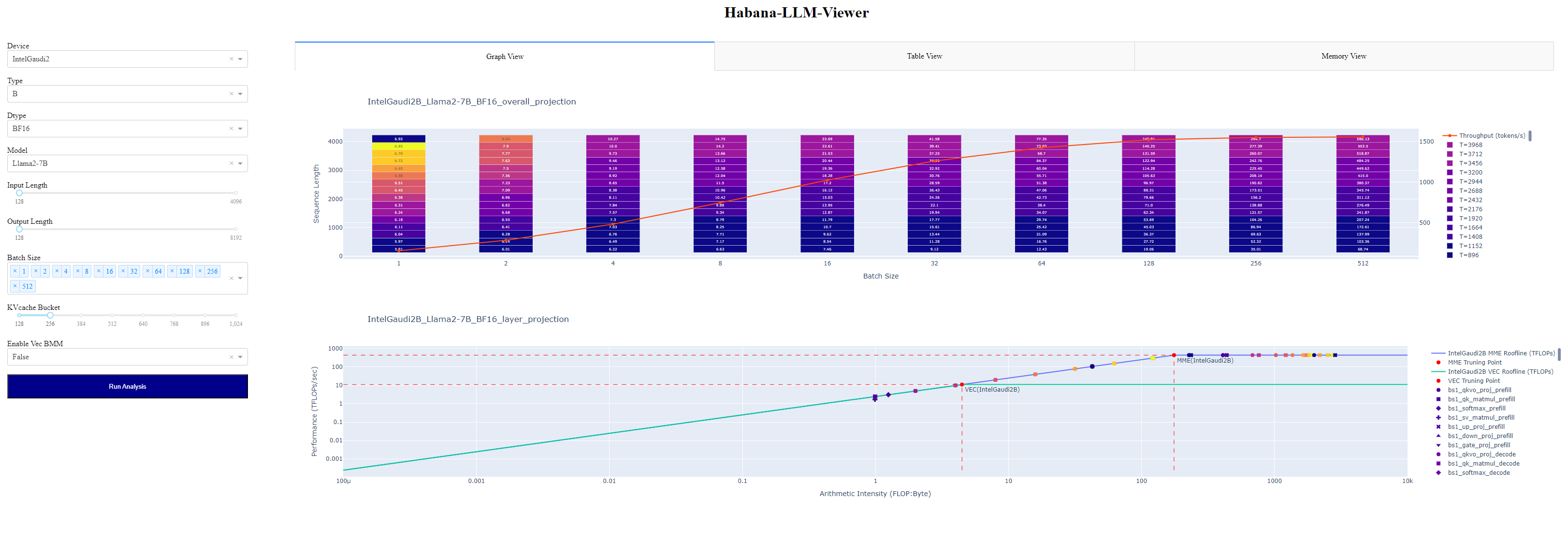 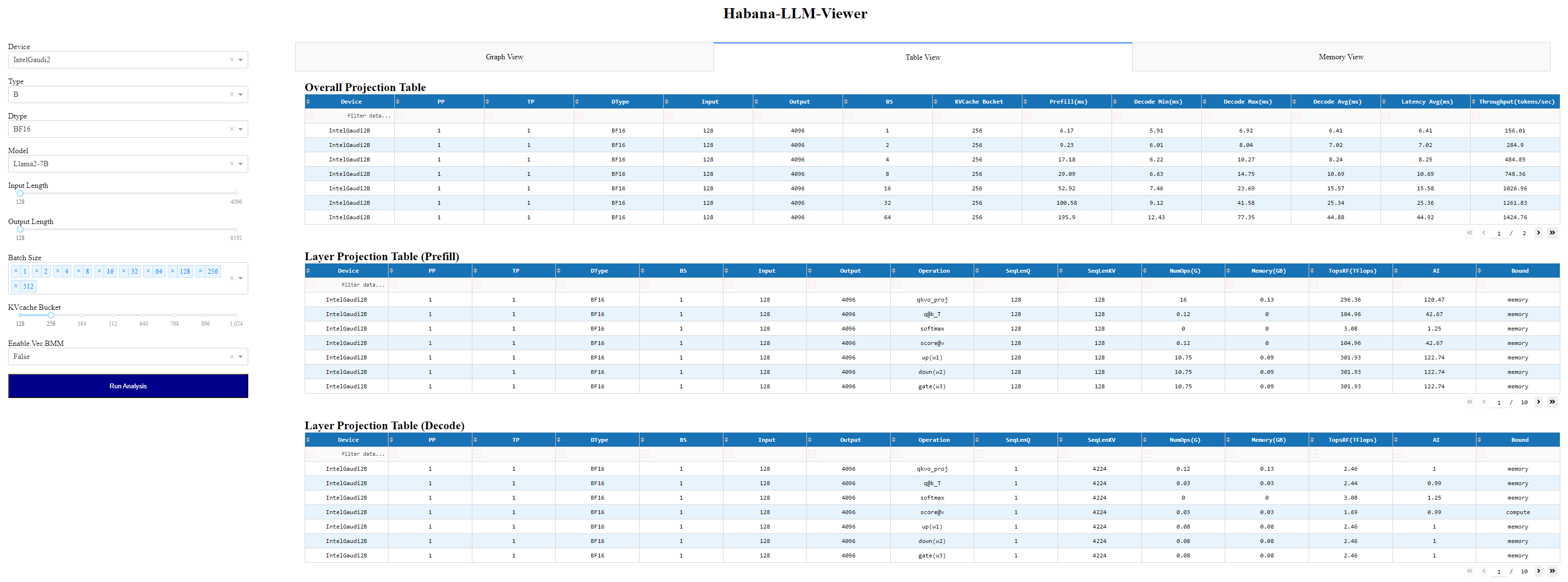 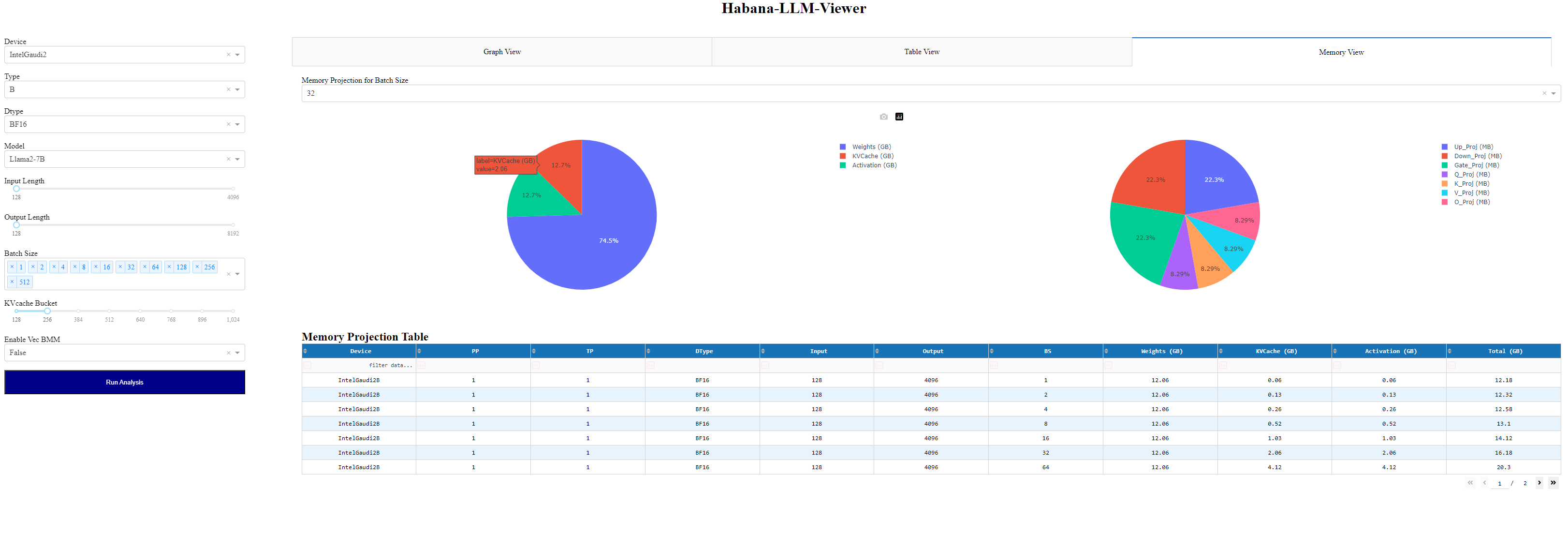 ## Model Projection ### Command 1. Simpily run with **[habana_viewer.py](./habana_viewer.py)** and the results will show up on localhost. ```sh python habana_viewer.py ``` 2. Simpily run with **[run_model_projection.py](./run_model_projection.py)** and the results will be saved to folder "data/model". ```sh python run_model_projection.py \ --device IntelGaudi2 \ --device-type B \ --model Llama2-7B \ --data-type BF16 \ --batch-size BATCH_SIZE \ --context-input CONTEXT_INPUT \ --context-output CONTEXT_OUTPUT \ --kvcache-bucket 256 \ --vec-bmm ``` <!-- 3. Run with jupyter notebook: **run_projection.ipynb** for simpily visualization. --> ### Example |Model Name|Projected Data| |:------:|:------:| |Llama2-7B|[Link](./data/model/Llama2-7B/)| |Llama2-13B|[Link](./data/model/Llama2-13B/)| |Llama3-8B|[Link](./data/model/Llama3-8B/)| |Qwen-7B|[Link](./data/model/Qwen-7B/)| |Qwen-14B|[Link](./data/model/Qwen-14B/)| |Mixtral-8x7B|[Link](./data/model/Mixtral-8x7B/)| <!-- ##### Llama3-8B - Overall Projection ( [Details](./data/model/Llama3-8B/IntelGaudi2C_overall_projection.csv) ) / Attn ( [Prefill_QK](./data/model/Llama3-8B/IntelGaudi2B_pp1_tp1_BF16_prefill_attn_qk_projection.csv) / [Decode_QK](./data/model/Llama3-8B/IntelGaudi2B_pp1_tp1_BF16_decode_attn_qk_projection.csv) / [Prefill_SV](./data/model/Llama3-8B/IntelGaudi2B_pp1_tp1_BF16_prefill_attn_sv_projection.csv) / [Decode_SV](./data/model/Llama3-8B/IntelGaudi2B_pp1_tp1_BF16_decode_attn_sv_projection.csv) ) / FFN ( [Prefill](./data/model/Llama3-8B/IntelGaudi2B_pp1_tp1_BF16_prefill_ffn_up_projection.csv) / [Decode](./data/model/Llama3-8B/IntelGaudi2B_pp1_tp1_BF16_decode_ffn_up_projection.csv) ) 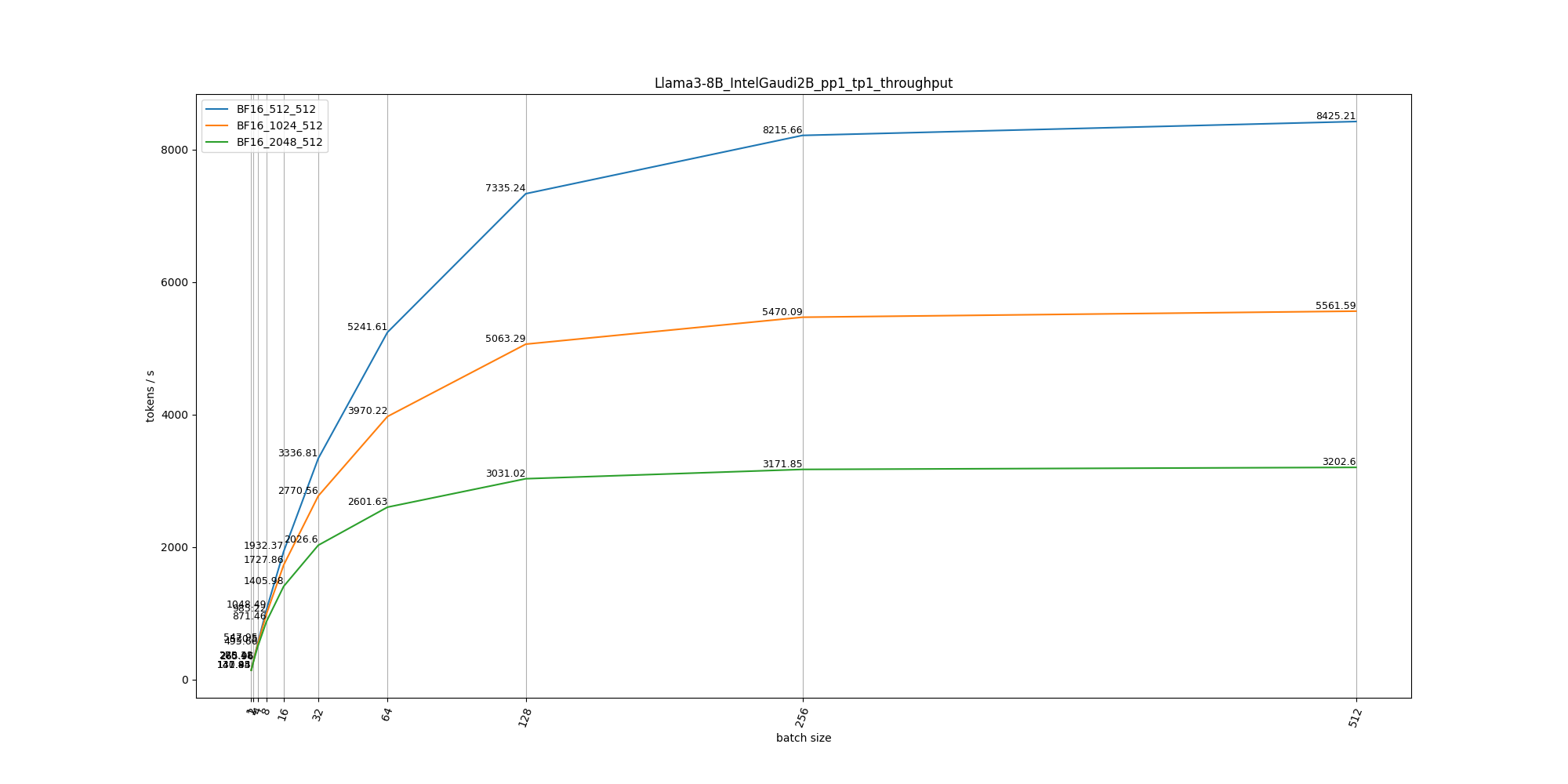 ##### Llama2-13B - Overall Projection ( [Details](./data/model/Llama2-13B/IntelGaudi2C_overall_projection.csv) ) / Attn ( [Prefill_QK](./data/model/Llama2-13B/IntelGaudi2B_pp1_tp1_BF16_prefill_attn_qk_projection.csv) / [Decode_QK](./data/model/Llama2-13B/IntelGaudi2B_pp1_tp1_BF16_decode_attn_qk_projection.csv) / [Prefill_SV](./data/model/Llama2-13B/IntelGaudi2B_pp1_tp1_BF16_prefill_attn_sv_projection.csv) / [Decode_SV](./data/model/Llama2-13B/IntelGaudi2B_pp1_tp1_BF16_decode_attn_sv_projection.csv) ) / FFN ( [Prefill](./data/model/Llama2-13B/IntelGaudi2B_pp1_tp1_BF16_prefill_ffn_up_projection.csv) / [Decode](./data/model/Llama2-13B/IntelGaudi2B_pp1_tp1_BF16_decode_ffn_up_projection.csv) ) 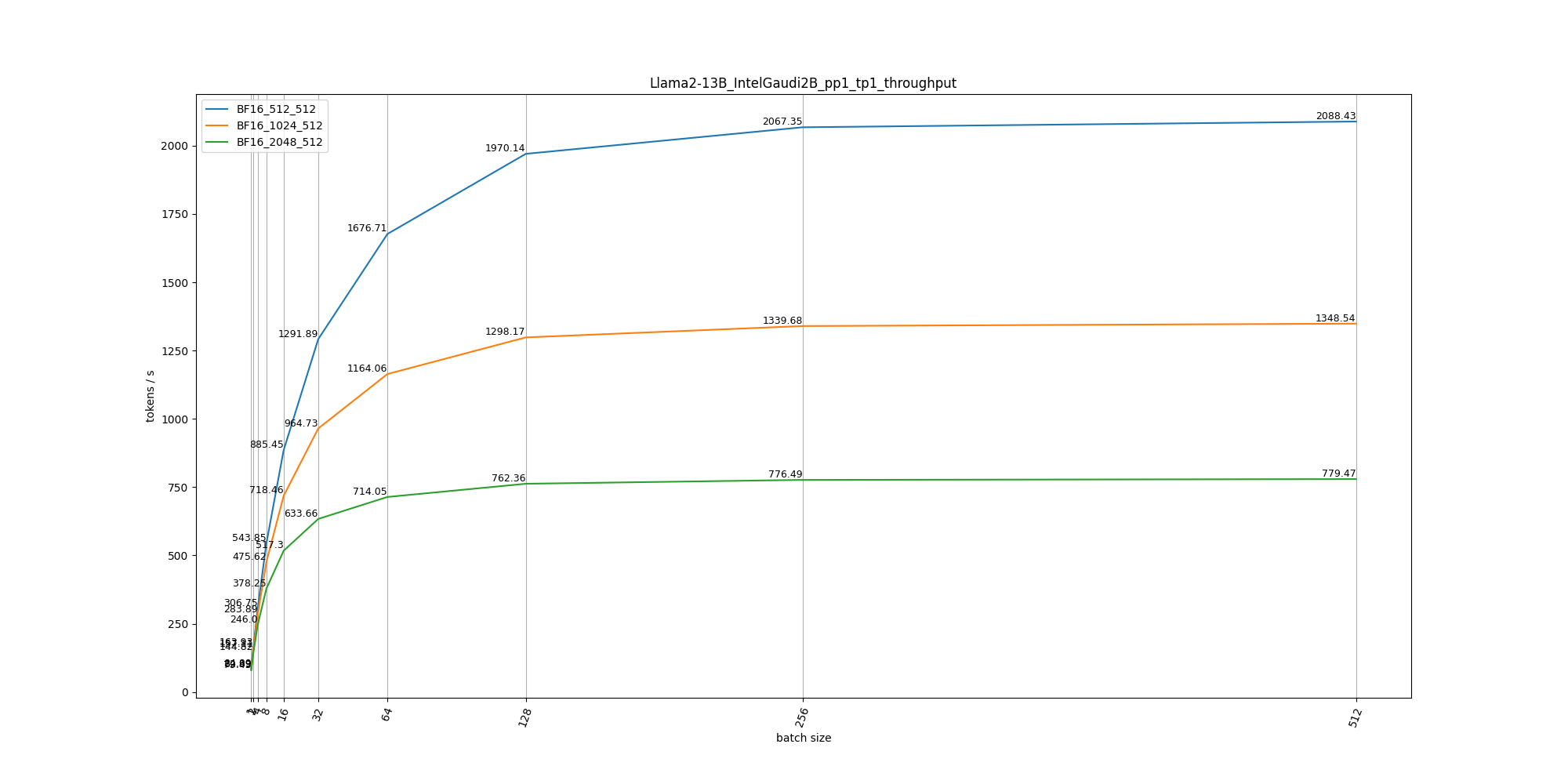 ##### Qwen-7B - Overall Projection ( [Details](./data/model/Qwen-7B/IntelGaudi2B_overall_projection.csv) ) / Attn ( [Prefill_QK](./data/model/Qwen-7B/IntelGaudi2B_pp1_tp1_BF16_prefill_attn_qk_projection.csv) / [Decode_QK](./data/model/Qwen-7B/IntelGaudi2B_pp1_tp1_BF16_decode_attn_qk_projection.csv) / [Prefill_SV](./data/model/Qwen-7B/IntelGaudi2B_pp1_tp1_BF16_prefill_attn_sv_projection.csv) / [Decode_SV](./data/model/Qwen-7B/IntelGaudi2B_pp1_tp1_BF16_decode_attn_sv_projection.csv) ) / FFN( [Prefill](./data/model/Qwen-7B/IntelGaudi2B_pp1_tp1_BF16_prefill_ffn_up_projection.csv) / [Decode](./data/model/Qwen-7B/IntelGaudi2B_pp1_tp1_BF16_decode_ffn_up_projection.csv) ) 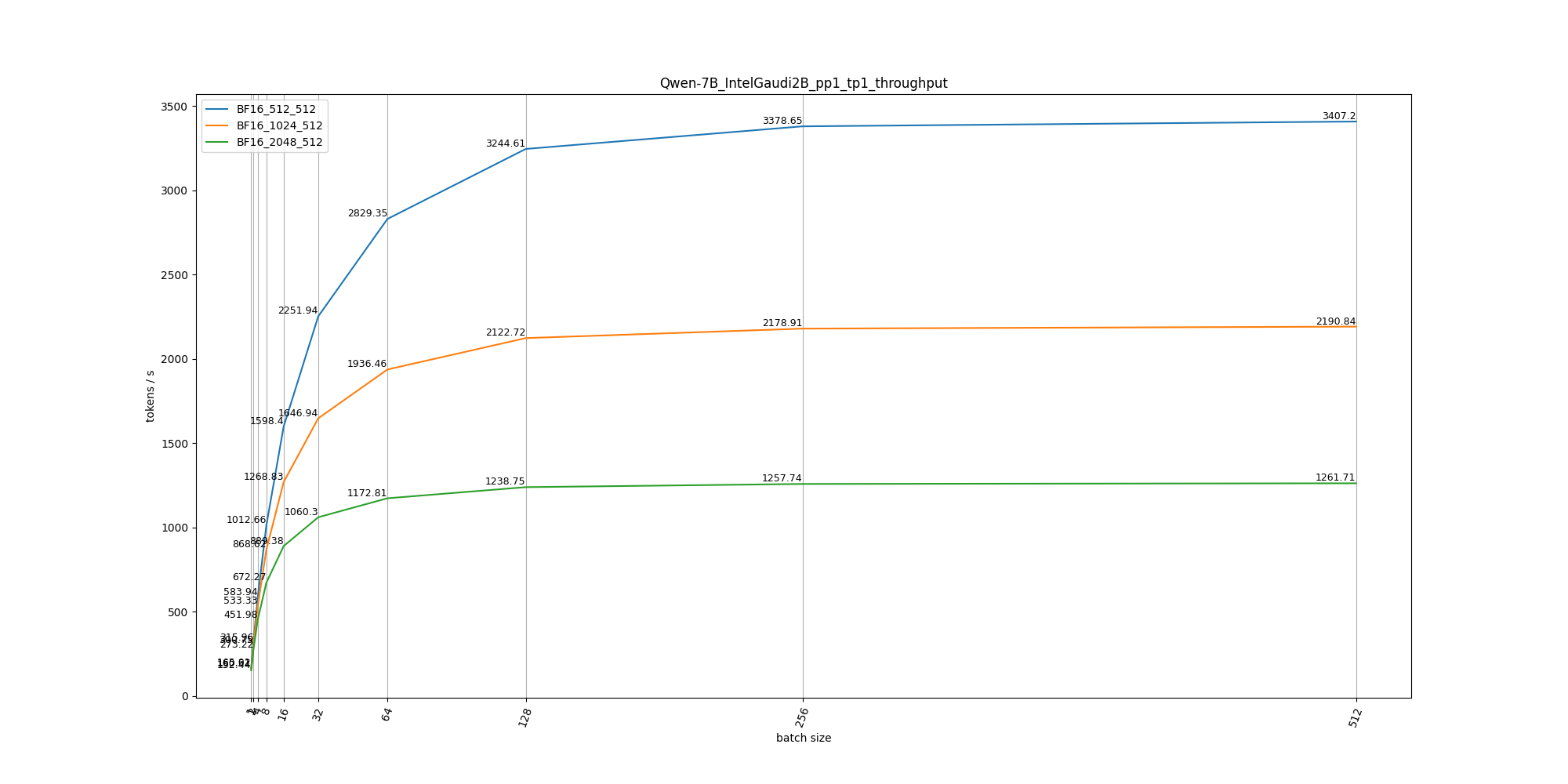 ##### Mixtral-8x7B - Overall Projection ( [Details](./data/model/Mixtral-8x7B/IntelGaudi2B_overall_projection.csv) ) / Attn ( [Prefill_QK](./data/model/Mixtral-8x7B/IntelGaudi2B_pp1_tp1_BF16_prefill_attn_qk_projection.csv) / [Decode_QK](./data/model/Mixtral-8x7B/IntelGaudi2B_pp1_tp1_BF16_decode_attn_qk_projection.csv) / [Prefill_SV](./data/model/Mixtral-8x7B/IntelGaudi2B_pp1_tp1_BF16_prefill_attn_sv_projection.csv) / [Decode_SV](./data/model/Mixtral-8x7B/IntelGaudi2B_pp1_tp1_BF16_decode_attn_sv_projection.csv) ) / FFN ( [Prefill](./data/model/Mixtral-8x7B/IntelGaudi2B_pp1_tp1_BF16_prefill_ffn_up_projection.csv) / [Decode](./data/model/Mixtral-8x7B/IntelGaudi2B_pp1_tp1_BF16_decode_ffn_up_projection.csv) ) 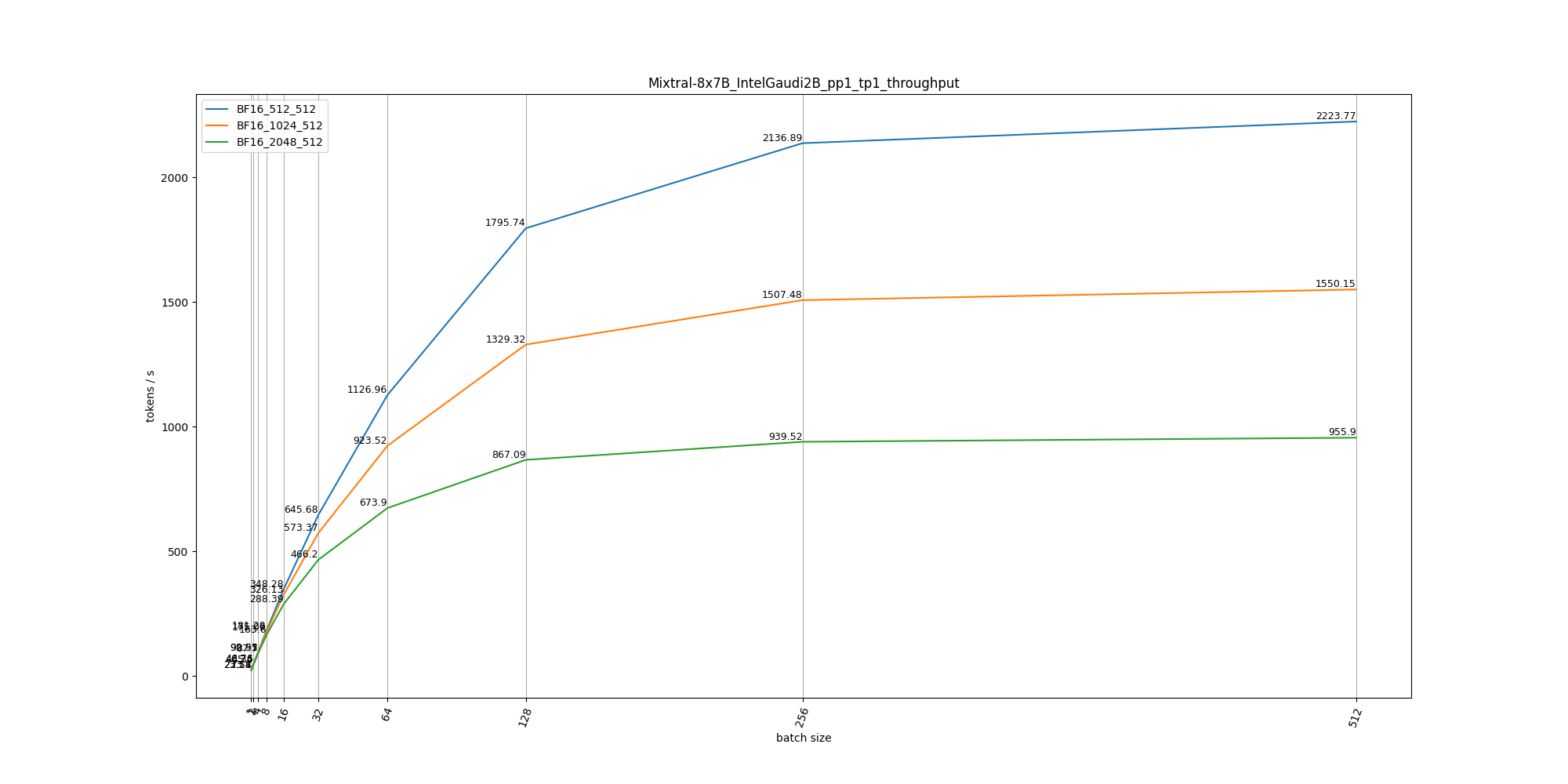 --> ## Operation Projection ### Command 1. Simpily run with **[run_op_projection.py](./run_op_projection.py)** and the results will be saved to folder "data/operation", same with model projection, one can modify **proj_cfg** in main. ```sh python run_op_projection.py \ --device IntelGaudi2 \ --device-type B \ --op Matmul \ --data-type BF16 \ --m-list m1 m2 ... \ --n-list n1 n2 ... \ --k-list k1 k2 ... ``` ### Example |Op Name|Projected Data| |:------:|:------:| |Matmul|[Link](./data/operation/Matmul/)| ### Todo 1. Currently only cover single card perf projection, will support multi-card / multi-node. 2. Will cover more models / operations.
