KO
|
EN
gitlite — search
Search
#python
#java
#python3
#arduino
#golang
#machine-learning
#rust
#html
#flask
#javascript
#seismology
#nodejs
Toolbar-Creator
★ 14
Open GitHub ↗
No description available.
Download README (.md)
Explore Similar Repositories
jodamoblog
:
just another android logging framework
vbo-tools
:
Simple utilities for RaceLogic VBO files.
txCelery
:
Celery for Twisted: manage Celery tasks from twisted using the Deferred API
rss-to-full-rss
:
Converts truncated RSS feeds to full RSS using the readability algorithm
wcag20
:
WCAG 2.0、Understanding WCAG 2.0およびTechniques for WCAG 2.0日本語版のXMLファイル。
// repository documentation
Was this content helpful?
★ 0
(0 ratings)
Select Rating:
★
★
★
★
★
Submit Feedback
Recent Feedback
×
Download README
Do you want to download the
README.md
file for
Toolbar-Creator
?
Download (.md)
# Toolbar Creator template ***for Photoshop (R) and ClipStudio Paint aka. Manga Studio (R)***<br><br> **Toolbar Creator** is one of few especially useful on-screen toolbars for Windows Tablet PCs. It makes using Windows tablets without keyboard much more comfortable and convenient. The software is developed by [**lblb**](http://forum.tabletpcreview.com/threads/toolbar-creator-v-2-2-beta-available-for-download.63014/) at TabletPC Review forum, which is a user-friendly interface for `RawInputControlTest` script by [**koide**](http://39kasen.sakura.ne.jp/rawinputcontroltest/). This repository is a toolbar *template*, specifically designed for painting in Adobe (R) Photoshop (R) and ClipStudio Paint aka. Manga Studio (R). Icon design is kindly provided by [**gahfe**](http://forum.tabletpcreview.com/threads/slatepal-dock-developing.54774/) at TabletPC Review forum. The template was created, ***assuming*** that modifier keys (Ctrl, Alt, Shift) reside on an external harware device, eg. keyboard, tablet buttons, gamepad etc. I have mine on a [Zeemote controller](http://i.imgur.com/Z8ivi4l) ## Screenshot 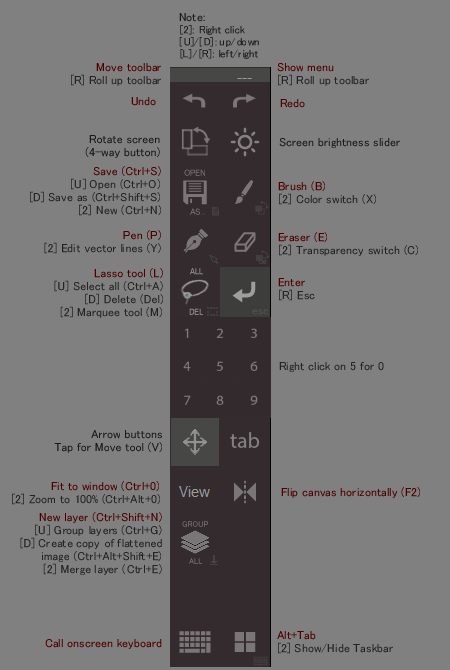 ## Logs - template for v2.2 beta 5 with more buttons added ## Installation instructions 0. Download and extract this repo - *(for non-GitHub users)*: Click [here](https://github.com/hemiolan/Toolbar-Creator/archive/master.zip), extract the downloaded file into a folder, and go into **`Toolbar-Creator-master`** folder. - *(for GitHub users)*: simply `clone` with `git` 1. Copy and paste folder **`[version]\Files`** into your **`Toolbar Creator`** folder. Replace **`[version]`** with either **`v2_1`** or **`v2_2_b5`** accordingly to your existing **`Toolbar Creator`** version. 2. Replace/Merge all existing files/folders if prompted. 3. Launch Toolbar Creator and change the current toolbar to **`painting`**.
