KO
|
EN
gitlite — search
Search
#python
#java
#python3
#arduino
#golang
#machine-learning
#rust
#html
#flask
#javascript
#seismology
#nodejs
oh-my-chat
★ 11
Open GitHub ↗
Android chat app, using firebase
Download README (.md)
Explore Similar Repositories
cudaSLAM
:
Simultaneous Localization And Mapping using lidar and CUDA
vuex-context
:
Write fully type inferred Vuex modules
ring-buffers
:
concurrent mutable ring buffers with atomic updates in GHC Haskell
esgg
:
ElasticSearch Guided (code) Generator
Xcode-Configuration
:
Xcode 相关配置,文件模板,代码片段
// repository documentation
Was this content helpful?
★ 0
(0 ratings)
Select Rating:
★
★
★
★
★
Submit Feedback
Recent Feedback
×
Download README
Do you want to download the
README.md
file for
oh-my-chat
?
Download (.md)
# Oh My Chat A chat app assignment for Mobile Application Development course. ## Built with This app is developed using: * Android Studio: IDE used, code written in Java * Firebase: Realtime Database ## Features * Authentication * Create account * Sign in * Reset password by email * Profile * Upload avatar * Change name and status * Change password * Messaging * Chat with other users * Group chat * Friends * Find friends * Accept Friend Requests * Requests * Send or Cancel friend requests * Lists * Current requests * Current group chat * List of messages ## Firebase Design 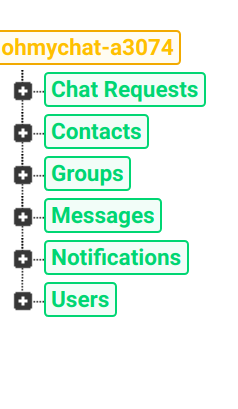 ## Screenshots <p align="center"> <img src="./screenshots/signup.png" width="360" height="750" /> </p> <p align="center"> <img src="./screenshots/signin.png" width="360" height="750" /> </po> <p align="center"> <img src="./screenshots/profile.png" width="360" height="750" /> </p> <p align="center"> <img src="./screenshots/notification.png" width="360" height="750" /> </p> <p align="center"> <img src="./screenshots/request.jpg" width="360" height="750" /> </p> <p align="center"> <img src="./screenshots/toolbox-accept.png" width="360" height="750" /> </p> <p align="center"> <img src="./screenshots/list-friend.jpg" width="360" height="750" /> </p> <p align="center"> <img src="./screenshots/chat.png" width="360" height="750" /> </p> <p align="center"> <img src="./screenshots/create-group.png" width="360" height="750" /> </p> <p align="center"> <img src="./screenshots/list-group.png" width="360" height="750" /> </p> <p align="center"> <img src="./screenshots/group.png" width="360" height="750" /> </p> <p align="center"> <img src="./screenshots/menu.png" width="360" height="750" /> </p>
