KO
|
EN
gitlite — search
Search
#python
#java
#python3
#arduino
#golang
#machine-learning
#rust
#html
#flask
#javascript
#seismology
#nodejs
MellPlayer
★ 172
Open GitHub ↗
A tiny terminal player based on Python3
Download README (.md)
Explore Similar Repositories
rxjava2-extras
:
Utilities for use with RxJava 2
node-starter-kit
:
Node.js / GraphQL project template pre-configured with TypeScript, PostgreSQL, login flow, transactional emails, unit tests, CI/CD workflow.
PrettyColors
:
Styles and colors text in the Terminal with ANSI escape codes. Conforms to ECMA Standard 48.
react-native-gcm-android
:
GCM for React Native Android
gdax-java
:
Java based wrapper for Coinbase Pro (Formerly known as GDAX API and Coinbase Exchange API)
// repository documentation
Was this content helpful?
★ 0
(0 ratings)
Select Rating:
★
★
★
★
★
Submit Feedback
Recent Feedback
×
Download README
Do you want to download the
README.md
file for
MellPlayer
?
Download (.md)
# MellPlayer    A tiny terminal player based on Python3. ※The song API only supports the Chinese Mainland visit. 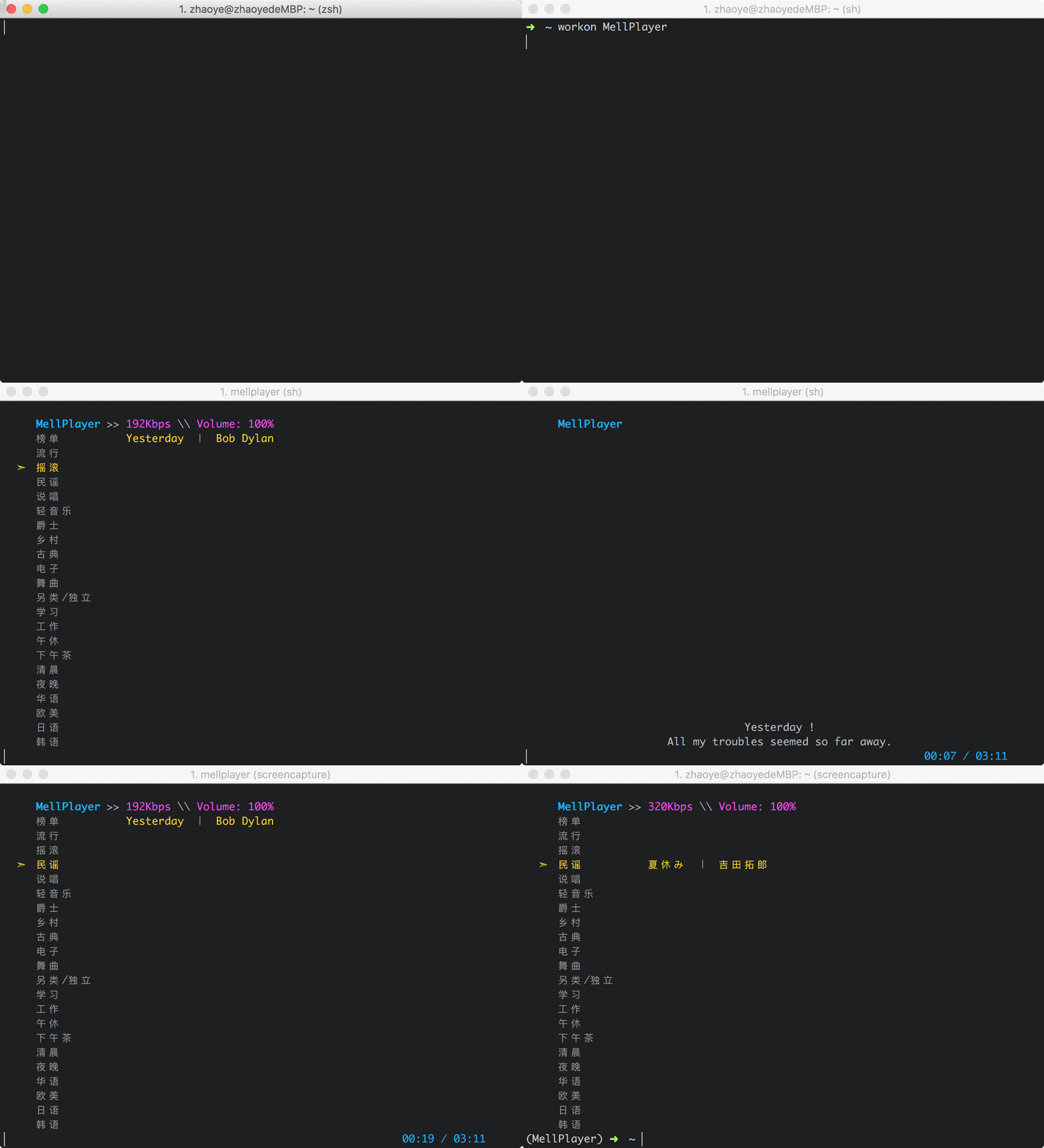 # OverView * [English Tutorial](#English_Tutorial) - [Support](#Support) - [Installation](#Installation) - [Additional Mac OSX Installation notes](#Additional_MacOSX_Installation_notes) - [Additional Ubuntu Installation notes](#Additional_Ubuntu_Installation_notes) - [Upgrading](#Upgrading) - [Usage](#Usage) - [About Country Restriction](#About_Country_Restriction) - [Keys](#Keys) * [中文说明](#Chinese_Tutorial) - [前言](#Preface_cn) - [开发理念](#Develop_idea_cn) - [关于项目](#About_Repo_cn) - [支持](#Support_cn) - [安装](#Installation_cn) - [Mac OSX 安装依赖](#Additional_MacOSX_Installation_notes_cn) - [Ubuntu 安装依赖](#Additional_Ubuntu_Installation_notes_cn) - [更新](#Upgrading_cn) - [使用](#Usage_cn) - [关于地区限制](#About_Country_Restriction_cn) - [快捷键](#Keys_cn) ## <a name="English_Tutorial"></a>English Tutorial ### <a name="Support"></a>Support OSX & Linux (Linux still have some bugs) ### <a name="Installation"></a>Installation Using [pip](https://pip.pypa.io/en/stable/) ```bash [sudo] pip3 install MellPlayer ``` ### <a name="Additional_MacOSX_Installation_notes"></a>Additional Mac OSX Installation notes Install mpv with [Homebrew](https://brew.sh/) ```bash brew install mpv ``` ### <a name="Additional_Ubuntu_Installation_notes"></a>Additional Ubuntu Installation notes Install mpv with apt-get (Ubuntu16.04 has been tested) ```bash sudo apt-get install libmpv-dev mpv ``` ### <a name="Upgrading"></a>Upgrading Upgrade pip installation: ```bash [sudo] pip3 install MellPlayer --upgrade ``` ### <a name="Usage"></a>Usage MellPlayer is run on the command line using the command: ```bash mellplayer ``` ### <a name="About_Country_Restriction"></a>About Country Restriction Because of the song API only supports the Chinese Mainland visit, or you may need to set the proxy yourself. ### <a name="Keys"></a>Keys ``` 操作 [j] [Next Line] ---> 下 [k] [Prev Line] ---> 上 [q] [Quit] ---> 退出 音乐 [space] [Start/Pause] ---> 播放/暂停 [n] [Next Song] ---> 下一曲 [p] [Prev Song] ---> 上一曲 [f] [Forward Playlist] ---> 下个歌单 [b] [Backward Playlist] ---> 上个歌单 音量 [-] [Reduce Volume] ---> 减小音量 [=] [Increase Volume] ---> 增加音量 [m] [Mute] ---> 静音 歌词 [l] [Show/Hide Lyric] ---> 显示/关闭歌词 帮助 [h] [Show/Hide Help] ---> 显示/关闭帮助 ``` ## <a name="Chinese_Tutorial"></a>中文说明 ### <a name="Preface_cn"></a>前言 我写代码时非常喜欢听音乐,最近在歌单中听到了许多入耳惊艳的歌,觉得非常不错。但是歌单的随机播放以及快速切换是个软肋,于是开发了MellPlayer,可以按照分类随机听歌,实现了歌单间的快速切换,希望大家能够喜欢。 ### <a name="Develop_idea_cn"></a>开发理念 MellPlayer的初版刚刚发布,还有许许多多需要改进的地方,非常希望能有志同道合的朋友Fork下来,一起打造越来越完美的播放器,下面就说下我的开发理念: >MellPlayer是一款命令行播放器,主要是为了实现根据心情随机听歌,并且能够快速进行歌单间的切换,简约流畅,我希望在此基础上谨慎添加小而美的功能。并不想引入过多繁琐的功能,添加一大堆的快捷键,将简洁的东西繁琐化是违背我的初衷的。 ### <a name="About_Repo_cn"></a>关于项目 项目地址:[MellPlayer](https://github.com/Mellcap/MellPlayer) 项目基于python3开发,依赖mpv。还有很多地方需要优化改进,大家发现什么问题可以给我提Issue,当然非常欢迎有兴趣的朋友加入,一起打造我们喜欢的播放器。 既然看到这儿了,就来 [Star](https://github.com/Mellcap/MellPlayer) 一下, 互相 [Follow](https://github.com/Mellcap) 一下吧哈哈!!! #### <a name="Support_cn"></a>支持 OSX & Linux (Linux 仍有些bug待修复) ### <a name="Installation_cn"></a>安装 通过 [pip3](https://pip.pypa.io/en/stable/) 安装 ```bash [sudo] pip3 install MellPlayer ``` #### <a name="Additional_MacOSX_Installation_notes_cn"></a>Mac OSX 安装依赖 通过 [Homebrew](https://brew.sh/) 安装 mpv ```bash brew install mpv ``` #### <a name="Additional_Ubuntu_Installation_notes_cn"></a>Ubuntu 安装依赖 通过 apt-get 安装 mpv (Ubuntu16.04已经过测试) ```bash sudo apt-get install libmpv-dev mpv ``` #### <a name="Upgrading_cn"></a>更新 通过 pip3 更新 ```bash [sudo] pip3 install MellPlayer --upgrade ``` ### <a name="Usage_cn"></a>使用 在命令行直接输入mellplayer即可享受: ```bash mellplayer ``` ### <a name="About_Country_Restriction_cn"></a>关于地区限制 因为歌曲 API 只接受中国大陆地区访问,港澳台及海外用户请自行设置代理。 #### <a name="Keys_cn"></a>快捷键 ``` 操作 [j] [Next Line] ---> 下 [k] [Prev Line] ---> 上 [q] [Quit] ---> 退出 音乐 [space] [Start/Pause] ---> 播放/暂停 [n] [Next Song] ---> 下一曲 [p] [Prev Song] ---> 上一曲 [f] [Forward Playlist] ---> 下个歌单 [b] [Backward Playlist] ---> 上个歌单 音量 [-] [Reduce Volume] ---> 减小音量 [=] [Increase Volume] ---> 增加音量 [m] [Mute] ---> 静音 歌词 [l] [Show/Hide Lyric] ---> 显示/关闭歌词 帮助 [h] [Show/Hide Help] ---> 显示/关闭帮助 ```
