KO
|
EN
gitlite — search
Search
#javascript
#python
#hacktoberfest
#react
#ai
#typescript
#llm
#go
#golang
#android
#machine-learning
#rust
#deep-learning
#linux
SpatialClaw
★ 11
Open GitHub ↗
No description available.
Download README (.md)
Explore Similar Repositories
BudCache
:
[ICML 2026] PyTorch implementation of BudCache
shadow-rogue-self-play
:
Dodge projectiles with Self Play and RL in Unity & ML Agents
bola-in-the-wild
:
Empirical taxonomy of BOLA from 108 HackerOne disclosures
MeowImportsChecker
:
The best file checker !
agent-aget
:
Browser workflow CLI for LLM agents
// repository documentation
Was this content helpful?
★ 0
(0 ratings)
Select Rating:
★
★
★
★
★
Submit Feedback
Recent Feedback
×
Download README
Do you want to download the
README.md
file for
SpatialClaw
?
Download (.md)
# SpatialClaw Memory-enabled spatial omics analysis platform. Local-first skills, canonical CLI, and persistent research context. SpatialClaw is a memory-augmented autonomous ecosystem for spatial omics analysis, with a canonical CLI, LLM-assisted routing, graph memory, and messaging/terminal interfaces. The current release is centered on spatial transcriptomics workflows, with support for selected paired spatial modality and image-omics tasks. [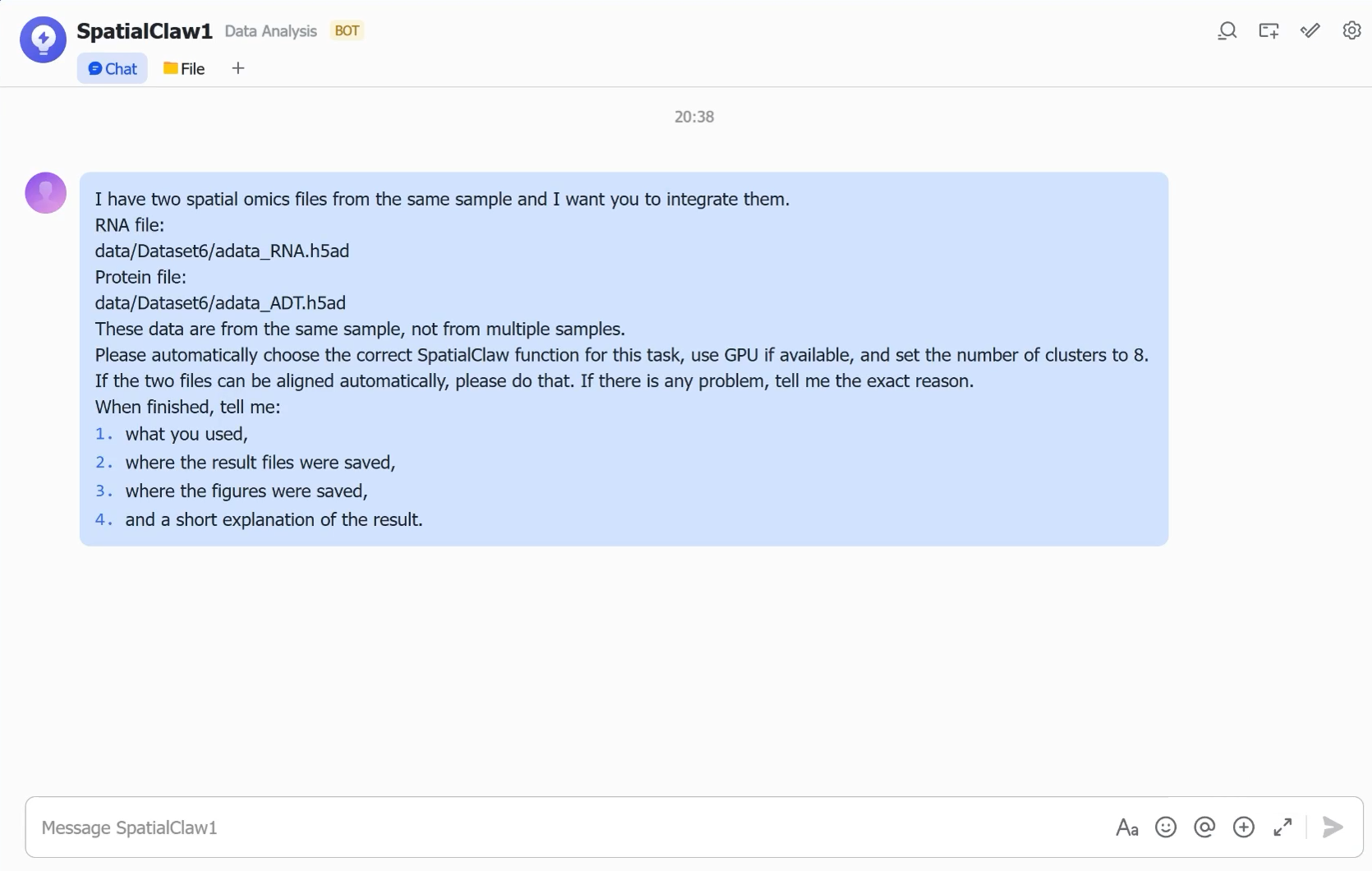](https://github.com/user-attachments/assets/edd456cf-e0ff-402e-9701-a0564e2e56bc) ## Features - Persistent graph memory for datasets, preferences, analyses, and sessions. - Spatial skill registry with strict canonical skill names and whitelisted flags. - Local-first execution through `spatialclaw.py run <skill>`. - Interactive CLI/TUI and Telegram/Feishu bot surfaces. - Spatial preprocessing, domain identification, annotation, deconvolution, communication, statistics, enrichment, trajectory, velocity, CNV, registration, visualization, and paired spatial modality integration. ## Quick Start ```bash git clone <your-repo-url> cd SpatialClaw pip install -e . python spatialclaw.py list python spatialclaw.py run spatial-preprocessing --demo --output /tmp/spatialclaw_demo ``` After installation, the console command is also available: ```bash spatialclaw list sc list spatialclaw run spatial-preprocessing --demo sc run spatial-preprocessing --demo ``` ## Canonical Skill Names Short legacy skill names are intentionally not supported. Use canonical names from the registry: ```bash python spatialclaw.py run spatial-preprocessing --demo python spatialclaw.py run spatial-domain-identification --input sample.h5ad --output results/domains python spatialclaw.py run spatial-svg-detection --input processed.h5ad --output results/svg python spatialclaw.py run spatial-cell-annotation --input processed.h5ad --output results/annotate python spatialclaw.py run spatial-deconvolution --input processed.h5ad --output results/deconvolution python spatialclaw.py run spatial-cell-communication --input processed.h5ad --output results/communication python spatialclaw.py run spatial-condition-comparison --input processed.h5ad --output results/condition python spatialclaw.py run spatial-integration --input sample.h5ad --output results/integration python spatialclaw.py run spatial-registration --input sample.h5ad --output results/registration python spatialclaw.py run spatial-orchestrator --demo --output results/orchestrator ``` ## Interactive Use ```bash python spatialclaw.py interactive python spatialclaw.py interactive --ui tui python spatialclaw.py interactive -p "run spatial-preprocessing demo" spatialclaw-chat -p "run spatial-preprocessing demo" sc-chat -p "run spatial-preprocessing demo" python spatialclaw.py tui python spatialclaw.py onboard ``` Common slash commands inside the interactive interface: | Command | Description | | ---------------------------------------- | -------------------------- | | `/skills [domain]` | List spatial skills | | `/run <skill> [--demo] [--input <path>]` | Run a skill directly | | `/sessions` | List recent sessions | | `/resume [id]` | Resume a session | | `/new` | Start a new session | | `/clear` | Clear conversation history | | `/mcp list` | List MCP servers | | `/config list` | View configuration | | `/help` | Show commands | | `/exit` | Quit | ## Configuration Create `.env` at the project root or run: ```bash python spatialclaw.py onboard ``` Examples: ```env LLM_PROVIDER=deepseek DEEPSEEK_API_KEY=sk-... SPATIALCLAW_MODEL=deepseek-chat ``` For local LLMs: ```env LLM_PROVIDER=ollama SPATIALCLAW_MODEL=qwen2.5:7b LLM_BASE_URL=http://localhost:11434/v1 ``` ## Project Layout ```text SpatialClaw/ ├── spatialclaw.py ├── spatialclaw/ │ ├── common/ │ ├── core/ │ ├── loaders/ │ ├── memory/ │ ├── routing/ │ ├── agents/ │ └── interactive/ ├── skills/ │ └── spatial/ │ ├── _lib/ │ ├── spatial-preprocessing/ │ ├── spatial-domain-identification/ │ ├── spatial-cell-annotation/ │ ├── spatial-deconvolution/ │ ├── spatial-modality-integrate/ │ └── spatial-orchestrator/ │ └── orchestrator/ # Top-level spatial orchestration wrapper ├── bot/ ├── docs/ ├── examples/ ├── sessions/ └── results/ ``` ## Bot Channels ```bash pip install -r bot/requirements.txt python bot/telegram_bot.py python bot/feishu_bot.py python -m bot.run --channels telegram,feishu ``` ## Development ```bash python -m pytest -v make demo make demo-orchestrator ``` To add a spatial skill: 1. Create `skills/spatial/<skill-directory>/`. 2. Add `SKILL.md`. 3. Add a Python script with `--input`, `--output`, and optional `--demo`. 4. Register canonical metadata and allowed flags in `spatialclaw/core/registry.py`. 5. Add focused tests. 6. Run `python scripts/generate_catalog.py` if the catalog is needed. ## Safety - All processing is local-first. - Reports include the SpatialClaw disclaimer. - CLI passthrough arguments are validated against registry metadata. - This is a research tool, not a medical device. ## Documentation - [AGENTS.md](AGENTS.md) — coding-agent guide - [docs/INSTALLATION.md](docs/INSTALLATION.md) — installation details - [docs/METHODS.md](docs/METHODS.md) — spatial method reference - [bot/README.md](bot/README.md) — bot setup
