KO
|
EN
gitlite — search
Search
#python
#java
#python3
#arduino
#golang
#machine-learning
#rust
#html
#flask
#javascript
#seismology
#nodejs
NetworkMap
★ 26
Open GitHub ↗
post-exploitation network mapper
Download README (.md)
Explore Similar Repositories
vaulter
:
No description available.
namu-wiki-extractor
:
A library to extract plaintexts from the JSON dump file of namu wiki
console-laravel
:
[DEPRECATED] See https://github.com/lucidarch/lucid
JAMS
:
Just A Modular System
python-tikteck
:
Python module for controlling Tikteck Bluetooth LED bulbs
// repository documentation
Was this content helpful?
★ 0
(0 ratings)
Select Rating:
★
★
★
★
★
Submit Feedback
Recent Feedback
×
Download README
Do you want to download the
README.md
file for
NetworkMap
?
Download (.md)
Post-exploitation network mapping ================================= The purpose of this tool is to produce a network diagram by collating network information gathered on remote hosts. Example: * Log on host A as any user * Dump some network information e.g. routing table, ARP table, traceroute * Feed the dumps to this tool * Go to another host * Dump network information ...rinse, repeat * Ultimately, this tool produces a network diagram showing all hosts reachable from your compromised nodes. Result (work in progress, but you get the idea): 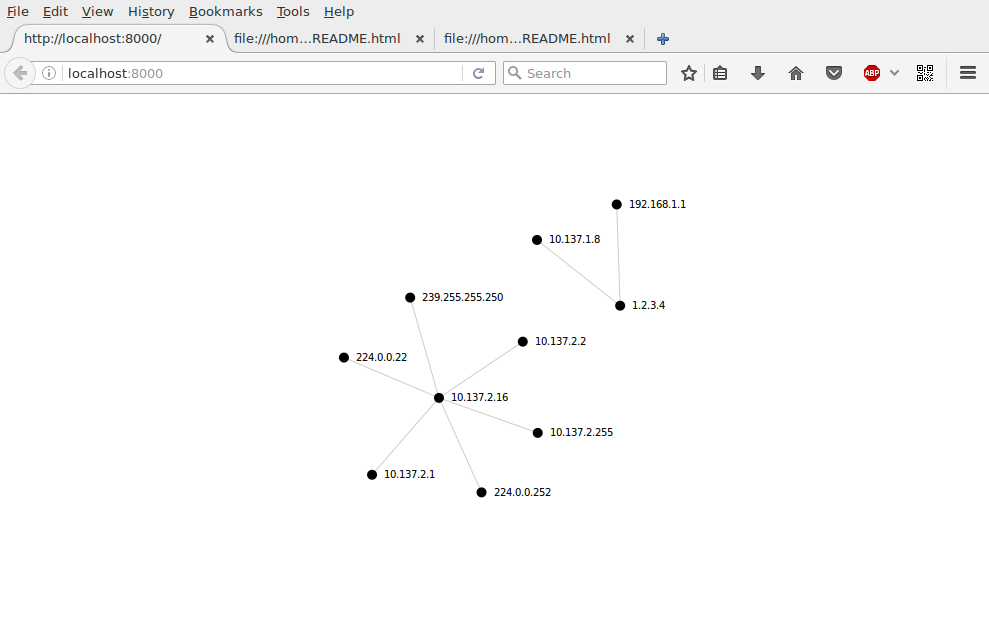 Please note that this is WORK IN PROGRESS and it needs some work to parse e.g. routing tables, etc. If you feel like helping, please take a look [here](https://github.com/lorenzog/NetworkMap/issues?q=is%3Aissue+is%3Aopen+label%3A%22help+wanted%22) Installation ------------ You'll need a fairly recent Python version with setuptools. 1. Set up a virtualenv: virtualenv venv source venv/bin/activate 2. Install the required libraries: pip install -r requirements.txt Usage ----- Run the tool passing the path of a network dump on the command line: python networkmap samples/arp/windows_7_arp.txt Then every subsequent run will grow the knowledge about the network (saved into the `networkmap.json` file). # note that with traceroute you need to specify the IP of the host python networkmap samples/traceroute/linux_traceroute.txt --ip 1.2.3.4 #### How to see the result Two methods: 1. Use the `-H` switch to automatically run Python's `SimpleHTTPServer` after each successful run (don't forget to point your browser to `http://localhost:8000`): python networkmap samples/arp/linux_arp.txt --ip 1.2.3.4 -H Or, 2. If you just want to serve the content of this directory use this command: python -m SimpleHTTPServer **WARNING** don't run the second method on an untrusted network as it will serve **the entire content of the local directory** to **ANYONE** as it listens to 0.0.0.0 rather than 127.0.0.1. ### Installing GraphViz If you want to automatically generate graphs (by default: yes) then you'll need pygraphviz installed. For debian-based systems: apt-get install pkg-config libgraphviz-dev graphviz-dev graphviz libgraphviz For RPM based systems: yum install graphviz graphviz-devel #### Weird errors when installing pygraphviz ##### Undefined symbol: Agundirected If you get a similar error to this one on a Debian-based system: File "/home/user/dev/NetworkMap/venv/local/lib/python2.7/site-packages/pygraphviz/graphviz.py", line 24, in swig_import_helper _mod = imp.load_module('_graphviz', fp, pathname, description) ImportError: /home/user/dev/NetworkMap/venv/local/lib/python2.7/site-packages/pygraphviz/_graphviz.so: undefined symbol: Agundirected Then fix it like that: pip uninstall graphviz pip install pygraphviz --install-option="--include-path=/usr/include/graphviz" --install-option="--library-path=/usr/lib/graphviz/" Source: http://stackoverflow.com/questions/32885486/pygraphviz-importerror-undefined-symbol-agundirected ##### redhat-hardened-cc1 missing If you get this error on a Fedora-based system: gcc: error: /usr/lib/rpm/redhat/redhat-hardened-cc1: No such file or directory You need to install redhat-rpm-config. Source: http://stackoverflow.com/a/34641068/204634 Possible alternatives --------------------- P2NMAP (it's a book, comes with source code): https://python-forensics.org/p2nmap/ #### Future: * Dump into Excel spreadsheet or SQL database? * Import into Microsoft Visio? https://support.office.com/en-gb/article/Create-a-detailed-network-diagram-by-using-external-data-in-Visio-Professional-1d43d1a0-e1ac-42bf-ad32-be436411dc08#bm2 Misc notes ---------- * Graphviz can also do clustering? http://www.graphviz.org/Gallery/undirected/gd_1994_2007.html * Graphviz and network maps (icons are a bit ugly tho): http://www.graphviz.org/Gallery/undirected/networkmap_twopi.html * For manual graphs (meh) - requires probably generating an output properly formatted like XML. Pain to maintain: https://community.spiceworks.com/topic/521280-i-need-software-that-make-my-whole-network-diagram-automatically
