KO
|
EN
gitlite — search
Search
#javascript
#python
#hacktoberfest
#react
#ai
#typescript
#llm
#go
#golang
#android
#machine-learning
#rust
#deep-learning
#linux
JavaPlot
★ 24
Open GitHub ↗
A Plot like Matlab Implemented Java
Download README (.md)
Explore Similar Repositories
clear
:
clear 消除游戏 common lisp写的游戏
MiniJava
:
A compiler for a subset of the Java programming language.
Kaggle_Rotten_Tomatoes
:
Code to munge data between Kaggle .tsv Rotten Tomatoes Sentiment Analysis data set and Vowpal Wabbit
gogobosh
:
Golang client library for applications wanting to talk to a BOSH/MicroBOSH or bosh-lite
conference-tutorial-1.0
:
CMF 1.0 version of the step by step tutorial how to build a real application with the Symfony2 CMF
// repository documentation
Was this content helpful?
★ 0
(0 ratings)
Select Rating:
★
★
★
★
★
Submit Feedback
Recent Feedback
×
Download README
Do you want to download the
README.md
file for
JavaPlot
?
Download (.md)
# JavaPlot A Matlab上plot功能类似的Java实现,基于swing组件,方便Java绘制波形。 ## API说明 所有的绘图api均封装在Plot类下,使用和Matlab类似的函数名称。 * figrue() 创建一个绘图面板 * hold_on() 开启绘图保持,用于将多个绘图对象绘制到同一个面板上 * hold_off() 关闭绘图保持 * plot() 绘图 * axis() 设置显示范围 * suit() 设置显示范围为最佳视野 ## 使用举例 建绘图面板: ``` Java Plot.figrue(); ``` 开启图形保持(为了将两个波形绘在同一个面板上) ``` Java Plot.hold_on(); ``` 准备绘图数据 ``` Java int len = 100; double[] y1 = new double[len]; double[] y2 = new double[len]; for (int i = 0; i < y1.length; i++) { y1[i] = Math.sin(i / 10.0f); y2[i] = Math.cos(i / 10.0f); } ``` 开始绘图 ``` Plot.plot(y1, "-b"); Plot.plot(y2, "-r"); ``` 完整的测试代码: ``` Java package com.sin.java.plot.test; import com.sin.java.plot.Plot; public class TestMain { public static void main(String[] args) { Plot.figrue(); Plot.hold_on(); int len = 100; double[] y1 = new double[len]; double[] y2 = new double[len]; for (int i = 0; i < y1.length; i++) { y1[i] = Math.sin(i / 10.0f); y2[i] = Math.cos(i / 10.0f); } Plot.plot(y1, "-b"); Plot.plot(y2, "-r"); } } ``` ## 运行截图 * 绘制正弦余弦 > 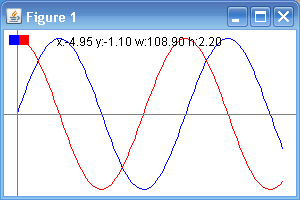 = ## 怎么获取这些代码? * 如果你只是想简单的使用这些代码的话你可以把它当作一个压缩包下载到你的电脑上,点击右边的“Download ZIP”: 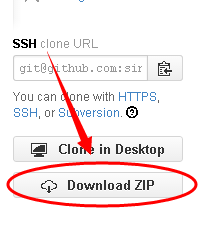 * 如果你喜欢这些代码,那么你可以加星:  * 如果你觉得这些代码还有很多可以改善的地方,那么请先fork一下(欢迎fork):  * fork之后这些代码就变成了你的了,你可以从自己的仓库中把它们clone到你的电脑上,之后的操作就和git一样了: 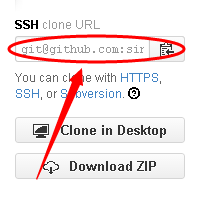 **享受开源带来的乐趣吧**
