KO
|
EN
gitlite — search
Search
#typescript
#ai-agents
#ai
#dsh-plugin
#deepseek-harness
#open-source
#cli
#claude-code
#codex
#developer-tools
#react
#windows
hy2
★ 54
Open GitHub ↗
hysteria2 一键部署
Download README (.md)
Explore Similar Repositories
hy2scale
:
A Hysteria 2-based reverse tunnel and mesh relay network.
gougou
:
狗狗加速官网地址
free-jichang
:
每日更新,2026年免费订阅含 V2ray/Trojan/SS/Hysteria2等类型节点
yifeng
:
一分机场官网地址
python_v2ray
:
A powerful, high-level Python wrapper for managing and testing V2Ray/Xray-core and Hysteria clients.
// repository documentation
Was this content helpful?
★ 0
(0 ratings)
Select Rating:
★
★
★
★
★
Submit Feedback
Recent Feedback
×
Download README
Do you want to download the
README.md
file for
hy2
?
Download (.md)
# Heyhy <a href = "https://t.me/+V1rQL8WFTNxiMjRh"><img src="https://img.shields.io/static/v1?style=social&logo=telegram&label=chat&message=studio" ></a> Heyhy 用于快速部署 [hysteria2 server](https://github.com/apernet/hysteria) 并输出客户端最佳实践配置,开箱即用! **What's features** | Supported Configuration | Status | | --------------------------- | ------ | | Hysteria2 server | ✅ | | NekoRay client proxy | ✅ | | sing-box `hy2` outbound | ✅ | | Mihomo `hysteria2` outbound | ✅ | | Hysteria2 client | ✅ | | via Cloudflare CDN | ✅ | **Prerequisites** - 在管理员权限下运行 - 提前为你的服务器的 IPv4 解析一个域名 A 纪录 ## Get started 一键部署脚本,以 `uv tool` 的方式调度管理工具: ```bash curl -LsSf https://astral.sh/uv/install.sh | sh && \ source $HOME/.local/bin/env ; \ uv tool install heyhy && \ uv run heyhy self update && \ uv run heyhy install -d <填写域名> ``` > 首次安装完毕后,你可以通过别名指令 `heyhy` 或 `uv run heyhy` 调度脚本。 ## What's next 安装指令其他参数: ```bash heyhy install -d [DOMAIN] ``` | 必选参数 | 简介 | | ---------------- | ---------- | | `--domain`, `-d` | 绑定的域名 | | 可选参数 | 简介 | | ------------------ | ---------------------------------------------------- | | `--password`, `-p` | 手动指定连接密码 (可选,默认随机生成) | | `--ip` | 手动指定服务器公网 IPv4 (可选,默认自动检测) | | `--port` | 指定监听端口 (可选,默认 4433) | | `--image` | 指定托管镜像(可选,默认 `metacubex/mihomo:latest`) | 移除所有项目依赖: ```bash heyhy remove ``` 升级脚本: ```bash heyhy self update ``` 输出客户端配置: 根据正在运行的服务配置生成 `mihomo client outbound` 配置。 ```bash heyhy check ``` 探索其他指令: ```bash heyhy --help ``` 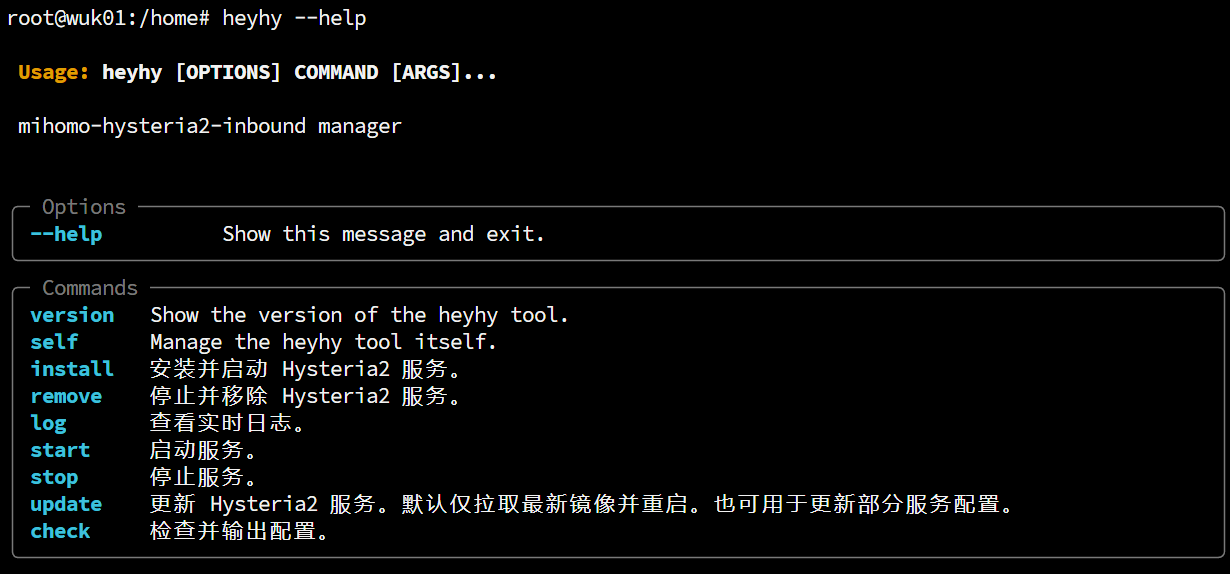 ## References - [Hysteria2](https://v2.hysteria.network/zh/docs/getting-started/Client/) hy2 官方文档 - [sing-box outbound](https://sing-box.sagernet.org/zh/configuration/outbound/hysteria2/) sing-box 客户端出站代理设置 - [mihomo outbound](https://wiki.metacubex.one/config/proxies/hysteria2/#hysteria2) mihomo/clash-meta 客户端出站代理设置 - [MatsuriDayo configuration](https://matsuridayo.github.io/n-extra_core/#_5) nekoray / nekobox 客户端出战代理设置(该项目已停止维护)
