KO
|
EN
gitlite — search
Search
#python
#java
#python3
#arduino
#golang
#machine-learning
#rust
#html
#flask
#javascript
#seismology
#nodejs
fzfmenu
★ 12
Open GitHub ↗
A task runner based on fzf.
Download README (.md)
Explore Similar Repositories
omar-gui
:
No description available.
klue
:
No description available.
Electric-Vehicle-Autonomous-Charging-with-Monocular-Camera
:
Research on EV Charging Port Detection and Pose Estimation with Monocular Camera
Recipe-Suggestion-App
:
No description available.
podcastgen
:
Convert PDFs into Podcasts
// repository documentation
Was this content helpful?
★ 0
(0 ratings)
Select Rating:
★
★
★
★
★
Submit Feedback
Recent Feedback
×
Download README
Do you want to download the
README.md
file for
fzfmenu
?
Download (.md)
# fzfmenu fzfmenu is a task runner inspired by [using_fzf_as_a_dmenurofi_replacement](https://www.reddit.com/r/commandline/comments/jatyek/using_fzf_as_a_dmenurofi_replacement/). It harnesses the power of fzf’s fuzzy search to offer a unified tool. It's written in rust and extensible. 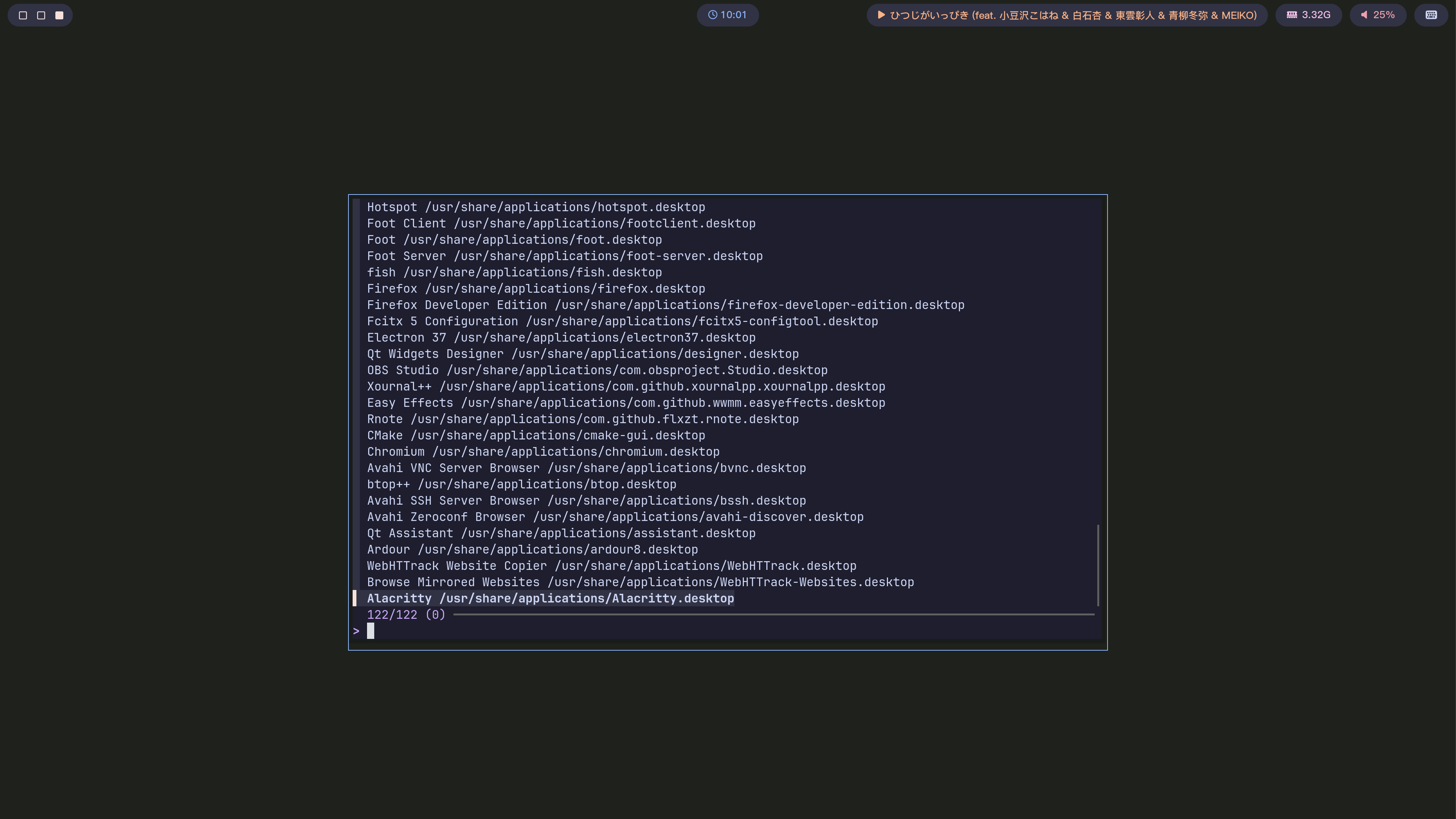 ## Usage Directly in your current terminal: ```shell fzfmenu ``` In a new terminal instance (using foot): ```shell foot -e fzfmenu ``` ## Dependencies - **fzf** ## Build To build, make sure you have `cargo` downloaded. ```shell git clone https://github.com/levinion/fzfmenu cd fzfmenu make ``` There's also an AUR package for ArchLinux users: ``` $AUR_HELPER -S fzfmenu ``` ## Configuration **⚠️ WARNING: NO BATTERY INCLUDED** To keep dependencies minimal, `fzfmenu` does not ship with any default configurations or plugins. Therefore, it requires a custom setup before it can be used. `fzfmenu` is configured using a toml file, typically located at ~/.config/fzfmenu/config.toml. This file defines needed settings and a list of plugins. Here is a heavily commented example to help you get started: ```toml [[plugins]] # `name` (string): # The name of the plugin, used for display in the fzfmenu interface. # It should be a short, easily recognizable name, like "app_launcher". name = "app_launcher" # `description` (optional string): # A brief description of the plugin, providing extra information about its purpose. # This can be displayed as help text in the fzfmenu interface. description = "Launch applications based on your desktop environment." # `prefix` (string): # The command prefix that triggers this plugin. Users type this prefix at the fzf prompt # to activate the plugin. # If the prefix is an empty string (""), this plugin is considered the default. prefix = "" # `picker` (string): # The command executed when the plugin is activated to generate a list of candidates. # Fzfmenu runs this command and uses its standard output as fzf's input. # The `{}` is a placeholder that will be replaced by the remaining text the user typed # at the fzf prompt. # You could also get the input from `FZFMENU_INPUT` env. picker = "python ~/.config/fzfmenu/plugins/app_launcher.py picker '{}'" # `runner` (optional string): # The command executed when a user selects an item from the list. # Fzfmenu runs this command. # The `{}` placeholder will be replaced by the result the user selected. # You could also get the output from `FZFMENU_OUTPUT` env. runner = "python ~/.config/fzfmenu/plugins/app_launcher.py runner '{}'" # `dynamic` (optional bool, defaults to false) # If set to true, the picker script is re-executed on every keystroke, allowing # for dynamic results. If false, the script runs only once when the plugin # is activated, and fzf filters the initial results locally. dynamic = false # `background` (optional bool, defaults to false) # If set to true, the runner will be executed in a new session. # This may be useful if a background task is all you need. background = true # `hooks` (optional) # List of fzf actions to execute. # There are three hooks: # - on_enter: Executed once when switching to the plugin. # - on_leave: Executed once when switching away. # - on_reload: Executed on every data refresh. # And three script version (a shell script prints fzf commands in lines) allowing dynamic control: # - on_enter_script: Executed once when switching to the plugin. # - on_leave_script: Executed once when switching away. # - on_reload_script: Executed on every data refresh. # See the full list of available actions in the fzf manual: # https://github.com/junegunn/fzf/blob/master/man/man1/fzf.1#L1834-L1976 on_enter = [ "change-preview(echo {} | awk '{print $NF}' | xargs bat --color always)", "show-preview", ] on_leave = ["hide-preview"] ``` An Example of configuration file and plugins can be found in [my dotfile repo](https://github.com/levinion/dotfiles/blob/main/linux/user/fzfmenu/.config/fzfmenu/config.toml).
