KO
|
EN
gitlite — search
Search
#javascript
#python
#hacktoberfest
#react
#ai
#typescript
#llm
#go
#golang
#android
#machine-learning
#rust
#deep-learning
#linux
comfyui-axces2000
★ 12
Open GitHub ↗
ComfyUI Custom Nodes
Download README (.md)
Explore Similar Repositories
r-ryantm-orbit
:
Static dashboard for r-ryantm / nixpkgs-update logs. ⚡
chat-downloader
:
A simple tool used to retrieve chat messages from livestreams, videos, clips and past broadcasts. No authentication needed!
ptq_workshop
:
No description available.
TubeTrim
:
Summarize any YouTube video in 12 languages using open-source LLMs without API keys.
Livabl
:
Livabl -- Turning urban data into clear decisions.
// repository documentation
Was this content helpful?
★ 0
(0 ratings)
Select Rating:
★
★
★
★
★
Submit Feedback
Recent Feedback
×
Download README
Do you want to download the
README.md
file for
comfyui-axces2000
?
Download (.md)
# comfyui-axces2000 Custom ComfyUI nodes by **axces2000** — practical utility nodes for audio handling, image dimensions, text manipulation, and string composition. --- ## Nodes ### 🎵 Audio Loader 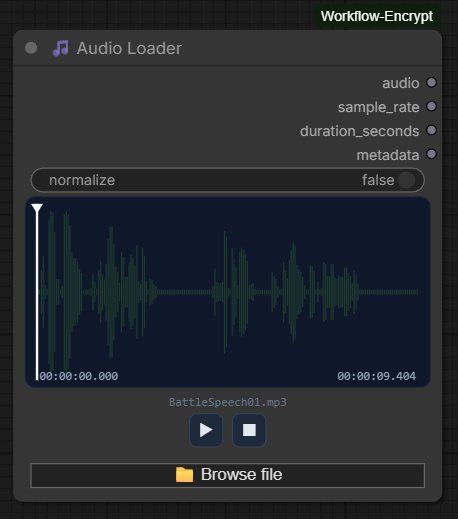 Load audio files into your ComfyUI workflow with a full-featured waveform interface. **Features** - Drag & drop audio files directly onto the node canvas - Real-time waveform visualisation with played/unplayed colour coding - Click or drag anywhere on the waveform to seek - Play / Pause / Stop transport controls - Current position and total duration displayed as `HH:MM:SS.mmm` - Optional normalisation toggle - Supports MP3, WAV, FLAC, OGG, AAC, M4A, OPUS - Compatible with ComfyUI's native audio pipeline — output connects directly to `SaveAudio`, `PreviewAudio`, and other audio nodes **Inputs** | Name | Type | Description | |------|------|-------------| | `normalize` | BOOLEAN | Normalise waveform amplitude to peak 1.0 (default: false) | **Outputs** | Name | Type | Description | |------|------|-------------| | `audio` | AUDIO | Waveform tensor + sample rate, compatible with native ComfyUI audio nodes | | `sample_rate` | INT | Sample rate in Hz | | `duration_seconds` | FLOAT | Duration in seconds | | `metadata` | STRING | File info: name, sample rate, channels, samples, size | --- ### 🎧 Audio Player 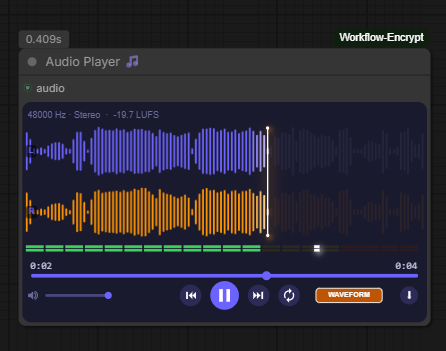 A rich in-node audio monitor for listening to and analysing audio output from any upstream node. Receives a ComfyUI `AUDIO` input and displays four switchable visualisation modes, full transport controls, a stereo level meter, and a download menu. Created by **qualar**. **Visualisation modes** — cycle through them with the button in the bottom-right corner: | Mode | Screenshot | |------|-----------| | **Waveform** — stereo RMS bar display, left channel in purple, right in orange, playhead scrubbing |  | | **Spectrum** — real-time FFT frequency plot with labelled Hz axis | 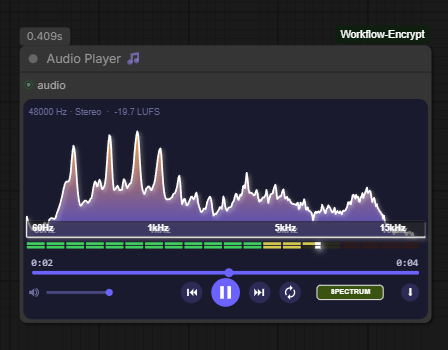 | | **Analyzer** — stereo goniometer (phase/width scope) and stereo correlation meter | 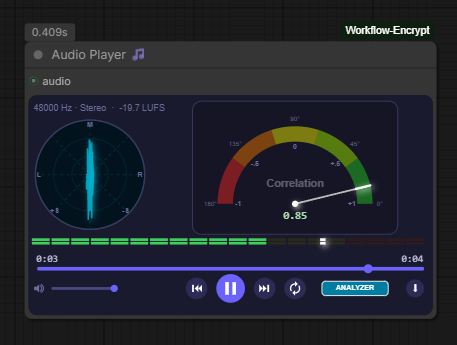 | | **Spectrogram** — psychoacoustic heatmap scrolling in real time | 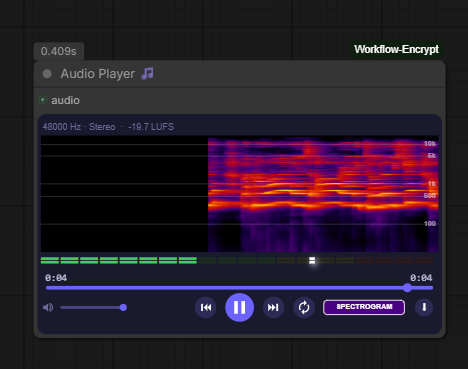 | **Transport controls** - Volume slider with mute button - Skip to start / skip to end - Play / Pause - Loop toggle **Download menu** — click the `⋮` button to export the audio: 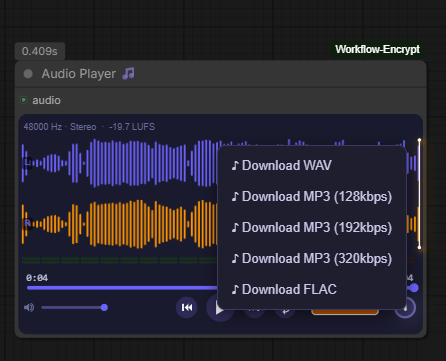 - Download WAV (lossless, original quality) - Download MP3 at 128 / 192 / 320 kbps (encoded in-browser via lamejs — no server round-trip) - Download FLAC (lossless compressed, encoded server-side via soundfile) **Stats bar** — always visible above the waveform: sample rate, mono/stereo, and integrated LUFS loudness. **Inputs** | Name | Type | Description | |------|------|-------------| | `audio` | AUDIO | Audio to monitor — connects from any node that outputs AUDIO | **Outputs** None — this is a terminal monitoring node. --- ### 📐 Resolution Master 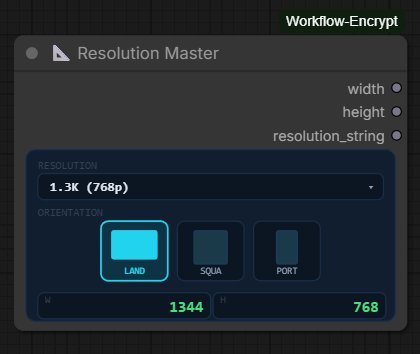 Pick a standard resolution and orientation and get clean width/height integers out — no more mental arithmetic or hardcoded values. **Features** - Visual orientation selector with landscape, square, and portrait icons - Covers SD through 8K with accurate pixel dimensions - Live preview of output width and height inside the node - Resolution dropdown with all standard presets **Resolution table** | | SD (480p) | 1K (720p) | 1.3K (768p) | 2K (1080p) | 2.5K (1440p) | 4K (2160p) | 8K (4320p) | |-------------|-----------|------------|-------------|------------|--------------|------------|------------| | Landscape | 720×480 | 1280×720 | 1344×768 | 1920×1080 | 2560×1440 | 3840×2160 | 7680×4320 | | Square | 512×512 | 1024×1024 | 1024×1024 | 1536×1536 | 1920×1920 | 2048×2048 | 5760×5760 | | Portrait | 480×720 | 720×1280 | 768×1344 | 1080×1920 | 1440×2560 | 2160×3840 | 4320×7680 | **Outputs** | Name | Type | Description | |------|------|-------------| | `width` | INT | Output width in pixels | | `height` | INT | Output height in pixels | | `resolution_string` | STRING | e.g. `1344x768` | --- ### ✂️ String Extractor 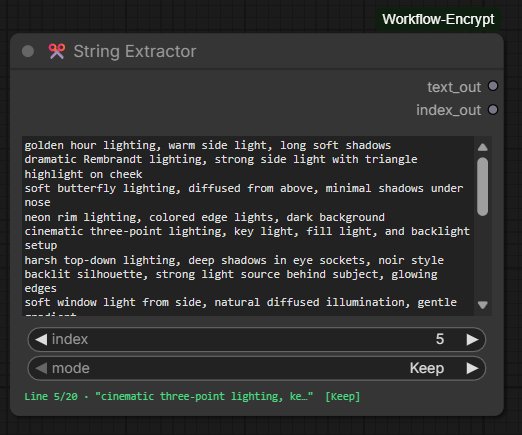 Extract individual lines from a multi-line text block by index, with automatic index advancement for batch workflows. **Features** - Multi-line text input (scrollable, supports paste) - Integer index selector to choose which line to extract - Live status bar showing current line preview and mode - Selected line is highlighted in the textarea - `text` and `index` can optionally be wired from upstream nodes - Works correctly across scheduled batch runs — advancement happens before each prompt is queued **How the index works** | index value | behaviour | |-------------|-----------| | `0` | Full textarea passed to output unchanged | | `1` to `N` (valid line) | That line is extracted; a trailing space is added if missing | | Greater than line count | Full textarea passed unchanged; index resets to `0` | **Mode selector** | Mode | Behaviour | |------|-----------| | `Keep` | Index stays the same after execution | | `Increment` | Index advances to the next line after each execution; wraps from last line back to `1` | | `Randomise` | Index is set to a random valid line number after each execution | The mode selector is disabled when the index is `0` or out of range. **Inputs** | Name | Type | Description | |------|------|-------------| | `text` | STRING | Multi-line text block (can be wired in or typed directly) | | `index` | INT | Line to extract, 0 = passthrough (can be wired in or set directly) | | `mode` | COMBO | Keep / Increment / Randomise | **Outputs** | Name | Type | Description | |------|------|-------------| | `text_out` | STRING | Extracted line (or full text for index 0 / out of range) | | `index_out` | INT | Updated index after applying mode | **Typical workflow pattern** Set mode to `Increment` and queue multiple runs — each run extracts the next line automatically, starting from the displayed index value. --- ### 🔗 String Combine 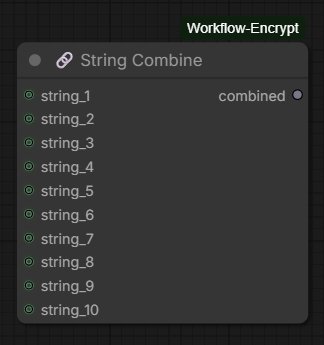 Concatenate up to 10 string inputs into a single output. All content is preserved exactly — no trimming, no separators added between inputs. **Features** - Up to 10 optional string inputs - Unconnected inputs are silently ignored - Strings are joined in order (1 through 10) with no modification - Add separators or spaces in upstream nodes if needed **Inputs** | Name | Type | Description | |------|------|-------------| | `string_1` … `string_10` | STRING | Optional string inputs to concatenate | **Outputs** | Name | Type | Description | |------|------|-------------| | `combined` | STRING | All connected strings joined in order | --- ## Installation ### Via ComfyUI Manager (recommended) Search for **axces2000** in the Custom Nodes section and click Install. ### Manual ```bash cd ComfyUI/custom_nodes git clone https://github.com/axces2000/comfyui-axces2000.git pip install -r comfyui-axces2000/requirements.txt ``` Then restart ComfyUI. --- ## Requirements - ComfyUI (any recent version) - `torchaudio` — for Audio Loader - `soundfile` — for Audio Loader (fallback backend) and Audio Player (FLAC export) - `scipy` — for Audio Player LUFS metering (optional, falls back to RMS if not present) --- ## File structure ``` comfyui-axces2000/ ├── __init__.py ├── requirements.txt ├── pyproject.toml ├── Makefile ├── docs/ │ ├── audio_loader.png │ ├── audio_player_1waveform.png │ ├── audio_player_2spectrum.png │ ├── audio_player_3analyzer.png │ ├── audio_player_4spectrogram.png │ ├── audio_player_5save.png │ ├── resolution_master.png │ ├── string_extractor.png │ └── string_combine.png ├── audio_loader/ │ ├── __init__.py │ ├── audio_loader.py │ └── js/ │ └── audio_loader.js ├── audio_player/ │ ├── __init__.py │ ├── audio_player_node.py │ └── js/ │ └── audio_player_widget.js ├── resolution_master/ │ ├── __init__.py │ ├── resolution_master.py │ └── js/ │ └── resolution_master.js ├── string_extractor/ │ ├── __init__.py │ └── string_extractor.py ├── string_combine/ │ ├── __init__.py │ └── string_combine.py └── js/ ├── audio_loader.js ├── audio_player_widget.js ├── resolution_master.js ├── string_extractor.js └── lib/ └── lame.min.js ``` --- ## Credits - **Audio Player** node created by [qualar](https://github.com/qualar) --- ## License MIT © axces2000
