KO
|
EN
gitlite — search
Search
#python
#react
#javascript
#nodejs
#hacktoberfest
#android
#machine-learning
#typescript
#go
#cli
#flask
#tensorflow
KMMT
★ 245
Open GitHub ↗
Kotlin Multiplatform Mobile App Template
Download README (.md)
Explore Similar Repositories
hello-spring-cloud-alibaba
:
SpringCloudAlibaba的详细使用,包括Nacos,Sentinel,Feign,Gateway,Skywalking等
angular-notifier
:
A well designed, fully animated, highly customizable, and easy-to-use notification library for your Angular application.
iceberg-rust
:
Unofficial rust implementation of Apache Iceberg with integration for Datafusion
ohbug
:
Self-hosted application monitoring that helps software teams quickly find and fix production errors.
fumadb
:
A unified database API for your libraries.
// repository documentation
Was this content helpful?
★ 0
(0 ratings)
Select Rating:
★
★
★
★
★
Submit Feedback
Recent Feedback
×
Download README
Do you want to download the
README.md
file for
KMMT
?
Download (.md)
# KMMT : Kotlin Multiplatform Mobile Template ## _Kotlin Multiplatform Mobile Development Simplified_ [](http://kotlinlang.org) [](https://opensource.org/licenses/MIT) [](https://kotlinlang.org/lp/mobile/) KMMT is a Multi-Module KMM based project template designed to simplify the KMM development. It uses a simplified approach that can be shared both in android and iOS easily. This template include network module, persistence module, resource module, analytics module ( with ios native library integration), domain module, presenter module etc. _Primary objective of this project is to help KMM Developers & promote KMM technology_ [](https://kotlinlang.org/lp/mobile/) #### KMMT Module Structure 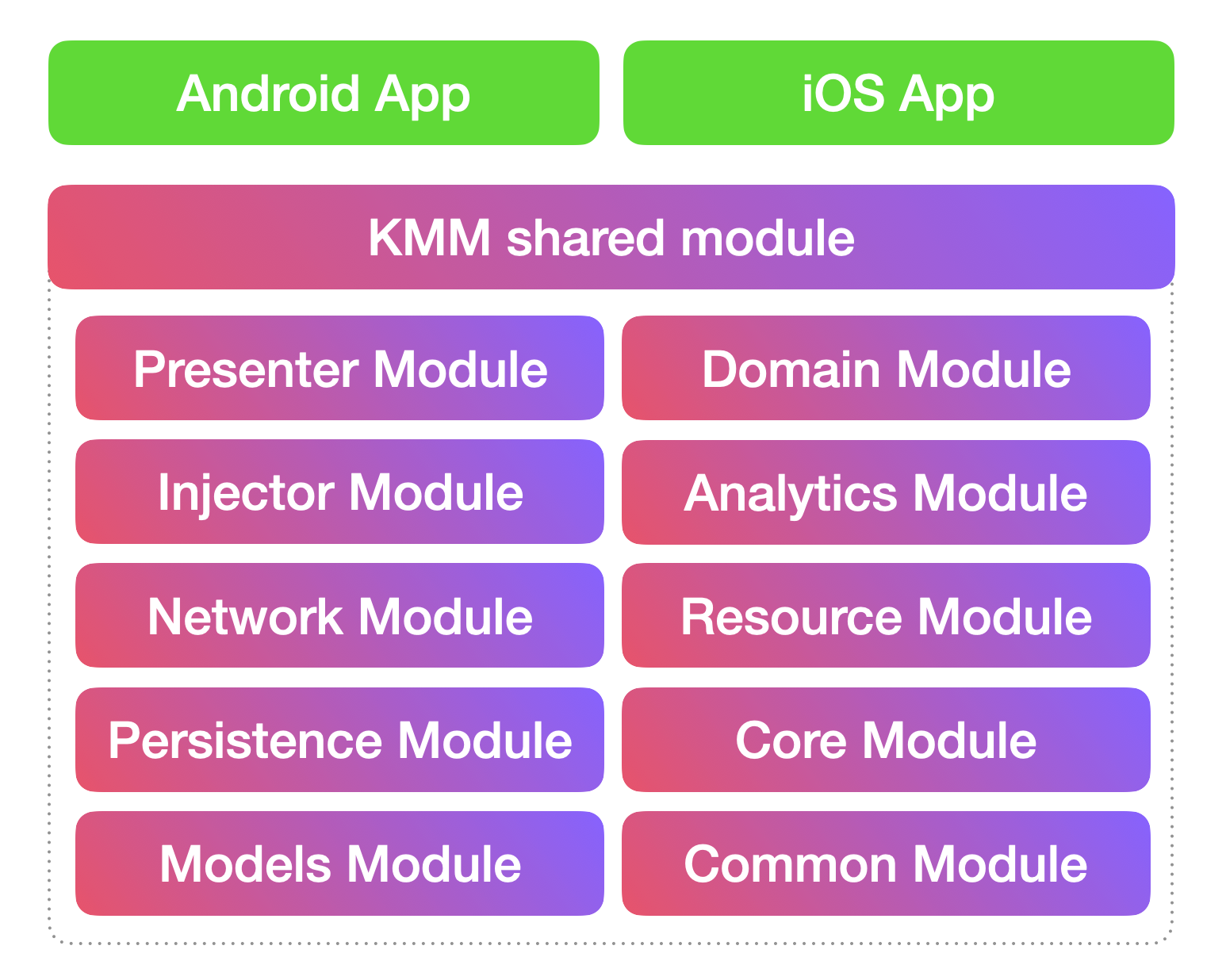 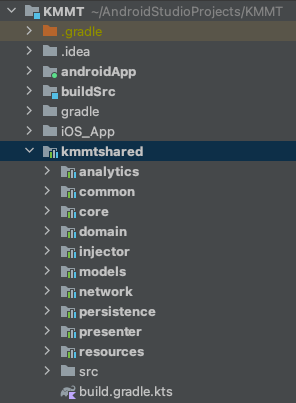 Credits : [KaMP Kit] https://user-images.githubusercontent.com/9760688/116871405-d2815b80-ac31-11eb-89cd-cbc92dd42d8c.mp4 https://user-images.githubusercontent.com/9760688/116871609-24c27c80-ac32-11eb-93bb-387b4f5918c2.mp4 ##### IDE Requirements IntelliJ/Android Studio - Android & Shared Module Xcode - iOS Project ## ✨Features ✨ #### 1. Simple Networking API ( [Ktor] ) #### 2. Async Task Helper ( [Kotlinx.Coroutines] ) #### 3. Multiplatform Bundle : Object Passing B/W Activities or ViewControllers #### 4. Platform Blocks #### 5. Object Serialization Helper ( [Kotlinx.Serialization] ) #### 6. Key Value Store ( [Multiplatform Settings] ) #### 7. LiveData & LiveDataObservable ( [LiveData] ) #### 8. Observe with DBHelper ( Local Database : SQLite - [SQLDelight] ) #### 9. Useful Functional Programming #### 10. Data Cache Helper #### 11. Persistence Module - Database ( [Realm] & [SQLDelight] ) and Key Value Store ( [Multiplatform Settings] ) #### 12. Injector Module - Dependency Injection ( [Koin] ) #### 13. Resource Module - strings and colors ( [MokoResources] ) #### 14. Analytics Module - _Mixpanel_ and _UXCam_ ( iOS & Android Native Library Integrated ) ### 1. Simple Networking API ( [Ktor] ) Create API Services using BaseAPI class. All network responses are wrapped in *Either* data type ```kotlin class JsonPlaceHolderServiceAPI : BaseAPI() { override val baseUrl: String get() = "https://jsonplaceholder.typicode.com/" suspend fun getPosts(postId: Int): Either<List<PostModel>, NetworkFailure> { return doGet("comments?postId=$postId") } suspend fun setPost(post: PostModel): Either<PostModel, NetworkFailure> { return doPost("comments", post) } } ``` ```kotlin class BreedServiceAPI : BaseAPI() { override val baseUrl: String get() = "https://dog.ceo/" suspend fun getBreeds(): Either<List<Breed>, NetworkFailure> { return doGet<BreedResult>("api/breeds/list/all").flatMap { breedResult -> //Converting BreedResult to List<TBreed> Either.Success( breedResult.message.keys .sorted().toList() .map { Breed(0L, name = it.toWordCaps(), false) } ) } } } ``` ### 2. Async Task Helper ( [Kotlinx.Coroutines] ) Run code (Networking calls, Heavy calculations, Large dataSets from local DB, etc..) in Background thread and get the result in UI thread. ```kotlin runOnBackground { //Code to execute in background } ``` Return value from background ```kotlin runOnBackgroundWithResult { //Code to execute in background with return }.resultOnUI { result -> } or runOnBackgroundWithResult { //Code to execute in background with return }.resultOnBackground { result -> } ``` ```kotlin class PostViewModel(view: LoginView) : BaseViewModel<LoginView>(view) { fun getPostsFromAPI() { runOnBackgroundWithResult { JsonPlaceHolderServiceAPI().getPosts(1) //getPost returns data so return statement is not needed //or // return@runOnBackgroundWithResult JsonPlaceHolderServiceAPI().getPosts(1) }.resultOnUI { getView()?.showPopUpMessage( "First Post Details", "Username : ${it.first().name}\n email : ${it.first().email}" ) } } fun savePost() { val post = PostModel("Post Body", "jit@ccc.com", 100, "Jitty", 6) runOnBackgroundWithResult { JsonPlaceHolderServiceAPI().setPost(post) }.resultOnUI { getView()?.showPopUpMessage("Saved Post Details", "Name : ${it.name}\n email : ${it.email}") } } } ``` ### 3. Multiplatform Bundle : Object Passing B/W Activities or ViewControllers View Model can pass objects & values from Activity to Activity (Android) or ViewController to ViewController (iOS) ###### Send Values From 1st View Model ```kotlin // 1st View Model var userModel = UserModel("jittya@gmail.com", "Jitty", "Andiyan") var bundle = Bundle { putStringExtra(HomeViewModel.USER_NAME, username.toString()) putSerializableExtra(HomeViewModel.USER_OBJECT, userModel, UserModel.serializer()) } getView()?.navigateToHomePage(bundle) // 1st View fun navigateToHomePage(bundle: BundleX) // 1st Activity : Android override fun navigateToHomePage(bundle: BundleX) { openActivity(HomeActivity::class.java, bundle) finish() } // 1st ViewContoller : iOS func navigateToHomePage (bundle: BundleX) { openViewController(newViewControllerName: "HomeViewController", bundle: bundle) } ``` ###### Retrieve Values From 2nd View Model ```kotlin // 2nd View Model class HomeViewModel(view: HomeView) : BaseViewModel<HomeView>(view) { companion object BundleKeys { const val USER_NAME = "USERNAME" const val USER_OBJECT = "USEROBJ" } override fun onStartViewModel() { getBundleValue<String>(USER_NAME)?.let { username -> } getBundleValue<UserModel>(USER_OBJECT)?.let { userModel -> } } } ``` ### 4. Platform Blocks Execute anything specific to a particular platform using Platform Blocks ```kotlin runOnAndroid { } runOniOS { } ``` ### 5. Object Serialization Helper ( [Kotlinx.Serialization] ) Use **_toJsonString_** and **_toObject_** functions for instant serialization. _Objects to String Serialization_ ```koltin var userModel = UserModel("jittya@gmail.com", "Jitty", "Andiyan") var jsonString = userModel.toJsonString(UserModel.serializer()) ``` _String to Object Serialization_ ```koltin var userModel = jsonString.toObject<UserModel>() or var userModel:UserModel = jsonString.toObject() or var userModel = jsonString.toObject(UserModel.serializer()) ``` ### 6. Key Value Store ( [Multiplatform Settings] ) Use **_storeValue_** and **_getStoreValue_** functions for storing and retrieving Key-Value respectively _Storing **Key-Value** pair_ ```koltin var userModel = UserModel("jittya@gmail.com", "Jitty", "Andiyan") storeValue { putString("Key1","Value") putBoolean("Key2",false) putSerializable("Key3",userModel,UserModel.serializer()) } ``` _Retrieve **Value** using **Key**_ ```koltin var stringValue = getStoreValue<String>("Key1") or var stringValue:String? = getStoreValue("Key1") var boolValue = getStoreValue<Boolean>("Key2") var userModel = getStoreValue<UserModel>("Key3",UserModel.serializer()) ``` ### 7. LiveData & LiveDataObservable ( [LiveData] ) LiveData follows the observer pattern. LiveData notifies Observer objects when underlying data changes. You can consolidate your code to update the UI in these Observer objects. That way, you don't need to update the UI every time the app data changes because the observer does it for you. ```koltin //Sources var premiumManager = PremiumManager() var premiumManagerBoolean = PremiumManagerBoolean() //Create Observer & Observe var subscriptionLiveDataObservable = observe<String> { getView()?.setSubscriptionLabel(it) } //Adding Sources subscriptionLiveDataObservable.addSource(premiumManager.premium()) or //Adding Sources with converter (Boolean to String) subscriptionLiveDataObservable.addSource(premiumManagerBoolean.isPremium()){ if (it) { return@addSource "Premium" }else{ return@addSource "Free" } } //Update source states premiumManager.becomePremium() premiumManagerBoolean.becomeFree() premiumManager.becomeFree() premiumManagerBoolean.becomePremium() ``` ```koltin class PremiumManager { private val premium = MutableLiveDataX<String>() fun premium(): LiveDataX<String> { return premium } fun becomePremium() { premium.value = "premium" } fun becomeFree() { premium.value = "free" } } class PremiumManagerBoolean { private val premium = MutableLiveDataX<Boolean>() fun isPremium(): LiveDataX<Boolean> { return premium } fun becomePremium() { premium.value = true } fun becomeFree() { premium.value = false } } ``` ### 8. Observe with DBHelper ( Local Database : SQLite - [SQLDelight] ) Use 'asFlow()' extension from DBHelper class to observe a query data ```kotlin class BreedTableHelper : DBHelper() { fun getAllBreeds(): Flow<List<TBreed>> = localDB.tBreedQueries .selectAll() .asFlow() .mapToList() .flowOn(Dispatchers_Default) suspend fun insertBreeds(breeds: List<TBreed>) { ... } fun selectById(id: Long): Flow<List<TBreed>> = localDB.tBreedQueries .selectById(id) .asFlow() .mapToList() .flowOn(Dispatchers_Default) suspend fun deleteAll() { ... } suspend fun updateFavorite(breedId: Long, favorite: Boolean) { localDB.transactionWithContext(Dispatchers_Default) { localDB.tBreedQueries.updateFavorite(favorite, breedId) } } } ``` ```kotlin class BreedViewModel(view: BreedView) : BaseViewModel<BreedView>(view) { private lateinit var breedTableHelper: BreedTableHelper private lateinit var breedLiveDataObservable: LiveDataObservable<Either<List<TBreed>, Failure>> private lateinit var breedListCache: BreedListCache override fun onStartViewModel() { breedTableHelper = BreedTableHelper() breedListCache = BreedListCache(getBackgroundCoroutineScope()) breedLiveDataObservable = observe { breedList -> breedList.either({ getView()?.showPopUpMessage(it.message) getView()?.stopRefreshing() }, { getView()?.refreshBreedList(it) getView()?.stopRefreshing() }) } refreshBreedListCache(forceRefresh = false) observeBreedsTable() } private fun observeBreedsTable() { //get Data from db with observe (Flow) runOnBackground { //Each refreshBreedListCache will trigger collect breedTableHelper.getAllBreeds().collect { breedLiveDataObservable.setValue(Either.Success(it)) } } } private fun refreshBreedListCache(forceRefresh: Boolean) { breedListCache.cacheData(Unit, forceRefresh) { cachedResult -> cachedResult.either({ breedLiveDataObservable.setValue(Either.Failure(it)) }, { println("Cache Table updated : $it") }) } } } ``` ### 9. Useful Functional Programming use *Either* data type to represent a value of one of two possible types (a disjoint union). Instances of *Either* are either an instance of *Failure* or *Success* ```kotlin Either<SuccessType, FailureType> ``` convert or map SuccessType using flatMap or map ```kotlin var result = doGet<List<UserModel>> { apiPath("jittya/jsonserver/users?username=${credentails.username}&password=${credentails.password}") } return result.flatMap { // convert List to Boolean Either.Success(it.any { it.username == credentails.username && it.password == credentails.password }) } ``` use either blocks( *either* or *eitherAsync* [for suspended method support] ) to define failure & success functionalities ```kotlin authenticatedResult.either({ //Failure getView()?.showPopUpMessage(it.message) }, { isAuthenticated -> //Success if (isAuthenticated) { var userModel = UserModel("jittya@gmail.com", "Jitty", "Andiyan") var bundle = Bundle { putStringExtra(HomeViewModel.USER_NAME, username.toString()) putSerializableExtra(HomeViewModel.USER_OBJECT, userModel, UserModel.serializer()) } getView()?.navigateToHomePage(bundle) } else { getView()?.showPopUpMessage("Login Failed") } }) ``` ### 10. Data Cache Helper Use *BaseDataCache<RequestParamType, DataType>* to implement data caching (remote to local). call *cacheData* function to get and save data ```kotlin class BreedListCache(backgroundCoroutineScope: CoroutineScope) : BaseDataCache<Unit, List<TBreed>>(backgroundCoroutineScope, "BREED_SYNC_TIME") { override suspend fun getData(param: Unit): Either<List<TBreed>, Failure> { //get data from remote (using api) return BreedServiceAPI().getBreeds() } override suspend fun saveData(data: List<TBreed>): Either<Boolean, Failure> { //save remote data in Local database return try { BreedTableHelper().insertBreeds(data) Either.Success(true) } catch (e: Exception) { Either.Failure(DataBaseFailure(e)) } } } ``` ```kotlin var breedListCache = BreedListCache(getBackgroundCoroutineScope()) private fun refreshBreedListCache(forceRefresh: Boolean) { // breedListCache.cacheData(Unit, forceRefresh) // or breedListCache.cacheData(Unit, forceRefresh) { cachedResult -> cachedResult.either({ failure -> println("Cache failed : $failure") }, { success -> println("Cache updated : $success") }) } } ``` ## How to use #### Shared Module (Business Logics & UI Binding Methods) : ##### _Step 1 : Define View_ - Create a View interface by extending from BaseView. - Define UI binding functions in View interface. ```kotlin interface LoginView : BaseView { fun setLoginPageLabel(msg: String) fun setUsernameLabel(usernameLabel: String) fun setPasswordLabel(passwordLabel: String) fun setLoginButtonLabel(loginLabel: String) fun getEnteredUsername(): String fun getEnteredPassword(): String fun setLoginButtonClickAction(onLoginClick: KFunction0<Unit>) fun navigateToHomePage(bundle: BundleX) } ``` ##### _Step 2 : Define ViewModel_ - Create a ViewModel class by extending from BaseViewModel with View as Type. - Define your business logic in ViewModel class. ```kotlin class LoginViewModel(view: LoginView) : BaseViewModel<LoginView>(view) { override fun onStartViewModel() { getView()?.setLoginPageLabel("Login : ${Platform().platform}") getView()?.setUsernameLabel("Enter Username") getView()?.setPasswordLabel("Enter Password") getView()?.setLoginButtonLabel("Login") getView()?.setLoginButtonClickAction(this::onLoginButtonClick) } fun onLoginButtonClick() { getView()?.showLoading("authenticating...") val username = getView()?.getEnteredUsername() val password = getView()?.getEnteredPassword() checkValidation(username, password) } fun checkValidation(username: String?, password: String?) { if (username.isNullOrBlank().not() && password.isNullOrBlank().not()) { val credentials = CredentialsModel(username.toString(), password.toString()) runOnBackgroundWithResult { JsonPlaceHolderServiceAPI().authenticate(credentials) }.resultOnUI { authenticatedResult -> getView()?.dismissLoading() authenticatedResult.either({ getView()?.showPopUpMessage(it.message) }, { isAuthenticated -> if (isAuthenticated) { var bundle = Bundle { putStringExtra(HomeViewModel.USER_NAME, username.toString()) } getView()?.navigateToHomePage(bundle) } else { getView()?.showPopUpMessage( "Login Failed" ) } }) } } else { getView()?.showPopUpMessage("Validation Failed", "Username or Password is empty") } } } ``` #### Android Module UI Binding : ##### _Step 3 : Define Android View_ - Create new activity by extending from KMMActivity with ViewModel as Type. - Implement created View interface in activity. - Implement all necessary methods from View & KMMActivity. Implement **_LoginView & Bind UI Controls_** ```kotlin class LoginActivity : KMMActivity<LoginViewModel, ActivityMainBinding>(), LoginView { //Generated Methods from KMMActivity based on LoginViewModel override fun initializeViewModel(): LoginViewModel { return LoginViewModel(this) } override fun viewBindingInflate(): ActivityMainBinding { return ActivityMainBinding.inflate(layoutInflater) } //Generated Methods from LoginView override fun setLoginPageLabel(msg: String) { binding.textView.text = msg } override fun setUsernameLabel(usernameLabel: String) { binding.usernameET.hint = usernameLabel } override fun setPasswordLabel(passwordLabel: String) { binding.passwordET.hint = passwordLabel } override fun getEnteredUsername(): String { return binding.usernameET.text.toString() } override fun getEnteredPassword(): String { return binding.passwordET.text.toString() } override fun setLoginButtonClickAction(onLoginClick: KFunction0<Unit>) { binding.loginBtn.setClickAction(onLoginClick) } override fun setLoginButtonLabel(loginLabel: String) { binding.loginBtn.text = loginLabel } override fun navigateToHomePage(bundle: BundleX) { openActivity(HomeActivity::class.java, bundle) finish() } } ``` #### iOS Module UI Binding (Xcode) : ##### _Step 4 : Define iOS View_ - Create new viewcontroller by extending from KMMUIViewController. - Implement created View interface in viewcontroller. - Implement all necessary methods from View & KMMUIViewController. Implement **_LoginView & Bind UI Controls_** ```kotlin class LoginViewController : KMMUIViewController, LoginView { @IBOutlet weak var usernameTF: UITextFieldX! @IBOutlet weak var passwordTF: UITextFieldX! @IBOutlet weak var textlabel: UILabel! @IBOutlet weak var loginBtn: UIButton! override func viewDidLoad() { super.viewDidLoad() // Do any additional setup after loading the view. } //Generated Methods from LoginView func setLoginPageLabel(msg: String) { textlabel.text = msg } func setUsernameLabel(usernameLabel: String) { usernameTF.placeholder = usernameLabel } func setPasswordLabel(passwordLabel: String) { passwordTF.placeholder = passwordLabel } func getEnteredUsername() -> String { usernameTF.errorMessage = "" return usernameTF.text ?? "" } func getEnteredPassword() -> String { return passwordTF.text ?? "" } func setLoginButtonClickAction(onLoginClick: @escaping() -> KotlinUnit) { loginBtn.setClickAction(action: onLoginClick) } func setLoginButtonLabel(loginLabel: String) { loginBtn.setTitle(loginLabel, for: UIControl.State.normal) } //Generated Methods from KMMUIViewController override func initializeViewModel() -> BaseViewModel<BaseView> { return LoginViewModel(view: self).getViewModel() } func navigateToHomePage(bundle: BundleX) { openViewController(newViewControllerName: "HomeViewController", bundle: bundle) } } ``` ##### _Subscribe for upcoming details and features..._  [//]: # (These are reference links used in the body of this note and get stripped out when the markdown processor does its job. There is no need to format nicely because it shouldn't be seen. Thanks SO - http://stackoverflow.com/questions/4823468/store-comments-in-markdown-syntax) [Ktor]: <https://github.com/ktorio/ktor> [Kotlinx.Coroutines]: <https://github.com/Kotlin/kotlinx.coroutines> [SQLDelight]:<https://github.com/cashapp/sqldelight> [Realm]:<https://github.com/realm/realm-kotlin> [kotlinx.serialization]:<https://github.com/Kotlin/kotlinx.serialization> [Multiplatform Settings]:<https://github.com/russhwolf/multiplatform-settings> [LiveData]:<https://github.com/florent37/Multiplatform-LiveData> [KaMP Kit]:<https://github.com/touchlab/KaMPKit> [Koin]:<https://github.com/InsertKoinIO/koin> [MokoResources]:<https://github.com/icerockdev/moko-resources>
