KO
|
EN
gitlite — search
Search
#python
#java
#python3
#arduino
#golang
#machine-learning
#rust
#html
#flask
#javascript
#seismology
#nodejs
calculator
★ 17
Open GitHub ↗
Azure DevOps 101 动手实验示例
Download README (.md)
Explore Similar Repositories
tbert
:
PyTorch port of BERT ML model
StopTLS
:
MitM proxy which performs opportunistic SSL/TLS stripping
wireguard
:
多用户脚本
lxc-service-snapshots
:
Run disposable (read-only then delete) Linux containers (LXC) to serve up OpenVPN (server only), Pi-Hole, or WireGuard.
flink-cep
:
flink-cep
// repository documentation
Was this content helpful?
★ 0
(0 ratings)
Select Rating:
★
★
★
★
★
Submit Feedback
Recent Feedback
×
Download README
Do you want to download the
README.md
file for
calculator
?
Download (.md)
# Calculator.js: node.js 演示项目 本应用使用node.js创建,并包含了试用mocha的单元测试代码。本应用的运行状态为网页中的计算器,如下图: 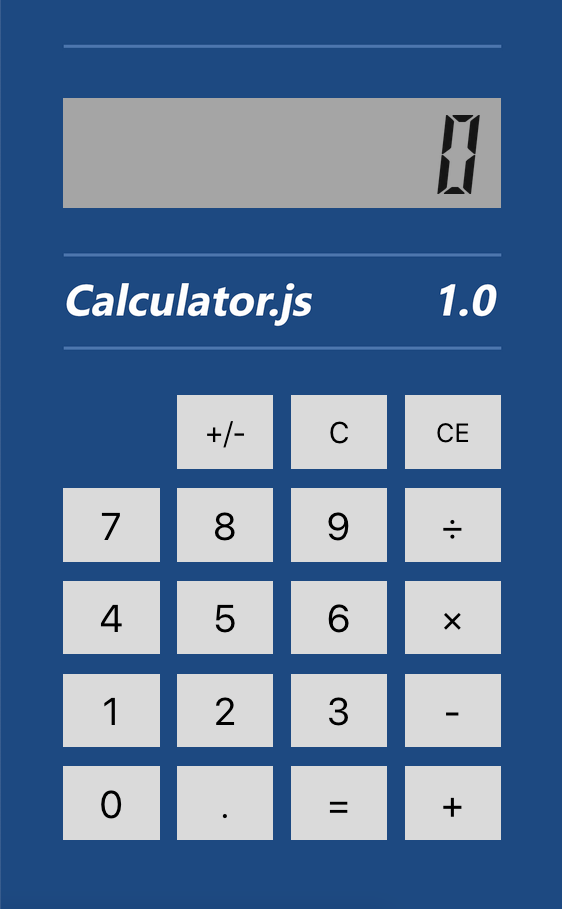 代码中使用node.js代码提供了REST APIs,其中提供各种数学计算功能单元。 使用mocah编写的测试代码可以完成所有以上API内部运算运算逻辑的验证,最终使用 `mocha-junit-reports` 来生成XML格式的测试结果文件以便 [Azure DevOps](https://azure.com/devops) 可以读取测试结果提供DevOps流水线的测试集成。 本地构建本项目的方式: 1. 运行 `npm install` 安装所有依赖包 2. 运行 `npm test` 运行所有测试 3. 运行 `npm start` 启动应用,并打开 http://localhost:3000 使用Docker构建和运行项目的方式: 1. 复制 _demo-assets/demo-dockerfile 到根目录下的Dockerfile文件 2. 运行以下命令完成 `calculator` 容器构建打包 ```shell docker build -t calculator . ``` 2. 运行 `calculator` 容器 ```shell docker run -itd -p 8080:3000 calculator ``` 打开 http://localhost:8080 应用启动后的状态如上图。
