KO
|
EN
gitlite — search
Search
#javascript
#php
#nodejs
#python
#angularjs
#c
#theme
#hacktoberfest
#blog
#arduino
#app
#apple
stratos-tropos-4
★ 50
Open GitHub ↗
No description available.
Download README (.md)
Explore Similar Repositories
prestashop-cloudflare-turnstile
:
Protect your Prestashop store from spam messages and spam user accounts with Cloudflare Turnstile
Toggles
:
Toggles is an elegant and powerful solution to feature flagging for Apple platforms.
scribe
:
Live transcription with OpenAi Whisper
pgjobs
:
Go and PostgreSQL job queue blueprint
curso-R-Python-data-science-analisis-datos
:
No description available.
// repository documentation
Was this content helpful?
★ 0
(0 ratings)
Select Rating:
★
★
★
★
★
Submit Feedback
Recent Feedback
×
Download README
Do you want to download the
README.md
file for
stratos-tropos-4
?
Download (.md)
<h1 align="center">Stratos Validator kurulum rehberi :atom_symbol:</h1>  # Stratos Türkiye Telegram grubu: [Stratos Türkiye](https://t.me/StratosTurkish) ## Sistem gereksinimleri: ``` 8GB RAM 160 GB SSD 4 vCPU ``` <h1 align="center">Validator kurulumu:</h1> ## root yetkisi: ``` sudo su ``` ## root dizinine gidiyoruz: ``` cd /root ``` ## Sistem güncellemesi: ``` sudo apt update && sudo apt upgrade -y ``` ## Kütüphane kurulumu: ``` sudo apt install make clang pkg-config libssl-dev build-essential git jq ncdu bsdmainutils -y < "/dev/null" ``` ## Binary dosya kurulumu: ``` cd $HOME wget https://github.com/stratosnet/stratos-chain/releases/download/v0.8.0/stchaind ``` ## stchaind ``` md5sum stchain* ``` ### :point_right: Komutu girdikten sonra görselde ki gibi çıktı alıcaksınız  ## Binary dosyalarına execute yetkisi verelim ``` chmod +x stchaind ``` ## Altta ki komutu girdikten sonra görselde ki gibi çıktı alıyoruz. ``` ls ``` ### Sizde sadece schaind yazması yeterli, sui ve stratos-chain yazmayacak.  ## Go kurulumu * go version yazdığınızda 1.16+ üstü sürüm olmalı, genelde 1.18 çıkar. ``` wget -O go1.18.2.linux-amd64.tar.gz https://golang.org/dl/go1.18.2.linux-amd64.tar.gz rm -rf /usr/local/go && tar -C /usr/local -xzf go1.18.2.linux-amd64.tar.gz && rm go1.18.2.linux-amd64.tar.gz echo 'export GOROOT=/usr/local/go' >> $HOME/.bash_profile echo 'export GOPATH=$HOME/go' >> $HOME/.bash_profile echo 'export GO111MODULE=on' >> $HOME/.bash_profile echo 'export PATH=$PATH:/usr/local/go/bin:$HOME/go/bin' >> $HOME/.bash_profile && . $HOME/.bash_profile go version go mod tidy ``` ## Source code ile binary dosyayı derliyoruz. ``` git clone https://github.com/stratosnet/stratos-chain.git cd stratos-chain git checkout v0.8.0 make build ``` #### :point_right: Hata alırsanız * Hata almazsanız bunları girmenıze gerek yok. (yüksek ihtimal hata almayacaksınız) ``` go mod tidy sudo apt update make build ``` ## Binary dosyalarını $GOPATH/bin dizinine yüklüyoruz: ``` cd ~/stratos-chain make install ``` ## initialize işlemi yapıyoruz. * :point_right: Node Name kısmını kendi validator isminizi girin :point_left: ``` cd $HOME ./stchaind init NodeName ``` ## genesis.json ve config.toml dosyalarını indiriyoruz: ``` wget https://raw.githubusercontent.com/stratosnet/stratos-chain-testnet/main/genesis.json wget https://raw.githubusercontent.com/stratosnet/stratos-chain-testnet/main/config.toml ``` ## addrbook.json dosyasını indiriyoruz: ``` wget -O $HOME/.stchaind/config/addrbook.json "https://github.com/mmc6185/node-testnets/blob/main/stratos/stratos-tropos-4/addrbook.json?raw=true" ``` ## genesis.json ve config.toml dosyalarını .stchaind/config/ dizini altına taşıma işlemi: ``` mv config.toml $HOME/.stchaind/config/ mv genesis.json $HOME/.stchaind/config/ ``` ## servis dosyası : ``` echo "[Unit] Description=Stratos Node After=network.target [Service] User=$USER Type=simple ExecStart=$(which stchaind) start Restart=on-failure LimitNOFILE=65535 [Install] WantedBy=multi-user.target" > $HOME/stratosd.service sudo mv $HOME/stratosd.service /etc/systemd/system sudo tee <<EOF >/dev/null /etc/systemd/journald.conf Storage=persistent EOF ``` ## servisimizi aktifleştiriyoruz: ``` sudo systemctl restart systemd-journald sudo systemctl daemon-reload sudo systemctl enable stratosd sudo systemctl restart stratosd ``` ## Node'umuzun loglarına bakıyoruz. * Görselde ki gibi loglar akıcak, 1-2-3 diye başlıyacak sizde. ``` journalctl -u stratosd -f ```  ## Şimdi explorere gidiyoruz: [explorer linki](https://big-dipper-tropos.thestratos.org/) * Sol üstte Latest Block yazıcak, güncel blok orası. * Birazdan false çıktısı komutunu gireceğiz * False çıktınız true yazacak, false olması için güncel bloğa gelmesi gerekiyor, örnek: * Eşleşmesi max 30-60 dakika arası sürer. ``` stchaind status 2>&1 | jq .SyncInfo ```  ## Şimdi o eşleşirken biz cüzdan oluşturalım: * WalletName kısmını kendı cüzdan adınız yapın! * Çıkan bilgileri not edin en altta 12 kelımenız olacak o da dahil. ``` stchaind keys add --hd-path "m/44'/606'/0'/0/0" --keyring-backend test WalletName ``` ## Faucetten token alalım * WalletAdres kısmını kaldırın ve cüzdan adresinizi yazın, tırnakları kaldırmayın! ``` curl --header "Content-Type: application/json" --request POST --data '{"denom":"ustos","address":"walletAddress"} ' https://faucet-tropos.thestratos.org/credit ``` ## Bakalım tokenler gelmişmi * st1400.. kısmına kendi cüzdan adresinizi yazın ``` stchaind query bank balances st1400f6e4kes5sk0ltfz8ms74ga9wzd9dulchh5q ```  ## Validator oluşturma * NodeName kısmına validator ismimizi girin! * WalletAddres kısmına cüzdan adınızı girin! ``` stchaind tx staking create-validator \ --amount=100000000ustos \ --pubkey=$(stchaind tendermint show-validator) \ --moniker="NodeName" \ --chain-id=tropos-4 --keyring-backend=test --gas=auto -y \ --commission-rate=0.10 \ --commission-max-rate=0.20 \ --commission-max-change-rate=0.01 \ --min-self-delegation=1 \ --from=walletAddress \ --gas=auto -y ``` ## Explorerde kendimizi kontrol edelim: 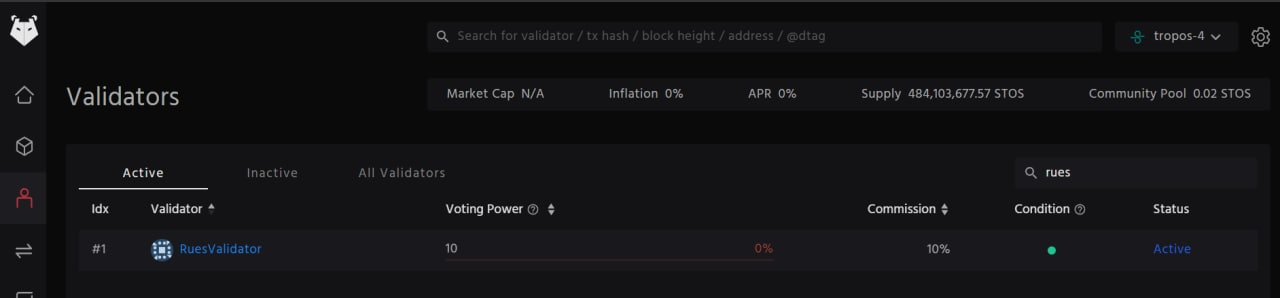 # Stratos Türkiye Telegram grubu: [Stratos Türkiye](https://t.me/StratosTurkish) ## Reach out to me <a href="https://twitter.com/Ruesandora0" target="blank"><img align="center" src="https://raw.githubusercontent.com/rahuldkjain/github-profile-readme-generator/master/src/images/icons/Social/twitter.svg" alt="zaferayan" height="30" width="40" /></a> <a href="https://medium.com/@ruesandora" target="blank"><img align="center" src="https://raw.githubusercontent.com/rahuldkjain/github-profile-readme-generator/master/src/images/icons/Social/medium.svg" alt="@zaferayan" height="30" width="40" /></a> <a href="https://www.youtube.com/c/RuesYouTube" target="blank"><img align="center" src="https://raw.githubusercontent.com/rahuldkjain/github-profile-readme-generator/master/src/images/icons/Social/youtube.svg" alt="uc1vykhlufpaoghrwhjikrqg" height="30" width="40" /></a> <br /> <p align="left"> <img src="https://komarev.com/ghpvc/?username=ruesandora&label=Profile%20views&color=0e75b6&style=flat" alt="ruesandora" /> <a href="https://twitter.com/ruesandora0" target="blank"><img src="https://img.shields.io/twitter/follow/ruesandora0?logo=twitter&style=for-the-badge" alt="ruesandora0" /></a> <img src="https://github-readme-stats.vercel.app/api?username=ruesandora&show_icons=true&theme=highcontrast" align="right" width="450" height="350" > - 🔭 I’m currently working on [developing my community](https://discord.gg/ruescommunity) - 🌱 I’m currently learning **Blokchain** - 👨💻 All of my projects are available at [Github](https://github.com/ruesandora?tab=repositories) - 📝 I regularly write articles on Layer-1 Blokchain - 💬 Ask me about [Telegram](https://t.me/Ruesandora) - [Twitter](https://twitter.com/Ruesandora0) - 📫 How to reach me [Mail](ruesinfo@gmail.com) - 📄 Know about my experiences [Forum](https://forum.rues.info/index.php) - ⚡ Fun fact **Managing Community | produce content**
