KO
|
EN
gitlite — search
Search
#ai
#docker
#typescript
#css
#machine-learning
#nextjs
#python
#ios
#open-source
#android
#windows
#software
cms-boot
★ 125
Open GitHub ↗
CMS based on Spring Boot 3 (Java 24)
Download README (.md)
Explore Similar Repositories
ionic4-starter-app-tutorial
:
Ionic 4 To Do List App. FREE Ionic 4 example app. Learn how to start using Ionic 4 to create a simple app with lists, forms and navigation.
fastify-routes
:
Decorates fastify instance with a map of routes
time_machine
:
A date and time API for Dart
webauthn-lib
:
[READ ONLY] Webauthn library
nbconflux
:
nbconflux converts Jupyter Notebooks to Atlassian Confluence pages
// repository documentation
Was this content helpful?
★ 0
(0 ratings)
Select Rating:
★
★
★
★
★
Submit Feedback
Recent Feedback
×
Download README
Do you want to download the
README.md
file for
cms-boot
?
Download (.md)
# CMS Spring Boot  CMS based on [Spring Boot](https://spring.io/projects/spring-boot). The aim is to create a lightweight, flexible, and extensible content management system built purely on Spring Boot and an SQL database. ## Architecture This project follows a classic __MVC__ architecture — simple, intuitive, and easy to understand for most developers. It uses the powerful [Spring Data JPA](https://spring.io/guides/gs/accessing-data-jpa/) for data persistence and entity management. ## 🚀 Quickstart > Prerequisites: Java 24 > We recommend to use [SDKMAN](https://sdkman.io) to manage multiple Java versions. 1) Clone repository 2) Go to project folder `cd cms-boot` 3) Run the application `./gradlew bootRun` The application is running on `http://localhost:8080` > Note: The default database is H2 (in-memory). Access the H2 console at http://localhost:8080/h2-console (Credentials_ > sa / > test). This setup is suitable for development and testing purposes only. ### 🔐 Login You can log in at `/login` using these default credentials: | __Role__ | __Email__ | __Password__ | |-----------|---------------------|--------------| | Admin | admin@admin.com | admin | | Developer | developer@admin.com | admin | ### 🛠️ Usage As a __developer__, you can manage page texts and page images via the admin interface. As an __administrator__, you can edit these texts and images. 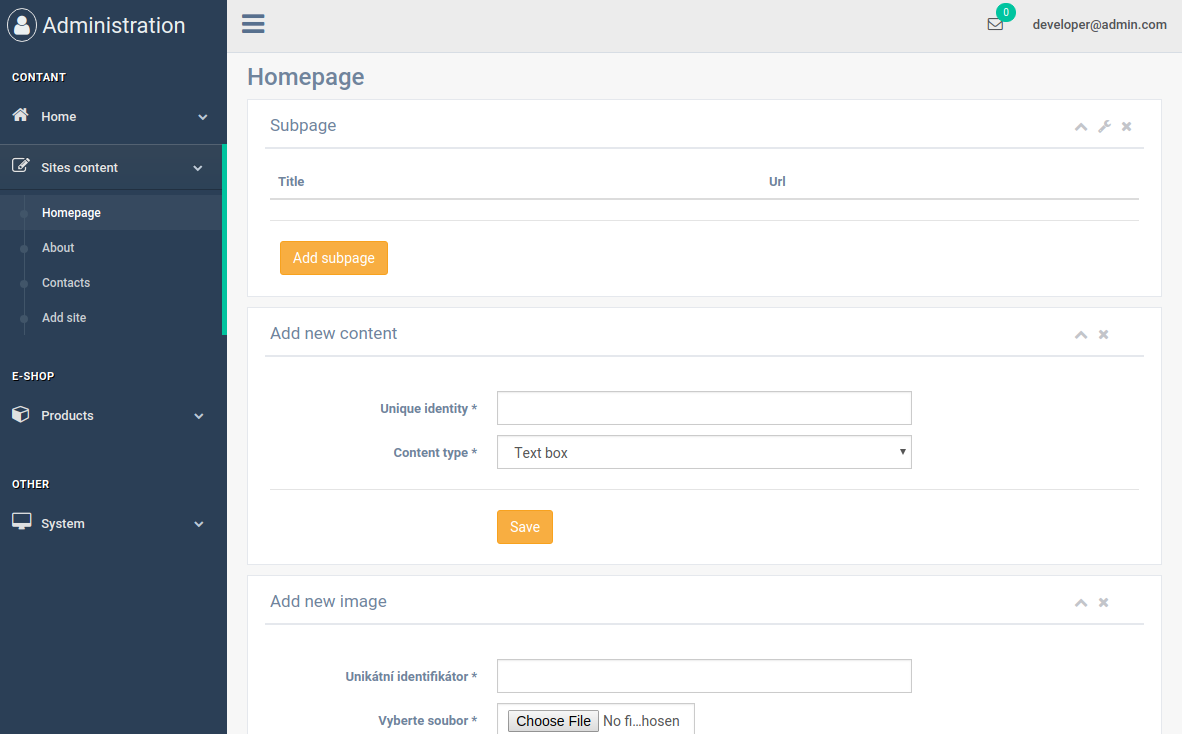 ### Example Use the `addPageData(model, page)` method to inject dynamic content into your views. Example from `HomepageController.java`: ```java @RequestMapping("/") public String index(Model model) { addPageData(model, "homepage"); return "front/index"; } ``` In your templates (e.g., `about.html`), you can access these dynamic variables: ```html <div class="row"> <div class="col-lg-12 text-center"> <h1 class="mt-5">About us</h1> <p th:utext="${pageTexts.get('about-text')}"></p> <image th:src="@{/file/} + ${pageImages.get('about-image')}"></image> </div> </div> ``` ### IDEA Config We recommend you to use IntelliJ IDEA. #### Lombok 1. Install the Lombok Plugin via Settings → Plugins. 2. Enable annotation processing in Settings → Build, Execution, Deployment → Compiler → Annotation Processors.
