KO
|
EN
gitlite — search
Search
#python
#java
#python3
#arduino
#golang
#machine-learning
#rust
#html
#flask
#javascript
#seismology
#nodejs
autoscrolldown
★ 11
Open GitHub ↗
No description available.
Download README (.md)
Explore Similar Repositories
FERI-zakljucno-delo-LaTeX
:
Predloga zaključnega (diplomskega ali magistrskega) dela na Fakulteti za elektrotehniko, računalništvo in informatiko
consquery
:
Консоль запросов 1c "consquery.ru"
envy
:
Shell helper that automatically sets and unsets environment variables
idapro-map-loader
:
Open .map files in IDA pro and set function names based on the symbols in the map file
smart-faq
:
Smart FAQ ⚠️INACTIVE → moved to internal GitLab ⚠️
// repository documentation
Was this content helpful?
★ 0
(0 ratings)
Select Rating:
★
★
★
★
★
Submit Feedback
Recent Feedback
×
Download README
Do you want to download the
README.md
file for
autoscrolldown
?
Download (.md)
# autoscrolldown README This Visual Studio Code extension automatically scrolls externally modified files to the end. By default, Code just reloads these files; with `autoscrolldown` they also scroll to the last line if certain conditions are met. ## Features Simply enable the `autoscrolldown` settings in the config or run the command. An example of how the command performs: 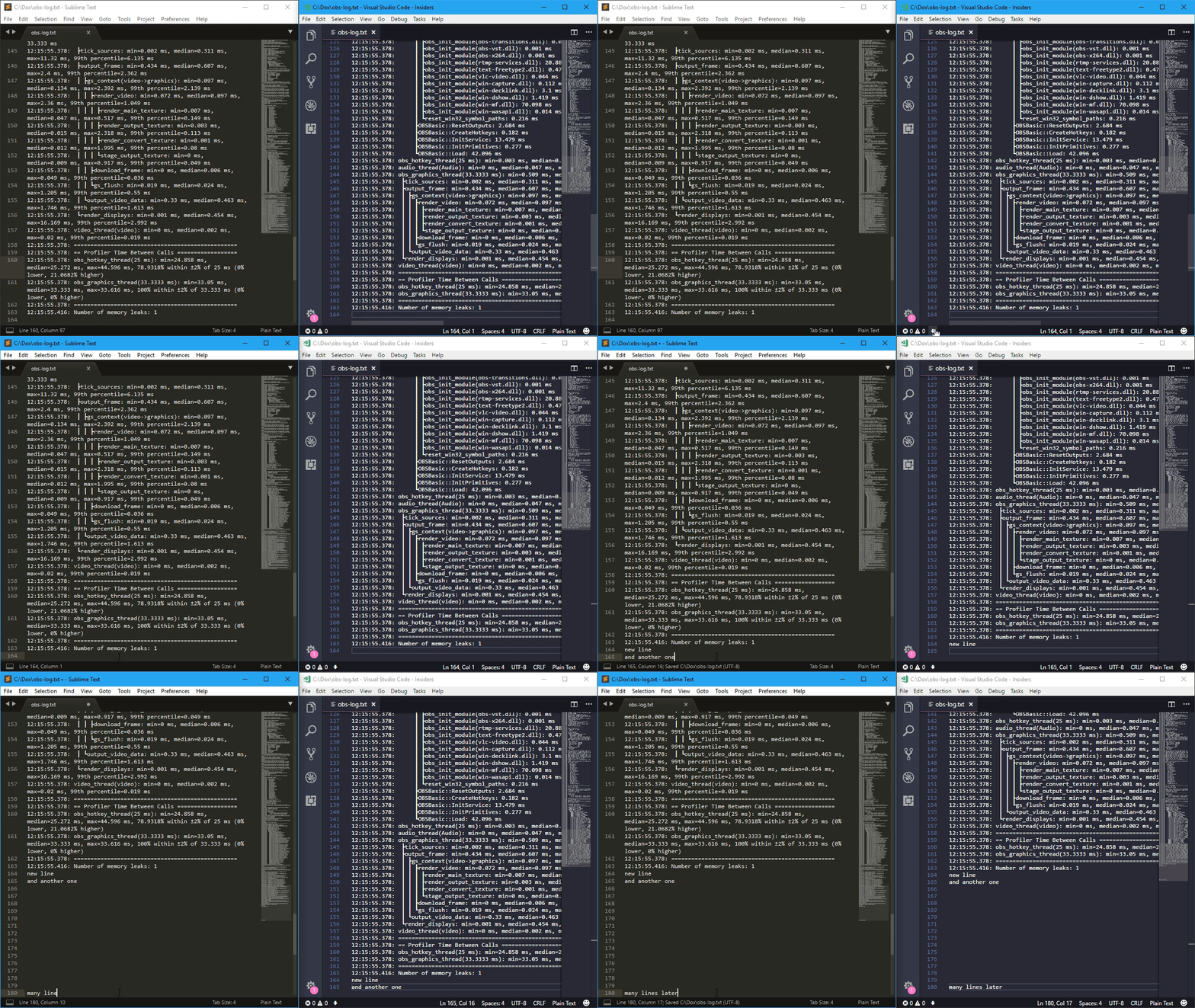 You'll know the feature is active when you see the "arrow-down" indicator in the status bar:  Depending on the `onlyWhenAtEnd` setting, sometimes it's necessary to be at the very end of the buffer for the indicator to appear and the extension to do its job. ## Requirements Visual Studio Code newer than 1.58.0. ## Extension Settings This extension contributes the following settings: * `autoscrolldown.allFiles`: all files scroll automatically to the end when modified externally * `autoscrolldown.onlyWhenAtEnd`: scrolling happens only if the cursor was already in the last position within the file * `autoscrolldown.alsoAutoscrollActive`: if Code has focus and the current buffer meets the requirements to be autoscrolled, scroll it. This setting might lead to confusion while editing a file, as it might move things around. There is also one command available, useful when `autoscrolldown.allFiles` is turned off: * `autoscrolldown: Toggle autoscroll To End For Current File` ## Known Issues None yet.
