KO
|
EN
gitlite — search
Search
#python
#java
#python3
#arduino
#golang
#machine-learning
#rust
#html
#flask
#javascript
#seismology
#nodejs
langmanus
★ 12
Open GitHub ↗
No description available.
Download README (.md)
Explore Similar Repositories
nats-bugs
:
Bugs or shortcomings in NATS that the developers disagree with
Dashboard_PowerBI
:
No description available.
image-generator-saas-nextjs
:
A beautiful and responsive image generator SaaS powered by the Skytells AI API.
homeassistant-jsengine
:
Create Javascript automations for Home Assistant
listen-fair-play
:
Searchable Football Cliches archive
// repository documentation
Was this content helpful?
★ 0
(0 ratings)
Select Rating:
★
★
★
★
★
Submit Feedback
Recent Feedback
×
Download README
Do you want to download the
README.md
file for
langmanus
?
Download (.md)
# 🦜🤖 LangManus [](https://www.python.org/downloads/) [](https://opensource.org/licenses/MIT) [](https://raw.githubusercontent.com/Miaque/langmanus/main/assets/wechat_community.jpg) [](https://discord.gg/m3MszDcn) [English](./README.md) | [简体中文](./README_zh.md) | [日本語](./README_ja.md) > Come From Open Source, Back to Open Source LangManus is a community-driven AI automation framework that builds upon the incredible work of the open source community. Our goal is to combine language models with specialized tools for tasks like web search, crawling, and Python code execution, while giving back to the community that made this possible. ## Demo **Task**: Calculate the influence index of DeepSeek R1 on HuggingFace. This index can be designed using a weighted sum of factors such as followers, downloads, and likes. **LangManus's Fully Automated Plan and Solution**: 1. Gather the latest information about "DeepSeek R1", "HuggingFace", and related topics through online searches. 2. Interact with a Chromium instance to visit the HuggingFace official website, search for "DeepSeek R1" and retrieve the latest data, including followers, likes, downloads, and other relevant metrics. 3. Find formulas for calculating model influence using search engines and web scraping. 4. Use Python to compute the influence index of DeepSeek R1 based on the collected data. 5. Present a comprehensive report to the user. 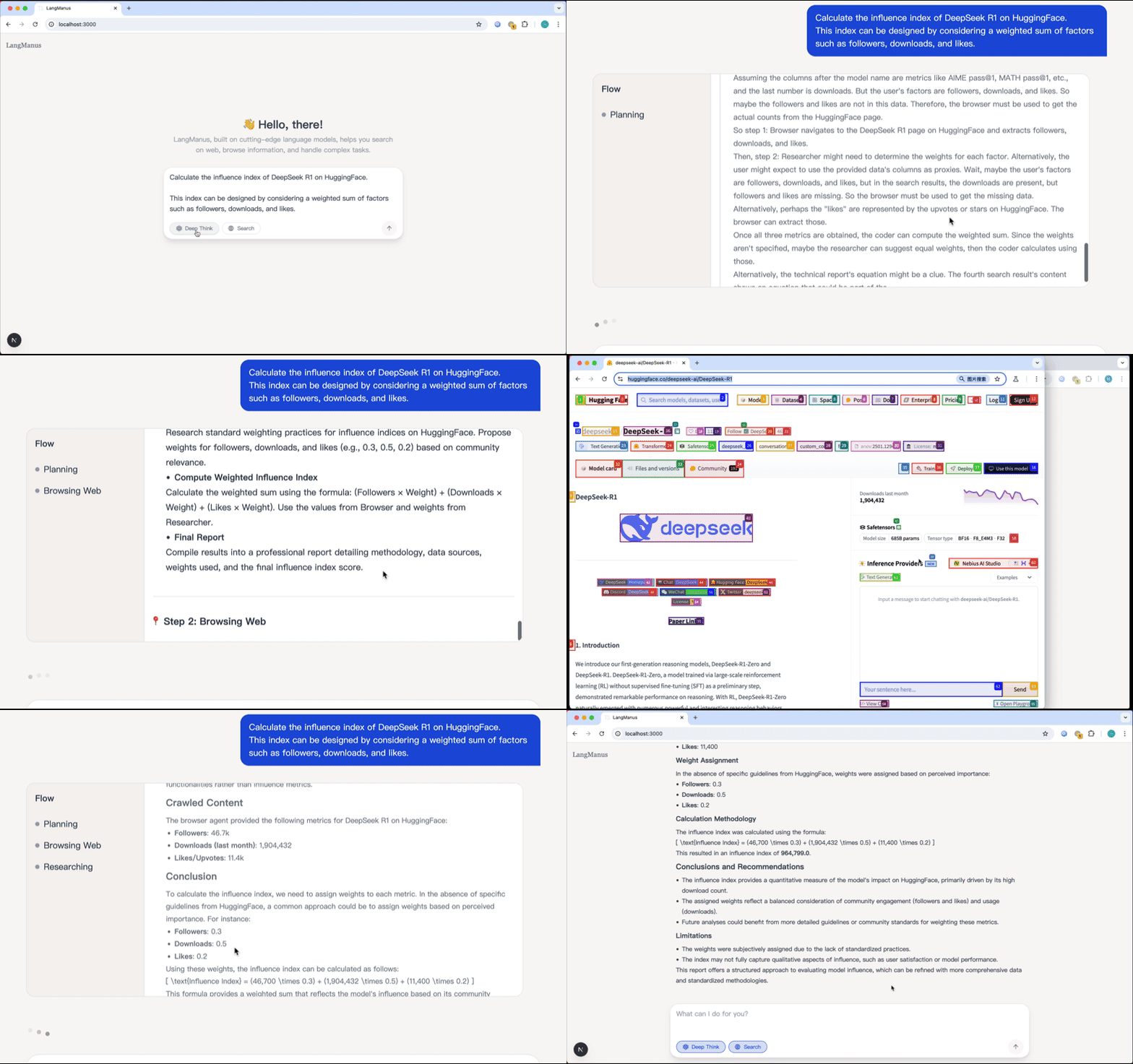 - [View on YouTube](https://youtu.be/sZCHqrQBUGk) ## Table of Contents - [Quick Start](#quick-start) - [Project Statement](#project-statement) - [Architecture](#architecture) - [Features](#features) - [Why LangManus?](#why-langmanus) - [Setup](#setup) - [Prerequisites](#prerequisites) - [Installation](#installation) - [Configuration](#configuration) - [Usage](#usage) - [Docker](#docker) - [Web UI](#web-ui) - [Development](#development) - [FAQ](#faq) - [Contributing](#contributing) - [License](#license) - [Acknowledgments](#acknowledgments) ## Quick Start ```bash # Clone the repository git clone https://github.com/langmanus/langmanus.git cd langmanus # Install dependencies, uv will take care of the python interpreter and venv creation uv sync # Playwright install to use Chromium for browser-use by default uv run playwright install # Configure environment # Windows: copy .env.example .env cp .env.example .env # Edit .env with your API keys # Run the project uv run main.py ``` ## Project Statement This is an academically driven open-source project, developed by a group of former colleagues in our spare time. It aims to explore and exchange ideas in the fields of Multi-Agent and DeepResearch. - **Purpose**: The primary purpose of this project is academic research, participation in the GAIA leaderboard, and the future publication of related papers. - **Independence Statement**: This project is entirely independent and unrelated to our primary job responsibilities. It does not represent the views or positions of our employers or any organizations. - **No Association**: This project has no association with Manus (whether it refers to a company, organization, or any other entity). - **Clarification Statement**: We have not promoted this project on any social media platforms. Any inaccurate reports related to this project are not aligned with its academic spirit. - **Contribution Management**: Issues and PRs will be addressed during our free time and may experience delays. We appreciate your understanding. - **Disclaimer**: This project is open-sourced under the MIT License. Users assume all risks associated with its use. We disclaim any responsibility for any direct or indirect consequences arising from the use of this project. ## 项目声明 本项目是一个学术驱动的开源项目,由一群前同事在业余时间开发,旨在探索和交流 Multi-Agent 和 DeepResearch 相关领域的技术。 - **项目目的**:本项目的主要目的是学术研究、参与 GAIA 排行榜,并计划在未来发表相关论文。 - **独立性声明**:本项目完全独立,与我们的本职工作无关,不代表我们所在公司或任何组织的立场或观点。 - **无关联声明**:本项目与 Manus(无论是公司、组织还是其他实体)无任何关联。 - **澄清声明**:我们未在任何社交媒体平台上宣传过本项目,任何与本项目相关的不实报道均与本项目的学术精神无关。 - **贡献管理**:Issue 和 PR 将在我们空闲时间处理,可能存在延迟,敬请谅解。 - **免责声明**:本项目基于 MIT 协议开源,使用者需自行承担使用风险。我们对因使用本项目产生的任何直接或间接后果不承担责任。 ## Architecture LangManus implements a hierarchical multi-agent system where a supervisor coordinates specialized agents to accomplish complex tasks: 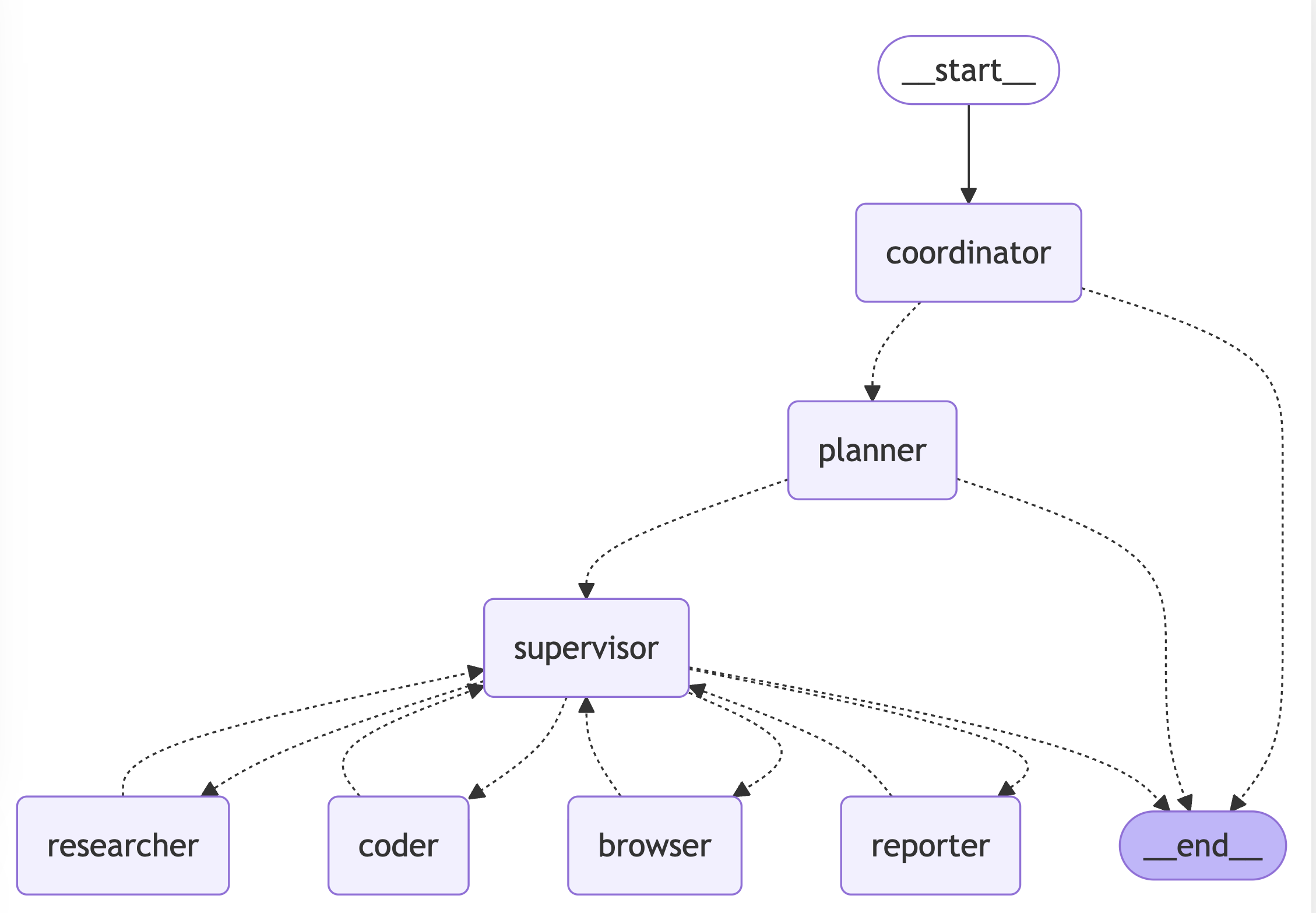 The system consists of the following agents working together: 1. **Coordinator** - The entry point that handles initial interactions and routes tasks 2. **Planner** - Analyzes tasks and creates execution strategies 3. **Supervisor** - Oversees and manages the execution of other agents 4. **Researcher** - Gathers and analyzes information 5. **Coder** - Handles code generation and modifications 6. **Browser** - Performs web browsing and information retrieval 7. **Reporter** - Generates reports and summaries of the workflow results ## Features ### Core Capabilities - 🤖 **LLM Integration** - It supports the integration of most models through [litellm](https://docs.litellm.ai/docs/providers). - Support for open source models like Qwen - OpenAI-compatible API interface - Multi-tier LLM system for different task complexities ### Tools and Integrations - 🔍 **Search and Retrieval** - Web search via Tavily API - Neural search with Jina - Advanced content extraction ### Development Features - 🐍 **Python Integration** - Built-in Python REPL - Code execution environment - Package management with uv ### Workflow Management - 📊 **Visualization and Control** - Workflow graph visualization - Multi-agent orchestration - Task delegation and monitoring ## Why LangManus? We believe in the power of open source collaboration. This project wouldn't be possible without the amazing work of projects like: - [Qwen](https://github.com/QwenLM/Qwen) for their open source LLMs - [Tavily](https://tavily.com/) for search capabilities - [Jina](https://jina.ai/) for crawl search technology - [Browser-use](https://pypi.org/project/browser-use/) for control browser - And many other open source contributors We're committed to giving back to the community and welcome contributions of all kinds - whether it's code, documentation, bug reports, or feature suggestions. ## Setup ### Prerequisites - [uv](https://github.com/astral-sh/uv) package manager ### Installation LangManus leverages [uv](https://github.com/astral-sh/uv) as its package manager to streamline dependency management. Follow the steps below to set up a virtual environment and install the necessary dependencies: ```bash # Step 1: Create and activate a virtual environment through uv uv python install 3.12 uv venv --python 3.12 source .venv/bin/activate # On Windows: .venv\Scripts\activate # Step 2: Install project dependencies uv sync ``` By completing these steps, you'll ensure your environment is properly configured and ready for development. ### Configuration LangManus uses a three-layer LLM system, which are respectively used for reasoning, basic tasks, and vision-language tasks. Configuration is done using the `conf.yaml` file in the root directory of the project. You can copy `conf.yaml.example` to `conf.yaml` to start the configuration: ```bash cp conf.yaml.example conf.yaml ``` ```yaml # Setting it to true will read the conf.yaml configuration, and setting it to false will use the original .env configuration. The default is false (compatible with existing configurations) USE_CONF: true # LLM Config ## Follow the litellm configuration parameters: https://docs.litellm.ai/docs/providers. You can click on the specific provider document to view the completion parameter examples REASONING_MODEL: model: "volcengine/ep-xxxx" api_key: $REASONING_API_KEY # Supports referencing the environment variable ENV_KEY in the.env file through $ENV_KEY api_base: $REASONING_BASE_URL BASIC_MODEL: model: "azure/gpt-4o-2024-08-06" api_base: $AZURE_API_BASE api_version: $AZURE_API_VERSION api_key: $AZURE_API_KEY VISION_MODEL: model: "azure/gpt-4o-2024-08-06" api_base: $AZURE_API_BASE api_version: $AZURE_API_VERSION api_key: $AZURE_API_KEY ``` You can create a .env file in the root directory of the project and configure the following environment variables. You can copy the.env.example file as a template to start: ```bash cp .env.example .env ``` ```ini # Tool API Key TAVILY_API_KEY=your_tavily_api_key JINA_API_KEY=your_jina_api_key # Optional # Browser Configuration CHROME_INSTANCE_PATH=/Applications/Google Chrome.app/Contents/MacOS/Google Chrome # Optional, the path to the Chrome executable file CHROME_HEADLESS=False # Optional, the default is False CHROME_PROXY_SERVER=http://127.0.0.1:10809 # Optional, the default is None CHROME_PROXY_USERNAME= # Optional, the default is None CHROME_PROXY_PASSWORD= # Optional, the default is None ``` > **Note:** > > - The system uses different models for different types of tasks: > - The reasoning LLM is used for complex decision-making and analysis. > - The basic LLM is used for simple text tasks. > - The vision-language LLM is used for tasks involving image understanding. > - The configuration of all LLMs can be customized independently. > - The Jina API key is optional. Providing your own key can obtain a higher rate limit (you can obtain this key at [jina.ai](https://jina.ai/)). > - The default configuration for Tavily search is to return up to 5 results (you can obtain this key at [app.tavily.com](https://app.tavily.com/)). ### Configure Pre-commit Hook LangManus includes a pre-commit hook that runs linting and formatting checks before each commit. To set it up: 1. Make the pre-commit script executable: ```bash chmod +x pre-commit ``` 2. Install the pre-commit hook: ```bash ln -s ../../pre-commit .git/hooks/pre-commit ``` The pre-commit hook will automatically: - Run linting checks (`make lint`) - Run code formatting (`make format`) - Add any reformatted files back to staging - Prevent commits if there are any linting or formatting errors ## Usage ### Basic Execution To run LangManus with default settings: ```bash uv run main.py ``` ### API Server LangManus provides a FastAPI-based API server with streaming support: ```bash # Start the API server make serve # Or run directly uv run server.py ``` The API server exposes the following endpoints: - `POST /api/chat/stream`: Chat endpoint for LangGraph invoke with streaming support - Request body: ```json { "messages": [{ "role": "user", "content": "Your query here" }], "debug": false } ``` - Returns a Server-Sent Events (SSE) stream with the agent's responses ### Advanced Configuration LangManus can be customized through various configuration files in the `src/config` directory: - `env.py`: Configure LLM models, API keys, and base URLs - `tools.py`: Adjust tool-specific settings (e.g., Tavily search results limit) - `agents.py`: Modify team composition and agent system prompts ### Agent Prompts System LangManus uses a sophisticated prompting system in the `src/prompts` directory to define agent behaviors and responsibilities: #### Core Agent Roles - **Supervisor ([`src/prompts/supervisor.md`](src/prompts/supervisor.md))**: Coordinates the team and delegates tasks by analyzing requests and determining which specialist should handle them. Makes decisions about task completion and workflow transitions. - **Researcher ([`src/prompts/researcher.md`](src/prompts/researcher.md))**: Specializes in information gathering through web searches and data collection. Uses Tavily search and web crawling capabilities while avoiding mathematical computations or file operations. - **Coder ([`src/prompts/coder.md`](src/prompts/coder.md))**: Professional software engineer role focused on Python and bash scripting. Handles: - Python code execution and analysis - Shell command execution - Technical problem-solving and implementation - **File Manager ([`src/prompts/file_manager.md`](src/prompts/file_manager.md))**: Handles all file system operations with a focus on properly formatting and saving content in markdown format. - **Browser ([`src/prompts/browser.md`](src/prompts/browser.md))**: Web interaction specialist that handles: - Website navigation - Page interaction (clicking, typing, scrolling) - Content extraction from web pages #### Prompt System Architecture The prompts system uses a template engine ([`src/prompts/template.py`](src/prompts/template.py)) that: - Loads role-specific markdown templates - Handles variable substitution (e.g., current time, team member information) - Formats system prompts for each agent Each agent's prompt is defined in a separate markdown file, making it easy to modify behavior and responsibilities without changing the underlying code. ## Docker LangManus can be run in a Docker container. default serve api on port 8000. Before run docker, you need to prepare environment variables in `.env` file. ```bash docker build -t langmanus . docker run --name langmanus -d --env-file .env -e CHROME_HEADLESS=True -p 8000:8000 langmanus ``` You can also just run the cli with docker. ```bash docker build -t langmanus . docker run --rm -it --env-file .env -e CHROME_HEADLESS=True langmanus uv run python main.py ``` ## Web UI LangManus provides a default web UI. Please refer to the [langmanus/langmanus-web-ui](https://github.com/langmanus/langmanus-web) project for more details. ## Docker Compose (include both backend and frontend) LangManus provides a docker-compose setup to easily run both the backend and frontend together: ```bash # Start both backend and frontend docker-compose up -d # The backend will be available at http://localhost:8000 # The frontend will be available at http://localhost:3000, which could be accessed through web browser ``` This will: 1. Build and start the LangManus backend container 2. Build and start the LangManus web UI container 3. Connect them using a shared network ** Make sure you have your `.env` file prepared with the necessary API keys before starting the services. ** ## Development ### Testing Run the test suite: ```bash # Run all tests make test # Run specific test file pytest tests/integration/test_workflow.py # Run with coverage make coverage ``` ### Code Quality ```bash # Run linting make lint # Format code make format ``` ## FAQ Please refer to the [FAQ.md](docs/FAQ.md) for more details. ## Contributing We welcome contributions of all kinds! Whether you're fixing a typo, improving documentation, or adding a new feature, your help is appreciated. Please see our [Contributing Guide](CONTRIBUTING.md) for details on how to get started. ## License This project is open source and available under the [MIT License](LICENSE). ## Star History [](https://www.star-history.com/#langmanus/langmanus&Date) ## Acknowledgments Special thanks to all the open source projects and contributors that make LangManus possible. We stand on the shoulders of giants. In particular, we want to express our deep appreciation for: - [LangChain](https://github.com/langchain-ai/langchain) for their exceptional framework that powers our LLM interactions and chains - [LangGraph](https://github.com/langchain-ai/langgraph) for enabling our sophisticated multi-agent orchestration - [Browser-use](https://pypi.org/project/browser-use/) for control browser These amazing projects form the foundation of LangManus and demonstrate the power of open source collaboration.
