KO
|
EN
gitlite — search
Search
#typescript
#ai-agents
#ai
#dsh-plugin
#deepseek-harness
#open-source
#cli
#claude-code
#codex
#developer-tools
#react
#windows
concoction
★ 32
Open GitHub ↗
Dynamic Shared Malware Scanner
Download README (.md)
Explore Similar Repositories
php-malware-scanner
:
PHP files analyzer for malware detection
malscan
:
A fully featured malware scanner for Linux desktops and servers.
Malware-Scanner
:
This complete implementation represents a fully featured and fault-tolerant version of a malware scanner.
PHPAV
:
PHP CLI Virus/Malware Scanner
pyarascanner
:
A simple many-rules to many-files YARA scanner for incident response or malware zoos.
// repository documentation
Was this content helpful?
★ 0
(0 ratings)
Select Rating:
★
★
★
★
★
Submit Feedback
Recent Feedback
×
Download README
Do you want to download the
README.md
file for
concoction
?
Download (.md)
# Concoction A shared Java malware scanner capable of static and dynamic analysis. ## Usage Concoction can be used either as a Java library or as a command line application. ### Scan models The format of scan models is described [here](docs/ModelFormat.md). ### As a library First add Concoction as a library to your project. It is available on maven central: ```xml <!-- Maven dependency declaration, for the latest version see the project releases page --> <dependency> <groupId>info.mmpa</groupId> <artifactId>concoction</artifactId> <version>${version}</version> </dependency> ``` ```groovy // Gradle dependency declaration implementation "info.mmpa:concoction:${version}" ``` For code examples on using Concoction as a library, see [the test cases](concoction-lib/src/test/java/info/mmpa/concoction). ### As a GUI application 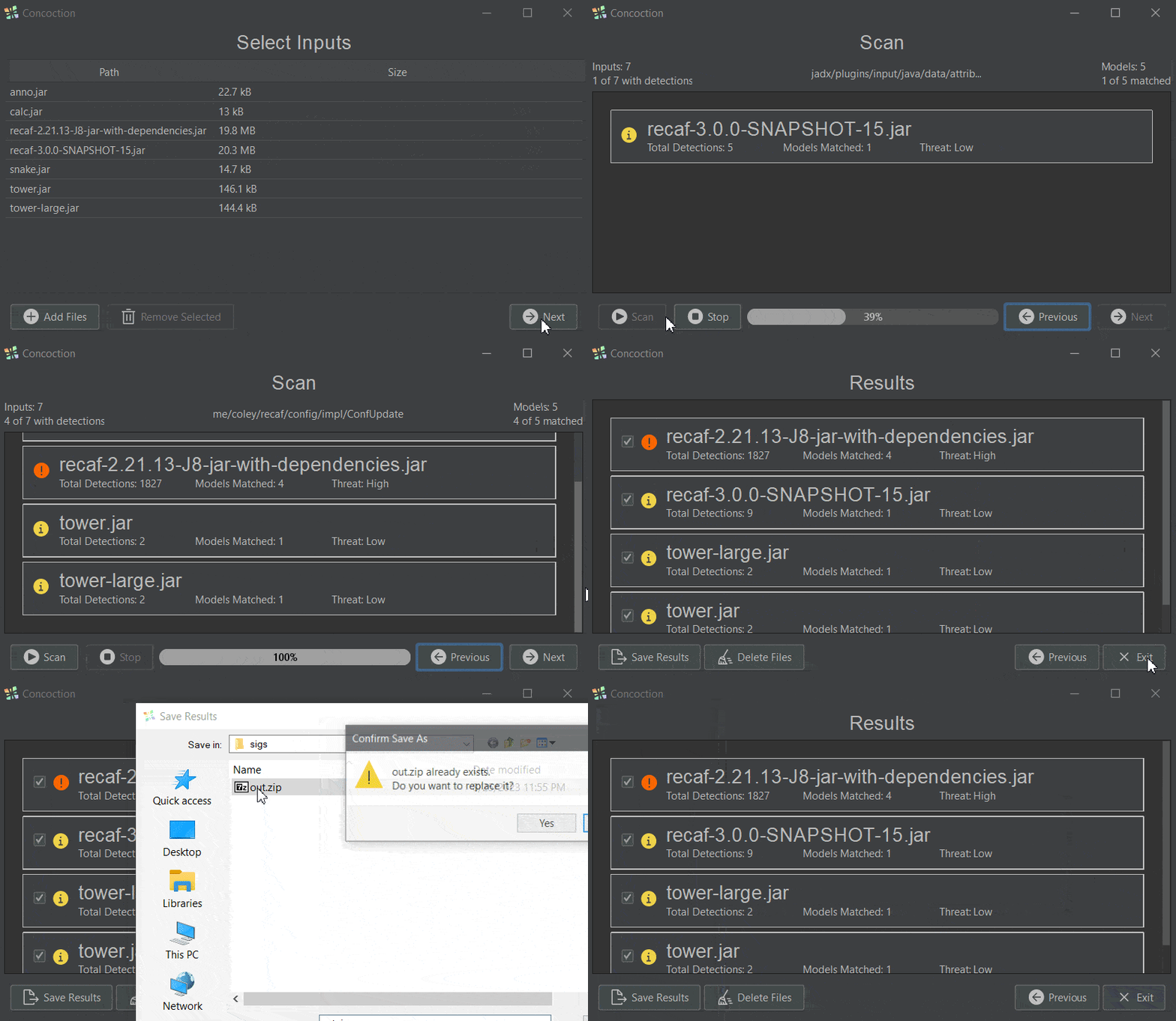 Concoction is available as a Java application, requiring at least Java 8, that allows you to: - Choose files to scan - Choose models to match against - Act on detections in provided files - Export detection reports as a ZIP archive - Delete files with detections, with the option to exclude certain entries ### As a command line application Usage as shown from `--help`: ```shell Usage: Concoction [-h] [-v] [-V] [-dd=<directoryDepth>] [-i=<input>] [-id=<inputDir>] [-im=<archiveMode>] [-m=<model>] [-md=<modelDir>] [-rcm=<consoleOutputMode>] Dynamic Shared Malware Scanner -dd, --dirDepth=<directoryDepth> Directory depth to scan for with --modelDir and --inputDir -h, --help Show this help message and exit. -i, --input=<input> Path to single file to scan (jar) -id, --inputDir=<inputDir>Directory containing files to scan (jar) -im, --inputMode=<archiveMode> Mode to use when parsing jar/zip files. - RANDOM_ACCESS_JAR: Used when inputs are loaded dynamically via 'java.util.zip.ZipFile' or 'java. util.zip.JarFile' - RUNNABLE_JAR: Used when inputs are treated as a program run via 'java -jar' or 'java -cp' - STREAMED_JAR: Used when inputs are loaded dynamically via streaming such as with 'java.util. zip.ZipInputStream' or 'java.util.zip. JarInputStream' -m, --model=<model> Path to single concoction scan model file (json) -md, --modelDir=<modelDir>Directory containing concoction scan model files (json) -rcm, --resultsConsoleMode=<consoleOutputMode> Console output display mode for results -v, --verbose Enables more verbose logging and error details -V, --version Print version information and exit. ``` Upon scan completion, results are printed to the console based on the value provided by `--resultsConsoleMode`. Currently, the output format is CSV form. The first column is the file path, and the second column is the detections matched, separated by `:`. An example of the CSV output would look like: ```csv mods/Sample1.jar,detection1 mods/Sample1and2.jar,detection2:detection2 ``` The application's exit codes also indicate the scan status. - Negative values indicate errors reading inputs - Zero indicates no detections were found - Positive values indicate the number of files with detections found
