KO
|
EN
gitlite — search
Search
#python
#ai-agent
#mcp-server
#agentic-ai
#automation
#genpark
#llm-tools
#claude-code
#mcp
#ai-agents
#ai
#rust
clitable
★ 60
Open GitHub ↗
CLI Table Output for PHP
Download README (.md)
Explore Similar Repositories
leanengine-node-sdk
:
LeanEngine Node.js SDK
clang-libdos
:
A "sub standard" C library for real-mode dos applications
tinyfiledialogs-rs
:
A Rust binding for the tinyfiledialogs library.
OPTICS_Clustering
:
MATLAB Implementation of the OPTICS unsupervised clustering algorithm
docker-android-project
:
DEPRECATED because Android SDK license does not allow re-distribution of its binaries
// repository documentation
Was this content helpful?
★ 0
(0 ratings)
Select Rating:
★
★
★
★
★
Submit Feedback
Recent Feedback
×
Download README
Do you want to download the
README.md
file for
clitable
?
Download (.md)
CLI Table Output for PHP ================================================ 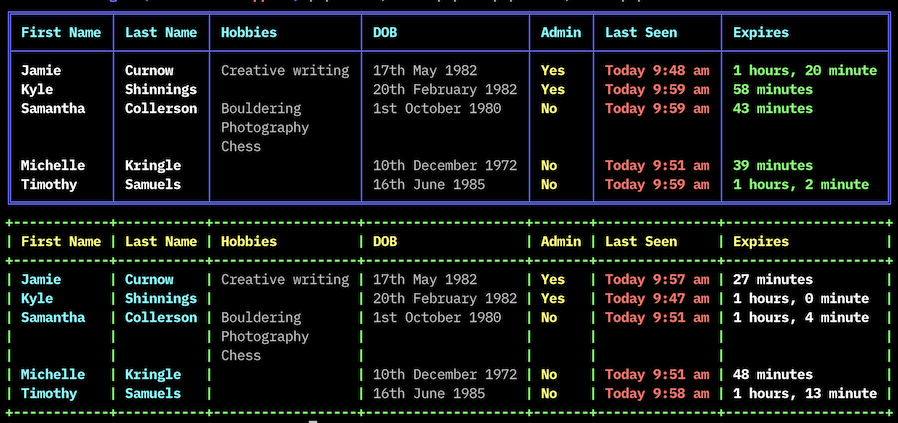 - Nice table output of data rows - Columns adjust to data size - Data manipulators for fields, formats raw data to a nice display output - Colors! When specifying a color, choose from these strings: blue, red, green, yellow, black, magenta, cyan, white, grey - Support for multi-line values. ### Installing via Composer ```bash # Install Composer curl -sS https://getcomposer.org/installer | php ``` Next, run the Composer command to install the latest stable version: ```bash composer.phar require jc21/clitable ``` After installing, you need to require Composer's autoloader: ```php require 'vendor/autoload.php'; ``` ### Using [Class documentation](docs/Documentation.md) See the tests folder for some examples, but basically here's how to use it: ```php use jc21\CliTable; // $data used below is an array of rows with fields. See tests/data.php for an example. $table = new CliTable; $table->setTableColor('blue'); $table->setHeaderColor('cyan'); $table->addField('First Name', 'firstName', false, 'white'); $table->addField('Last Name', 'lastName', false, 'white'); $table->addField('DOB', 'dobTime', new CliTableManipulator('datelong')); $table->addField('Admin', 'isAdmin', new CliTableManipulator('yesno'), 'yellow'); $table->addField('Last Seen', 'lastSeenTime', new CliTableManipulator('nicetime'), 'red'); $table->addField('Expires', 'expires', new CliTableManipulator('duetime'), 'green'); $table->injectData($data); $table->display(); ``` ### Manipulators These are the manipulators provided in the package: - dollar: Formats 12300.23 to $12,300.23 - date: Formats unix timestamp 1372132121 to AU date 25-06-2013 (because I'm an Aussie mate) - datelong: Formats unix timestamp 1372132121 to 25th June 2013 - time: Formats unix timestamp 1372132121 to 1:48 pm - datetime: Formats unix timestamp 1372132121 to 25th June 2013, 1:48 pm - nicetime: Formats unix timestamp 1372132121 to one of the following, depending if it falls on Today or Yesterday or earlier: - Today, 1:48 pm - Yesterday, 1:48 pm - 25th June 2013, 1:48 pm - duetime: Formats unix timestamp to x years x days x hours x minutes x seconds - nicenumber: Formats 123456 to 123,456 - month: Formats unix timestamp 1372132121 to June - year: Formats unix timestamp 1372132121 to 2013 - monthyear: Formats unix timestamp 1372132121 to June 2013 - percent: Formats 54 to 54% - yesno: Formats a boolean value to Yes or No - text: Strips HTML from the value before returning If you want to create your own manipulators: ```php class MyManipulator extends CliTableManipulator { public function chucknorris($value) { return 'Chuck norris said: ' . $value; } } $table = new CliTable; $table->setTableColor('blue'); $table->setHeaderColor('cyan'); $table->addField('First Name', 'firstName', false, 'white'); $table->addField('Last Name', 'lastName', false, 'white'); $table->addField('DOB', 'dobTime', new CliTableManipulator('datelong')); $table->addField('Admin', 'isAdmin', new MyManipulator('chucknorris'), 'yellow'); $table->addField('Last Seen', 'lastSeenTime', new CliTableManipulator('nicetime'), 'red'); $table->addField('Expires', 'expires', new CliTableManipulator('duetime'), 'green'); $table->injectData($data); $table->display(); ```
