KO
|
EN
gitlite — search
Search
#python
#java
#python3
#arduino
#golang
#machine-learning
#rust
#html
#flask
#javascript
#seismology
#nodejs
gogs
★ 17
Open GitHub ↗
How to install Gogs in Kubernetes
Download README (.md)
Explore Similar Repositories
NanoAIO
:
Unfinished bot for Supreme/Shopify/Adidas
ScrollViewNestedRecyclerView
:
利用NestedScrolling机制,把RecyclerView嵌套在NestedScrollView中,实现嵌套滚动,RecyclerView复用回收机制不受影响
nes-breakout
:
Breakout meets Inception on the NES
membership-portal
:
REST API for the UC San Diego ACM chapter's membership portal.
resume
:
个人简历-纯静态页面,无后台
// repository documentation
Was this content helpful?
★ 0
(0 ratings)
Select Rating:
★
★
★
★
★
Submit Feedback
Recent Feedback
×
Download README
Do you want to download the
README.md
file for
gogs
?
Download (.md)
# Install Gogs in Kubernetes # The following installation steps will create a working Git server in Kubernetes. ## Installation ## Use the script [gogs.yaml](gogs.yaml) to create all Kubernetes entities needed. Run the script with: ```shell $ kubectl apply -f gogs.yaml namespace/gogs created persistentvolumeclaim/gogs-pv-claim created deployment.extensions/gogs created service/gogs-svc created ``` Depending on your needs, you may want to modify: - size of the persistent volume (currently `2GB`) - Gogs Docker image (currently `gogs/gogs:0.13`) - number of replicas - turn the Deployment into a StatefulSet or a DaemonSet ## Access to Gogs ## You may access Gogs in 2 ways: - via web interface that is similar with Github - via SSH using git command line If you use Minikube then you should add the local address of Gogs to /etc/hosts with the following command: ```shell echo -e "\n"$(minikube ip)" gogs.local" | sudo tee -a /etc/hosts ``` ### Access via web interface ### In order to access the Gogs web interface you have the following options: - via an Ingress (uncomment the ingress section in [gogs.yaml](gogs.yaml)) - via an Istio gateway - run the script [istio.yaml](istio.yaml) to create the Istio entities needed. For this option you will need to previously [install Istio](https://github.com/drabo/istio) ```shell $ kubectl apply -f istio.yaml gateway.networking.istio.io/gogs-gateway created virtualservice.networking.istio.io/gogs-vs created ``` #### Gogs Configuration via web interface #### Access in your browser the link: http://gogs.local **Database Settings:** For simplicity choose `SQLite3` 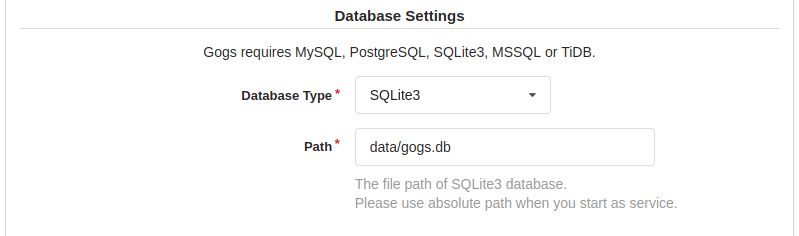 **Application General Settings:** - Domain: `gogs.local` - SSH Port: `30022` - HTTP Port: `3000` - Application URL: `http://gogs.local/` 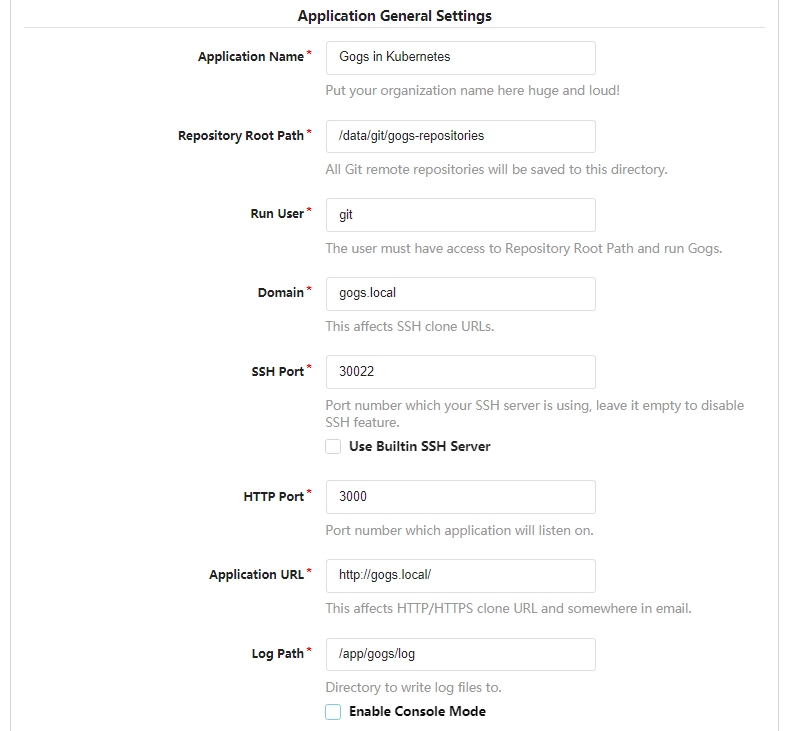 **Optional Settings:** Expand *Admin Account Settings* and create an admin user: - Username: `your-user-name` - Password: `your-password` - Email: `your-email-address` or a dummy address 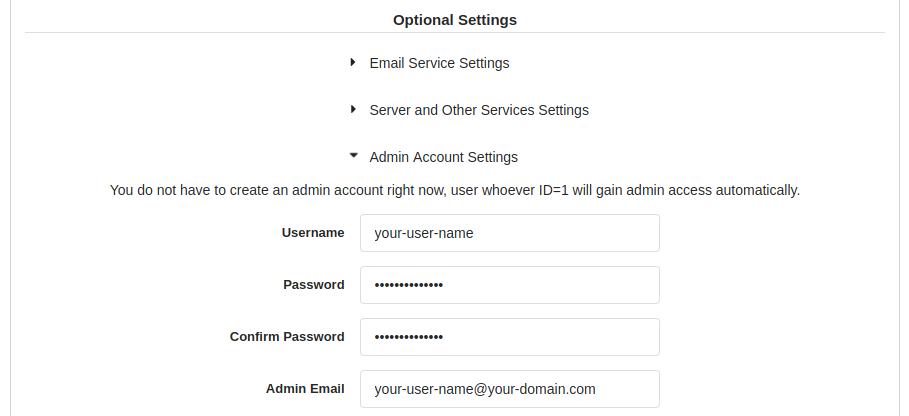 > :exclamation: Upload the public key to your Gogs user that will be useful for SSH access. ### Access via SSH ### Create the following entry into your `~/.ssh/config` file: ```shell Host gogs.local HostName gogs.local Port 30022 User git ``` Test the SSH conection to Gogs: ```shell $ ssh gogs.local Warning: Permanently added the ECDSA host key for IP address '[192.168.99.100]:30022' to the list of known hosts. PTY allocation request failed on channel 0 Hi there, You've successfully authenticated, but Gogs does not provide shell access. If this is unexpected, please log in with password and setup Gogs under another user. Connection to gogs.local closed. ``` More information about the Docker for Gogs on page https://github.com/gogs/gogs/tree/master/docker ## Gogs for ARM64 ## If you have a Kubernetes cluster running on a Raspberry Pi 4 with 8GB RAM or a server in cloud running ARM64 processor then Gogs may be installed by using the deployment script [gogs-arm64.yaml](gogs-arm64.yaml)
