KO
|
EN
gitlite — search
Search
#typescript
#ai-agents
#ai
#dsh-plugin
#deepseek-harness
#open-source
#cli
#claude-code
#codex
#developer-tools
#react
#windows
stripe-postman
★ 88
Open GitHub ↗
Postman collection for Stripe's API
Download README (.md)
Explore Similar Repositories
datafusion-java
:
Java binding to Apache DataFusion
Convenience
:
.NET Core 5/Angular11/NG-ZORRO 权限管理系统 工作流系统
Titan
:
Titan, Game Engine in .NET 8 C# 11 and DirectX 12
AutoInterface
:
C# interface-to-member source generator
commitlint
:
commitlint checks if your commit messages meets the conventional commit format
// repository documentation
Was this content helpful?
★ 0
(0 ratings)
Select Rating:
★
★
★
★
★
Submit Feedback
Recent Feedback
×
Download README
Do you want to download the
README.md
file for
stripe-postman
?
Download (.md)
> ## Now available within Postman's API Network > The Stripe API Collection is now hosted within [Stripe's public workspace](https://www.postman.com/stripedev/workspace/stripe-developers/overview) in Postman. This means you no longer need to import this collection, but can instead fork from the public workspace into yours. Head over there to get started. ## Stripe API Postman Collection This is a postman collection covering the Stripe API. See https://stripe.com/docs/api for more details. ## Prerequisites - [Postman](https://www.getpostman.com/downloads/) - [Stripe Account](https://dashboard.stripe.com/register) ## Getting Started To get started you can either fork the collection from [Stripe's public workspace](https://www.postman.com/stripedev/workspace/stripe-developers/overview) within Postman or import the collection JSON file from this repo. ### Fork the collection from Stripe's public workspace From within the [Stripe's public workspace](https://www.postman.com/stripedev/workspace/stripe-developers/overview), fork the Stripe API collection:  Enter a name for your fork and select the workspace where it will be created:  You can also fork the environment template from the Stripe Developers Workspace: 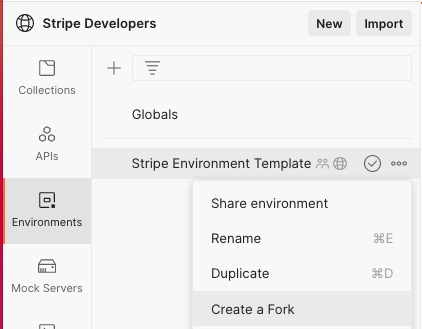 Next: [Set your API key](#set-your-api-key) ### Import the collection file into your workspace If you don't want to fork the collection from the public workspace, you can import it from this repo. Within your Postman workspace select the Import button:  Next copy the [StripeAPICollection.json](https://github.com/stripe/stripe-postman/blob/master/StripeAPICollection.json) contents and paste in the **Paste Raw Text** section of the import dialog:  ### Set your API key To run requests you'll need to supply your [testmode secret API key](https://dashboard.stripe.com/test/apikeys) and set it as an [environment variable](https://learning.postman.com/docs/sending-requests/variables/) within your workspace. To set any environment variable, fork the environment template within the Stripe public workspace, or create a new envionment within Postman: 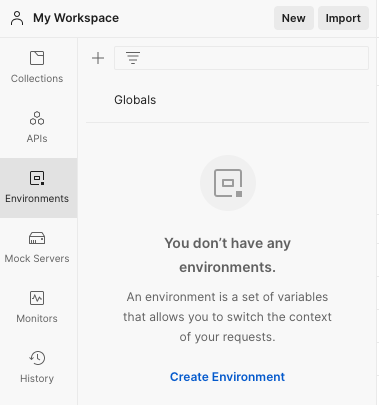 Add your secret key as a variable to the environment and save:  Set the environment to active:  Now within the collection set it to use the environment you just created:  If your environment is set up correctly, you should see your secret key value if you mouse over the `secret_key` variable in the Token field:  Be sure to save the collection after you've configured the set the key: 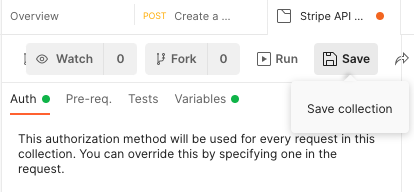 ## Make a test call You should be ready now to make a test call. An easy first call is to create a customer: 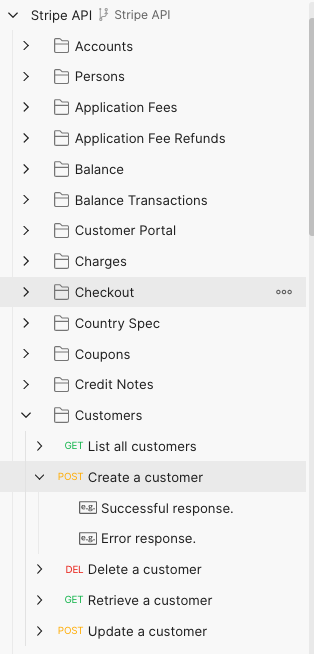 Since no parameters are required to create a customer, you can just hit the Send button to run this request:  If your environment is set up you'll get a customer object back as the response to the call:  Add parameters to the call by clicking the body tab, where you'll see a list of available parameters. Select and populate the ones you want to use. Here's an example of adding an email parameter:  You'll see the email address in the reponse:  ## Passing Metadata In a Request Right now [metadata](https://stripe.com/docs/api/metadata) does not show up as a optional parameter on requests, but it can still be provided to calls that will accept it. Here's an example of adding 2 metadata fields to the customer create call:  Metadata key value pairs can be updated in a similar manner. To remove a metadata key during an update call, supply the `metadata[key]` parameter without setting a value. This will pass an empty string as part of the request: 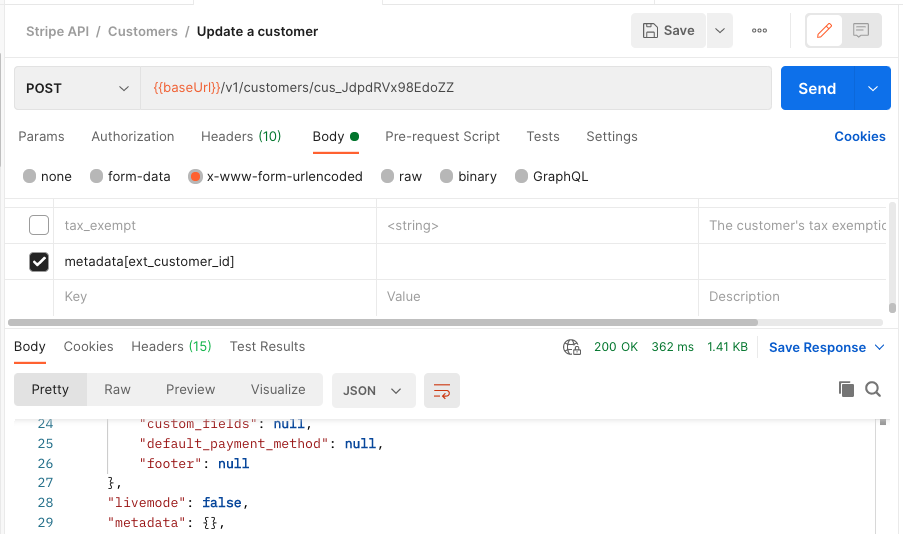 To remove all metadata pass the `metadata` parameter without a value set:  ## Other useful links - [Stripe API docs](https://docs.stripe.com/api) - [Stripe Developers YouTube](https://www.youtube.com/stripedevelopers) To keep track of major Stripe API updates and version, reference the [API upgrades page](https://docs.stripe.com/upgrades#api-versions) in our documentation. For a detailed list of API changes, please refer to our [API Changelog](https://docs.stripe.com/changelog). ## We want to hear from you We want to hear how we can make the collection better! Don't hestiate to file [issues](https://github.com/stripe/stripe-postman/issues) for any bugs you encounters, features you'd like to see or other suggestions you have.
