KO
|
EN
gitlite — search
Search
#javascript
#php
#ruby
#hacktoberfest
#nodejs
#python
#blog
#gulp
#java
#css
#r
#angularjs
telegram-gruvbox
★ 44
Open GitHub ↗
gruvbox theme for telegram-desktop
Download README (.md)
Explore Similar Repositories
AnotherStorm
:
😍 A cool dark theme for Telegram Desktop
TDesktop-Dark-Theme
:
Telegram Desktop Dark Theme
TDroidDesk
:
Convert Telegram Android themes to Telegram Desktop ones
Telegram-Desktop-themes-maker
:
Archived: The Telegram Desktop Theme Maker is designed to work on your own server. Help, suggestions and questions are welcome. It's also running at:
breeze-tdesktop-theme
:
Breeze Themes for Telegram Desktop to match KDE Breeze Themes
// repository documentation
Was this content helpful?
★ 0
(0 ratings)
Select Rating:
★
★
★
★
★
Submit Feedback
Recent Feedback
×
Download README
Do you want to download the
README.md
file for
telegram-gruvbox
?
Download (.md)
[gruvbox](https://github.com/morhetz/gruvbox) theme for [tdesktop](https://github.com/telegramdesktop/tdesktop) with a touch of [gruvbox-material](https://github.com/sainnhe/gruvbox-material). 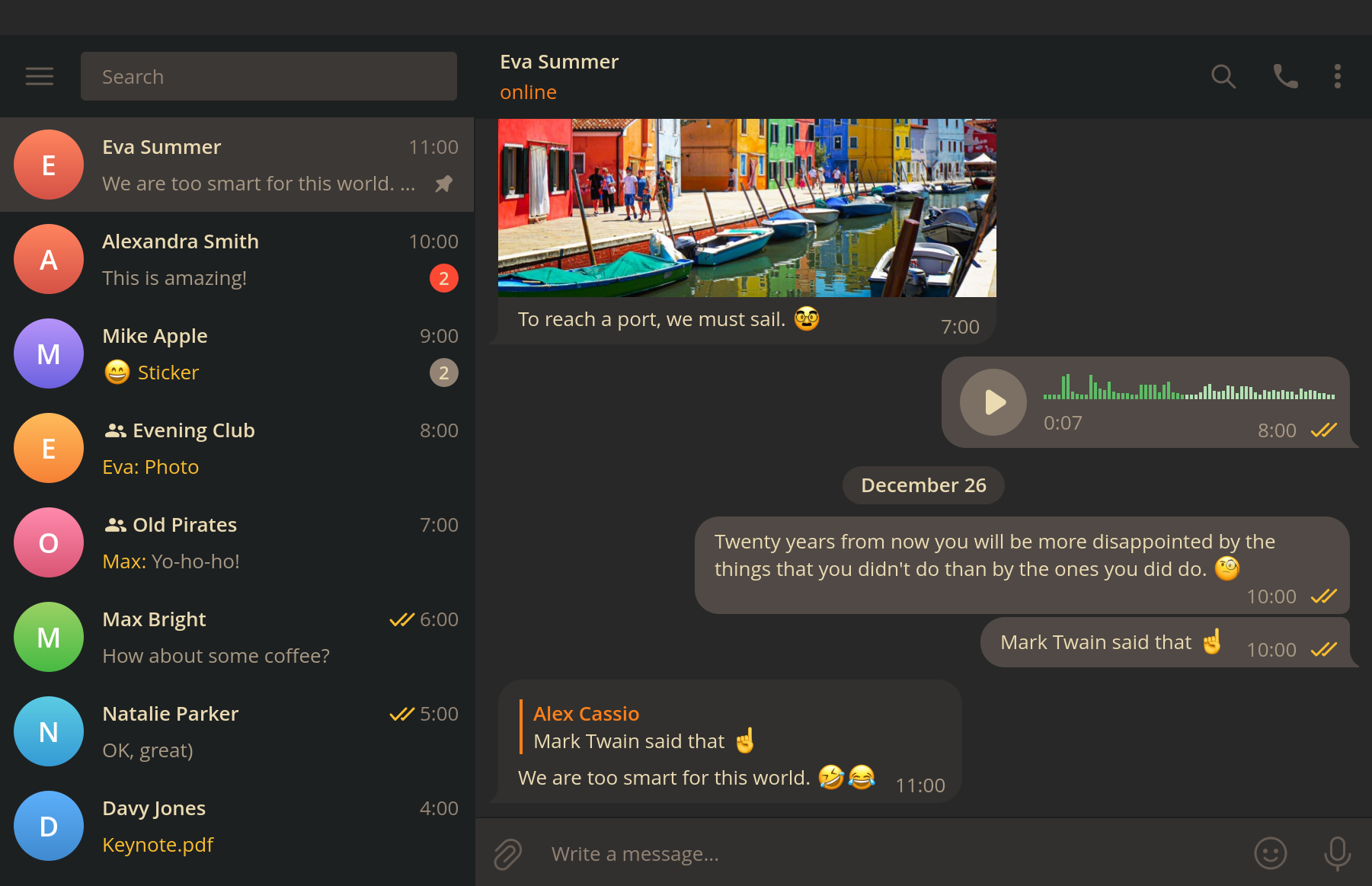 ## Installation 1. Download `gruvbox.tdesktop-theme` from the [releases page](https://github.com/indev29/telegram-gruvbox/releases). 2. Use Settings menu to select the theme or just send `gruvbox.tdesktop-theme` to yourself in Telegram and click on the message. 3. Click "Apply this theme". ## Manual Build Clone repo: ```bash git clone https://github.com/indev29/telegram-gruvbox.git ``` Pack background and colors files: ```bash zip gruvbox.tdesktop-theme background.png colors.tdesktop-theme ``` ## Customization You may not like some of the decisions made for this theme. To change the colors, edit `colors.tdesktop-theme` and follow [manual build](#manual-build) instructions to generate new theme file. Some particular options you may want to edit are listed below. ### Showing scroll bar ``` scrollBarBg: none; // default scroll bar current rectangle, the bar itself (like in chats list) scrollBg: none; // default scroll bar background scrollBarBgOver: none; // default scroll bar current rectangle with mouse over it scrollBgOver: none; // default scroll bar background with mouse over the scroll bar historyScrollBarBg: scrollBarBg; // scroll bar current rectangle, the bar itself in the chat view (adjusted) historyScrollBarBgOver: scrollBarBgOver; // scroll bar current rectangle with mouse over it in the chat view (adjusted) historyScrollBg: scrollBg; // scroll bar background (adjusted) historyScrollBgOver: scrollBgOver; // scroll bar background with mouse over the scroll bar (adjusted) ``` ### Showing title buttons (minimize, maximize, close) ``` titleButtonBg: none; // custom window title minimize/maximize/restore button background when window is inactive (Windows only) titleButtonFg: none; // custom window title minimize/maximize/restore button icon when window is inactive (Windows only) titleButtonCloseBg: none; // custom window title close button background when window is inactive (Windows only) titleButtonCloseFg: none; // custom window title close button icon when window is inactive (Windows only) titleButtonBgOver: titleButtonBg; // custom window title minimize/maximize/restore button background with mouse over when window is inactive (Windows only) titleButtonFgOver: titleButtonFg; // custom window title minimize/maximize/restore button icon with mouse over when window is inactive (Windows only) titleButtonCloseBgOver: titleButtonBgOver; // custom window title close button background with mouse over when window is inactive (Windows only) titleButtonCloseFgOver: titleButtonFgOver; // custom window title close button icon with mouse over when window is inactive (Windows only) titleButtonBgActive: titleButtonBg; // custom window title minimize/maximize/restore button background when window is active (Windows only) titleButtonFgActive: titleButtonFg; // custom window title minimize/maximize/restore button icon when window is active (Windows only) titleButtonCloseBgActive: titleButtonCloseBg; // custom window title close button background when window is active (Windows only) titleButtonCloseFgActive: titleButtonCloseFg; // custom window title close button icon when window is active (Windows only) titleButtonBgActiveOver: titleButtonBgOver; // custom window title minimize/maximize/restore button background with mouse over when window is active (Windows only) titleButtonFgActiveOver: titleButtonFgOver; // custom window title minimize/maximize/restore button icon with mouse over when window is active (Windows only) titleButtonCloseBgActiveOver: titleButtonCloseBgOver; // custom window title close button background with mouse over when window is active (Windows only) titleButtonCloseFgActiveOver: titleButtonCloseFgOver; // custom window title close button icon with mouse over when window is active (Windows only) ``` ## Contribution Have a suggestion? Open an [Issue](https://github.com/indev29/telegram-gruvbox/issues)!
