KO
|
EN
gitlite — search
Search
#javascript
#python
#hacktoberfest
#react
#ai
#typescript
#llm
#go
#golang
#android
#machine-learning
#rust
#deep-learning
#linux
quick-start
★ 23
Open GitHub ↗
ULX3S Quick Start
Download README (.md)
Explore Similar Repositories
App_VirusForecaster
:
Covid-19 Forecaster Web App
export-onenote-to-html
:
A Toolkit that convert OneNote pages into HTML and Markdown with images.
PayMaya-JS-SDK-v2
:
No description available.
Resize-UserProfileDisk
:
Powershell script for compacting User Profile Disk (UPD)
boomadmin
:
boomadmin - MySQL db explorer with SQL builder
// repository documentation
Was this content helpful?
★ 0
(0 ratings)
Select Rating:
★
★
★
★
★
Submit Feedback
Recent Feedback
×
Download README
Do you want to download the
README.md
file for
quick-start
?
Download (.md)
# quick-start ULX3S Quick Start # Know your programmer! Newer versions of the ULX3S, such as those shipped to [Crowd Supply](https://www.crowdsupply.com/radiona/ulx3s) backers, require the [latest version of fujprog](https://github.com/kost/fujprog/releases). Older versions of `fujprog` as well as [ujprog](https://github.com/f32c/tools/tree/master/ujprog) *MAY NOT WORK PROPERLY*. # Connecting ULX3S You need to connect to USB1 (US1) connector to the host computer in order to program the board. Connecting to USB2 (US2) will not work. 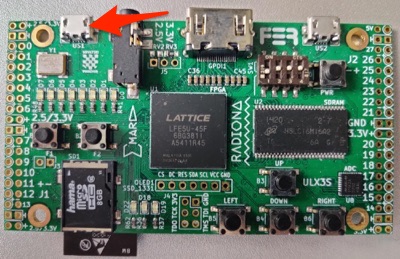 # Getting toolchain binaries ## Precompiled opensource tools for all platforms - https://github.com/emard/ulx3s/blob/master/doc/MANUAL.md#precompiled-opensource-tools-for-all-platforms ## Mac OS X toolchain via homebrew You can get Mac OS X toolchain by running following commands: ``` brew tap kost/homebrew-ulx3s brew install --HEAD project-trellis yosys nextpnr-trellis fujprog ``` # Blink a LED - https://github.com/ulx3s/blink # Building toolchain from source If you want to build complete toolchain from source, there are different ways to build it. ## Building Linux toolchain from source with docker If you want to build complete toolchain yourself, you can rebuild complete toolchain using docker: ``` git clone https://github.com/alpin3/ulx3s/ cd ulx3s make build make bins ``` ## Building Barebones Linux toolchain (coming soon) This installs only the bare essentials (yosys/nextpnr/fujprog) to get started with FPGA programming. For ESP32, RISC-V and other features - see the full toolchain. ## Building Full Linux toolchain from source without docker Another way is to use scripts to build complete toolchain https://github.com/ulx3s/ulx3s-toolchain ``` sudo apt-get install git --assume-yes mkdir -p ~/workspace cd ~/workspace git clone https://github.com/ulx3s/ulx3s-toolchain.git cd ulx3s-toolchain chmod +x ./install_all.sh ./install_all.sh ``` ## Building Full Windows Subsystem for Linux (WSL) toolchain from source without docker This buld assumes [WSL](https://docs.microsoft.com/en-us/windows/wsl/faq) is already installed. WSL2 has not yet been tested. The only difference from regular Linux install is this one puts files on the `C:\Workspace` directory for safe and easy access from Windows. Be aware of the [dangers](https://devblogs.microsoft.com/commandline/do-not-change-linux-files-using-windows-apps-and-tools/) of editing WSL file system from Windows. ``` sudo apt-get install git --assume-yes mkdir -p /mnt/c/workspace/ cd /mnt/c/workspace/ git clone https://github.com/ulx3s/ulx3s-toolchain.git cd ulx3s-toolchain chmod +x ./install_all.sh ./install_all.sh ``` # Next steps Now, you're ready for the next steps, we suggest following: - https://github.com/emard/ulx3s/blob/master/doc/MANUAL.md - https://github.com/emard/ulx3s-misc - https://github.com/ulx3s/fpga-odysseus - https://github.com/emard/ulx3s-examples - https://github.com/emard/ulx3s-bin - https://github.com/kost/ulx3s-ghdl-examples/ Or explore different projects available at: https://ulx3s.github.io/ # Chat and support Discord chanel - https://discord.gg/qwMUk6W (problems/question/general chat) Gitter chanel - https://gitter.im/ulx3s/Lobby (Focused on development)
