KO
|
EN
gitlite — search
Search
#typescript
#ai-agents
#ai
#dsh-plugin
#deepseek-harness
#open-source
#claude-code
#codex
#cli
#developer-tools
#react
#windows
rcloneMon
★ 53
Open GitHub ↗
Web based remote monitor for rclone jobs
Download README (.md)
Explore Similar Repositories
remora
:
REMORA: REsource MOnitoring for Remote Applications
remonit
:
Remote monitoring from any device.
pcs-remote-monitoring-webui
:
Azure IoT PCS Remote Monitoring Web UI
azure-iot-pcs-remote-monitoring-java
:
Azure IoT Java solution for Remote Monitoring
Intelligent-remote-video-monitoring
:
本系统以树莓派3B+为嵌入式计算平台,与CSI摄像头、二自由度旋转云台结合,主体使用Python和PHP编程,应用I2C通信与OpenCV等前沿技术,通过Frp内网穿透打通内外网数据传输,实现具有远程实时视频监控、运动检测及画面截图邮件预警、远程控制云台摄像头转动、监控画面截取及视频录制、Web端在线预览视频/图片、下载或删除文件等功能的远程流媒体传输系统。
// repository documentation
Was this content helpful?
★ 0
(0 ratings)
Select Rating:
★
★
★
★
★
Submit Feedback
Recent Feedback
×
Download README
Do you want to download the
README.md
file for
rcloneMon
?
Download (.md)
# rcloneMon Web based remote monitor for rclone jobs - Version 0.9b # Introduction **rcloneMon** is a set tools focused on monitoring [`rclone`](https://rclone.org/) **jobs**. Its main objetive it to manage (babysit) rclone jobs that have a reasonably long run time or run constantly in the background. It can, however, monitor any `rclone` job, provided that it runs long enogh to allow monitoring. **rcloneMon** is made of 3 major components: - A **wrapper script** for rclone, that provides enhanced real-time transfer progress statistics (that are currently not available with `rclone`), as well as create persistent job run information. - A **web based monitor** for `rclone` jobs, that uses `rclone`'s Remote Control feature to obtain progress information in real-time. Optionally, it can use the enhanced statistics provided by the **wrapper script**. - A **job dashboard** that allow monitoring/babysiting multiple jobs on different machines that integrates the **web based monitor**. All components share a common configuration file (`config.json`). This allow a seamless flow of information for a tight integration. Although the main target for **rcloneMon** are jobs running on headless boxes (such as NAS boxes), it can be used to monitor any `rclone` job running on the local desktop or remote hosts. 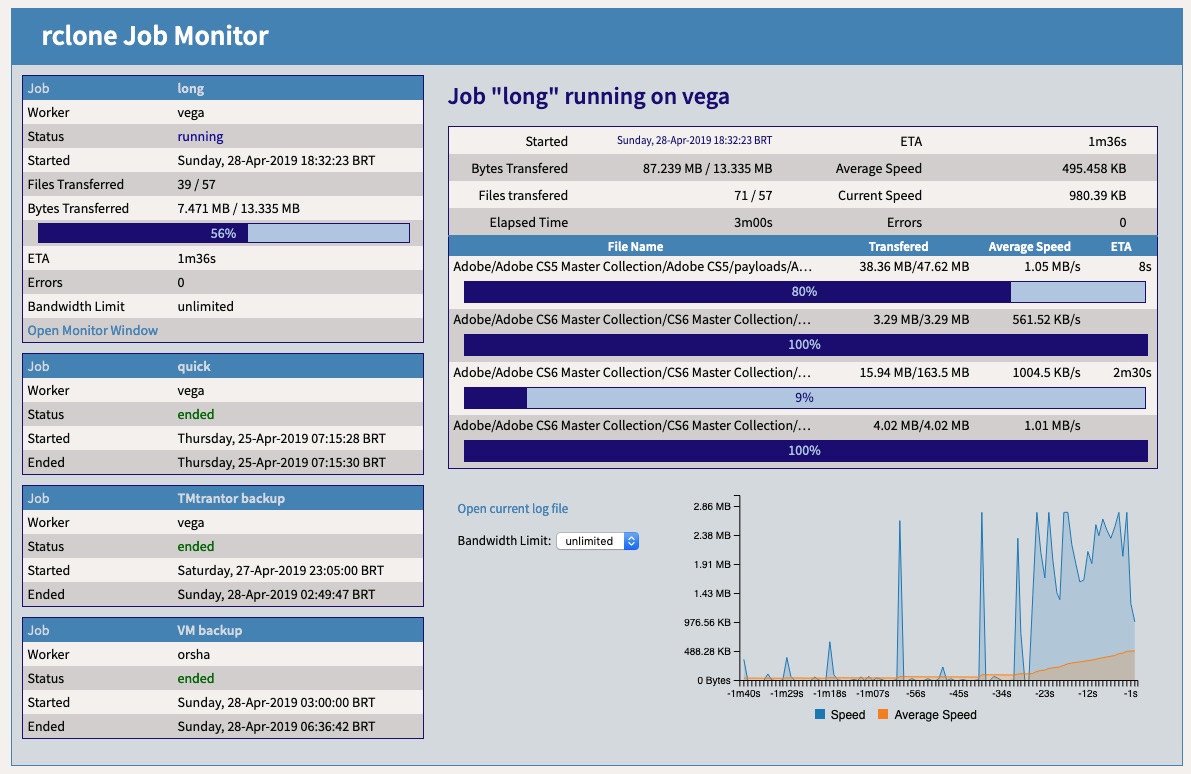 # Features - Web based interface - Graphical progress information at the **job** and file levels - Bandwidth usage graph (per **job**) - Bandwidth limit control - Persistent **job** statistics and results - Dashboard with extensive **job** statistics, even for finished or failed jobs - **job** status notification (using external exit) - Support for multiple simultaneous **jobs** running on multiple **hosts** # Concepts ## `rclone` job modes Currently `rclone` support two types of jobs: - A single synchronous `rclone` job, that are the ones started directly by the `rclone` command. - Multiple asynchorous `rclone` jobs, that are started with `rclone` Remote Control (`rclone rc` command) to run on a `rclone` remote controlled daemon, started with `rclone rcd`. ### Current limitations The ideal and more efficient scenario for monitorable jobs is to use asynchronous `rclone` jobs. However, the current Remote Control API does not provide fine grain progress information on a per job basis. As a result **rcloneMon** currently uses synchronous `rclone` jobs. When the remote control API is enhanced to provides per job statistics **rcloneMon** will provide support for asynchronous jobs. ## Roles **rcloneMon** bases its operation on the following roles: ### Host As expected, the **host** is the actual computer where an instance of `rclone` is running. It's defined by one IP address or host name. ### Worker A **worker** is one instance of `rclone` running on a **host** with Remote Control active. It's defined by the **host** IP address or name, the TCP port that the Remote Control is answering requests on and protocol (HTTP or HTTPS). There can be multiple **workers** in a host, provided that they are assigned (bind) to different TCP ports (using `rclone` option `--rc-addr`). ### Job A **job** is a `rclone` operation that will be executed by a particular **worker**. There can be several **jobs** associated with a single **worker**. At this time, **rcloneMon** only supports **workers** for synchronous **job**. This (temporary) limitation will restrict a single active **job** per **worker**. **rcloneMon** does not perform any check for multiples **jobs** for a **worker**, but `rclone` will fail to start because the TCP port is already in use by the other instace of the **worker** (synchronous). # Future development Once (and if) `rclone` provides per job statistics (for asynchronous jobs in a single rclone instance), rcloneMon will be enhanced to allow multiple asynchronous simultaneous **jobs** on a **worker**. Current goals are: 1. Support asynchronous jobs [require feature change in rclone] 2. Create a modular component 3. Job run history # Dependencies First and foremost, the **wrapper scripts** were written and tested under Linux, but should run without problems on other \*nix flavors (such as macOS). Running under Windows will require several adaptations, not possible at this time. ## Web Server All **rcloneMon** files served over HTTP are static. **rcloneMon** don't require a dedicated webserver. `rclone` can act as a web server for regular (static) files when running with the `--rc-files` option, combined with the `--rc` option or running in Remote Control Daemon mode `rcd`). However, it can make use of an existing web server (such as Apache) for serving all the static files, while `rclone` will still be used to provide real-time statistics over HTTP. One can rely on an instance of `rclone` that is running a **job** to serve static files, along with servicing real-time statistics. The drawback here is that when the **job** finishes, the web server will also terminate, and it will no longer be possible to obtain **job** status for the dashboard. There are two ways to overcome this limitation: 1. Run a dedicated `rclone` instance (`rclone rcd --rc-files` plus other options) just to serve the static files. 2. Run a separate web server, such as Apache, for these files. ### CORS considerations When using `rclone` as the sole web server there are no extra CORS considerations. When running with another web server it may be necessary to properly configure the server for CORS, if multiple servers are involved. For Apache, the proper htaccess file (to be renamed to .htaccess) is provided to allow cross-domain requests to be properly handled as needed. ## Other dependencies **rcloneMon** componenents have the following dependecies: - Bandwidth usage graphics use [C3.js](https://c3js.org/), as well as its dependency [D3.js](https://d3js.org/). - The **wrapper script** is written in `PHP` (5.6+), as handling JSON data in regular `sh` or `bash` is not a very sane option. This should not be a big problem as PHP is readly available (normally built-in) on most modern OS, including popular NAS boxes (such as QNAP and Synology). # Installing ## C3 and D3 All project files, including C3.js (please use c3.min.js and c3.min.css) and D3.js (d3.min.js) must be placed in a single directory accessible by the selected web server. ## PHP scripts Like any other \*unix scripts, PHP scripts requires the first line to contain the path to the PHP executable/interpreter, **PLEASE UPDATE** the *shebang* (first line, that starts with `#!`) to reflect the location of the PHP binary on your system, and if necessary the location of the php.ini file (if using non standard PHP settings). Note that PHP *shebangs* cannot have more than a single option and it moust not have blanks. Therefore, use `-c/pathto/php.ini` and not `-c /pathto/php.ini` or it will not work. Most of the time the default PHP instalation and configuration will sufice, being the only change that may be necessary is to define a default "timezone" (that can be also specified directly on the **rcloneMon** `config.json` file). The **wrapper script** is actually a collection of at least 3 scripts: * `myrclone` - that is the main script, and is used to start a job: ``` myrclone jobname [basedir] ``` * `proclog` - that is used to attach to and process the log file while it's being written by `rclone`, to produce the real-time and persistent *status file*. * `notify` - a sample notification exit, also written in PHP, that will be called by `myrclone` at the start and end of a job, receiving as parameter the full path of the *status file*. By examining the *status file* the script can send a message (using any available method) or email to the appropriate user. Writting and configuring this exit is beyond the scope of **rcloneMon**. ### cron `myrclone` script is suitable for use with `cron`. Just follow these simple rules to properly integrate with `cron`: 1. As with any script, it's better to invoke the shell passing the script as a parameter. For example (your PHP may be at a differnent location). 2. Divert `STDOUT` to `/dev/null`. The technique used to hook to the log file may cause problems if the job is running without an attached TTY. ``` /sbin/php myclone jobname > /dev/null ``` # Configuration ## Paths and URLs Proper settings for path and URLs are required to allow all the components to find the information they need. There are two files specified in `config.json`: 1. The log file: this is the log file that is generated by the `rclone` **worker** that must run with the `-v` option in order to write overall **job** progress statistics. 2. The status file: this file is generated and updated by **wrapper script** to provide missing progress information as well as persistent job information. Status files are served as static files by the selected web server. Both files need to be accessed by the scripts and served over the web, so it's necessary to have the proper path and URL settings for each one. ### basedir Paths that are not absolute (start with a `/`) will have the `basedir` prepended. For the `basedir` the following defaults apply, in order, to **compute** the actual value used: 1. the directory where the script is located 2. the directory passed as the second parameter for the **wrapper script** 3. the `basedir` specification for the **worker** 4. the `basedir` specification for the **job** ### baseURL Like paths, any relative URL will be anchored at `baseUR` with the following defaults, in order, to **compute** the actual value used: 1. The base for the current page (means located at the same directory as the page) 2. the `baseurl` specification for the **worker** 3. the `baseurl` specification for the **job** ## config.json file The `config.json` file must be placed on the same directory as all other files. It defines all **jobs** and associated **workers**, as well as some OS **enviroment** related settings (used only by the **wrapper script**). The file contains a single JSON *object* with the following *keys*: ### workers The `workers` *value* is an *array* of *objects*, each one defining a **worker**. For each **worker** the following *keys* are available: * `name` - an arbritary *string* used to identify this **worker** for linking **jobs** to it (using the `worker` *key* on the **job**). * `description` - an arbritrary *string* to describe the **worker**. At this time it serves only as a comment. * `url` - a *string* with the URL that is used to submit Remote Control commands to this server. * `bandwidth` - an object with 2 *keys*: 1. `speedcap` - an *integer* defining the maximum bandwidth in bytes available for this **worker**. If defined, will be used to prevent out-of-bounds errors (outliers) in speed calculations. 2. `settings` - an *object* that contains the values for the bandwidth setting dropdown menu. The *key* is the what gets send to `rclone` and the *value* is what is displayed on the **monitor** GUI for selection. The first pair **must match** the default bandwidth setting for all **jobs** that will use this **worker**. * `notify` - a *string* with the full path for the notification exit (see bellow) executable. * `basedir` - a *string* defining the base directory path that will be prepended to the statusfile and logfile for all **jobs** associated with the **worker**. It can be overwritten at the **job** level. * `baseurl` - a *string* defining the base URL path that will be prepended to the statusfile and logfile URLs for all **jobs** associated with the **worker**. It can be overwritten at the **job** level. * `statusfile` - a *string* defining the name and path of the status file to use. If the path is relative, it will be prepended by the **computed** `basedir`. It can be overwritten at the **job** level. * `logfile` - a *string* defining the name and path of the log file to use. If the path is relative, it will be prepended by the **computed** `basedir`. It can be overwritten at the **job** level. ### jobs The `jobs` *value* is an *array* of *objects*, each one defining a **job**. For each **job** the following *keys* are available: * `name` - an arbritary *string* used to identify this **job**. Used for starting the **monitor** (passed in the URL query string) and for identifying the **job** in the **dashbord**. * `description` - an arbritrary *string* to describe the **job**. At this time it serves only as a comment. * `worker` - a *string* that will be used to link (identify) to the **worker** that will used to run the **job**. Must match the `name` of the **worker**. * `command` - a *string* with the complete `rclone` command to be executed by the **wrapper script**. Must include *all* necessary parameters for running in Remote Control mode (`--rc`, `--rc-addr`, `-v`), set the log file location (to match the logfile specification that will be *computed*, set any authentication paramters, the `rclone` action to be performed and, if necessary, the **root** for the integrated web server (`--rc-files`). * `basedir` - a *string* defining the base directory path that will be prepended to the statusfile and logfile for all **jobs** associated with the **worker**. * `baseurl` - a *string* defining the base URL path that will be prepended to the statusfile and logfile URLs for all **jobs** associated with the **worker**. * `statusfile` - a *string* defining the name and path of the status file to use. If the path is relative, it will be prepended by the **computed** `basedir`. * `logfile` - a *string* defining the name and path of the log file to use. If the path is relative, it will be prepended by the **computed** `basedir`. ### enviroment The `enviroment ` *value* is an *object*, with each *key* defining a setting of the operating enviroment. The following *keys* are available: * `timezone` - [optional] PHP does not use the system defined time zone. You may alternatively define it in the php.ini that will be used by the scripts (see PHP notes above). Defaults to UTC. * `systemp` - [optional] path to the system temporary directory that is wiped out on every boot. Defaults to `/var/run`. Here is a sample `config.json`. **It will not work without modifications**. ``` { "workers": [ { "name":"worker1", "description":"Description of worker #1", "url":"http://server1.example.com:5572", "baseurl":"http://server1.example.com/rclone/", "bandwidth":{"speedcap":2883584,"settings":{"off":"unlimited","500k":"500KBps","1M":"1MBps","1.500M":"1.5MBps","2M":"2MBps","2.500M":"2.5MBps","3M":"3MBps"}}, "notify":"/usr/share/rclone/notify" }, { "name":"worker2", "description":"Description of worker #2", "url":"http://server2.example.com:5572", "baseurl":"http://server2.example.com/rclone/", "bandwidth":{"speedcap":2883584,"settings":{"off":"unlimited","500k":"500KBps","1M":"1MBps","1.500M":"1.5MBps","2M":"2MBps","2.500M":"2.5MBps","3M":"3MBps"}}, "notify":"/usr/share/rclone/notify" } ], "jobs": [ { "name":"Backup1", "description":"Backup Job #1", "worker":"worker1", "command":"/usr/bin/rclone --rc --rc-addr=0.0.0.0:5572 -v --log-file=/usr/share/rclone/backup1/rclone.log --tpslimit=3 --checkers=3 --drive-chunk-size=32M --rc-files=/usr/share/rclone --rc-user=xxxx --rc-pass=xxxx sync /file/tobackup1 remote:backup1", "basedir":"/usr/share/rclone", "logfile":"backup1/rclone.log", "statusfile":"backup1/rclone.status" }, { "name":"Backup2", "description":"Backup Job #2", "worker":"worker2", "command":"/usr/bin/rclone --rc --rc-addr=0.0.0.0:5572 -v --log-file=/usr/share/rclone/backup2/rclone.log --tpslimit=3 --checkers=3 --drive-chunk-size=32M --rc-files=/usr/share/rclone --rc-user=xxxx --rc-pass=xxxx sync /file/tobackup2 remote:backup2", "basedir":"/usr/share/rclone", "logfile":"backup2/rclone.log", "statusfile":"backup2/rclone.status" }, { "name":"quick1", "description":"Quick rclone test for worker #1", "worker":"worker1", "command":"/usr/bin/rclone -v --log-file=/usr/share/rclone/test/quick.log lsf remote:", "basedir":"/usr/share/rclone", "logfile":"test/quick.log", "statusfile":"test/quick.status" }, { "name":"long1", "description":"Long rclone test for worker #1", "worker":"worker1", "command":"/usr/bin/rclone --rc --rc-addr=0.0.0.0:5572 -v --log-file=/usr/share/rclone/test/long.log --tpslimit=3 --checkers=3 --drive-chunk-size=32M --rc-files=/usr/share/rclone --rc-user=xxxx --rc-pass=xxxx sync /file/junkpile remote:garbage1", "basedir":"/usr/share/rclone", "logfile":"test/long.log", "statusfile":"test/long.status" }, { "name":"quick2", "description":"Quick rclone test for worker #2", "worker":"worker2", "command":"/usr/bin/rclone -v --log-file=/usr/share/rclone/test/quick.log lsf remote:", "basedir":"/usr/share/rclone", "logfile":"test/quick.log", "statusfile":"test/quick.status" }, { "name":"long2", "description":"Long rclone test for worker #2", "worker":"worker2", "command":"/usr/bin/rclone --rc --rc-addr=0.0.0.0:5572 -v --log-file=/usr/share/rclone/test/long.log --tpslimit=3 --checkers=3 --drive-chunk-size=32M --rc-files=/usr/share/rclone --rc-user=xxxx --rc-pass=xxxx sync /file/junkpile remote:garbage2", "basedir":"/usr/share/rclone", "logfile":"test/long.log", "statusfile":"test/long.status" } ], "environment": { "timezone":"America/New_York", "systemp":"/var/run" } } ``` ## Authentication When connecting to `rclone` for statistics or when using it as the main web server, basic authentication `--rc-user` + `--rc-pass` or `--rc-htpasswd` can be used without problems and the web browser will ask for the authentication only once per session. If using another web server and authentication is required, please follow the appropriate instructions for configuring basic authentication. ## Notification **rcloneMon** allows the definition of a *notification exit* that will be called when the **job** is started and again when it ends. The exit program, along with any optional parameters, is specified in the `config.json` file. The actual command to be executed will have the full path to the **status file** appended. The exit program (that can be a binary or a script) must read the *status file* to determine the current state of the **job**. Send the actual notification and the actual proceedure to do it is not part of **rcloneMon** or this document. Note file `notify.template` contain a sample *notification exit* written in PHP to serve as a starting point. ## Status file The *status file* contain a single JSON object with the following keys: * `status` - Current **job** status ('running', 'ended' or 'failed') * `job` - **job** name * `worker` - **worker** name * `start` - start timestamp (in seconds since the UNIX EPOCH) * `starttime` - formated start time * `end` - end timestamp (in seconds since the UNIX EPOCH) * `endtime` - formated end time * `elapsed` - seconds elapsed since the start (formated) * `ETA` - ETA (as estimated by `rclone`) * `bandwidth` - current bandwitdh limit (see below) * `transferredbytes` - bytes transferred * `transferredfiles` - files transferred * `totalbytes` - total bytes estimated to be transferred by the **job** * `totalfiles` - total files estimated to be transferred by the **job** * `errors` - number of errors * `lastrc` - last exit code from `rclone` Notes: 1. Not all *keys* will be present at all times. 2. Bandwith limitation cannot be queried, so initially it's set to the first value specified in the `config.json` bandwidth settings, and will correctly change to when set in the GUI or externally directly with Remote Control. 3. totalbytes and totalfiles may change as `rclone` revises these numbers (running checks). # Using **rcloneMon** (Finally!) Once the web server (stand alone or rclone) is running, open the URL pointing to the **dashboard** (dashboard.html) on your favorite web browser. Alternatively, you may monitor a running job directly by connecting to the **monitor** url and passing the **job** name. ``` http://server1.example.com:5572/rcloneMon.html?job=jobname ```
