KO
|
EN
gitlite — search
Search
#javascript
#python
#hacktoberfest
#react
#ai
#typescript
#llm
#go
#golang
#android
#machine-learning
#rust
#deep-learning
#linux
sfcc-jobs-executor
★ 10
Open GitHub ↗
Execute SFCC jobs from VSCode.
Download README (.md)
Explore Similar Repositories
kos-virtualbox-guest
:
VirtualBox Guest Additions driver for KolibriOS.
cpp-shellcode-inject
:
C++ shellcode injection with Createremotethread
edgerouter-spi-repair
:
Material to repair EdgeRouters with faulty SPI memory
zkBOX
:
Artemis Academy capstone project
homelab
:
No description available.
// repository documentation
Was this content helpful?
★ 0
(0 ratings)
Select Rating:
★
★
★
★
★
Submit Feedback
Recent Feedback
×
Download README
Do you want to download the
README.md
file for
sfcc-jobs-executor
?
Download (.md)
# SFCC Jobs Executor Run SFCC jobs from VSCode and view the job logs in the output panel. 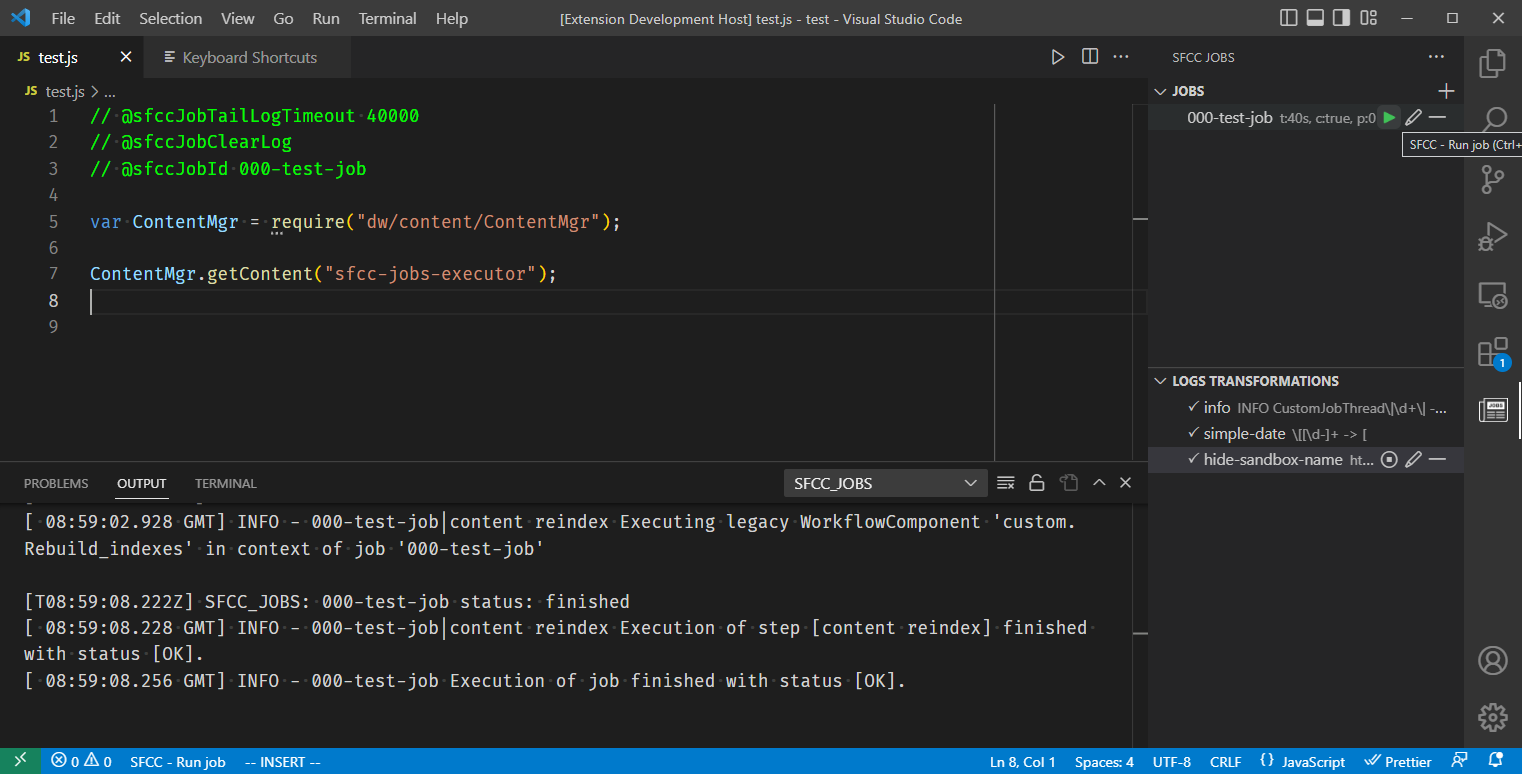 ## Features - Read the job id from the comments on the active file - Read a specific job using a keyboard shortcut - Show the job execution logs in the output window - Manage and run jobs from a dedicated panel - Apply regex transformation rules to the job output logs ## Installation You can install it from the [marketplace](https://marketplace.visualstudio.com/items?itemName=ionutvmi.sfcc-jobs-executor). `ext install ionutvmi.sfcc-jobs-executor` ## Configuration The job configurations can be controlled from the dedicated panel: 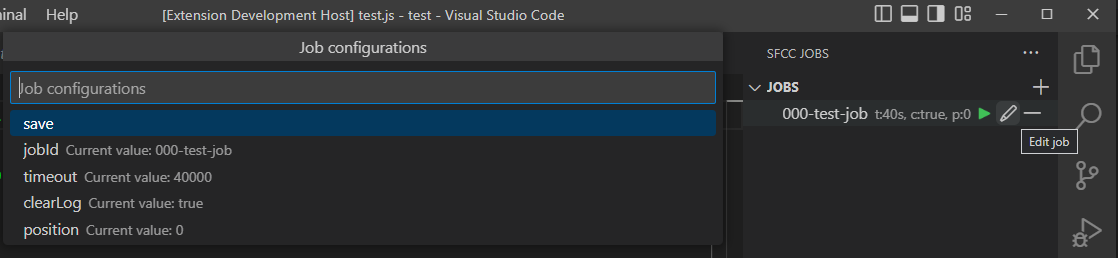 The transformations can be controlled from the dedicated panel: 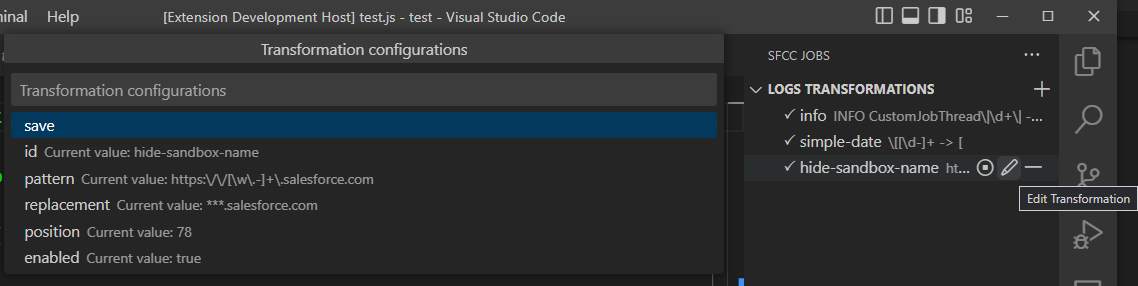 ### Logs transformations The log transformations are a set of regular expressions replace patterns that are applied before printing the text in the output panel. The enabled rules have a checkmark before their name. The rules are applied in the order they are listed in the panel. The sorting is done by the position attribute. The regex is applied with the global modifier enabled. ### Business Manager Administration > Site Development > Open Commerce API Settings Data - Global ```json { "clients": [ { "allowed_origins": [], "client_id": "", "resources": [ { "resource_id": "/jobs/{job_id}/executions", "read_attributes": "(**)", "write_attributes": "(**)", "methods": ["post"] }, { "resource_id": "/jobs/{job_id}/executions/{id}", "read_attributes": "(**)", "write_attributes": "(**)", "methods": ["get"] } ] } ] } ``` Administration > Organization > WebDAV Client Permissions ```jsonc { "clients": [ { "client_id": "", "permissions": [ { "path": "/Logs", "operations": ["read"] } ] } ] } ``` ### In the VSCode workspace ```jsonc // dw.json file { "hostname": "", "username": "", "password": "", "client-id": "", "client-secret": "" } ``` If you are using access tokens and you want to use a dedicated one for this extension: ```jsonc { "hostname": "", "bm-username": "", "bm-password": "", "client-id": "", "client-secret": "" } ``` If you don't need to have support for debugging you can use the following minimal configuration: ```jsonc "hostname": "", "client-id": "", "client-secret": "" ``` ```js // In any file you can specify the job id and timeout // The job id should be last in the configuration list. // @sfccJobTailLogTimeout 60000 // @sfccJobClearLog // @sfccJobId 000-test-job // or jsdoc style /** * @sfccJobTailLogTimeout 60000 * @sfccJobClearLog * @sfccJobId 000-test-job */ ``` ## Keyboard shortcuts To configure a custom keyboard shortcut: ```jsonc // keybindings.json // run the job from the current file { "key": "ctrl+shift+f6", "command": "sfcc-jobs-executor.runJob" } // run a specific job regardless of the current file { "key": "ctrl+shift+f6", "command": "sfcc-jobs-executor.runJob", "args": { "job": { "id": "000-test-job", "timeout": 60000, "clearLog": true } } } ``` ## Release Notes The release notes are available in the [CHANGELOG.md](./CHANGELOG.md) document. --- ## Author Mihai Ionut Vilcu - [github/ionutvmi](https://github.com/ionutvmi) - [twitter/mihai_vlc](http://twitter.com/mihai_vlc) **Enjoy!**
