KO
|
EN
gitlite — search
Search
#typescript
#ai-agents
#ai
#dsh-plugin
#deepseek-harness
#open-source
#claude-code
#codex
#cli
#developer-tools
#react
#windows
comp-m2
★ 174
Open GitHub ↗
Comp Mark II – Simple 4-bit virtual computer
Download README (.md)
Explore Similar Repositories
Hanabi
:
[Deprecated] UICollectionViewLayout subclass with a focus on UICollectionViewCell content.
azure-cosmosdb-js-server
:
The JavaScript SDK for server-side programming in Azure Cosmos DB
molecular-design-toolkit
:
Notebook-integrated tools for molecular simulation and visualization
xpmjs
:
微信小程序云端增强 SDK
multipart-kit
:
🏞 Parses and serializes multipart-encoded data with Codable support.
// repository documentation
Was this content helpful?
★ 0
(0 ratings)
Select Rating:
★
★
★
★
★
Submit Feedback
Recent Feedback
×
Download README
Do you want to download the
README.md
file for
comp-m2
?
Download (.md)
Comp Mark II ============ #### Updated version of [**Comp**](https://github.com/gto76/comp-cpp) – Simple 4-bit/1 Hz virtual computer for learning purposes 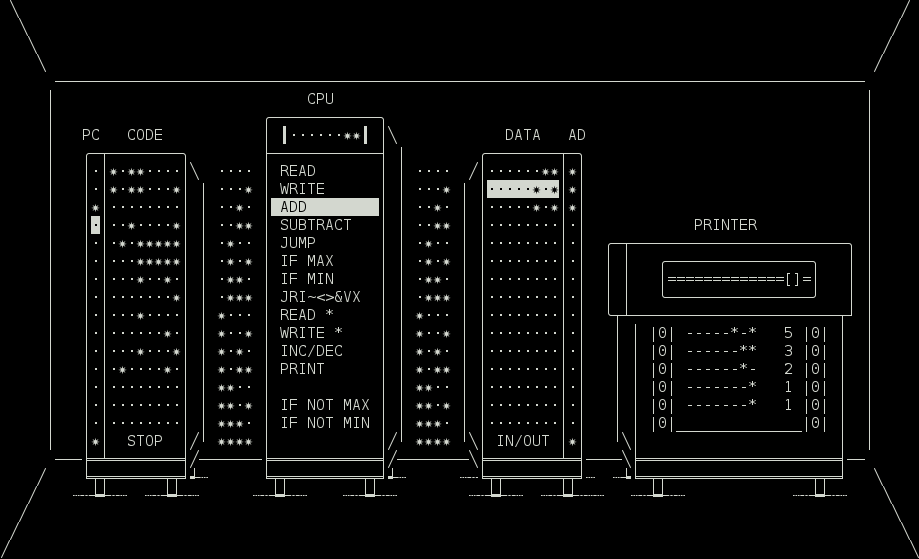 **For quick start see [HOW TO RUN](#how-to-run-on)** Overview -------- * Processor has one 8 bit register. * Ram is separated in two address spaces; one for instructions, called CODE, and another for data, called DATA. * All instructions are 8 bits long. * Execution starts at the first address (0) of the CODE ram. * Execution stops when program reaches the last address (15) of the CODE ram. * Most of instructions consist of instruction code and address: ``` instruction code - 4 bits | +-- address - 4 bits v v ----***- -> READ 14 -> Copy value stored at address 14 of DATA ram to register. ``` * All addresses specified by instructions refer to DATA ram, except for addresses of *Execution Control* instructions (`JUMP`, `IF MAX`, `IF MIN`, ...). They refer to CODE part of ram. * Some instructions (`JRI~<>&V`) do not specify address. They operate on register (`SHIFT L/R`, `NOT`, ...) or between register and predefined DATA address (`AND`, `OR`, ...). * Whatever gets written to the last address is sent to the printer, or to *stdout* if program is running in a non-interactive mode. * When reading from the last address (15), we get a random byte value, or a single word from *stdin*, if program is running in non-interactive mode. * In this word every `*` is interpreted as *true* and all other characters as *false*. If word starts with a digit, it is then read as a number and converted appropriately. * Program will start in a non-interactive mode when any input is piped in, or any option is given. For instance `echo | ./comp <file>` * Programs can be saved with `s` key and loaded by passing their name as a parameter. * If more than one filename is passed, the computers will be chained together (*stdin* > *comp-1* > *comp-2* > ... > *stdout*). * If folder is passed, all files in that folder that have suffix `.cm2` will be loaded in an alphabetical order. Instruction set --------------- Most of the instructions, together with the highlighted word that they use/modify, are pretty self-explainatory. Exception are instructions that start with `-***`, and are a part of `JRI~<>&VX` instruction cluster. They are: * `J` – JUMP_REG, * `R` – READ_REG, * `I` – INIT, * `~` – NOT, * `<` – SHIFT_L, * `>` – SHIFT_R, * `&` – AND, * `V` – OR, * `X` – XOR. (Use Shift–Left/Right Arrow to easily shift between them.) Detailed descriptions of all instructions can be found [**HERE**](doc/instruction-set.md). Keys ---- * `Space` – Flip bit * `Tab` – Switch address space * `Enter` – Start/pause execution * `Esc` – Cancel execution * `Delete`, `Backspace` – Delete word or move following words up if empty * `Insert`, `]` – Insert empty word and move following words down * `s` – Save ram to textfile named `punchcard-<num>.cm2`. To load it, start program with `./comp <file>` * `q` – Save and quit Detailed descriptions of all keys can be found [**HERE**](doc/keys.md). Options ------- * `--non-interactive`, `-n` – Runs program without an interface. Output is sent to *stdout* instead of a printer. This option is not necessary if any other option is present, or if input is piped in. * `--char-output`, `-c` – Converts numbers to characters using ASCII standard when printing to *stdout*. * `--filter`, `-f` – Convert characters to numbers when reading from *stdin*, and numbers to characters when printing to *stdout*. * `--game`, `-g` – Same as *filter*, but reads characters directly from keyboard. * `parse` – Converts program to c++ code (other options may be specified). * `compile` – Compiles program to executable file, by converting it to c++ code and then running g++ compiler (other options from above may be specified). Only difference between compiled program and one run on the Comp Mark II is in execution speed. How to run on… -------------- ### Windows * Install *Tiny Core Linux* on *VirtualBox* using this [**instructions**](https://github.com/gto76/my-linux-setup/tree/gh-pages/conf-files/tiny-core-linux). * Run the *UNIX* commands. ### UNIX *Make* and *g++* need to be installed first. On *Ubuntu* and *Debian* you can get them by running `sudo apt-get install build-essential`, on *OS X* they get installed automatically after running *make*. ``` $ git clone https://github.com/gto76/comp-m2.git $ cd comp-m2 $ ./run ``` ### Docker ``` $ docker run -it --rm mvitaly/comp-m2 <options> ``` Examples -------- #### Fibonacci Sequence ``` $ ./comp --non-interactive examples/fibonacci.cm2 -------* 1 -------* 1 ------*- 2 ------** 3 -----*-* 5 ----*--- 8 ... ``` #### Multiply ``` $ echo "3 4" | ./comp examples/multiply.cm2 ----**-- 12 ``` #### Hello World ``` $ ./comp --char-output examples/hello-world.cm2 Hello world ``` #### To Upper Case ``` $ echo "Hello world" | ./comp --filter examples/to-upper-case.cm2 HELLO WORLD ``` #### Cat and Mouse Two player game ``` $ ./comp compile --game examples/cat-and-mouse/ Compiled as cat-and-mouse $ ./cat-and-mouse ``` ``` ################## # # # C # # # # # # # # # # # # # # # # # # # # # # # # # # m # # # ################## ``` Further Development ------------------- Check out the blueprint of [**Mark III**](https://github.com/gto76/comp-m2/issues/4) model.
