KO
|
EN
gitlite — search
Search
#typescript
#ai-agents
#ai
#dsh-plugin
#deepseek-harness
#open-source
#claude-code
#codex
#cli
#developer-tools
#react
#windows
ideaweaver
★ 65
Open GitHub ↗
No description available.
Download README (.md)
Explore Similar Repositories
CoSurfGS
:
CoSurfGS: Collaborative 3D Surface Gaussian Splatting with Distributed Learning for Large Scene Reconstruction
obsidian-tab-panels
:
Create tab panels to organize content into sections.
MSE_Fall2024
:
No description available.
RefMask3D
:
[ACM MM-2024] RefMask3D: Language-Guided Transformer for 3D Referring Segmentation
PU-SignUpBot
:
自动报名pu口袋校园的python脚本
// repository documentation
Was this content helpful?
★ 0
(0 ratings)
Select Rating:
★
★
★
★
★
Submit Feedback
Recent Feedback
×
Download README
Do you want to download the
README.md
file for
ideaweaver
?
Download (.md)
# IdeaWeaver [](https://github.com/ideaweaver-ai-code/ideaweaver/actions/workflows/basic-test.yml) [](https://www.python.org/downloads/release/python-3120/) [](https://opensource.org/licenses/MIT) [](https://ideaweaver-ai-code.github.io/ideaweaver-docs/) [](https://raw.githubusercontent.com/ideaweaver-ai-code/ideaweaver/main/) A comprehensive CLI tool for AI model training, evaluation, and deployment with advanced RAG capabilities and MCP (Model Context Protocol) integration. Train, fine-tune, and deploy language models with enterprise-grade features. ## IdeaWeaver Architecture 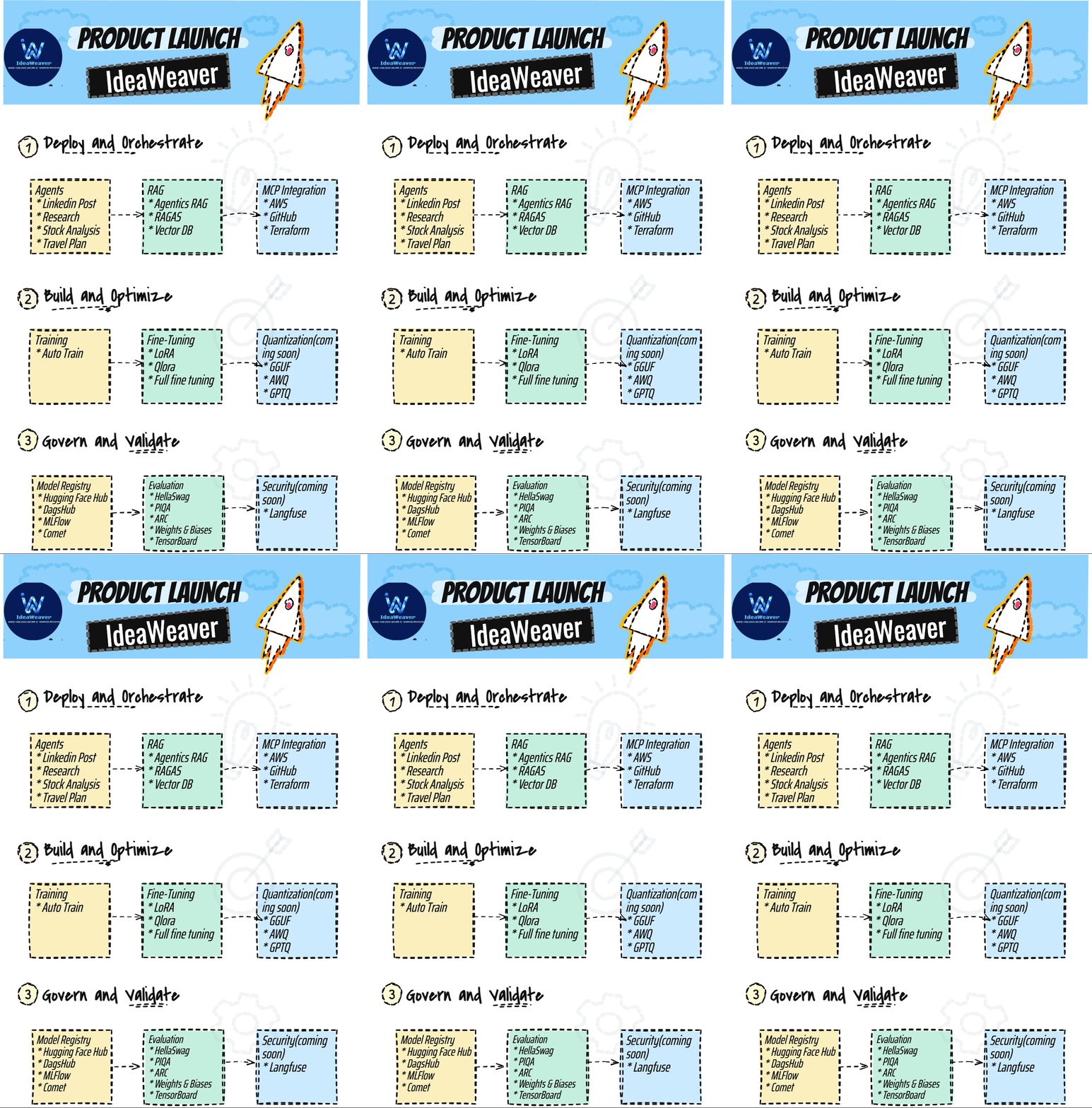 ## Key Features - **One-Click Setup** - Automated Python 3.12 environment with all dependencies - **Advanced RAG** - Traditional + Agentic RAG with multiple vector stores,RAGAS - **Flexible Training** - LoRA, QLoRA, and full fine-tuning support - **Comprehensive Evaluation** - Built-in benchmarks + custom metrics - **Docker & Kubernetes** - Containerize and deploy models with FastAPI servers - **MCP Integration** - GitHub, Terraform and AWS integrations - **Multi-Agent Workflows** - CrewAI pipeline support - **Configuration Validation** - YAML validation and schema checking ## 🚀 Quick Start ### Installation ```bash # One-line installation git clone https://github.com/ideaweaver-ai-code/ideaweaver.git cd ideaweaver chmod +x setup_environments.sh ./setup_environments.sh ``` ### Environment Setup > **⚠️ Important:** IdeaWeaver requires Python 3.12. Make sure you have Python 3.12 installed before proceeding. 1. **Check Python Version** ```bash python --version # Should show Python 3.12.x ``` 2. **Activate the Environment** ```bash # On Unix/macOS source ideaweaver-env/bin/activate ``` 3. **Verify Installation** ```bash ideaweaver --help ``` ## 📚 Core Usage Examples ### Basic Model Training ```bash # Train a model using a config file ideaweaver train --config configs/training_config.yml # Or train with command-line options ideaweaver train \ --model google/bert_uncased_L-2_H-128_A-2 \ --dataset ./datasets/training_data.csv \ --task text_classification \ --project-name cli-final-test \ --epochs 1 \ --batch-size 4 \ --learning-rate 2e-05 \ --verbose ``` ### RAG (Retrieval-Augmented Generation) ```bash # Initialize a new RAG system ideaweaver rag init --name my_rag_system # 1. Create a knowledge base ideaweaver rag create-kb --name mykb --embedding-model sentence-transformers/all-MiniLM-L6-v2 # 2. Ingest documents into the knowledge base ideaweaver rag ingest --kb mykb --source ./documents/ # 3. Query the knowledge base ideaweaver rag query --kb mykb --question "What is machine learning?" ``` ### MCP (Model Context Protocol) Integration ```bash # See all available MCP integrations ideaweaver mcp list-servers # Set Up GitHub Integration # 1. Set up GitHub authentication (will prompt for your token) ideaweaver mcp setup-auth github # 2. Enable the GitHub MCP server ideaweaver mcp enable github # 3. List available MCP servers (to verify) ideaweaver mcp list-servers # 4. Call a tool on the GitHub MCP server (example: list issues) ideaweaver mcp call-tool github list_issues --args '{"owner": "your-username/org name", "repo": "your-repo"}' ``` ### Model Fine-tuning ```bash ideaweaver finetune full \ --model microsoft/DialoGPT-small \ --dataset datasets/instruction_following_sample.json \ --output-dir ./test_full_basic \ --epochs 5 \ --batch-size 2 \ --gradient-accumulation-steps 2 \ --learning-rate 5e-5 \ --max-seq-length 256 \ --gradient-checkpointing \ --verbose ``` ### Model Evaluation ```bash # Basic evaluation with local results only ideaweaver evaluate ./downloaded_model \ --tasks hellaswag,arc_easy,winogrande \ --output-path results.json \ --report-to none # Evaluation with TensorBoard logging ideaweaver evaluate ./downloaded_model \ --tasks hellaswag,arc_easy,winogrande \ --output-path results.json \ --report-to tensorboard # Evaluation with Weights & Biases logging ideaweaver evaluate ./downloaded_model \ --tasks hellaswag,arc_easy,winogrande \ --output-path results.json \ --report-to wandb \ --wandb-project my-evaluation-project ``` > **⚠️ Troubleshooting:** > - If the command appears to hang, check if you have specified `--report-to` option > - For wandb logging, ensure you're logged in (`wandb login`) or use `--report-to none` > - For TensorBoard logging, ensure tensorboard is installed (`pip install tensorboard`) > - Use `--verbose` flag for detailed progress information ### Agent Workflows ```bash ideaweaver agent generate_storybook --theme "brave little mouse" --target-age "3-5" ``` ### System Diagnostics AI-powered system performance analysis with real command execution: ```bash # Basic system diagnostics ideaweaver agent system_diagnostics # Detailed analysis with verbose output ideaweaver agent system_diagnostics --verbose --openai-api-key your_key ``` > 📋 **Comprehensive Documentation**: See [System Diagnostics README](README_SYSTEM_DIAGNOSTICS.md) for complete feature documentation, examples, and troubleshooting. ## 🐳 Docker & Kubernetes Deployment After training a model with IdeaWeaver, you can containerize and deploy it to Kubernetes for production use. ### Prerequisites Install the required tools: ```bash # Install Docker (macOS with Homebrew) brew install docker # Install kind (Kubernetes in Docker) brew install kind # Install kubectl brew install kubectl ``` ### Quick Start - End-to-End Deployment Deploy a trained model in one command: ```bash # Deploy a model end-to-end (Docker + Kubernetes) ideaweaver deploy-model \ --model-path ./my-model \ --deployment-name my-model-api \ --verbose ``` This command will: - Build a Docker image with your model and FastAPI server - Create a kind cluster (if it doesn't exist) - Deploy the model to Kubernetes - Expose the API on http://localhost:30080 ### Step-by-Step Deployment For more control, you can do each step manually: #### 1. Build Docker Image ```bash # Build Docker image for your trained model ideaweaver docker build \ --model-path ./my-model \ --image-name my-model:latest \ --port 8000 \ --verbose ``` #### 2. Create Kubernetes Cluster ```bash # Create a kind cluster ideaweaver k8s create-cluster \ --cluster-name ideaweaver-cluster \ --verbose ``` #### 3. Deploy to Kubernetes ```bash # Deploy the Docker image to Kubernetes ideaweaver k8s deploy \ --image-name my-model:latest \ --deployment-name my-model-api \ --replicas 1 \ --verbose ``` ### Docker Commands ```bash # Build model image ideaweaver docker build --model-path ./path/to/model --image-name my-model:latest # Run container locally ideaweaver docker run --image-name my-model:latest --port-mapping 8000:8000 # List images ideaweaver docker list # Remove image ideaweaver docker remove --image-name my-model:latest ``` ### Kubernetes Commands ```bash # Cluster management ideaweaver k8s create-cluster --cluster-name ideaweaver-cluster ideaweaver k8s delete-cluster --cluster-name ideaweaver-cluster ideaweaver k8s cluster-info # Model deployment ideaweaver k8s deploy --image-name my-model:latest --deployment-name my-model-api ideaweaver k8s undeploy --deployment-name my-model-api ideaweaver k8s list-deployments ``` ### API Usage Once deployed, your model exposes a FastAPI server: ```bash # Health check curl http://localhost:30080/health # Model information curl http://localhost:30080/info # Text generation curl -X POST http://localhost:30080/generate \ -H "Content-Type: application/json" \ -d '{ "text": "Hello, how are you?", "max_length": 50, "temperature": 0.7 }' # Interactive API docs # Visit: http://localhost:30080/docs ``` ## 🔧 Official Documentation Please refer to the [official documentation](https://ideaweaver-ai-code.github.io/ideaweaver-docs/). ## 📊 Features We've Tested 1. **Environment Setup** - Python 3.12 environment creation - Dependency installation - Repository cloning 2. **Model Fine-tuning** - Full fine-tuning with DialoGPT - Custom dataset support - Training parameter configuration 3. **Model Evaluation** - Multiple benchmark tasks - Results logging - TensorBoard integration 4. **Agent Workflows** - Storybook generation - CrewAI integration ## 🤝 Contributing We welcome contributions! Please see our [contributing guidelines](https://github.com/ideaweaver-ai-code/ideaweaver/blob/main/CONTRIBUTING.md) for more details. ## 📄 License This project is licensed under the MIT License - see the [LICENSE](LICENSE) file for details. ## 📚 Documentation For detailed documentation, tutorials, and API references, please visit our [documentation site](https://ideaweaver-ai-code.github.io/ideaweaver-docs/). ## 🐛 Known Issues - Some features may require additional setup ⚠️ Note: IdeaWeaver is currently in alpha. Expect a few bugs, and please report any issues you find. If you like the project, drop a ⭐ on GitHub! ## 🔗 Links - [GitHub Repository](https://github.com/ideaweaver-ai-code/ideaweaver) - [Documentation](https://ideaweaver-ai-code.github.io/ideaweaver-docs/) - [Issue Tracker](https://github.com/ideaweaver-ai-code/ideaweaver/issues)
