KO
|
EN
gitlite — search
Search
#javascript
#python
#hacktoberfest
#react
#ai
#typescript
#llm
#go
#golang
#android
#machine-learning
#rust
#deep-learning
#linux
InteractScience
★ 9
Open GitHub ↗
No description available.
Download README (.md)
Explore Similar Repositories
NBL
:
Efficient Large Language Model Inference with Neural Block Linearization
ESP32.LD2410.movements-classification-with-Neural-Networks
:
No description available.
dontmock
:
Presentation for the Droidcon Berlin 2025 'How to write a mock-free app'
ai-agents-hackathon
:
Freepik API code examples
Irancell_internet-Free
:
No description available.
// repository documentation
Was this content helpful?
★ 0
(0 ratings)
Select Rating:
★
★
★
★
★
Submit Feedback
Recent Feedback
×
Download README
Do you want to download the
README.md
file for
InteractScience
?
Download (.md)
# InteractScience: Programmatic and Visually-Grounded Evaluation of Interactive Scientific Demonstration Code Generation <p> <a href='https://arxiv.org/abs/2510.09724'> <img src='https://img.shields.io/badge/arXiv-2510.09724-b31b1b.svg'> </a> <a href="https://huggingface.co/datasets/internlm/InteractScience"> <img alt="HF Dataset" src="https://img.shields.io/badge/HF%20Dataset-InteractScience-FFD21F?logo=huggingface"> </a> <a href="https://opensource.org/license/apache-2-0"> <img alt="Apache 2.0 License" src="https://img.shields.io/badge/License-Apache_2.0-4285f4.svg?logo=apache"> </a> </p> InteractScience is a benchmark specifically designed to evaluate the capability of large language models in generating interactive scientific demonstration code. This project provides a complete evaluation pipeline including model inference, automated testing, and multi-dimensional assessment. 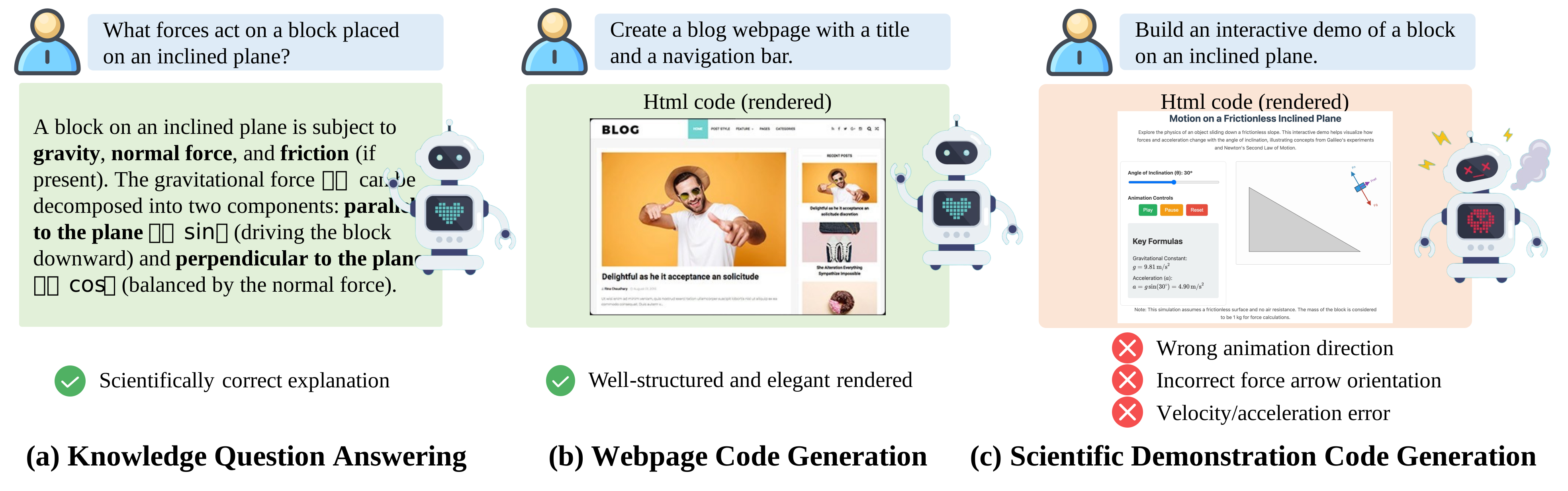 ## 📁 Directory Structure ``` . ├── data/ # Benchmark dataset │ ├── interactscience.jsonl # Main dataset file containing problems and references │ └── snapshots/ # Reference screenshot directory │ ├── *_Snapshot-1.png │ ├── *_Snapshot-2.png │ └── ... ├── PFT_tests/ # Program Functionality Testing (PFT) scripts │ ├── *.spec.js # Playwright test scripts │ └── ... ├── VQT_tests/ # Visual Quality Testing (VQT) scripts │ ├── *.spec.js # Playwright test scripts │ └── ... ├── eval/ # Model inference results │ ├── interactscience_lm_*.jsonl # Language model inference results │ ├── interactscience_vlm_*.jsonl # Vision-language model inference results │ └── ... ├── results/ # Test result data │ ├── lm_results/ # Language model test results │ │ ├── PFT_test_results/ # Program functionality test results │ │ ├── VQT_test_results/ # Visual quality test results │ │ ├── VQT_clip_results/ # CLIP scoring results │ │ └── VQT_vlm_judge_results/ # VLM scoring results │ └── vlm_results/ # Vision-language model test results ├── run_generation.sh # Model inference script ├── run_benchmark.sh # Automated testing script ├── run_vlm_as_judge.sh # VLM scoring script ├── cal_metrics.py # Metrics calculation script ├── test_llm.py # Language model testing main program ├── vlm_as_judge.py # VLM scoring main program ├── clip_score.py # CLIP score calculation └── extract_and_save_code.py # Code extraction and saving ``` ## 🚀 Usage Tutorial ### 1. Environment Setup First install Node.js and npm, then install the Playwright testing environment: ```bash # Install project dependencies npm install # Install Playwright browsers npx playwright install ``` ### 2. Model Inference Use the `run_generation.sh` script for model inference: ```bash # Edit the model path and parameters in the script vim run_generation.sh # Run inference (requires model path configuration) bash run_generation.sh ``` **Script Description:** - Starts vLLM API server - Calls `test_llm.py` for inference - Results saved to `eval/` directory ### 3. Automated Testing Use the `run_benchmark.sh` script for automated testing: ```bash # Set the model name to test export MODEL="your_model_name" # Run tests bash run_benchmark.sh ``` **Testing Process:** 1. Extract HTML code from inference results (`extract_and_save_code.py`) 2. Execute Program Functionality Testing (PFT) using `playwright_PFT.config.js` 3. Execute Visual Quality Testing (VQT) using `playwright_VQT.config.js` 4. Calculate CLIP similarity scores (`clip_score.py`) 5. Results saved to `results/` directory ### 4. VLM Scoring Use `run_vlm_as_judge.sh` for VLM-as-Judge evaluation: ```bash # Edit model and path configuration in the script vim run_vlm_as_judge.sh # Run VLM scoring bash run_vlm_as_judge.sh ``` **Scoring Description:** - Uses vision-language models to score generated results - Compares reference screenshots with generated screenshots - Evaluation based on predefined checklists ### 5. Results Analysis Use `cal_metrics.py` and `cal_vlm_as_judege_score.py` to calculate final metrics: ```bash python cal_metrics.py python cal_vlm_as_judege_score.py ``` ## 📊 Dataset Description ### interactscience.jsonl Main dataset file, each line contains a test sample: - `id`: Unique identifier - `question`: Detailed HTML implementation plan - `lm_system_prompt`: Language model system prompt - `vlm_system_prompt`: Vision-language model system prompt - `image_path`: List of reference screenshot paths - `snapshot_checklists`: Visual verification checklists ### Reference Screenshots Located in `data/snapshots/` directory, naming format: - `{task_id}_Snapshot-{number}.png` ## 🧪 Test Types ### 1. Program Functionality Testing (PFT) - Validates functional correctness of HTML code - Checks interactive element behavior - Tests JavaScript logic ### 2. Visual Quality Testing (VQT) - Generates page screenshots - Compares with reference screenshots - Calculates perceptual similarity (CLIP scores) - Calculates semantic correctness (VLM-judge scores) ## 🛠️ Core Scripts Description ### test_llm.py Language model testing main program: ```bash python test_llm.py \ --dataset_path data/interactscience.jsonl \ --prompt_type lm_system_prompt \ --dump_path eval/result.jsonl \ --model_path your_model_path \ --base_url http://localhost:8000/v1 \ --api_key EMPTY ``` ### vlm_as_judge.py VLM scoring main program: ```bash python vlm_as_judge.py \ --reference_image_dir data/snapshots \ --generated_image_dir generated_images \ --checklist_file data/checklists.jsonl \ --output_path results/vlm_judge.jsonl \ --base_url your_api_endpoint \ --api_key your_api_key ``` ## 📈 Evaluation Metrics - **Program Functionality Test Pass Rate**: Percentage of PFT test cases passed - **Visual Quality Score**: Visual similarity based on CLIP model - **VLM Score**: Comprehensive score given by multimodal models ## Experiments We have evaluated 30 state-of-the-art large language models on the InteractScience benchmark. The results are available in the `results/` directory. | **Model** | **PFT Overall (%)** | **PFT Average (%)** | **PFT Perfect (%)** | **VQT Action (%)** | **VQT CLIP** | **VQT VLM-judge** | |----------------------------|---------------------|---------------------|---------------------|--------------------|--------------|-------------------| | **Closed-Source Large Language Models** ||||||| | GPT-5 | 39.47 | **37.61** | **16.08** | 89.66 | 71.95 | **57.02** | | GPT-4.1 | 37.07 | 34.08 | 11.19 | 89.15 | 71.21 | 52.84 | | GPT-4o | 28.27 | 27.09 | 5.59 | 85.93 | 67.11 | 42.45 | | o3 | 34.93 | 32.09 | 13.99 | 89.83 | 72.24 | 52.82 | | o4-mini | 37.33 | 34.90 | 13.29 | 88.64 | 71.79 | 51.90 | | Gemini-2.5-Pro | 35.33 | 34.62 | 11.19 | 86.78 | 70.65 | 54.69 | | Gemini-2.5-Flash | 31.60 | 31.07 | 10.49 | 86.95 | 69.59 | 49.34 | | Claude-Sonnet-4-20250514 | **41.47** | 37.40 | 13.29 | 89.66 | 73.50 | 55.42 | | Claude-Opus-4-20250514 | 40.27 | 36.34 | 11.19 | 89.32 | **73.22** | 54.93 | | Claude-3.5-Sonnet | 33.33 | 31.45 | 9.79 | **90.17** | 72.32 | 49.43 | | **Open-Source Large Language Models** ||||||| | DeepSeek-R1-0528 | **33.87** | **32.02** | 8.39 | 88.31 | 69.54 | 49.46 | | DeepSeek-V3-0324 | 31.73 | 30.57 | 10.49 | 85.93 | 68.68 | 49.46 | | Kimi-K2 | 31.60 | 31.22 | 9.79 | 87.29 | 70.11 | **50.04** | | GLM-4.5 | 29.33 | 26.65 | 8.39 | 70.51 | 55.90 | 38.57 | | Intern-S1 | 31.87 | 28.93 | 7.69 | 87.46 | 68.74 | 45.27 | | gpt-oss-120b | 28.00 | 27.78 | 9.79 | **90.85** | **72.13** | 49.57 | | gpt-oss-20b | 15.20 | 12.97 | 3.50 | 80.51 | 54.68 | 21.40 | | Qwen3-235B-A22B-Instruct-2507 | 33.33 | 31.46 | **13.29** | 78.14 | 70.02 | 45.14 | | Qwen3-32B | 27.20 | 24.09 | 5.59 | 87.46 | 66.46 | 39.69 | | Qwen3-14B | 24.13 | 23.58 | 7.69 | 85.08 | 66.46 | 36.53 | | Qwen3-8B | 20.00 | 18.85 | 4.20 | 81.53 | 64.13 | 34.67 | | Qwen3-4B | 14.67 | 13.10 | 2.80 | 82.03 | 60.90 | 28.33 | | Qwen3-1.7B | 6.53 | 6.22 | 1.40 | 75.76 | 59.65 | 20.33 | | Qwen2.5-Coder-32B-Instruct | 27.20 | 25.10 | 7.69 | 84.58 | 51.67 | 38.51 | | Qwen2.5-Coder-14B-Instruct | 22.53 | 20.61 | 4.90 | 85.42 | 64.47 | 35.72 | | Qwen2.5-Coder-7B-Instruct | 12.40 | 10.51 | 0.70 | 82.37 | 65.17 | 26.97 | | Qwen2.5-VL-72B-Instruct | 23.73 | 22.82 | 6.99 | 87.12 | 64.33 | 37.30 | | Qwen2.5-VL-7B-Instruct | 7.47 | 6.72 | 0.70 | 70.00 | 49.49 | 20.41 | | Llama-3.1-70B-Instruct | 18.67 | 18.04 | 4.90 | 88.64 | 59.56 | 33.36 | | Llama-3.1-8B-Instruct | 11.33 | 10.16 | 3.50 | 80.00 | 65.42 | 22.75 | ### Comparison Across Difficulty Levels 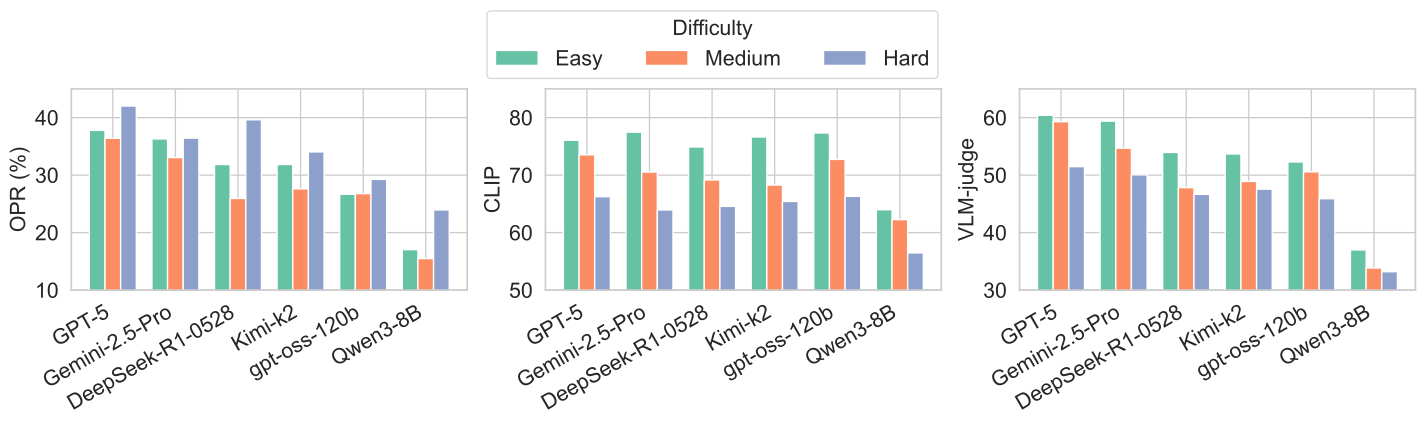 ### Comparison Across Disciplines 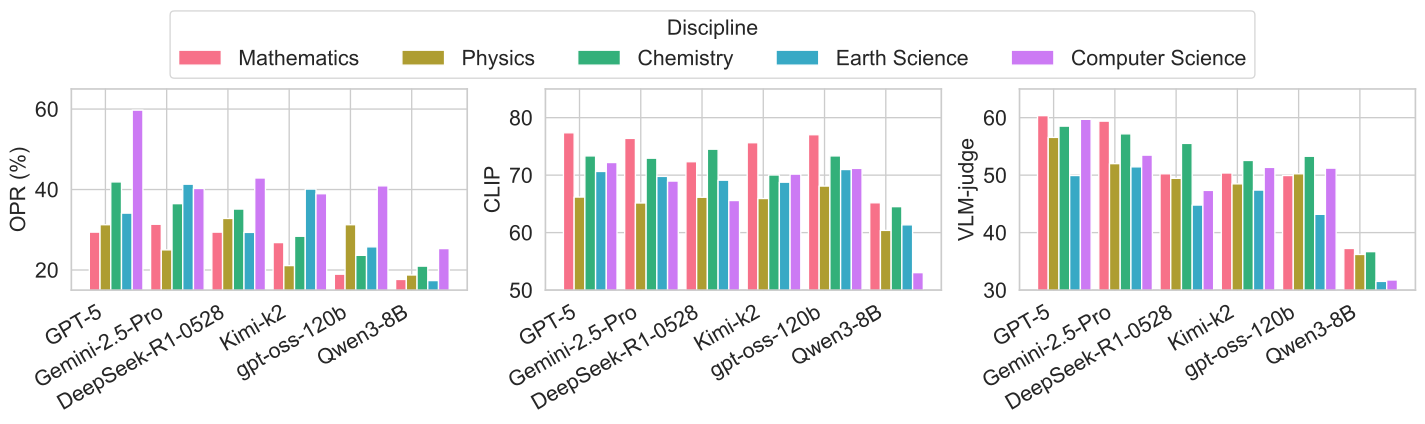 ### Results on Multimodal LLMs with Reference Snapshots as Input 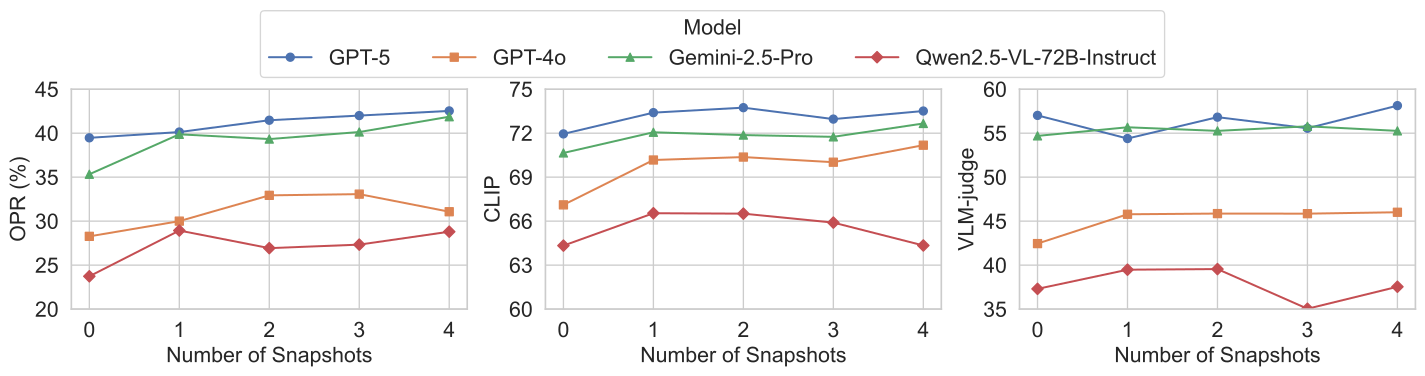 ## Example Cases 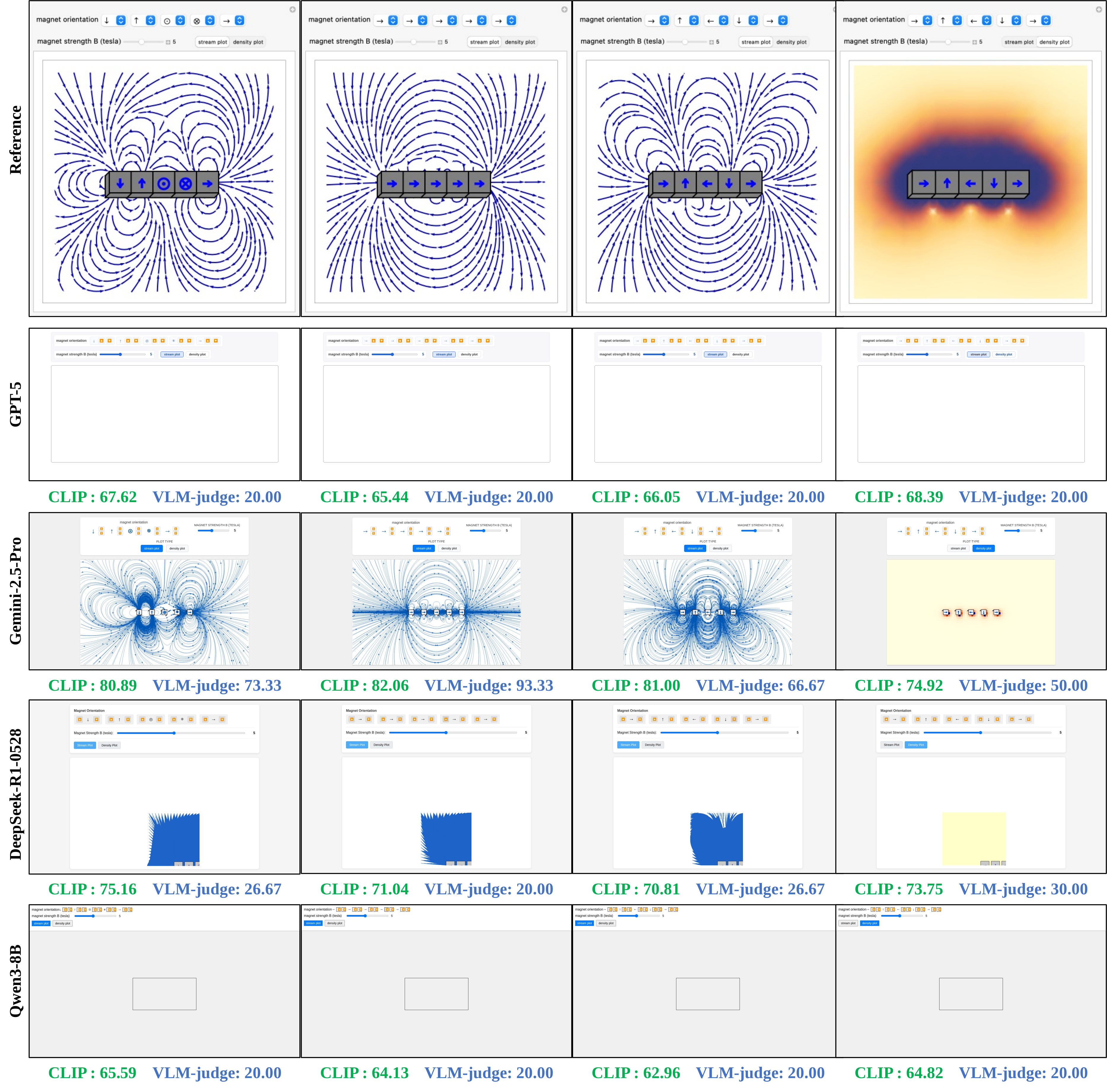 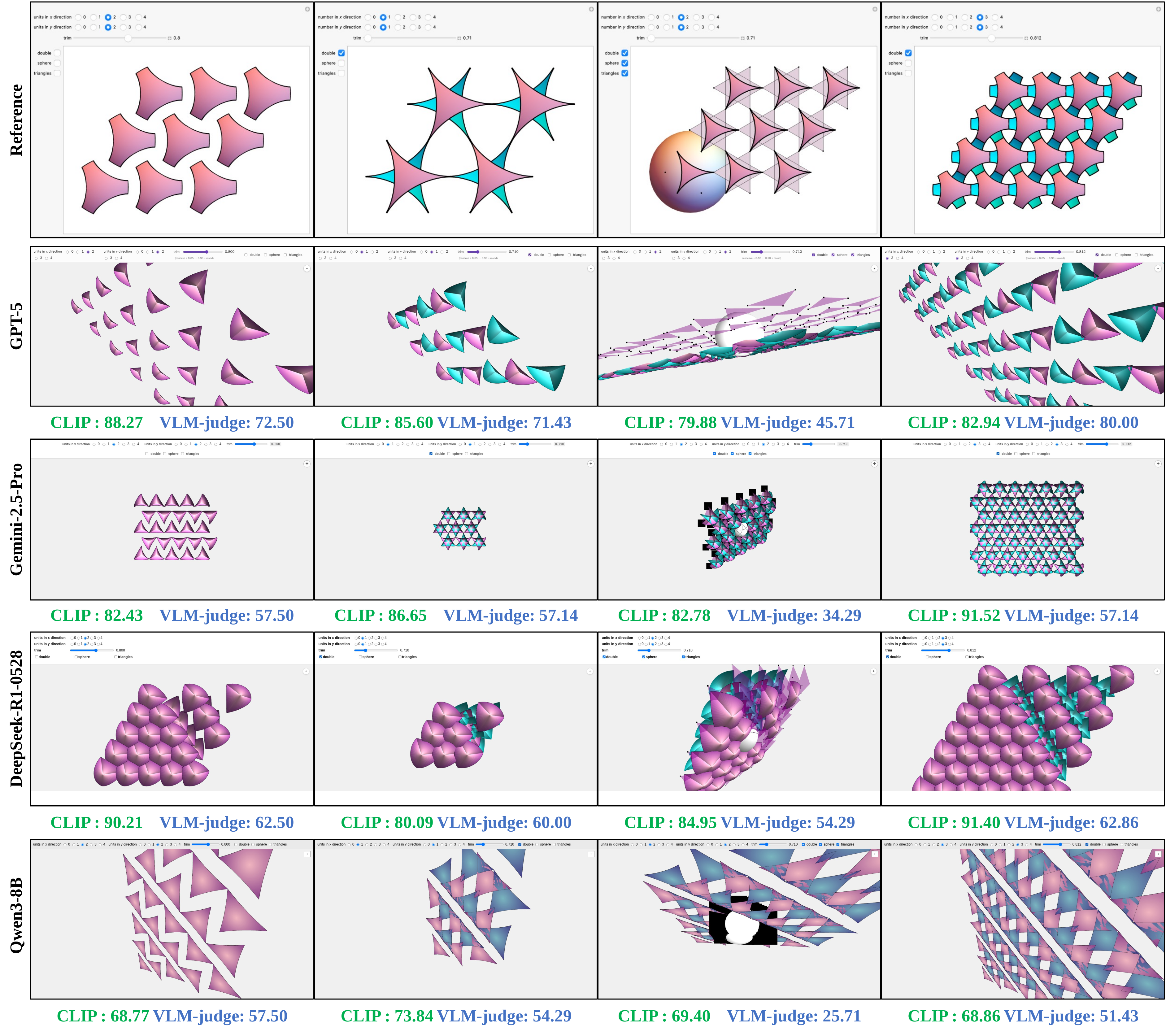 ## Citation ``` @article{InteractScience, author = {Qiaosheng Chen and Yang Liu and Lei Li and Kai Chen and Qipeng Guo and Gong Cheng and Fei Yuan}, title = {InteractScience: Programmatic and Visually-Grounded Evaluation of Interactive Scientific Demonstration Code Generation}, journal = {arXiv preprint arXiv:2510.09724}, year = {2025} } ```
