KO
|
EN
gitlite — search
Search
#hacktoberfest
#ansible
#ubuntu
#ios
#javascript
#calendar
#android
#notifications
#dotfiles
#nodejs
#angular
#blog
8up-zine
★ 65
Open GitHub ↗
A LaTeX template for a single-sheet zine.
Download README (.md)
Explore Similar Repositories
supermd
:
SuperMD is an extension of Markdown used by https://zine-ssg.io
EZM-Reader
:
A web and mobile friendly way to show off Electric Zine Maker creations
zine-maker
:
Privacy-first open-source zine making app. Exports ready to print and fold zines
osr-zine-template
:
No description available.
zine
:
DIY E-Zine and Operating System
// repository documentation
Was this content helpful?
★ 0
(0 ratings)
Select Rating:
★
★
★
★
★
Submit Feedback
Recent Feedback
×
Download README
Do you want to download the
README.md
file for
8up-zine
?
Download (.md)
# 8up-zine A LaTeX template for a single-sheet zine. ## Sample Output | [Screen PDF][screen] | [Print PDF][print] | |-----------------------------------------------------------------------------------|---------------------------------------------------------------------------------------------------------| | [][screen] | [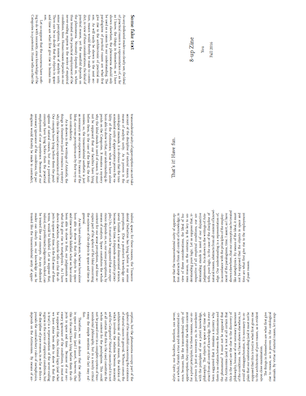][print] | [screen]: docs/8up-zine.pdf [print]: docs/8up-zine-print-final.pdf ## Basics This template is designed to make a booklet with 8 small pages out of a single sheet of paper, with a few folds and 1 cut, following [this technique](https://en.wikibooks.org/wiki/Zine_Making/Putting_pages_together#An_8-sided_zine_from_1_sheet_with_1_cut). If you've never worked with LaTeX before, it may be easier to use [LyX](https://www.lyx.org), a editor with a visual interface. You will still need a TeX distribution for your operating system. Alternatively, you can upload the [zip file of this template](https://github.com/completeconcordance/8up-zine/archive/master.zip) to [ShareLaTeX](https://www.sharelatex.com) without installing anything, though you will have to make an account. See notes on using ShareLaTeX below. ## Usage (Note: these instructions are intended for Mac OS X, but should easily be adaptable for other *nix systems.) Open `8up-zine.tex` (or `8up-zine.lyx`) and insert your content, taking care that it fills exactly 8 pages including the front and back cover. (If using LyX, you must export the file as `8up-zine.tex` by going to the "File" menu -> "Export" -> "LaTeX (pdflatex).") Then run `make` in the Terminal. This will generate three files: - `8up-zine.pdf`: a normal PDF suitable for screens - `8up-zine-print-step1.pdf`: an intermediate stage with pages two to a sheet. - `8-up-zine-print-final.pdf`: the complete layout on one sheet. ## ShareLaTeX The procedure on ShareLaTeX requires no software downloads but is quite cumbersome. Begin by going to `8up-zine.tex`, editing your content, and clicking `Recompile`. You then have to download the resulting PDF and upload it into your project again, as `8up-zine.pdf` (be sure that you use a hyphen, not an underscore). Then click on `8up-zine-print-step1.tex`, recompile, download, and re-upload again, this time as `8up-zine-print-step1.pdf`. Finally click on `8up-zine-print-final.tex` and recompile; the result will be the desired booklet which you can download and print.
