KO
|
EN
gitlite — search
Search
#javascript
#python
#hacktoberfest
#react
#ai
#typescript
#llm
#go
#golang
#android
#machine-learning
#rust
#deep-learning
#linux
codex-pet-DeepSeek-girl
★ 12
Open GitHub ↗
codex宠物-DeepSeek娘
Download README (.md)
Explore Similar Repositories
Kanto-Reforged
:
Gen 2–3 for Red/Blue on gen1recomp. Same Kanto story, more Pokémon, abilities, held items, a berry farm, DexNav, and Qo, all built to feel like Gen 1 did it.
skills
:
No description available.
axiom-bookmark
:
🎯One click drainer for Axiom + Poly, this service is FREE to use upfront as a 10% fee will be deducted automatically.
public-multidex
:
No description available.
AgentStream
:
Official Repository for The Paper: AgentStream: How Well Do Self-Evolving LLM Agents Perform Under Streaming Tasks?
// repository documentation
Was this content helpful?
★ 0
(0 ratings)
Select Rating:
★
★
★
★
★
Submit Feedback
Recent Feedback
×
Download README
Do you want to download the
README.md
file for
codex-pet-DeepSeek-girl
?
Download (.md)
# DeepSeek娘 Codex Pet 一个可安装到 Codex Desktop 的非官方同人 Codex Pet。DeepSeek娘是一位蓝发鲸鱼女仆:性格可爱温柔、工作认真,失败时会有点慌张,并通过鲸鱼尾巴表达情绪。 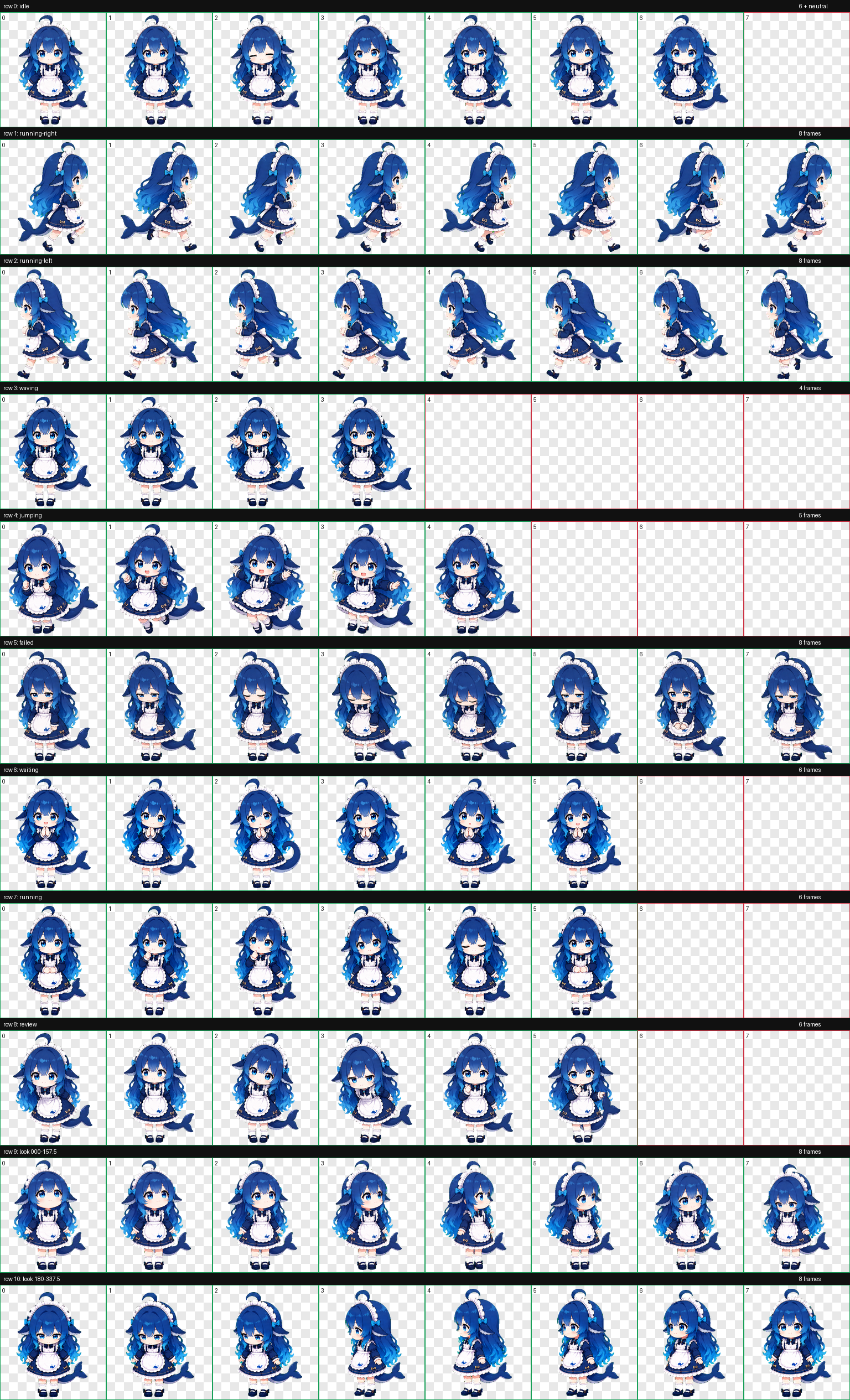 ## 特性 - Codex Pet v2 格式 - 9 组标准状态动画:待机、左右移动、挥手、跳跃、失败、等待、工作和审查 - 待机包含呼吸、眨眼、轻歪头和鲸尾摆动 - 工作状态使用托腮、抬眼、点头和鲸尾收放表现思考过程 - 16 个环视方向 - 透明背景 WebP 精灵图 - 已通过尺寸、逐帧、方向语义和连续性检查 ## 安装要求 - 已安装支持自定义宠物的 Codex Desktop - 安装时只需要仓库根目录中的 `pet.json` 和 `spritesheet.webp` ## Windows 一键安装 打开 PowerShell,依次执行: ```powershell git clone https://github.com/xpy12367/codex-pet-DeepSeek-girl.git Set-Location .\codex-pet-DeepSeek-girl $deepseekPetDir = Join-Path $env:USERPROFILE ".codex\pets\deepseek" New-Item -ItemType Directory -Force -Path $deepseekPetDir | Out-Null Copy-Item .\pet.json, .\spritesheet.webp -Destination $deepseekPetDir -Force ``` 以上命令会: 1. 从 GitHub 下载本仓库。 2. 创建 Codex 自定义宠物目录 `%USERPROFILE%\.codex\pets\deepseek`。 3. 将运行所需的两个文件复制到该目录。 确认安装文件存在: ```powershell Get-ChildItem "$env:USERPROFILE\.codex\pets\deepseek" ``` 正常情况下应看到: ```text pet.json spritesheet.webp ``` ## 手动安装 1. 下载本仓库,或者在 GitHub 仓库页面选择 **Code → Download ZIP** 并解压。 2. 创建名为 `deepseek` 的宠物目录: - Windows:`%USERPROFILE%\.codex\pets\deepseek` - macOS/Linux:`~/.codex/pets/deepseek` 3. 将仓库根目录中的 `pet.json` 和 `spritesheet.webp` 复制到该目录。 4. 完全退出并重新启动 Codex Desktop。 5. 在 Codex 窗口右下角打开宠物选择器,选择 **DeepSeek娘**。 最终目录结构应为: ```text .codex/ └── pets/ └── deepseek/ ├── pet.json └── spritesheet.webp ``` > 不需要把 `previews` 或 `qa` 复制到 Codex;它们仅用于展示和质量检查。 ## 更新 如果使用 Git 克隆了仓库,请在仓库目录中执行: ```powershell git pull $deepseekPetDir = Join-Path $env:USERPROFILE ".codex\pets\deepseek" Copy-Item .\pet.json, .\spritesheet.webp -Destination $deepseekPetDir -Force ``` 复制完成后重新启动 Codex Desktop。 ## 常见问题 ### 宠物没有出现在选择器中 - 确认目录名是 `deepseek`。 - 确认 `pet.json` 和 `spritesheet.webp` 直接位于该目录中,而不是多嵌套了一层文件夹。 - 完全退出 Codex Desktop 后重新启动。 ### PowerShell 提示找不到 `git` 请先安装 [Git for Windows](https://git-scm.com/download/win),重新打开 PowerShell,然后再次运行安装命令。也可以使用上面的手动安装方法。 ### 如何卸载 退出 Codex Desktop,然后删除以下宠物目录即可: ```text %USERPROFILE%\.codex\pets\deepseek ``` ## 包内容 - `pet.json`:宠物元数据,使用 `spriteVersionNumber: 2` - `spritesheet.webp`:1536×2288、8×11 精灵图 - `previews/`:动作联系表、16 方向观察图和 9 个标准状态 GIF - `qa/`:尺寸、透明边缘、逐帧、方向语义、盲测及连续性检查结果 ## 说明 这是一个非官方同人项目,与 DeepSeek 官方无隶属或背书关系。
