KO
|
EN
gitlite — search
Search
#python
#java
#python3
#arduino
#golang
#machine-learning
#rust
#html
#flask
#javascript
#seismology
#nodejs
speed-run-ethereum
★ 11
Open GitHub ↗
No description available.
Download README (.md)
Explore Similar Repositories
YuRis_Tool
:
No description available.
VK-Bridge-For-Unity
:
Неофициальный SDK VK Bridge для Unity
Neural_Network_optimization_method
:
这是一个Matlab代码,里面包括五种常见神经网络优化算法的对比。包括SGD、SGDM、Adagrad、AdaDelta、Adam
Spring-Cloud-Function-SpEL
:
Spring-Cloud-Function-SpEL_POC_EXP
BedrockProtocolDumper
:
[deprecated] Generate basic information about new protocol versions from BDS using Python and GNU objdump
// repository documentation
Was this content helpful?
★ 0
(0 ratings)
Select Rating:
★
★
★
★
★
Submit Feedback
Recent Feedback
×
Download README
Do you want to download the
README.md
file for
speed-run-ethereum
?
Download (.md)
# Speed Running Ethereum I completed [speed running ethereum](https://speedrunethereum.com/) by [Austin Griffith](https://twitter.com/austingriffith)🏗 Here are my notes & key learnings on the way! ---- ## ✅ Challenge 0: 🎟 Simple NFT Example **[Live Demo](https://challenge0-speedrunning.surge.sh/)**, **[Contract](https://rinkeby.etherscan.io/address/0x1aEda3999686e3933DEf92bF6A87228043985398)** This challenge shows how to deploy a contract, upload it to a hosting platform, test it out on the interface and work with burner wallets. You will not be coding, but it is important to give you an idea of how scaffold-eth works & the different components. Here are some key learnings: - Working with IPFS, how it uses hash. Here's a [video on IPFS.](https://www.youtube.com/watch?v=5Uj6uR3fp-U&ab_channel=SimplyExplained) - ERC721: Minting the NFT & transfer to the wallet - Verifying a contract on Etherscan - Notes: you can run **yarn test** for automated testing in speedrun! Here's my [post](https://eda.hashnode.dev/create-your-own-nft-collection-on-ethereum) I wrote on how to create an NFT Collection ## ✅ Challenge 1: 🥩 Decentralized Staking App **[Live Demo](https://challenge1-speedrunning.surge.sh/)**, **[Contract](https://rinkeby.etherscan.io/address/0x1175D26ff811ccCf7FB54CC889295df66876CE8C#code)** Staking App allows coordinating economic activity (superpower of crypto). It basically 'locks' up your funds for a certain time. You can withdraw, or the funds can be used for a certain purpose. *, For example, let's say you want to raise funds to buy the Mona Lisa; you can raise money from anyone who wants to contribute, and you don't end up buying; in the end, people can withdraw their funds. Likewise, you can raise money to buy the US Constitution:-)* In the Proof of Stake blockchain, you stake so that the blockchain can put these tokens to work. If you stake your crypto, it will become part of the process to validate/approve/add to the blockchain; transactions are validated by people who stake the tokens. For more on Staking: [Ethereum Staking](https://ethereum.org/en/staking/#stake) and [WhiteBoard Crypto.](https://www.youtube.com/watch?v=vZ2UZdB07fo&ab_channel=WhiteboardCrypto) * The tricky part about the challenge was understanding what to build. Here's my design to get an idea: 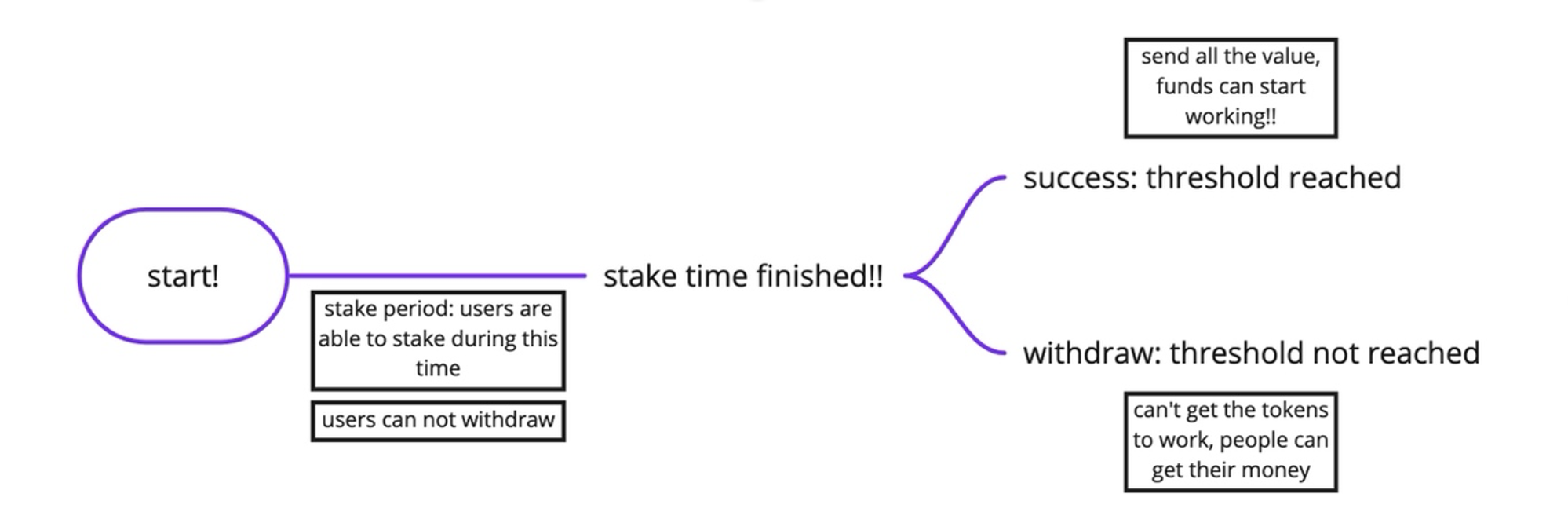 *When the staking period is over, the user shouldn't be able to take any actions (it's like game over)* Here are some key learnings: - Interacting with user address & balances: solidity practice (more on payable functions, msg.sender, msg.balance) - Solidity Modifiers (keep track of a state) - Recap events in solidity (events & emit --> send to the frontend) - Execute function: needs to be run by the user; smart contract doesn't auto-execute ## ✅ Challenge 2: 🏵 Token Vendor **[Live Demo](https://challenge1-speedrunningethereum.surge.sh/)**, **[Contract](https://rinkeby.etherscan.io/address/0xA966A7776Eb58772dF33C52CA481b6C934A03415#code)** A token vendor is a machine from where you can buy and sell tokens. You can buy tokens with ETH or sell your tokens in exchange for ETH. The project uses ERC20 token. Some key learnings: - YourToken.sol inherits this openzepplin contract - balanceOf allows you to check the balance of the address directly in ERC 20 :-) - ERC 20 has a transfer() function; many of the functions are already there. Here's my previous [post](https://eda.hashnode.dev/create-your-own-cryptocurrency-token) on ERC20. Key learnings from Vendor.sol: - Getting the balance of the contract (address(this).balance) - Ownership in contracts (this allows you to verify the actual owner, and I think that they can append or something like that to the contract—need to verify this)--> Directly use the onlyOwner in your functions - there are different options you can uses when sending eth: send(), transfer(), and call(). Here's more info on the [topic](https://github.com/scaffold-eth/scaffold-eth/tree/send-ether-reentrancy). And a short quote: 'recommended method for sending ether is the verbose: """ (bool sent, bytes memory _data) = msg.sender.call{value:a mount}(""); require(sent, "Failed to send Ether");` """' (also over [here](https://blockchain-academy.hs-mittweida.de/courses/solidity-coding-beginners-to-intermediate/lessons/solidity-2-sending-ether-receiving-ether-emitting-events/topic/sending-ether-send-vs-transfer-vs-call/) it states that call is the recommended way to send eth) (I used to transfer in my contract after seeing a common withdrawal pattern over [here](https://docs.soliditylang.org/en/v0.8.7/common-patterns.html), however after researching more learned that the call function would have been a better way) Also on [solidity by example](https://solidity-by-example.org/sending-ether/) mentions using call for better gas. - There is an approve pattern for ERC 20. Read more about it [here.](https://docs.ethhub.io/guides/a-straightforward-guide-erc20-tokens/).I found [this](https://stackoverflow.com/questions/70672642/whats-the-purpose-of-the-approve-function-in-erc-20) helpful in understanding the purpose of approve (User allows the dex, for example, to spend their tokens). So, you need to approve the tokens for the transaction before the Vendor can buy them back. The user approves that the tokens can go to the Vendor. On the UI, you'll need to test with approve before directly selling the tokens back to the Vendor. (you are allowing the vendor smart contact to spend your tokens). On the UI, it's a two-process step. You need to sign 2 different transactions w/metamask as the user 1) to approve the selling 2) to sell the tokens (you can check how many tokens are approved from the allowances function). ## ✅ Challenge 3: ⚖️ Build a DEX **[Live Demo](https://rambunctious-quilt-dex.surge.sh)**, **[Contract](https://rinkeby.etherscan.io/address/0x3d25ca8b66f1d758dbf942394b9fdfb2e7753f7e#code)** A decentralized exchange (or DEX) is a peer-to-peer marketplace. You can select from the avaliable tokens, and the choose what token you want to get in exchange for it. Then actually make the swap. 🎥 Heres a simple examplier [video](https://www.youtube.com/watch?v=2tTVJL4bpTU&ab_channel=WhiteboardCrypto ) on what a DEX is. [Here's](https://www.coinbase.com/learn/crypto-basics/what-is-a-dex) also a good overview post on DEX's. [Uniswap](https://uniswap.org/) and [1inch](https://1inch.io/) are two of the popular exchanges on Ethereum. 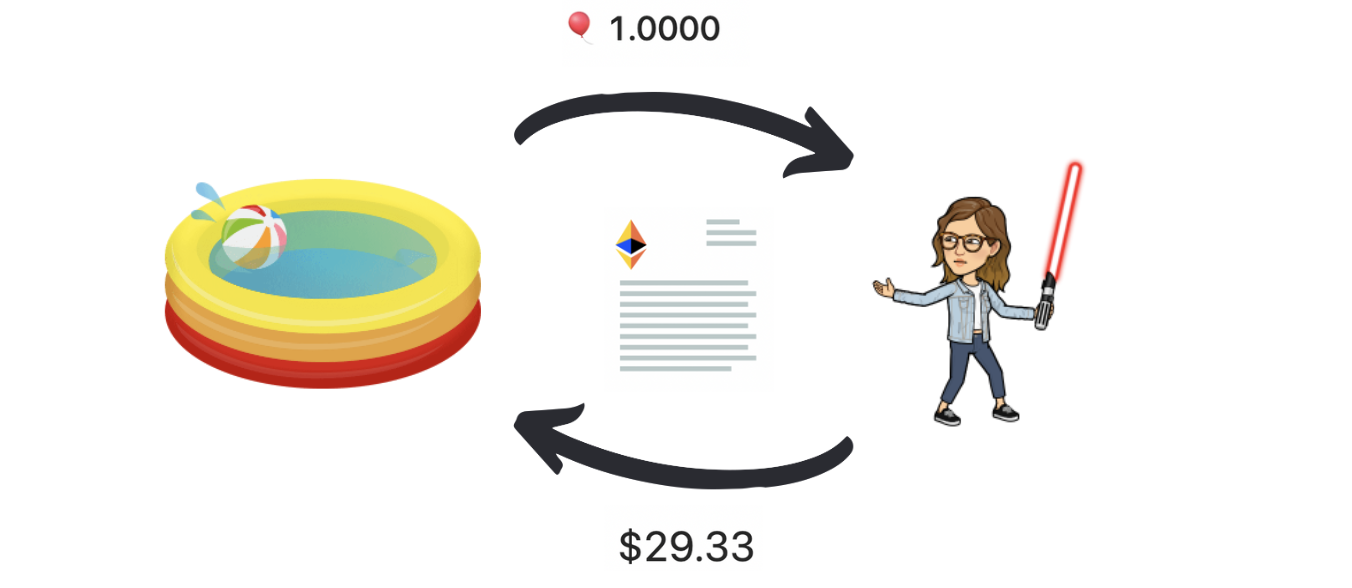 In a very simple form, a DEX allows us to exchange the tokens and then, based on the tickets in the pool; it will automatically re-calculate the price of each. It works in a decentralized way, meaning that there is no central person in between checking the transactions or modifying the price. That is what the smart contract is for. The smart contract is just like a legal agreement, but it's written in code. Liquidity refers to the number of tokens in the pool of the DEX. If you buy a lot of one token, then the amount left in the pool could dramatically go down, and the price can go up. The same can apply vice-versa. This becomes an issue with low liquidity. *Note: As with all crypto, there is no customer support. Be careful when you are making transactions, and don't trust every site you land on.* Key learnings: - How a DEX works: creating reserves, keeping track of the liquidity (how many tokens there are), initializing a DEX (it will have no money in the pool when first loaded) - Approve pattern for erc20 token (needed to transfer tokens from one account to another) - Price curve for DEX: when one token is taken or added, the ratio in the pool will change (note: no such thing as a free lunch. The DEX will take a fee for every exchange it makes, this is added to our price function) -- you'll see the fee on the graph when you want to make a transaction - Solidity learning: we're using the openzeplin SafeMath library, check out the docs [here](https://docs.openzeppelin.com/contracts/2.x/api/math) - Recap on solidity require statements - Recap on solidity events - Deploying the smart contract! It makes sure you understand what you are deploying, especially because if you add a lot of liquidity for initializing the DEX you will likely run into issues unless you have lots of TestNet money or any network tokens on your account. You May need to dig into the network configurations to make some changes depending on the network you choose (i needed to adjust the gas fee to make the transaction go through -- a lot of debugging involved). Also, note that it can take time for the transactions to take place; its not as fast as your localhost 😀 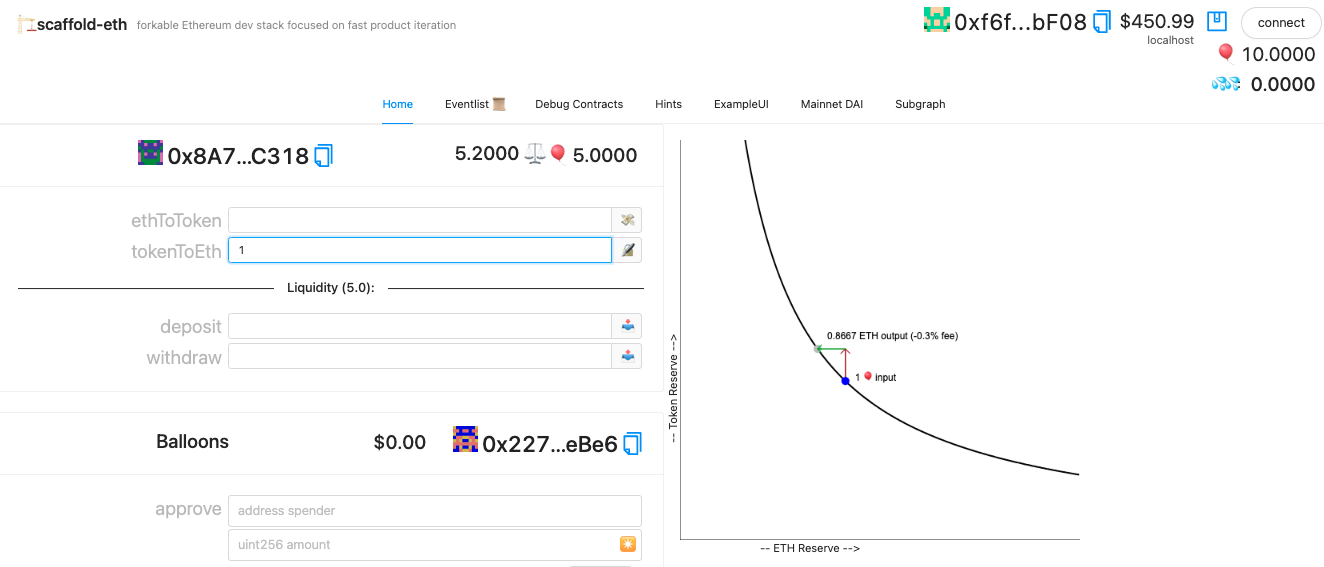 ## Challenge 4: 🏰️ BG 🏤 Bazaar In this challange you're uploading your DEX to Buildguild Bazaar to see how it works. Also come and join the Friday calls 😉 ## ✅ Challenge 5: 👛 Multisig Wallet **[TO DO: Live Demo]()**, **[TO DO: Contract]()**, **[GitHub](https://github.com/edakturk14/multi-sig-challenge)** Instructions [here](https://github.com/scaffold-eth/scaffold-eth-examples/tree/meta-multi-sig). Task: get the main branch of Scaffold-eth and make a multi-sig. FYI clone a single branch: git clone --single-branch --branch master (_url_) Multisig stands for multi-signature. It's a digital signature that makes it possible for more than one user to sign a document. It's like a box with two or more keys. Depending on the rules, you may need a certain number or just one key to open it. Crypto wallets have single keys. This may be a problem when you want to set up a shared account or have a backup for yourself. That's where the mulish comes to play. (You can create an MFA for your wallet by having two approvers, so it's not just for having multiple users share an account but can be used as a security feature.) Today, [Gnosis Safe](https://gnosis-safe.io/) is the most popular multi-sig on Ethereum. Key learnings: - Using modifiers in solidity: onlyOwner can call the function; Solidity Events practice - How smart contract wallets work checkout my practice contract [here](./contracts/MultiSig_StudyNotes.sol) following [this tutorial](https://www.youtube.com/watch?v=8ja72g_Dac4) (this does not use ECDSA, not safe. Doesn't verify signatures.) - **Mappings:** It's painful to iterate through a mapping, and you cannot because mappings are virtually initialised. All variables are assigned. If you want to iterate must define a struct on top of it. More on mappings: [here](https://www.geeksforgeeks.org/solidity-mappings/). On my multisig, I store the signer addresses in an array and have the functions to add/remove from it. - **Calldata vs. Memory** Memory is for variables that are defined within the function. Calldata is an immutable, temporary location where function arguments are stored and behaves mostly like Memory. Calldata over Memory, provides gas savings. - Working with **ECDSA:** functions for recovering and managing Ethereum accounts, more [here](https://docs.openzeppelin.com/contracts/2.x/utilities); its a method for checking signatures on-chain - NOTE: 💰 When you are executing a transaction, you need to have money in your smart contract. You can not send something you don't have... - The backend is needed to create & execute a transaction. A transaction cannot be executed w/o the required number of signatures. ([Here](https://github.com/edakturk14/speed-run-ethereum/blob/main/images/connection_refused.png) is how the error looks like, "inspect" on the browser to see) <video src="https://user-images.githubusercontent.com/22100698/168458209-d292f137-b712-439a-8bec-2da94beee645.mov" controls="controls" style="max-width: 200px;"> </video> ## ✅ Challenge 6: 🎁 SVG NFT 🎫 Building Cohort **[Live Demo](https://trite-bushes-nft.surge.sh)**, **[Contract](https://rinkeby.etherscan.io/address/0x27a03346daaf6d88795feaa4f1a464d9a9ee7142#code)** **NOTE: SVG NFT is working, the randomness is a work in progress** SVG stands for "Scalable Vector Graphics." It's an XML language that can be used to create images. They can be encoded and set as images for the NFTs. Thus the image is created by the code. Task: Get Scaffold-eth's master branch and make an SVG NFT collection. EG: checkout **Chainlink** for dynamic ones Notes: - My previous [blog post](https://eda.hashnode.dev/create-your-own-nft-collection-on-ethereum) on creating an NFT collection (not onchain) - Previous [blog post](https://eda.hashnode.dev/create-your-generative-nft-collection-on-polygon) on creating genererative nft with data on ipfs (not svg) Extra Randomness w/chainlink resources: (*didn't add to the nft, might add later on*) - [How to make NFT Art with On-Chain Metadata](https://www.youtube.com/watch?v=9oERTH9Bkw0&t=5226s&ab_channel=PatrickCollins) - https://docs.chain.link/docs/intermediates-tutorial/ - Note to use, you must create a VRF subscription AND add the consumer to the subscription. [Here](https://vrf.chain.link/) is the webpage.
