KO
|
EN
gitlite — search
Search
#python
#java
#python3
#arduino
#golang
#machine-learning
#rust
#html
#flask
#javascript
#seismology
#nodejs
intel-reg-pp
★ 10
Open GitHub ↗
Intel Register 'Pretty Print' tool.
Download README (.md)
Explore Similar Repositories
php-eventsource
:
A simple EventSource / SSE (Server-Sent Events) client for PHP.
myimages
:
store images
video-autenticacao-usuarios-react
:
No description available.
robotframework-automation-practice
:
Example Robot Framework test suite utilizing object and variable files with custom keywords and functions
data-science-tutorial-for-beginners
:
Data science tutorial in Chinese.
// repository documentation
Was this content helpful?
★ 0
(0 ratings)
Select Rating:
★
★
★
★
★
Submit Feedback
Recent Feedback
×
Download README
Do you want to download the
README.md
file for
intel-reg-pp
?
Download (.md)
# Overview This tool was created while working on a Thermal Throttling problem associated with Intel® Core™ i5-4300U Processor (formerly Haswell). Since looking at data sheets required checking specific registers and bits it became useful to draw these in a formate that mimicked the data sheet. For example, the image below is shown in a datasheet titled "Intel® 64 and IA-32 Architectures Software Developer’s Manual Volume 3B: System Programming Guide, Part 2". 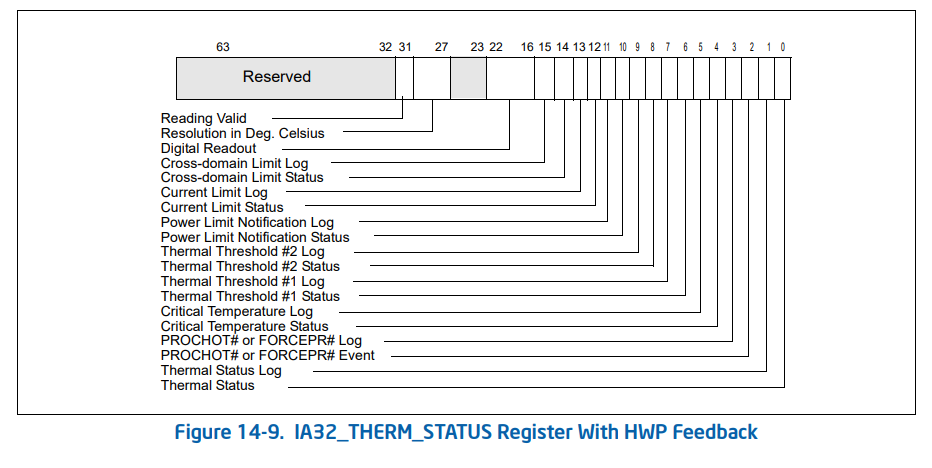 A link to the problem description is the following: https://software.intel.com/en-us/forums/software-tuning-performance-optimization-platform-monitoring/topic/815194 # Prerequisite This tool is used in conjunction with Linux **msr-tools** because this tool allows one to read the Intel processor specific registers. This tool was built using Visual Studio for Linux and tested on a Ubuntu 18.04.1 LTS x64 machine. To install **msr-tools** run the following commands: ``` sudo apt-get update sudo apt-get -y install msr-tools ``` After that initialize the MSR driver explicitly by running the following command: ``` sudo modprobe msr ``` Last, read a Intel Model Specific register (MSR) using the following command: ``` sudo rdmsr 0x19C -f 63:0 sudo strace rdmsr 0x19C -f 63:0 ``` Take the hexidecimal output from the command and pass it to the **intel-reg-pp** application. ``` user1@ubuntu:~$ sudo rdmsr 0x19C -f 63:0 884100800 ``` # Example(s) The tool is quite simple. To view the usage, simply place the binary on the system one wishes to execute and call it by name as shown below: ``` root@ubuntu-233:~# ./intel-reg-pp.out Intel Register Pretty Print (intel-reg-pp) v1.0.0 Usage: intel-reg-pp -a address_hex value_hex_string Usage: intel-reg-pp -n name_string value_hex_string -a Register address in hexidecimal -n Register name as string, currently supported: 199H IA32_PERF_CTL 19aH IA32_CLOCK_MODULATION 19bH IA32_THERM_INTERRUPT 19cH IA32_HWP_THERM_STATUS 1a0H IA32_MISC_ENABLE 1a1H IA32_PACKAGE_THERM_MARGIN 1a2H IA32_TEMPERATURE_TARGET 1b1H IA32_PKG_THERM_STATUS 611H MSR_PKG_ENERGY_STATUS 613H MSR_PKG_STATUS 64eH MSR_PPERF 690H MSR_CORE_PERF_LIMIT_REASONS 770H IA32_PM_ENABLE 771H IA32_HWP_CAPABILITIES 772H IA32_HWP_REQUEST_PKG 773H IA32_HWP_INTERRUPT 774H IA32_HWP_REQUEST 775H IA32_HWP_PECI_REQUEST_INFO 777H IA32_HWP_STATUS intel-reg-pp -n MSR_CORE_PERF_LIMIT_REASONS 0x1c220002 intel-reg-pp -a 0x64F 0x1c220002 intel-reg-pp -a 64FH 0x1c220002 Unknow Register ID! root@ubuntu-233:~# ``` The output of this will indicate how to use it and what is supported as shown in the screenshot below. 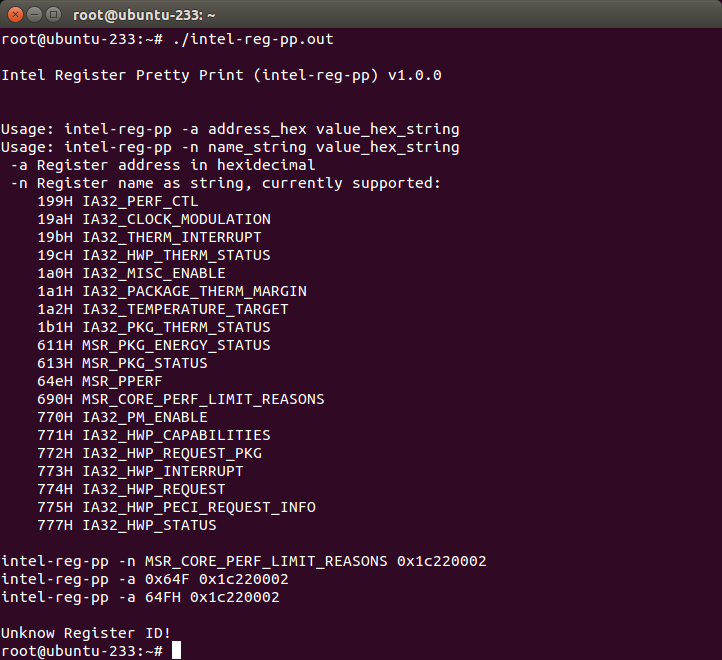 To show *pretty-print* of a particular register in this case *IA32_HWP_THERM_STATUS* run the command as shown below: ``` root@ubuntu-233:~# ./intel-reg-pp.out -n IA32_HWP_THERM_STATUS 884100800 Intel Register Pretty Print (intel-reg-pp) v1.0.0 [19CH] IA32_HWP_THERM_STATUS Register With HWP Feedback Command to read: sudo rdmsr 0x19c -f 63:0 Value of register is: 884100800 64 60 50 40 30 20 10 43210987654321098765432109876543210987654321098765432109876543210 0b00000000000000000000000000000100010000100000100000000100000000000 └───────────────┬───────────────┘│└─┬┘└─┬┘└──┬──┘││││││││││││││││ Reserved │ │ │ │ ││││││││││││││││ Reading Valid ─────────────────────┘ │ │ │ ││││││││││││││││ Reading in Deg. Celcius ──────────────┘ │ │ ││││││││││││││││ Reserved ─────────────────────────────────┘ │ ││││││││││││││││ Digital Readout ───────────────────────────────┘ ││││││││││││││││ 16 C -> 60 F Cross-domain Limit Log ────────────────────────────┘│││││││││││││││ Cross-domain Limit Status ──────────────────────────┘││││││││││││││ Current Limit Log ───────────────────────────────────┘│││││││││││││ Current Limit Status ─────────────────────────────────┘││││││││││││ Power Limit Notification Log ──────────────────────────┘│││││││││││ Power Limit Notification Status ────────────────────────┘││││││││││ Thermal Threshold #2 Log ────────────────────────────────┘│││││││││ Thermal Threshold #2 Status ──────────────────────────────┘││││││││ Thermal Threshold #1 Log ──────────────────────────────────┘│││││││ Thermal Threshold #1 Status ────────────────────────────────┘││││││ Critical Temperature Log ────────────────────────────────────┘│││││ Critical Temperature Status ──────────────────────────────────┘││││ PROCHOT# or FORCEPR# Log ──────────────────────────────────────┘│││ PROCHOT# or FORCEPR# Event ─────────────────────────────────────┘││ Thermal Status Log ──────────────────────────────────────────────┘│ Thermal Status ───────────────────────────────────────────────────┘ root@ubuntu-233:~# ``` And the corresponding screenshot is: 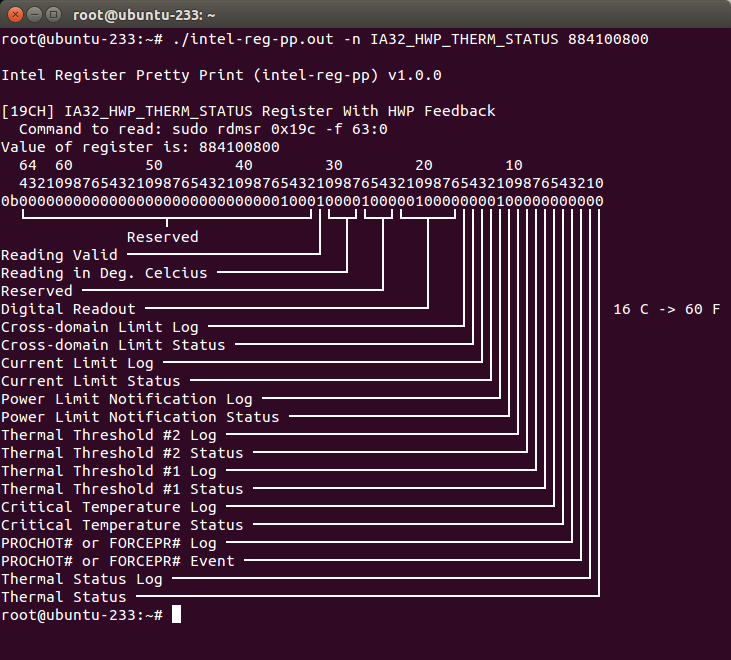 Lastly, the reading of the registers can be automated for each core as shown with script (in the same directory as source code) below: ``` root@ubuntu-233:~# ./msr_output.sh MSR Dump, Script Version 1.0 +----+------------------------------+---------+----------+----------+----------+----------+ | # | MSR Register | Address | Core 0 | Core 1 | Core 2 | Core 3 | +----+------------------------------+---------+----------+----------+----------+----------+ | 0 | IA32_PERF_CTL | 0x199 | 1d00 | 1d00 | 1d00 | 1d00 | | 1 | IA32_CLOCK_MODULATION | 0x19A | 0 | 0 | 0 | 0 | | 2 | IS32_THERM_INTERRUPT | 0x19B | 13 | 13 | 13 | 13 | | 3 | IA32_HWP_THERM_STATUS | 0x19C | 883a0800 | 88380800 | 883b0800 | 88390800 | | 4 | IA32_MISC_ENABLE | 0x1A0 | 850089 | 850089 | 850089 | 850089 | | 5 | IA32_PACKAGE_THERM_MARGIN | 0x1A1 | 3afc | 3af0 | 3ae4 | 3ad2 | | 6 | IA32_TEMPERATURE_TARGET | 0x1A2 | 640000 | 640000 | 640000 | 640000 | | 7 | IA32_PKG_THERM_STATUS | 0x1B1 | 88380800 | 88380800 | 88380800 | 88380800 | | 8 | MSR_PKG_ENERGY_STATUS | 0x611 | 61b9b602 | 61b9b874 | 61b9bbbb | 61b9be6d | | 9 | MSR_PKG_STATUS | 0x613 | 4e | 4e | 4e | 4e | | 10 | MSR_PPERF | 0x64E | N/A | N/A | N/A | N/A | | 11 | MSR_CORE_PERF_LIMIT_REASONS | 0x690 | 1c200020 | 1c200000 | 1c201000 | 1c201000 | | 12 | IA32_PM_ENABLE | 0x770 | N/A | N/A | N/A | N/A | | 13 | IA32_HWP_CAPABILITIES | 0x771 | N/A | N/A | N/A | N/A | | 14 | IA32_HWP_REQUEST_PKG | 0x772 | N/A | N/A | N/A | N/A | | 15 | IA32_HWP_INTERRUPT | 0x773 | N/A | N/A | N/A | N/A | | 16 | IA32_HWP_REQUEST | 0x774 | N/A | N/A | N/A | N/A | | 17 | IA32_HWP_PECI_REQUEST_INFO | 0x775 | N/A | N/A | N/A | N/A | | 18 | IA32_HWP_STATUS | 0x777 | N/A | N/A | N/A | N/A | +----+------------------------------+---------+----------+----------+----------+----------+ Generated table by executing commands: [ 0] sudo rdmsr -p 0 0x199 -f 63:0 2>&1 ... ``` # Further work Need to determine how to get the values of the following registers: | MSR Register Name | MSR Register Address | Output | |-------------------|----------------------|---| | MSR_PPERF | 0x64E | rdmsr: CPU 0 cannot read MSR 0x0000064E | | IA32_PM_ENABLE | 0x770 | rdmsr: CPU 0 cannot read MSR 0x00000770 | | IA32_HWP_CAPABILITIES | 0x771 | rdmsr: CPU 0 cannot read MSR 0x00000771 | | IA32_HWP_REQUEST_PKG | 0x772 | rdmsr: CPU 0 cannot read MSR 0x00000772 | | IA32_HWP_INTERRUPT | 0x773 | rdmsr: CPU 0 cannot read MSR 0x00000773 | | IA32_HWP_REQUEST | 0x774 | rdmsr: CPU 0 cannot read MSR 0x00000774 | | IA32_HWP_PECI_REQUEST_INFO | 0x775 | rdmsr: CPU 0 cannot read MSR 0x00000775 | | IA32_HWP_STATUS | 0x777 | rdmsr: CPU 0 cannot read MSR 0x00000777 |
