KO
|
EN
gitlite — search
Search
#typescript
#ai-agents
#ai
#dsh-plugin
#deepseek-harness
#open-source
#claude-code
#codex
#cli
#developer-tools
#react
#windows
pvf
★ 34
Open GitHub ↗
pvfDotnet
Download README (.md)
Explore Similar Repositories
booking-hotel-scraper
:
Web Scraper for extracting hotels data from Booking.com - Name, Price, Rating, Location, Beds, etc. using Python3
Aw-Jeez
:
A simple app to demonstrate riverpod using Rick and Morty API(https://rickandmortyapi.com/)
Cue-Maker
:
A simple and easy to use program that fetches original cue files for your roms.
mindsdb_native
:
Machine Learning in one line of code
RS256-2-HS256
:
JWT Attack to change the algorithm RS256 to HS256
// repository documentation
Was this content helpful?
★ 0
(0 ratings)
Select Rating:
★
★
★
★
★
Submit Feedback
Recent Feedback
×
Download README
Do you want to download the
README.md
file for
pvf
?
Download (.md)
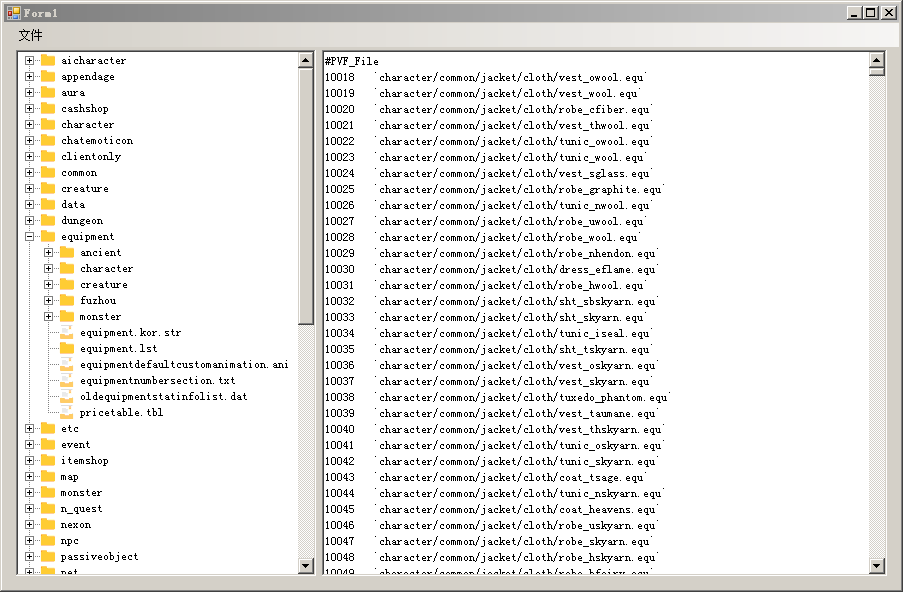
# pvf 详细注释请参考文件。 # 使用方法 很简单: ``` C# var pvf = new Pvf(pvfFilename);//初始化pvf文件,进行读取操作 string fileContent = pvf.getPvfFileByPath("equipment/equipment.lst", Encoding.UTF8); pvf.dispose();//不用了就释放掉 ``` 打开文件并初始化PVF对象,排序显示到TreeView中: ``` C# private void 打开ToolStripMenuItem_Click(object sender, EventArgs e) { OpenFileDialog fileDialog = new OpenFileDialog(); fileDialog.Multiselect = false; fileDialog.Title = "请选择文件"; fileDialog.Filter = "Script.pvf文件(*.pvf)|*.pvf"; if (fileDialog.ShowDialog() == DialogResult.OK) { pvfFilename = fileDialog.FileName; Thread th = new Thread(loadPvfThread); th.Start(); //pvf.getPvfFileByPath("equipment/equipment.lst", Encoding.UTF8); } } private void loadPvfThread() { pvf = new Pvf(pvfFilename);//正常使用只需要这一个就行了,关闭窗体的时候记得dispose() TreeNode root = new TreeNode(); foreach (string dom in pvf.headerTreeCache.Keys) dfsCreateNode(pvf.headerTreeCache[dom], ref root, dom.Split('/'), 0); sortNodes(ref root); Invoke(new EventHandler(delegate (object o, EventArgs e) { foreach (TreeNode node in root.Nodes) treeView1.Nodes.Add(node); })); } private void dfsCreateNode(HeaderTreeNode tag,ref TreeNode tree,string[] a,int deep) { if (a.Length - 1 == deep)//到文件了 { TreeNode item = new TreeNode(); item.Tag = tag; item.Name = a[deep]; item.Text = a[deep]; item.ImageKey = "file"; tree.Nodes.Add(item); return; } if (!tree.Nodes.ContainsKey(a[deep])) { tree.Nodes.Add(a[deep], a[deep]); } var item1 = tree.Nodes[a[deep]]; dfsCreateNode(tag, ref item1, a, deep + 1); } private void sortNodes(ref TreeNode node) { if (node.Tag == null) //对文件夹进行排序 { List<TreeNode> al = new List<TreeNode>(); foreach (TreeNode tn in node.Nodes) al.Add(tn); al.Sort(new Comparison<TreeNode>(delegate (TreeNode tx, TreeNode ty) { if (tx.Tag == null && ty.Tag != null) return -1; else if (tx.Tag != null && ty.Tag == null) return 1; else return string.Compare(tx.Text, ty.Text); })); node.Nodes.Clear(); for (int i = 0; i < al.Count; i++) { TreeNode tn = al[i]; sortNodes(ref tn); node.Nodes.Add(tn); } } } ``` # 预览图