KO
|
EN
gitlite — search
Search
#python
#dotfiles
#php
#javascript
#shell
#java
#c-plus-plus
#ruby
#hacktoberfest
#unmaintained
#parser
#library
PageWatcher
★ 110
Open GitHub ↗
一款能够监控网页内容改变,并发出提醒的软件。可以用于抢课,抢票,秒杀等等。
Download README (.md)
Explore Similar Repositories
openwhisk-cli
:
Apache OpenWhisk Command Line Interface (CLI)
crypto
:
Elliptic Curve Cryptography and Common Public Key Cryptography Implementations
inversify-basic-example
:
A basic example that showcases how to setup InversifyJS
imgix-rails
:
A gem for integrating imgix into Rails projects
merge-deep
:
Recursively merge values in a JavaScript object.
// repository documentation
Was this content helpful?
★ 0
(0 ratings)
Select Rating:
★
★
★
★
★
Submit Feedback
Recent Feedback
×
Download README
Do you want to download the
README.md
file for
PageWatcher
?
Download (.md)
# 网页监控助手(PageWatcher) 一款能够监控网页内容改变,并发出提醒的软件。可以用于抢课,抢票,秒杀等等。 >最近要选英语课了,但选课时间并未通知,为了能在选课系统开放的第一时间得知消息,写了一个能持续监听网站信息变动的程序,这次选择编写chrome的插件来实现这个功能。 ##已实现功能: 1. 自定义刷新时间间隔,自动刷新网页,当网页内容发生改变时,进行提示 2. 提示分为3种方式,声音提示、桌面弹窗提示、发送QQ邮件提示 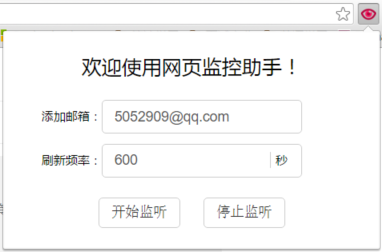 ##插件下载: 网页监控助手下载地址:[点击下载](https://raw.githubusercontent.com/liyumeng/PageWatcher/resource/PageWatcher.crx) ##安装方法: 1. 搜狗浏览器:打开搜狗浏览器,直接拖拽上去即可。 2. 360极速浏览器:使用360极速浏览器打开PageWatcher.crx即可。 3. chrome浏览器:在chrome中输入该地址:chrome://extensions/,然后将下载到的PageWatcher.crx拖拽上去即可。 ##TODO: 1. 设置提醒邮箱地址 [已完成 By:tliyun](https://github.com/tliyun) 2. 自定义每天的刷新时间段,例如在晚间不开启自动刷新[未进行] 3. 自定义是否弹窗、是否播放音乐提醒、是否发送邮件提醒[未进行] 4. 自定义提醒规则,包括出现关键字时提醒、正则表达式匹配成功提醒等[未进行] 5. 自动找出网页变化的内容,显示在邮件的内容中 欢迎大家一起来完善这个小插件的功能。
