KO
|
EN
gitlite — search
Search
#python
#java
#python3
#arduino
#golang
#machine-learning
#rust
#html
#flask
#javascript
#seismology
#nodejs
onco-analytics-on-fhir
★ 13
Open GitHub ↗
Onco Analytics on FHIR
Download README (.md)
Explore Similar Repositories
nodes
:
Plug & play nodes for the Flojoy visual scripting platform
particle-orbit-near-black-hole
:
test particle's orbit in Schwarzschild metric, time-like geodesic
rust-codex32
:
Rust reference implementation of codex32
Neural-Networks
:
No description available.
kala
:
An interactive online tool that visualizes the passing of time.
// repository documentation
Was this content helpful?
★ 0
(0 ratings)
Select Rating:
★
★
★
★
★
Submit Feedback
Recent Feedback
×
Download README
Do you want to download the
README.md
file for
onco-analytics-on-fhir
?
Download (.md)
# onco-analytics-on-fhir [](https://scorecard.dev/viewer/?uri=github.com/bzkf/onco-analytics-on-fhir) This software is used to transform oncological basic data set (oBDS) XML files from tumor documentation systems to HL7® FHIR® and to a tabular format. ## Modular Pipeline 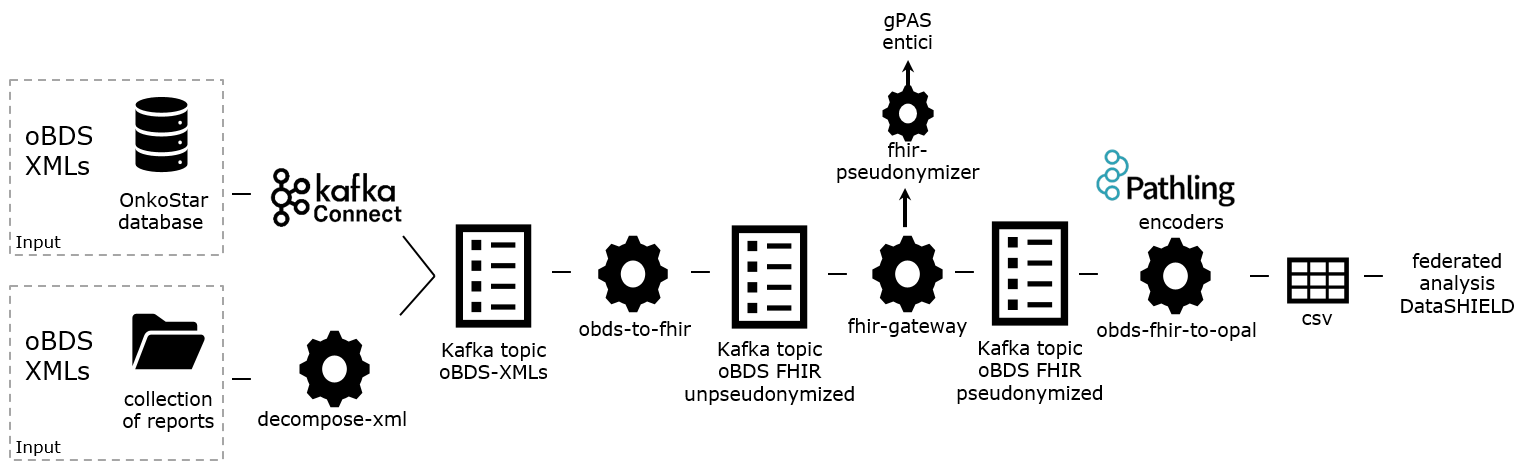 ### Citation If you use this work, please cite: Ziegler J, Erpenbeck MP, Fuchs T, Saibold A, Volkmer PC, Schmidt G, Eicher J, Pallaoro P, De Souza Falguera R, Aubele F, Hagedorn M, Vansovich E, Raffler J, Ringshandl S, Kerscher A, Maurer JK, Kühnel B, Schenkirsch G, Kampf M, Kapsner LA, Ghanbarian H, Spengler H, Soto-Rey I, Albashiti F, Hellwig D, Ertl M, Fette G, Kraska D, Boeker M, Prokosch HU, Gulden C Bridging Data Silos in Oncology with Modular Software for Federated Analysis on Fast Healthcare Interoperability Resources: Multisite Implementation Study J Med Internet Res 2025;27:e65681 [doi: 10.2196/65681](https://doi.org/10.2196/65681) PMID: 40233352 PMCID: 12041822 ## Installation ### Installation: Docker Compose Setup Please follow along here: [docker-compose/README.md](docker-compose/README.md) ### Installation: kubernetes setup #### Prerequisites - [helm](https://github.com/helm/helm) #### Steps ##### Install K3S Cluster ```sh curl -sfL https://get.k3s.io | INSTALL_K3S_VERSION=v1.26.1+k3s1 sh - # optional: modify the kube config to allow running kubectl commands as a non-root user # alternatively, prefix each kubectl and helm command with `sudo` mkdir ~/.kube sudo k3s kubectl config view --raw > ~/.kube/config chmod 600 ~/.kube/config kubectl get nodes # create a namespace to isolate the installation export ONCO_ANALYTICS_NAMESPACE_NAME=bzkf-onco-analytics kubectl create namespace ${ONCO_ANALYTICS_NAMESPACE_NAME} --dry-run=client -o yaml | kubectl apply -f - kubectl config set-context --current --namespace=${ONCO_ANALYTICS_NAMESPACE_NAME} ``` ## Development ### Required tooling ```sh curl -LsSf https://astral.sh/uv/install.sh | sh sudo apt install openjdk-21-jre graphviz ``` ### Install dependencies ```sh uv sync source .venv/bin/activate ``` ### Configure using .env You can create a .env file in the directory from which you invoke `uv run` to override settings. E.g. create a `.env` like so: ```text STUDY_NAME=study_protocol_a ``` to override the `Settings.study_name` setting. Make sure not to commit the file. ### Format and auto-fix using Ruff ```sh ruff format . ruff check --fix . ``` ### Run on CLI ```sh uv run analytics_on_fhir/main.py ``` ### Test ```sh uv run pytest -vv --log-cli-level=20 --cov=analytics_on_fhir --cov-report=html --capture=no ``` #### Update snapshots ```sh uv run pytest -vv --log-cli-level=20 --snapshot-update ```
