KO
|
EN
gitlite — search
Search
#typescript
#python
#nodejs
#react
#rust
#mcp
#ai
#javascript
#mcp-server
#hacktoberfest
#cli
#windows
tagfmt
★ 23
Open GitHub ↗
Tagfmt formats struct tag within Go programs.
Download README (.md)
Explore Similar Repositories
gtag
:
Help you to get golang struct's tags elegantly.
go-reflectx
:
Go reflection library to find struct field by its tag
go-tagger.nvim
:
Lightweight Neovim plugin to manage struct field tags in Go source files.
hamr
:
The Go framework for building MCP servers. Your struct tags are your schema.
filler
:
fill struct data easily with fill tags
// repository documentation
Was this content helpful?
★ 0
(0 ratings)
Select Rating:
★
★
★
★
★
Submit Feedback
Recent Feedback
×
Download README
Do you want to download the
README.md
file for
tagfmt
?
Download (.md)
# tagfmt [](https://goreportcard.com/report/github.com/bigpigeon/tagfmt) [](https://travis-ci.org/bigpigeon/tagfmt) [](https://codecov.io/gh/bigpigeon/tagfmt) Tagfmt formats struct tag within Go programs. It uses blanks for alignment. tag must be in key:"value" pair format tagfmt feature: - align field tags in part - fill specified tag key to field - sort field tags ## get tagfmt you can download from github releases https://github.com/bigpigeon/tagfmt/releases or go get go get github.com/bigpigeon/tagfmt ## usage ``` usage: tagfmt [flags] [path ...] -P string field name with inverse regular expression pattern -a align with nearby field's tag (default true) -cpuprofile string write cpu profile to this file -d display diffs instead of rewriting files -e report all errors (not just the first 10 on different lines) -f string fill key and value for field e.g json=lower(_val)|yaml=snake(_val) -l list files whose formatting differs from tagfmt's -p string field name with regular expression pattern (default ".*") -s sort struct tag by key -sP string struct name with inverse regular expression pattern -so string sort struct tag keys order e.g json|yaml|desc -sp string struct name with regular expression pattern (default ".*") -sw string sort struct tag keys weight e.g json=1|yaml=2|desc=-1 the higher weight, the higher the ranking, default keys weight is 0 -w write result to (source) file instead of stdout ``` ## use in vscode 1. install filewatcher extension first 2. edit filewatcher settings 3. add sub item to `filewatcher.commands`, and then save it 4. open the go file, add struct field and then save it ``` { "match": "\\.go", "isAsync": true, "event": "onFileChange", "cmd": "tagfmt -w -f \"json=or(:tag,snake(:field))|yaml=or(:tag,lower_camel(:field))\" ${file} -s -so \"json|yaml\" ${file} " } ``` 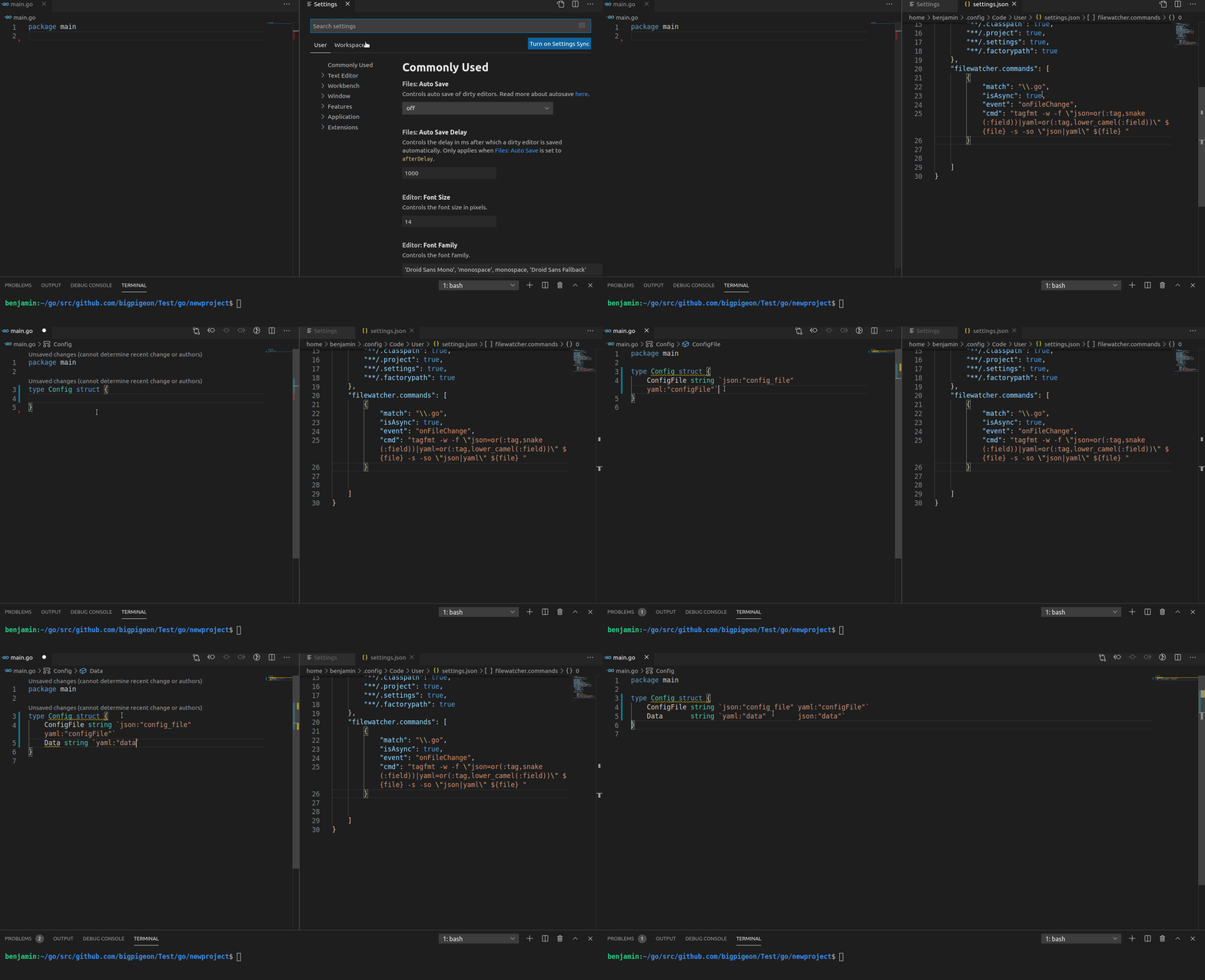 ## tag align align tag according to the longest tag's object of each column ```go // tagfmt . package main type Example struct { Data string `xml:"data" yaml:"data" json:"data"` OtherData string `xml:"other_data" json:"other_data:omitempty" yaml:"other_data"` } ``` the result ```go // tagfmt package main type Example struct { Data string `xml:"data" yaml:"data" json:"data"` OtherData string `xml:"other_data" json:"other_data:omitempty" yaml:"other_data"` } ``` space line or no tag's field will split this rule, just like struct field align by gofmt ```go //tagfmt package main type Example struct { Data string `xml:"data" yaml:"data,omitempty" json:"data"` OtherData string `xml:"other_data" json:"other_data" yaml:"other_data"` NewLineData string `xml:"new_line_data" yaml:"new_line_data" json:"new_line_data"` NewLineOtherData string `xml:"new_line_other_data" yaml:"new_line_other_data" json:"new_line_other_data"` } // after format package main type Example struct { Data string `xml:"data" yaml:"data,omitempty" json:"data"` OtherData string `xml:"other_data" json:"other_data" yaml:"other_data"` NewLineData string `xml:"new_line_data" yaml:"new_line_data" json:"new_line_data"` NewLineOtherData string `xml:"new_line_other_data" yaml:"new_line_other_data" json:"new_line_other_data"` } ``` ## tag fill tag fill can fill specified key to field tag e.g ``` //tagfmt -f "json=:field" type OrderDetail struct { ID string `` UserName string `json:"name"` OrderID string `json:"order"` Callback string `` Address []string `` } // after format package main type OrderDetail struct { ID string `json:"ID"` UserName string `json:"name"` OrderID string `json:"order"` Callback string `json:"callback"` Address []string `json:"address"` } ``` if you didn't want to change the existing tag, use 'or' function ``` //tagfmt -f "json=or(:tag, :field)" type OrderDetail struct { ID string `` UserName string `json:"name"` OrderID string `json:"order"` Callback string `` Address []string `` } // after format package main type OrderDetail struct { ID string `json:"ID"` UserName string `json:"name"` OrderID string `json:"order"` Callback string `json:"Callback"` Address []string `json:"Address"` } ``` and then I hope the tag convert to snake case style, use snake ``` //tagfmt -f "json=or(:tag, snake(:field))" type OrderDetail struct { ID string `` UserName string `json:"name"` OrderID string `json:"order"` Callback string `` Address []string `` } // after format package main type OrderDetail struct { ID string `json:"id"` UserName string `json:"name"` OrderID string `json:"order"` Callback string `json:"callback"` Address []string `json:"address"` } ``` final my struct tag have some extra data need to keep it is, use ':tag_extra' to get extra data and '+' to link it ``` //tagfmt -f "json=snake(:field)+':tag_extra'" type OrderDetail struct { ID string `` UserName string `json:",omitempty"` OrderID string `json:"order,omitempty"` Callback string `` Address []string `` } // after format package main type OrderDetail struct { ID string `json:"id"` UserName string `json:"user_name,omitempty"` OrderID string `json:"order_id,omitempty"` Callback string `json:"callback"` Address []string `json:"address"` } ``` fill rule have many functions and placeholders to avoid writing tags manually |function | purpose | |--------------|---------| |upper(s string) | a-z to A-Z |lower(s string) | A-Z to a-z |snake(s string) | convert upper_camel/lower_camel word to snake case |upper_camel(s string) | convert snake case/lower camel case to upper camel case |lower_camel(s string) | convert upper camel case/snake case to lower camel case |or(s string, s string) | return return first params if it's not zero,else return the second |placeholder | purpose | |------------|---------| |:field | replace with struct field name |:tag | replace with struct field existed tag's value |:tag_basic | replace with field existed tag's basic value (the value before the first ',' ) |:tag_extra | replace with field existed tag's extra data (the value after the first ',' ) ## tag fill with comment filter use `// tagfill: [key1 key2]` to filter below struct requires key ```go //tagfmt -f "json=snake(:tag)|yaml=lower_camel(:tag)|bson=lower_camel(:tag)|toml=upper_camel(:tag)" package main // tagfill: toml yaml type OrderConfig struct { Name string `` UserName string `` Pay int `` } // tagfill: json bson type OrderDetail struct { ID string `` UserName string `` Pay int `` } ``` after format ```go //tagfmt -f "json=snake(:tag)|yaml=lower_camel(:tag)|bson=lower_camel(:tag)|toml=upper_camel(:tag)" package main // tagfill: toml yaml type OrderConfig struct { Name string `toml:"" yaml:""` UserName string `toml:"" yaml:""` Pay int `toml:"" yaml:""` } // tagfill: json bson type OrderDetail struct { ID string `bson:"" json:""` UserName string `bson:"" json:""` Pay int `bson:"" json:""` } ``` ## tag sort ``` //tagfmt -s package main type Example struct { Data string `xml:"data" yaml:"data" json:"data" ` } // after format package main type Example struct { Data string `json:"data" xml:"data" yaml:"data"` } ``` you can use tag sort order to custom sort order ``` //tagfmt -s -so "json|yaml|desc" package main type Example struct { Data string `desc:"some inuse data" yaml:"data" json:"data" ` } // after format package main type Example struct { Data string `json:"data" yaml:"data" desc:"some inuse data"` } ``` use sort weight to determine the sort order ``` //tagfmt -s -sw "json=2|yaml=1|toml=1|desc=-1" package main type Example struct { Data string `desc:"some inuse data" yaml:"data" toml:"data" binding:"required" json:"data" ` } // after format package main type Example struct { Data string `json:"data" toml:"data" yaml:"data" binding:"required" desc:"some inuse data"` } ``` ### tag select when use `-p "regex"` the tagfmt only select fields that match the regular expression you also use the `-P "regex"` to invert the select ``` //tagfmt -P "^Ignore.*$" type OrderDetail struct { ID string `json:"id" yaml:"id"` UserName string `json:"user_name" yaml:"user_name"` Ignore string `json:"-" yaml:"-"` OrderID string `json:"order_id" yaml:"order_id"` Callback string `json:"callback" yaml:"callback"` Address []string `json:"address" yaml:"address"` } type OrderDetail struct { ID string `json:"id" yaml:"id"` UserName string `json:"user_name" yaml:"user_name"` Ignore string `json:"-" yaml:"-"` OrderID string `json:"order_id" yaml:"order_id"` Callback string `json:"callback" yaml:"callback"` Address []string `json:"address" yaml:"address"` } ``` ### struct select just like tag select, use `-sp "regex"` regular expression to match what struct you want use the `-sP "regex"` to invert the select
