KO
|
EN
gitlite — search
Search
#python
#java
#python3
#arduino
#golang
#machine-learning
#rust
#html
#flask
#javascript
#seismology
#nodejs
hmm
★ 15
Open GitHub ↗
hmm is a tool for instant charting your data
Download README (.md)
Explore Similar Repositories
xmake-plugins
:
A plugins repository based on xmake
MOQA
:
Mixtures of Opinions for Question Answering
tinyjs-resource-loader
:
用于处理 Tiny.js 游戏资源的 webpack loader
ComicbookCoversDownloader
:
Webscraper for DC, Marvel and more Comicbook Wikias to download CB covers
Rubiks-Cube
:
Reinforcement Learning program that looks to be able to quickly learn to solve a Rubik's Cube
// repository documentation
Was this content helpful?
★ 0
(0 ratings)
Select Rating:
★
★
★
★
★
Submit Feedback
Recent Feedback
×
Download README
Do you want to download the
README.md
file for
hmm
?
Download (.md)
# hmm [](https://travis-ci.org/mkevac/hmm) hmm is a tool for instant charting your data # Why? Imagine you have a script that gives you some numbers. Benchmark script that gives you an amount of requests per seconds, for example. It would be great to see these numbers on a chart! hmm can help you with this. You can send an output for your script to hmm's stdin and hmm will open your browser and show these numbers to you as a beautiful atimatically updating chart. # Example Suppose you want to observe load average numbers for your operating system. You can print them with a small bash command: ``` echo "Time 1min 5min 15min"; while true; do echo -n $(date +%H:%M:%S); echo -n " "; uptime | cut -d " " -f 9-11; sleep 1; done; Time 1min 5min 15min 19:32:33 2.38 2.12 2.04 19:32:34 2.38 2.12 2.04 19:32:35 2.40 2.12 2.04 19:32:36 2.38 2.12 2.04 19:32:37 4.01 2.13 2.04 ^C ``` Cool. We can use hmm to see this numbers as a chart by sending same data to hmm's stdin: ``` (echo "Time 1min 5min 15min"; while true; do echo -n $(date +%H:%M:%S); echo -n " "; uptime | cut -d " " -f 9-11; sleep 1; done;) | hmm ``` It will look like this: 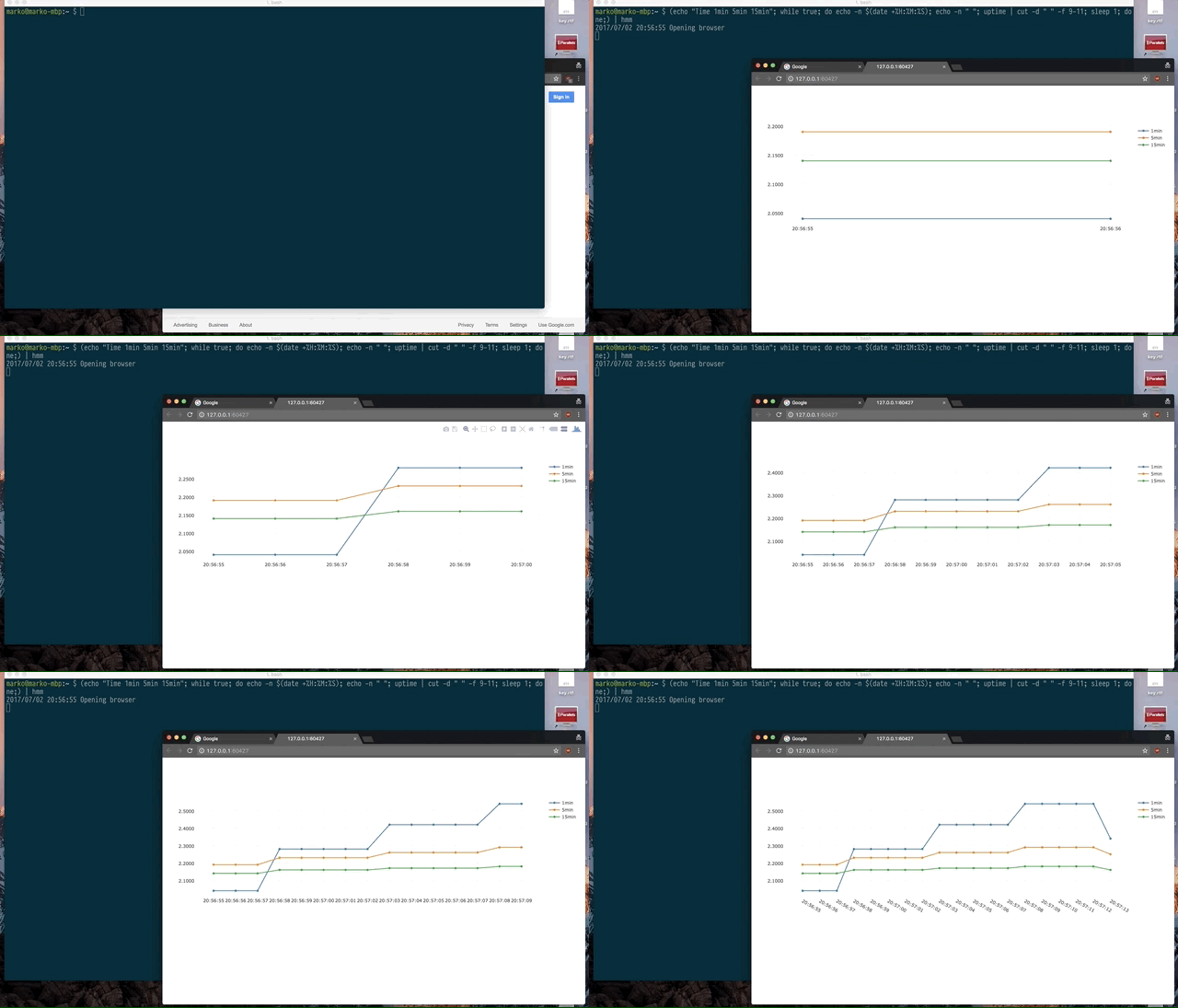 You can event get data from remote server with ssh: ``` ssh server '(echo "Time 1min 5min 15min"; while true; do echo -n $(date +%H:%M:%S); echo -n " "; uptime | cut -d " " -f 9-11; sleep 1; done;)' | hmm ``` *P.S. These commands work on MacOS. For Linux use* ``` echo "Time 1min 5min 15min"; while true; do echo -n $(date +%H:%M:%S); echo -n " "; cat /proc/loadavg | cut -d " " -f 1-3; sleep 1; done; ``` and ``` (echo "Time 1min 5min 15min"; while true; do echo -n $(date +%H:%M:%S); echo -n " "; cat /proc/loadavg | cut -d " " -f 1-3; sleep 1; done;) | hmm ``` and ``` ssh server '(echo "Time 1min 5min 15min"; while true; do echo -n $(date +%H:%M:%S); echo -n " "; cat /proc/loadavg | cut -d " " -f 1-3; sleep 1; done;)' | hmm ``` # Installation You can find binaries [here](https://github.com/mkevac/hmm/releases). Or, similar to most of the go packages, just use go get: ``` go get -u githib.com/mkevac/hmm ``` # Usage ``` $ hmm -h Usage: hmm [OPTIONS] Application Options: --http= Address on which to listen to (default: localhost:0) -n, --noheader Do not expect header in the first line -t, --notimestamp Do not expect timestamp in the first column -v, --verbose Increase verbosity -l, --last= Which period to show (default: 24h) Help Options: -h, --help Show this help message ``` # Data format hmm expects that in each input line it gets first column will be value for x axis (usually time or datetime) and all other columns will have values for y axis. One for each line. E.g. ``` 10:11:12 10 15 34.2 10:11:13 11 11 36.2 ``` But in case you want to send only values for y, you can use -t option and hmm will use current timestamp as a x value. First line of input is special. It is called header and it's used to name lines. E.g. ``` Time Line1 Line2 BestLine ``` If you don't have such first line, use -n option.
