KO
|
EN
gitlite — search
Search
#javascript
#python
#hacktoberfest
#react
#ai
#typescript
#llm
#go
#golang
#android
#machine-learning
#rust
#deep-learning
#linux
SkyBlog
★ 9
Open GitHub ↗
利用SPA的优势,构造出一个将阅读与管理合一的轻量级博客,只支持Markdown编辑。
Download README (.md)
Explore Similar Repositories
tic-net-toe
:
A good starter project for getting into TCP networking in GMS2. Fully working Tic Tac Toe example.
analyticdb_demo
:
No description available.
lazada-api
:
Interaction with the lazada api for seller
big-data-insights-scala
:
personal solutions to big data problem scenarios using scala
Count-the-number-of-Palm-Trees
:
No description available.
// repository documentation
Was this content helpful?
★ 0
(0 ratings)
Select Rating:
★
★
★
★
★
Submit Feedback
Recent Feedback
×
Download README
Do you want to download the
README.md
file for
SkyBlog
?
Download (.md)
# SkyBlog 该项目是一个阅读与管理合一的轻量级博客,仅支持Markdown编辑。 项目使用前后端分离架构,所以部署在Github和自己的服务器各部署了一份前端网页。 项目整体运用了`Docker`进行构建与运行,并且使用`DockerCompose`来启动。 构建与运行应用了Docker在17.05新增的特性:[Use multi-stage builds](https://docs.docker.com/develop/develop-images/multistage-build/),解放了构建机需要对应环境的问题。 # 系统结构 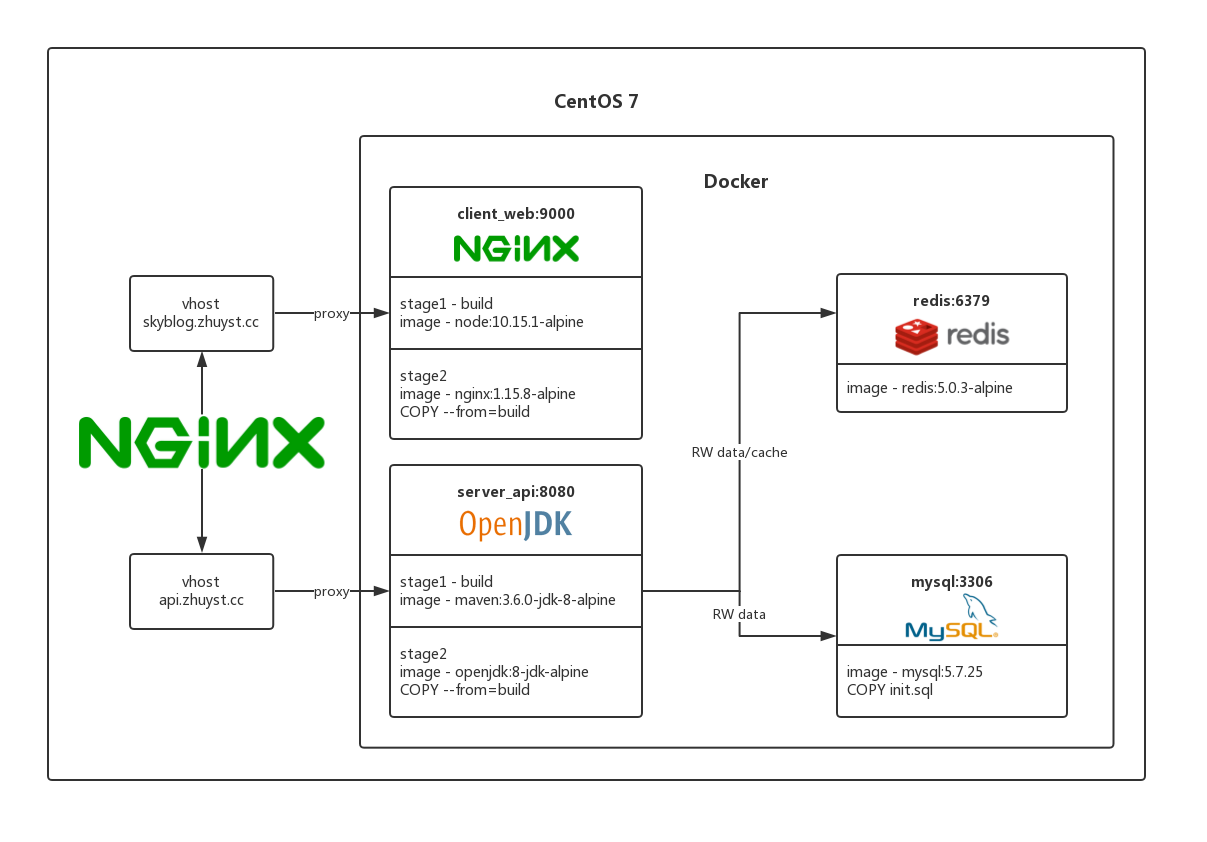 # 快速开始 ```sh docker-compose up -d ``` ## 前端项目 —— Client Web 运用了`NodeJS`镜像进行项目的构建,然后将构建产物`COPY`到`nginx`镜像中,详情见[Dockerfile](./client_web/Dockerfile) Github Pages : [zhuyst.github.io](https://zhuyst.github.io) Nginx : [skyblog.zhuyst.cc](https://skyblog.zhuyst.cc) 前端使用[create-react-app](https://github.com/facebook/create-react-app)创建,并且还使用了以下框架/工具: * 路由:[reactr-router](https://github.com/ReactTraining/react-router) * 状态管理工具:[redux](https://github.com/reactjs/redux) * 界面:[react-bootstrap](https://github.com/react-bootstrap/react-bootstrap) * CSS动画: [react-transition-group](https://github.com/reactjs/react-transition-group) * Markdown渲染:[react-markdown](https://github.com/rexxars/react-markdown) * Markdown编辑器:[react-mde](https://github.com/andrerpena/react-mde) * 通知:[reapop](https://github.com/LouisBarranqueiro/reapop) ## 后端项目 —— Server API 运用了`Maven`镜像进行构建,然后将构建后的`app.jar`文件`COPY`到`openjdk`镜像中,然后使用`docker`配置文件启动项目,详情见[Dockerfile](./server_api/Dockerfile) Swagger : [api.zhuyst.cc](https://api.zhuyst.cc) 1. 后台使用[Spring Boot](https://github.com/spring-projects/spring-boot)为基础构建 2. 使用[MyBatis](https://github.com/mybatis/mybatis-3)作为持久层框架 3. 使用[Swagger](https://github.com/swagger-api/swagger-core)生成在线API文档,方便测试与开发 4. 项目有完整的javadoc,并且已通过[阿里巴巴编码规范](https://github.com/alibaba/p3c)插件的检测 后台API采用[Spring Security](https://github.com/spring-projects/spring-security)来作为安全框架,并且整合了[JWT](https://github.com/jwtk/jjwt)来生成`Token`。 数据库方面则使用`MySQL`作为持久化,`Redis`作为缓存,使用缓存来减少数据查询的消耗。
