KO
|
EN
gitlite — search
Search
#javascript
#python
#hacktoberfest
#react
#ai
#typescript
#llm
#go
#golang
#android
#machine-learning
#rust
#deep-learning
#linux
Seg2Track-SAM2
★ 18
Open GitHub ↗
No description available.
Download README (.md)
Explore Similar Repositories
deploying-ai
:
No description available.
gprxy
:
Go based SSO-first, psql-compatible proxy
submission
:
CVE-Genie
lmcache_frontend
:
the frontend of lmcache
MOFFlow-2
:
Implementation for Flexible MOF Generation with Torsion-Aware Flow Matching
// repository documentation
Was this content helpful?
★ 0
(0 ratings)
Select Rating:
★
★
★
★
★
Submit Feedback
Recent Feedback
×
Download README
Do you want to download the
README.md
file for
Seg2Track-SAM2
?
Download (.md)
# Seg2Track-SAM2 Diogo Mendonça, Tiago Barros, Cristiano Premebida, Urbano J.Nunes <p align="center"> <img src="assets/sequence.gif?raw=true" alt="Example output sequence" /> </p> [[Paper](https://arxiv.org/abs/2509.11772.)] Recent advances in foundation models like SAM2 have demonstrated strong zero-shot generalization for video segmentation. However, directly applying SAM2 to Multi-Object Tracking and Segmentation (MOTS) is limited by challenges in identity management and memory efficiency. Seg2Track-SAM2 addresses these challenges by: - Integrating pre-trained object detectors with SAM2 - Introducing a novel Seg2Track module for track initialization, management, and reinforcement - Remaining detector-agnostic and requiring no fine-tuning 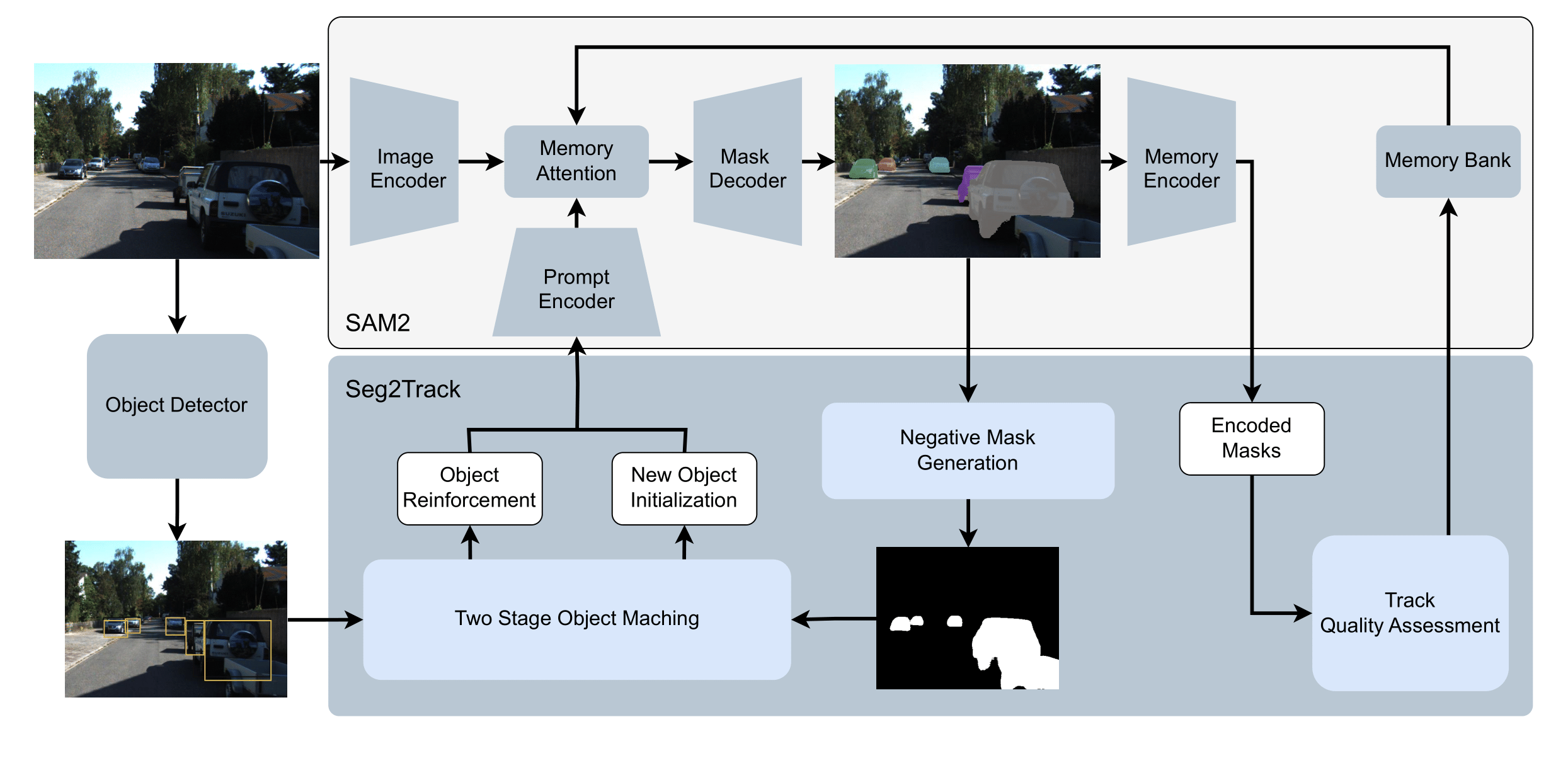 ## Installation SAM 2 needs to be installed first before use. The code requires `python>=3.10`, as well as `torch>=2.5.1` and `torchvision>=0.20.1`. Please follow the instructions [here](https://pytorch.org/get-started/locally/) to install both PyTorch and TorchVision dependencies. You can install SAM 2 on a GPU machine using: ```bash git clone https://github.com/facebookresearch/sam2.git && cd sam2 pip install -e . ``` If you are installing on Windows, it's strongly recommended to use [Windows Subsystem for Linux (WSL)](https://learn.microsoft.com/en-us/windows/wsl/install) with Ubuntu. To use the SAM 2 predictor and run the example notebooks, `jupyter` and `matplotlib` are required and can be installed by: ```bash pip install -e ".[notebooks]" ``` Note: 1. It's recommended to create a new Python environment via [Anaconda](https://www.anaconda.com/) for this installation and install PyTorch 2.5.1 (or higher) via `pip` following https://pytorch.org/. If you have a PyTorch version lower than 2.5.1 in your current environment, the installation command above will try to upgrade it to the latest PyTorch version using `pip`. 2. The step above requires compiling a custom CUDA kernel with the `nvcc` compiler. If it isn't already available on your machine, please install the [CUDA toolkits](https://developer.nvidia.com/cuda-toolkit-archive) with a version that matches your PyTorch CUDA version. 3. If you see a message like `Failed to build the SAM 2 CUDA extension` during installation, you can ignore it and still use SAM 2 (some post-processing functionality may be limited, but it doesn't affect the results in most cases). ### Execution This model is ready to run KITTI and MOT datasets with the kitti_run and mot_run scripts, respectively. In order to run said scripts, it is necessary to supply a configuration file with the flag --config (check configs folder for some examples). Detections must be supplied on the config file. This must follow the format defined for TrackRCNN detections (supplied in KITTI) or MOT detectors. ### Download Checkpoints All the model checkpoints can be downloaded by running: ```bash cd checkpoints && \ ./download_ckpts.sh && \ cd .. ``` or individually from: - [sam2.1_hiera_tiny.pt](https://dl.fbaipublicfiles.com/segment_anything_2/092824/sam2.1_hiera_tiny.pt) - [sam2.1_hiera_small.pt](https://dl.fbaipublicfiles.com/segment_anything_2/092824/sam2.1_hiera_small.pt) - [sam2.1_hiera_base_plus.pt](https://dl.fbaipublicfiles.com/segment_anything_2/092824/sam2.1_hiera_base_plus.pt) - [sam2.1_hiera_large.pt](https://dl.fbaipublicfiles.com/segment_anything_2/092824/sam2.1_hiera_large.pt) ## License The SAM 2 model checkpoints, SAM 2 demo code (front-end and back-end), and SAM 2 training code are licensed under [Apache 2.0](./LICENSE), however the [Inter Font](https://github.com/rsms/inter?tab=OFL-1.1-1-ov-file) and [Noto Color Emoji](https://github.com/googlefonts/noto-emoji) used in the SAM 2 demo code are made available under the [SIL Open Font License, version 1.1](https://openfontlicense.org/open-font-license-official-text/).
