KO
|
EN
gitlite — search
Search
#python
#java
#python3
#arduino
#golang
#machine-learning
#rust
#html
#flask
#javascript
#seismology
#nodejs
mythic-gme-adventures
★ 26
Open GitHub ↗
No description available.
Download README (.md)
Explore Similar Repositories
hackspacecon-2023
:
Workshop & Talk Slide Decks from HackSpaceCon
Tap-fap
:
Website that use Eporner API to watch porn videos
SmartPointers
:
This repo includes all different versions of SmartPointer in Delphi to simulate a garbage collector.
segment-anything-and-yolov8
:
Object segmentation in collaboration with Segment Anyting Model and Yolov8
doco
:
Doco builds documentation sites from markdown documents and folders.
// repository documentation
Was this content helpful?
★ 0
(0 ratings)
Select Rating:
★
★
★
★
★
Submit Feedback
Recent Feedback
×
Download README
Do you want to download the
README.md
file for
mythic-gme-adventures
?
Download (.md)
# Mythic GME Adventures **Mythic GME Adventures** is an App for managing adventures using the rules of [Mythic Game Master Emulator, 2nd Edition](https://wordmillgames.com/mythic.html). Features: - Fate chart with Chaos variations (standard, mid, low, none) - Meaning tables (from the book + user-created + translation support) - Threads and Characters lists - Thread progress track and Discovery questions - Scenes with Adjustments - Keyed Scenes - Prepared Adventures - Basic dice roller - Save on Google Drive: you can share your adventures between your devices - Works offline - Export your adventure to a text file: you can format it properly in your text editor of choice - Physical dice mode: switch to this mode to roll the dice yourself and lookup the result in the App Available on [Windows](https://github.com/idispatch75/mythic-gme-adventures/releases), [Android](https://play.google.com/store/apps/details?id=idispatch.mythic_gme_adventures) and [Web](https://mythic-gme-adventures.idispatch.ovh). The web version can be "installed" as an App on iOS and any desktop. Please refer to the [User Manual](https://idispatch75.github.io/mythic-gme-adventures/user_manual/#web-app) for browser compatibility. See the [Home page](https://idispatch75.github.io/mythic-gme-adventures/) for more details. [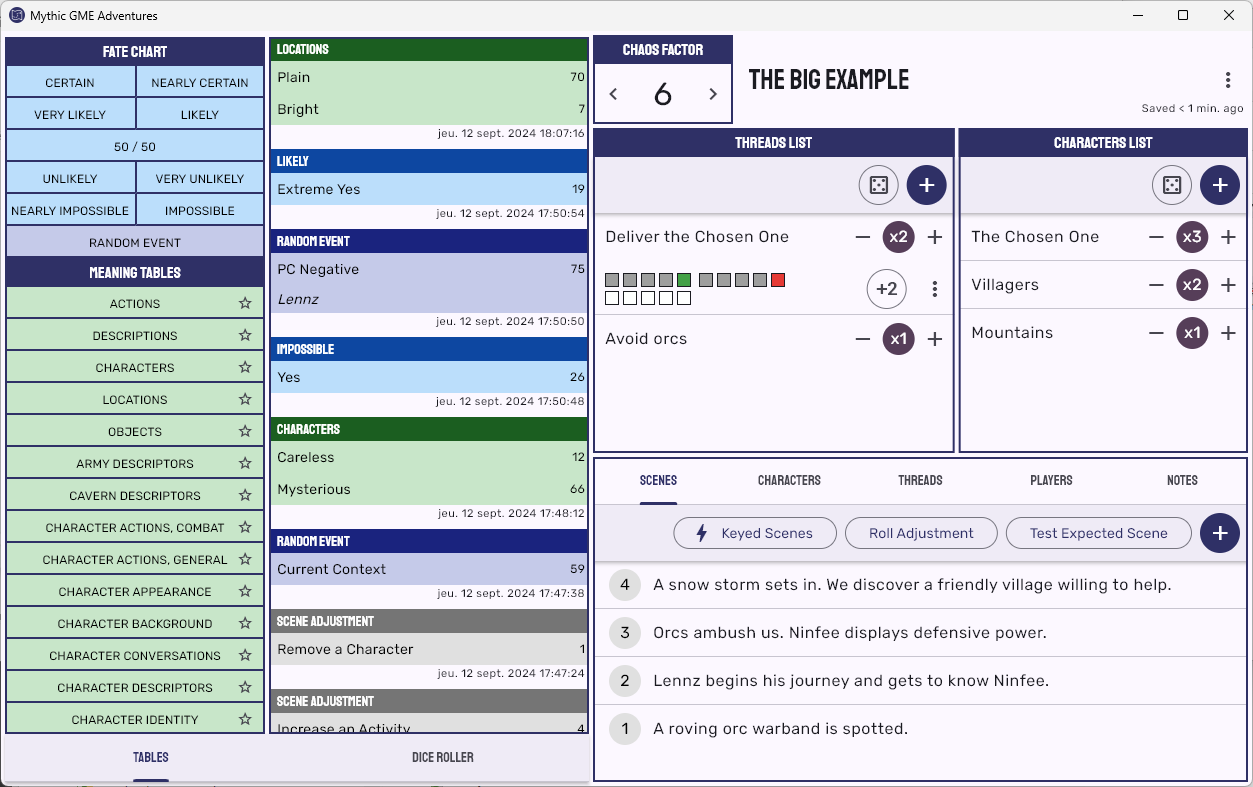](docs/img/desktop.png) ## Build ### Windows Install [Inno Setup](https://jrsoftware.org/isdl.php). ```bat flutter build windows "C:\Program Files (x86)\Inno Setup 6\ISCC.exe" windows\setup.iss ``` The setup is in `.\build\windows`. ### Android 1. Update the build number in `pubspec.yml` for a new release. The build number will be used as `versionCode` in `android\app\build.gradle`. [Android versioning](https://developer.android.com/studio/publish/versioning). 1. Build the App bundle. ``` flutter build appbundle ``` The bundle is `build/app/outputs/bundle/release/app-release.aab`. ### Web Build the site. ``` flutter build web --base-href /<build_number>/ ``` The result is in `build\web`. The content must be deployed to the directory `/<build_number>/` except `index.html` and `auth.html` that must be deployed at the root: ``` /<build_number> icons manifest.json main.dart.js ... /index.html /auth.html ``` This is required to ensure having the browser load the latest version of the site while utilizing the offline caching of the PWA. See https://github.com/flutter/flutter/issues/127459#issuecomment-2378870433 for more info. Another option is to build with `--pwa-strategy none` to disable PWA caching completely (in this case `manifest.json` must be updated with `"start_url": "."`). Deploy: https://learn.microsoft.com/en-us/azure/static-web-apps/static-web-apps-cli-deploy ``` cd build\web az login az staticwebapp secrets list --name swa-mythic-gme-adventures --query "properties.apiKey" swa deploy --env production --deployment-token TOKEN ``` ## Development ### Certificates - Android: ``` keytool -genkey -v -keystore upload-keystore.jks -storetype JKS -keyalg RSA -keysize 2048 -validity 10000 -alias upload ``` To get the SHA1 of the debug signing certificate: ``` keytool -list -v -keystore c:\users\your_user_name\.android\debug.keystore -alias androiddebugkey -storepass android -keypass android ``` ### Non versioned files From Securesafe: - download `android\app\upload-keystore.jks` - download `android\key.properties` ### VS Code extensions https://marketplace.visualstudio.com/items?itemName=Dart-Code.flutter ### Upgrade https://docs.flutter.dev/release/upgrade ### Google Sign-in https://developers.google.com/android/guides/client-auth ### Image converter https://imagemagick.org/ ```bat rem Android magick -background "#2f3066" -size 192x192 assets\ic_launcher.svg android\app\src\main\res\mipmap-xxxhdpi\ic_launcher.png magick -background "#2f3066" -size 144x144 assets\ic_launcher.svg android\app\src\main\res\mipmap-xxhdpi\ic_launcher.png magick -background "#2f3066" -size 96x96 assets\ic_launcher.svg android\app\src\main\res\mipmap-xhdpi\ic_launcher.png magick -background "#2f3066" -size 72x72 assets\ic_launcher.svg android\app\src\main\res\mipmap-hdpi\ic_launcher.png magick -background "#2f3066" -size 48x48 assets\ic_launcher.svg android\app\src\main\res\mipmap-mdpi\ic_launcher.png magick -background none -size 108x108 assets\splash-android12-light.svg android\app\src\main\res\drawable\ic_launcher_foreground.png magick -background none -size 500x500 assets\splash-light.svg assets\splash-light.png magick -background none -size 500x500 assets\splash-dark.svg assets\splash-dark.png magick -background "#2f3066" -size 512x512 assets\android-store.svg assets\android-store.png rem Windows magick -background none -size 16x16 assets\splash-light.svg %temp%\ic-16.png magick -background none -size 20x20 assets\splash-light.svg %temp%\ic-20.png magick -background none -size 24x24 assets\splash-light.svg %temp%\ic-24.png magick -background none -size 30x30 assets\splash-light.svg %temp%\ic-30.png magick -background none -size 32x32 assets\splash-light.svg %temp%\ic-32.png magick -background none -size 36x36 assets\splash-light.svg %temp%\ic-36.png magick -background none -size 40x40 assets\splash-light.svg %temp%\ic-40.png magick -background none -size 48x48 assets\splash-light.svg %temp%\ic-48.png magick -background none -size 60x60 assets\splash-light.svg %temp%\ic-60.png magick -background none -size 64x64 assets\splash-light.svg %temp%\ic-64.png magick -background none -size 72x72 assets\splash-light.svg %temp%\ic-72.png magick -background none -size 80x80 assets\splash-light.svg %temp%\ic-80.png magick -background none -size 96x96 assets\splash-light.svg %temp%\ic-96.png magick -background none -size 256x256 assets\splash-light.svg %temp%\ic-256.png magick %temp%\ic-*.png windows\runner\resources\app_icon.ico rem web rem https://learn.microsoft.com/en-us/microsoft-edge/progressive-web-apps-chromium/how-to/icon-theme-color magick -background none -size 16x16 assets\splash-light_mini.svg web\favicon.png magick -background none -size 16x16 assets\splash-light_mini.svg web\icons\icon-16.png magick -background none -size 24x24 assets\splash-light_mini.svg web\icons\icon-24.png magick -background none -size 32x32 assets\splash-light_mini.svg web\icons\icon-32.png magick -background none -size 44x44 assets\splash-light_mini.svg web\icons\icon-44.png magick -background none -size 48x48 assets\splash-light_mini.svg web\icons\icon-48.png magick -background none -size 55x55 assets\splash-light_mini.svg web\icons\icon-55.png magick -background none -size 71x71 assets\splash-light_mini.svg web\icons\icon-71.png magick -background none -size 89x89 assets\splash-light_mini.svg web\icons\icon-89.png magick -background none -size 150x150 assets\splash-light.svg web\icons\icon-150.png magick -background none -size 188x188 assets\splash-light.svg web\icons\icon-188.png magick -background none -size 192x192 assets\splash-light.svg web\icons\icon-192.png magick -background none -size 256x256 assets\splash-light.svg web\icons\icon-256.png magick -background none -size 310x310 assets\splash-light.svg web\icons\icon-310.png magick -background none -size 388x388 assets\splash-light.svg web\icons\icon-388.png magick -background none -size 512x512 assets\splash-light.svg web\icons\icon-512.png ``` ### Platform-specific - file_picker: https://github.com/miguelpruivo/flutter_file_picker/wiki/Setup - flutter_secure_storage: https://pub.dev/packages/flutter_secure_storage - Only one App instance on Desktop: https://stackoverflow.com/questions/67233239/run-only-single-instance-of-flutter-desktop-application #### Android - android SDK versions - in `android\app\build.gradle` ```groovy defaultConfig { ... minSdkVersion 21 targetSdkVersion 34 } ``` - to avoid saving the secure storage: - in `android\app\src\main\AndroidManifest.xml` add to `activity`: `android:fullBackupContent="@xml/auto_backup_rules"` `android:dataExtractionRules="@xml/data_extraction_rules"` - add file `android\app\src\main\res\xml\auto_backup_rules.xml` ```xml <?xml version="1.0" encoding="utf-8"?> <full-backup-content> <include domain="sharedpref" path="."/> <exclude domain="sharedpref" path="FlutterSecureStorage"/> </full-backup-content> ``` - add file `android\app\src\main\res\xml\data_extraction_rules.xml` ```xml <?xml version="1.0" encoding="utf-8"?> <data-extraction-rules> <cloud-backup> <include domain="sharedpref" path="."/> <exclude domain="sharedpref" path="FlutterSecureStorage"/> </cloud-backup> <device-transfer> <include domain="sharedpref" path="."/> <exclude domain="sharedpref" path="FlutterSecureStorage"/> </device-transfer> </data-extraction-rules> ``` - to enable signing - in `android\app\build.gradle` ```groovy def keystoreProperties = new Properties() def keystorePropertiesFile = rootProject.file('key.properties') if (keystorePropertiesFile.exists()) { keystoreProperties.load(new FileInputStream(keystorePropertiesFile)) } ``` ```groovy android { ... signingConfigs { release { keyAlias keystoreProperties['keyAlias'] keyPassword keystoreProperties['keyPassword'] storeFile keystoreProperties['storeFile'] ? file(keystoreProperties['storeFile']) : null storePassword keystoreProperties['storePassword'] } } buildTypes { release { signingConfig signingConfigs.release } } } ```
